
1. Johdanto
Kiitos ostoksestasiasing the YESIDO YSP03 Sports Bluetooth In-Ear Earphones. This manual provides essential information for the safe and efficient use of your new earphones. Please read it thoroughly before use and retain it for future reference.
2. Turvallisuustiedot
- Älä altista kuulokkeita äärimmäisille lämpötiloille, kosteudelle tai syövyttäville ympäristöille.
- Avoid dropping, impacting, or bending the earphones.
- Do not disassemble or modify the earphones. This may void the warranty and cause damage.
- Pidä kuulokkeet poissa lasten ja lemmikkien ulottuvilta.
- Käytä ainoastaan laitteen mukana toimitettua latauskaapelia tai vastaavaa sertifioitua kaapelia.
- Kuuntele kohtuullisella äänenvoimakkuudella kuulovaurioiden välttämiseksi.
- Älä käytä kuulokkeita ajaessasi tai tilanteissa, joissa sinun on oltava tietoinen ympäristöstäsi.
3. Pakkauksen sisältö
Tarkista pakkauksesta seuraavat tuotteet:
- YESIDO YSP03 Sports Bluetooth In-Ear Earphones
- USB-latauskaapeli
- Käyttöopas
- Ear tips (various sizes, typically)
4. Tuote ohiview
The YESIDO YSP03 earphones feature an in-ear design with a control unit for easy operation. They support Bluetooth wireless connectivity and also offer direct music playback via an SD card.
Control Unit and Ports
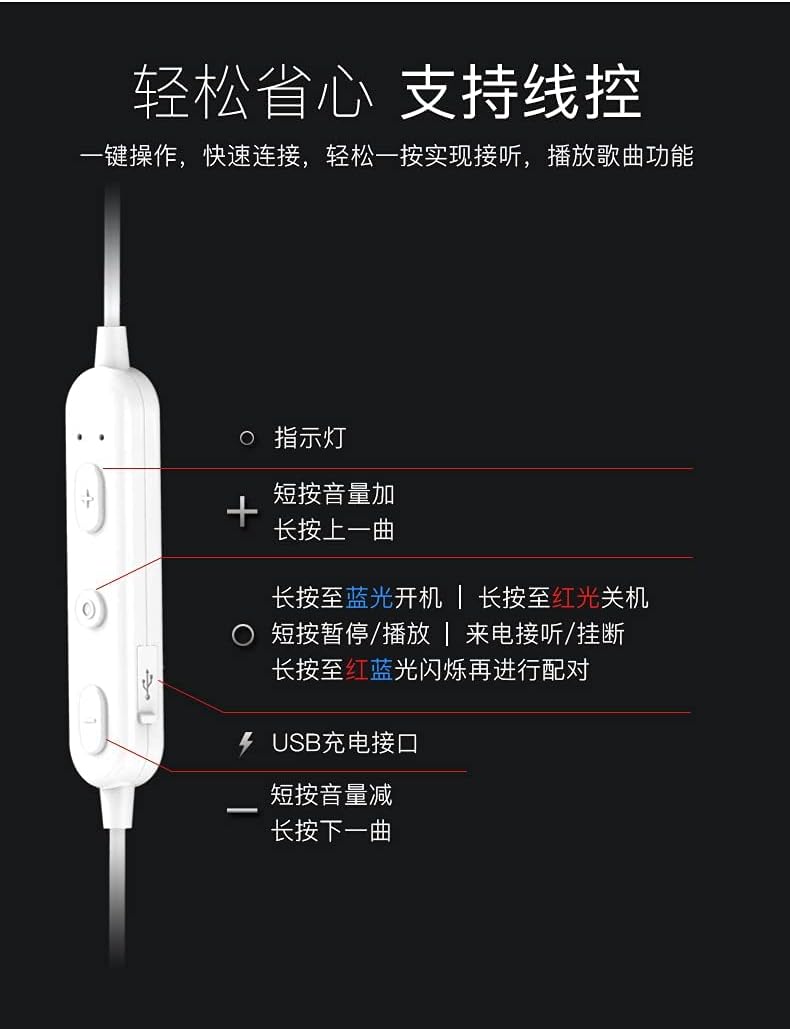
Kuva: Yksityiskohtainen view of the earphone control unit, showing the indicator light, volume/track buttons, multi-function button, and USB charging port.
- Merkkivalo: Näyttää tilan (virta, pariliitos, lataus).
- '+'-painike: Short press for Volume Up; Long press for Previous Track.
- Monitoimipainike (keskellä): Long press for Power On (blue light) / Power Off (red light); Short press for Play/Pause or Answer/Hang up calls; Long press until red and blue lights flash for Pairing Mode.
- '-'-painike: Short press for Volume Down; Long press for Next Track.
- USB-latausportti: Latauskaapelin kytkemistä varten.
SD-korttipaikka
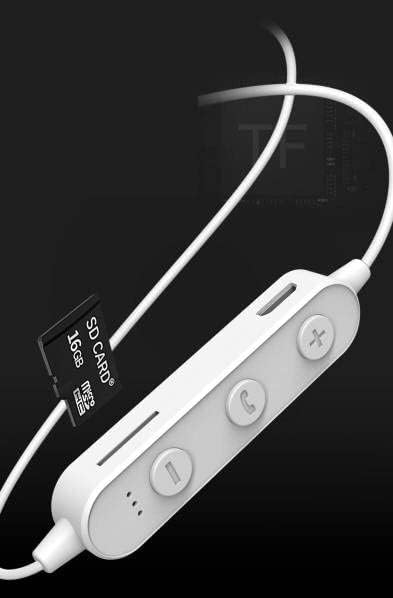
Kuva: Close-up of the control unit showing the SD card slot, indicating direct music playback without a phone. A 64GB card can store approximately 15,000 songs.
The earphones feature an integrated SD card slot, allowing you to play music directly from a memory card without needing a connected device. This is ideal for sports or activities where carrying a phone is inconvenient.
5. Asennus
5.1 Kuulokkeiden lataaminen
- Connect the USB charging cable to the USB charging port on the earphone control unit.
- Liitä USB-kaapelin toinen pää USB-virtalähteeseen (ei sisälly toimitukseen) tai tietokoneen USB-porttiin.
- The indicator light will typically show a red light during charging and turn off or change color when fully charged.
- Varaa täyteen lataukseen noin 1–2 tuntia.
5.2 Bluetooth -pariliitos
- Varmista, että kuulokkeet on sammutettu.
- Press and hold the Multi-function Button (center button) for approximately 5-7 seconds until the indicator light flashes red and blue alternately. This indicates pairing mode.
- On your mobile phone or Bluetooth-enabled device, go to the Bluetooth settings and turn on Bluetooth.
- Etsi available devices. You should see "YESIDO YSP03" or a similar name in the list.
- Select "YESIDO YSP03" to connect. Once successfully paired, the indicator light will typically flash blue slowly or turn off.
- Jos salasanaa pyydetään, kirjoita "0000".
5.3 SD-kortin asettaminen
- Locate the SD card slot on the control unit.
- Gently insert a formatted Micro SD card (TF card) with the metal contacts facing down until it clicks into place.
- The earphones will automatically detect the card and switch to SD card playback mode if no Bluetooth device is connected or if Bluetooth is disconnected.
6. Käyttöohjeet
6.1 Virta päälle/pois
- Virta päälle: Press and hold the Multi-function Button until the blue indicator light appears.
- Virta pois: Press and hold the Multi-function Button until the red indicator light appears.
6.2 Musiikin toisto (Bluetooth-tila)
- Toista/tauko: Paina monitoiminäppäintä lyhyesti.
- Ääni kovemmalle: Short press the '+' Button.
- Äänenvoimakkuutta pienemmälle: Short press the '-' Button.
- Seuraava kappale: Paina pitkään '-'-painiketta.
- Edellinen kappale: Paina pitkään '+'-painiketta.
6.3 Puheluiden hallinta
- Puhelun vastaaminen/lopetus: Short press the Multi-function Button when an incoming call is received.
- Hylkää puhelu: Long press the Multi-function Button when an incoming call is received.
- Uudelleenvalinta viimeinen numero: Paina monitoimipainiketta kahdesti.
6.4 SD-kortin toisto
- Once an SD card is inserted and detected, the earphones will automatically begin playing music from the card.
- The same controls for Play/Pause, Volume, Next/Previous Track apply as in Bluetooth mode.
7. Huolto
- Puhdistus: Puhdista kuulokkeet pehmeällä, kuivalla liinalla. Älä käytä voimakkaita kemikaaleja tai hankaavia materiaaleja.
- Varastointi: Säilytä kuulokkeita viileässä, kuivassa paikassa, poissa suorasta auringonvalosta ja äärimmäisistä lämpötiloista.
- Akun hoito: To prolong battery life, charge the earphones regularly, even if not in frequent use. Avoid fully discharging the battery for extended periods.
8. Vianmääritys
| Ongelma | Ratkaisu |
|---|---|
| Earphones won't power on. | Ensure the earphones are fully charged. Press and hold the Multi-function Button for a longer duration. |
| Laitteen pariliitos ei onnistu. | Ensure earphones are in pairing mode (red and blue flashing light). Turn off and on Bluetooth on your device. Move closer to the earphones. Forget the device in your phone's Bluetooth settings and try pairing again. |
| Ei ääntä. | Check volume levels on both earphones and your connected device. Ensure earphones are properly connected via Bluetooth or that the SD card is inserted correctly and contains playable files. |
| SD-kortti ei toista. | Ensure the SD card is inserted correctly and contains compatible audio files (e.g., MP3). Try re-inserting the card. Ensure no Bluetooth device is actively connected, as SD card playback might be prioritized when Bluetooth is disconnected. |
| Huono äänenlaatu. | Ensure there are no obstructions between the earphones and your device. Move closer to your device. Try a different audio source or file. |
9. Tekniset tiedot
| Ominaisuus | Yksityiskohta |
|---|---|
| Merkki | YESIDO |
| Mallinumero | YSP03 |
| Väri | Valkoinen |
| Korvien sijoitus | Korvassa |
| Yhteystekniikka | Langaton (Bluetooth) |
| Melunhallinta | Ei mitään |
| Yhteensopivat laitteet | Matkapuhelimet |
| Tuotteen erityiskäyttö | Urheilu |
| Kaapeliominaisuus | Kaapeliton |
| Vedenkestävyystaso | Ei vedenkestävä |
| Ohjaustyyppi | Ääniohjaus |
| Valvontamenetelmä | App (Voice Control implies app integration for some functions) |
Akun suorituskyky

Kuva: Visual representation of battery performance metrics for the YESIDO YSP03 earphones.
- Musiikin toistoaika: Noin 9 tuntia
- Headphone Standby Time: Noin 120 tuntia
- Puhelun kesto: Noin 7.5 tuntia
*Note: These data are obtained from YESIDO laboratory tests, and slight deviations may occur due to changes in objective environment and usage patterns.
10. Takuu ja tuki
10.1 Takuutiedot
This product is provided without an explicit warranty. Please refer to your retailer's return policy for any issues within the applicable return period.
10.2 Asiakastuki
For further assistance or inquiries, please contact the retailer where you purchased the product. You may also visit the official YESIDO website for general product information and potential support resources.