
1. Johdanto
Welcome to the user manual for your new Samsung Galaxy A21S smartphone. This guide provides essential information to help you set up, operate, maintain, and troubleshoot your device. Please read this manual carefully to ensure proper use and to maximize the performance of your phone.
2. Turvallisuustiedot
Before using your device, please read all safety warnings and precautions to prevent injury or damage. Keep the device away from water and extreme temperatures. Use only Samsung-approved chargers and accessories. Do not attempt to disassemble or repair the device yourself.
3. Pakkauksen sisältö
Varmista, että tuotepakkauksesi sisältää seuraavat osat:
- Samsung Galaxy A21S -älypuhelin
- Virtalähde
- USB-kaapeli
- SIM-poistotyökalu
- Pika-aloitusopas
Laitteen mukana toimitetut varsinaiset osat voivat vaihdella alueesta ja palveluntarjoajasta riippuen.
4. Laitteen asettelu
Familiarize yourself with the physical features and button locations of your Samsung Galaxy A21S.
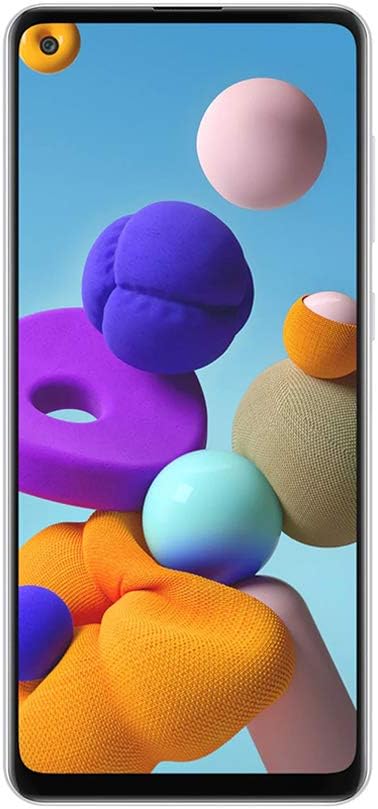
Kuva 4.1: Etuosa view of the Samsung Galaxy A21S, highlighting the 6.5-inch display and the punch-hole front camera.

Kuva 4.2: Takaosa view of the Samsung Galaxy A21S, featuring the quad camera array and the rear-mounted fingerprint sensor.

Kuva 4.3: Sivu view of the Samsung Galaxy A21S, illustrating the placement of the volume rocker and power button.
5. Asennus
5.1. Installing the SIM and microSD Card
- Etsi SIM-kortin alusta laitteen sivusta.
- Avaa SIM-kortin poistotyökalu työntämällä se pieneen reikään lokeron vieressä.
- Place your Nano-SIM card(s) and/or microSD card (up to 64GB) into the tray with the gold contacts facing down. Ensure they are correctly seated.
- Työnnä lokeroa varovasti takaisin lokeroon, kunnes se napsahtaa paikalleen.
5.2. Ensimmäinen käynnistys
Press and hold the Power button (located on the side of the device) until the Samsung logo appears. Follow the on-screen prompts to complete the initial setup, including language selection, Wi-Fi connection, Google account setup, and security settings (fingerprint recognition).
6. Laitteen käyttö
6.1. Perusnavigointi
Your Galaxy A21S uses a touchscreen interface. Swipe to navigate between screens, tap to open apps, and pinch to zoom. Use the navigation bar at the bottom of the screen or gesture navigation for Home, Back, and Recent Apps functions.
6.2. Puheluiden soittaminen ja viestien lähettäminen
Soittaaksesi puhelun, avaa Puhelin-sovellus, anna numero ja napauta puhelukuvaketta. Lähetäksesi viestin, avaa Viestit-sovellus, napauta uuden viestin kuvaketta, anna vastaanottaja ja viestisi ja napauta sitten Lähetä.
6.3. Kameran käyttäminen
The Galaxy A21S features a versatile quad-camera system. Open the Camera app to capture photos and videos. Tap the shutter button to take a picture. Swipe left or right to switch between modes like Photo, Video, and Macro. The front camera is 8 MP, and the main rear camera is 48 MP.
6.4. Yhteydet
- Wi-Fi: Yhdistä langattomiin verkkoihin internetyhteyttä varten. Siirry kohtaan Asetukset > Yhteydet > Wi-Fi.
- Bluetooth: Pair with other Bluetooth devices like headphones or speakers. Go to Settings > Connections > Bluetooth.
- Mobiilidata (LTE): Enable mobile data for internet access when Wi-Fi is unavailable. Go to Settings > Connections > Data usage.
6.5. Kaksois-SIM-toiminto
Your device supports two SIM cards, allowing you to manage two phone numbers or data plans simultaneously. You can set a preferred SIM for calls, messages, and mobile data in Settings > Connections > SIM card manager.
7. Huolto
7.1. Akun hoito
The device is equipped with a 5000 mAh Lithium-Ion battery. To prolong battery life, avoid fully discharging the battery frequently. Charge your device using the provided adapter and cable. Avoid exposing the device to extreme heat or cold during charging.
7.2. Ohjelmistopäivitykset
Keep your device's software up to date to ensure optimal performance and security. Go to Settings > Software update to check for and install available updates. Ensure your device is connected to Wi-Fi and has sufficient battery before starting an update.
7.3. Laitteen puhdistaminen
Puhdista puhelimen näyttö ja runko pehmeällä, nukkaamattomalla liinalla. Vältä voimakkaiden kemikaalien tai hankaavien materiaalien käyttöä, sillä ne voivat vahingoittaa laitteen pintaa.
8. Vianmääritys
8.1. Yleisiä ongelmia
- Laite ei käynnisty: Varmista, että akku on ladattu. Jos ei, kytke laturi ja odota muutama minuutti ennen kuin yrität käynnistää laitteen.
- Sovellukset jumiutuvat tai kaatuvat: Sulje ongelmallinen sovellus ja avaa se uudelleen. Jos ongelma jatkuu, käynnistä laite uudelleen.
- Verkkoyhteysongelmat: Check if Airplane mode is off. Restart your device or reset network settings in Settings > General management > Reset > Reset network settings.
8.2. Tehdasasetusten palautus
If your device experiences persistent issues, a factory data reset can resolve many software-related problems. Varoitus: Tämä poistaa kaikki laitteesi tiedot. Varmuuskopioi tärkeät tiedot ennen jatkamista. Siirry kohtaan Asetukset > Yleinen hallinta > Nollaa > Tehdasasetusten palautus.
9. Tekniset tiedot
Below are the key technical specifications for the Samsung Galaxy A21S (A217M/DS):
| Ominaisuus | Erittely |
|---|---|
| Mallin nimi | Galaxy A21s (A217M/DS) |
| Käyttöjärjestelmä | Android 10.0 |
| Näytön koko | 6.5 tuumaa |
| Näytön resoluutio | 720x1600 pikseliä |
| RAM-muisti | 4 Gt |
| Tallennuskapasiteetti | 64 Gt |
| Laajennettava Muisti | microSD up to 64 GB (Flash Memory Supported Size Maximum) |
| Takakamera | 48 MP (Main) + 8 MP + 2 MP + 2 MP (Quad Camera) |
| Etukamera | 8 MP |
| Akun kapasiteetti | 5000 mAh (litiumioniakku) |
| SIM-korttipaikka | Dual SIM (Nano) |
| Yhteydet | Wi-Fi, LTE, GSM, UMTS, Bluetooth |
| Biometrinen turvallisuus | Sormenjälkien tunnistus |
| Kuulokkeet Jack | 3.5 mm |
| Tuotteen mitat | 6 x 4 x 2 tuumaa |
10. Takuu ja tuki
Your Samsung Galaxy A21S is covered by a manufacturer's warranty. For detailed warranty information, please refer to the warranty card included in your product packaging or visit the official Samsung website. For technical support, software updates, or service inquiries, please contact Samsung customer service or visit an authorized service center. You can find more information and support resources on the Samsung-myymälä.


