
MPOW BH473A
Mpow Air Pro 2.4G Langattomien Pelikuulokkeiden Käyttöohje
Model: BH473A | Brand: MPOW
Johdanto
Thank you for choosing the Mpow Air Pro 2.4G Wireless Gaming Headset. This manual provides detailed instructions on how to set up, operate, and maintain your headset to ensure optimal performance and longevity. The Mpow Air Pro is designed for an immersive gaming experience with 7.1 surround sound, a stable 2.4G wireless connection, and a noise-cancelling microphone.

Image: The Mpow Air Pro 2.4G Wireless Gaming Headset, featuring a black and red design with an adjustable microphone.
Pakkauksen sisältö
Varmista, että pakkauksessasi on kaikki alla luetellut tuotteet:
- Mpow Air Pro Wireless Gaming Headset
- USB Dongle (2.4G Wireless Receiver)
- USB-latauskaapeli
- 3.5 mm audiokaapeli
- Käyttöopas
- User Guide for Software (for 7.1 Surround Sound)

Image: A flat lay showing all items included in the Mpow Air Pro headset package: the headset, USB dongle, USB charging cable, 3.5mm audio cable, and two user guides.
Ominaisuudet yliview
The Mpow Air Pro headset incorporates several key features for an enhanced audio experience:
7.1 Surround-ääni
Experience immersive 7.1 Surround Sound, engineered for ultra-low distortion audio, bringing games, music, and movies to life. Note: The 7.1 surround sound software is available on Windows 7/8/10.

Image: A visual representation of the virtual 7.1 surround sound feature, showing the headset overlaid on a gaming scene with directional audio indicators.
2.4G langaton yhteys
The 2.4G wireless technology provides wireless freedom with lag-free real-time transmission. Enjoy up to 17 hours of battery life and a wireless range of approximately 39 feet (12 meters).
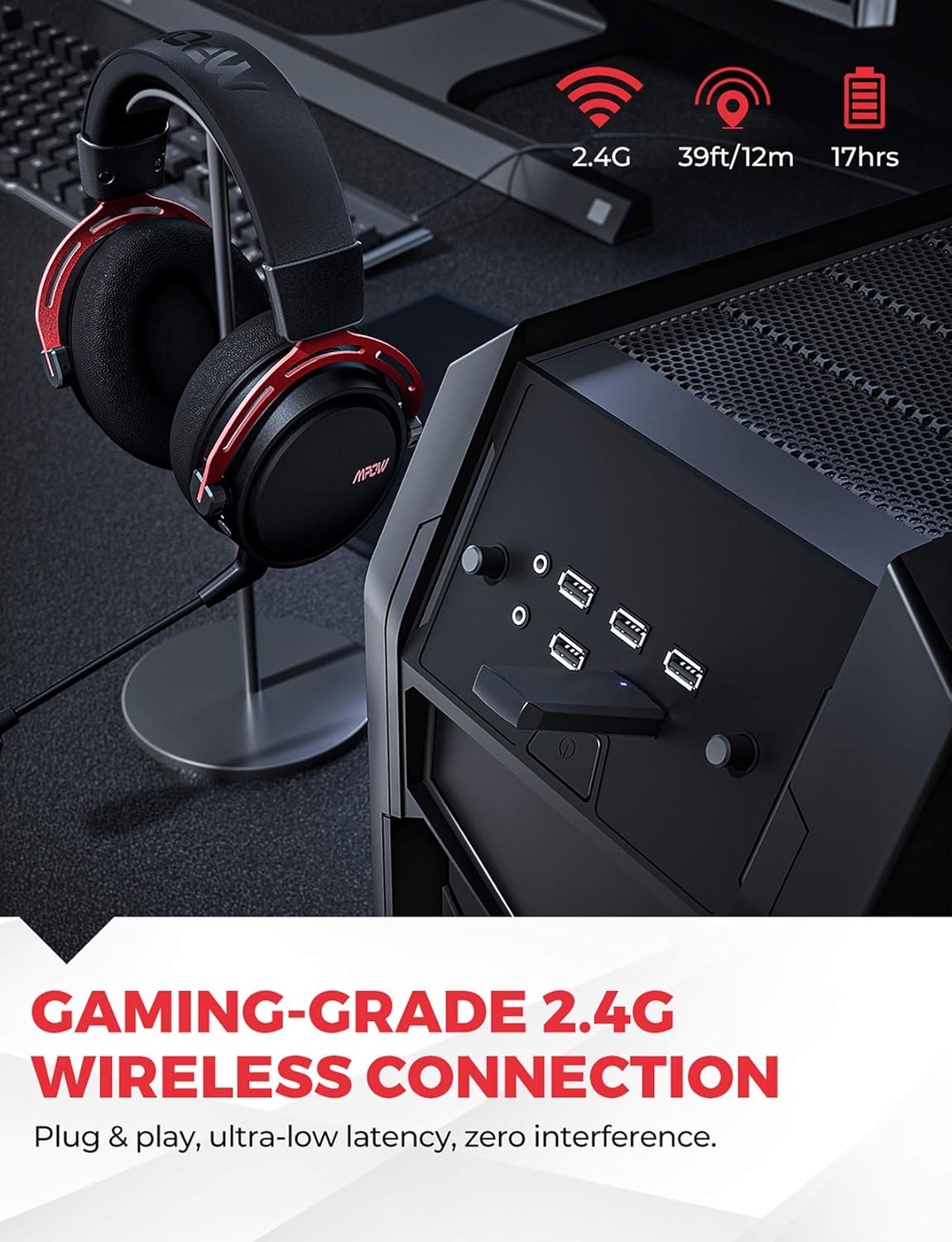
Image: The Mpow Air Pro headset connected wirelessly via a USB dongle to a PC, highlighting the 2.4G wireless, 39ft/12m range, and 17-hour battery life.
Melua vaimentava mikrofoni
The integrated noise-cancellation microphone delivers clear vocal communications by reducing background noise. The flexible microphone can be adjusted for optimal voice pickup.

Image: A gamer wearing the Mpow Air Pro headset, demonstrating the use of the noise-cancelling microphone during gameplay.
Mukavuus ja kestävyys
Constructed with an aluminum frame, soft leather headpad, memory foam ear cushions, and an adjustable steel headband, the headset is designed for extended comfort during use.

Kuva: Lähikuva views highlighting the comfort features of the Mpow Air Pro headset, including the adjustable steel headband, leather head pad, lightweight aluminum frame, and memory-protein foam ear cushions.
Asennus ja yhteys
Langaton yhteys (2.4G)
- Insert the USB dongle into an available USB port on your PC, Mac, or Nintendo Switch (TV Mode).
- Power on the Mpow Air Pro headset by pressing and holding the Power button until the indicator light illuminates.
- The headset will automatically pair with the USB dongle. A solid indicator light on the headset signifies a successful connection.
- Ensure the Mpow Air Pro is selected as the default audio output and input device in your operating system's sound settings.
Huomautus: The wireless function does not support PS4 temporarily. For 7.1 surround sound, software installation is required on Windows 7/8/10.
Langallinen yhteys (3.5 mm:n äänikaapeli)
- Connect one end of the 3.5mm audio cable to the audio jack on the Mpow Air Pro headset.
- Connect the other end of the 3.5mm audio cable to the audio output jack on your PC, PS4, Xbox One, Nintendo Switch, or mobile phone.
- The headset will function in stereo mode when connected via the 3.5mm cable.
Kuulokkeiden lataaminen
- Liitä USB-latauskaapeli kuulokkeiden latausporttiin.
- Liitä USB-latauskaapelin toinen pää USB-virtalähteeseen (esim. tietokoneen USB-porttiin tai USB-seinäsovittimeen).
- The indicator light will show charging status and turn off or change color when fully charged. A full charge provides approximately 17 hours of usage.
Käyttöohjeet
Virta päälle/pois
- Käynnistä painamalla virtapainiketta 2 sekuntia.
- Sammuta virta painamalla virtapainiketta 3 sekuntia.
Äänenvoimakkuuden säätö
- Rotate the volume wheel located on the earcup to adjust the audio output level.
Mikrofoni Mykistä/Poista mykistys
- Use the microphone mute button on the earcup to toggle the microphone on or off.
- The microphone is flexible and can be adjusted to your preferred position.
7.1 Surround Sound Software (Windows Only)
- For Windows 7/8/10 users, download and install the dedicated software from the Mpow official website to enable and customize the 7.1 surround sound feature.
- Refer to the "User Guide for Software" included in your package for detailed installation and usage instructions.
Huolto
- Puhdistus: Use a soft, dry cloth to clean the headset. Do not use abrasive cleaners or solvents. For ear cushions, gently wipe with a damp liinalla ja anna kuivua kokonaan ilmassa.
- Varastointi: Säilytä kuulokkeita viileässä, kuivassa paikassa, poissa suorasta auringonvalosta ja äärimmäisistä lämpötiloista. Vältä painavien esineiden asettamista kuulokkeiden päälle.
- Akun hoito: Akun käyttöiän pidentämiseksi vältä kuulokkeiden jatkuvaa tyhjentämistä kokonaan. Lataa kuulokkeet säännöllisesti, vaikka niitä ei käytettäisi pitkään aikaan (esim. kerran kolmessa kuukaudessa).
- Käsittely: Do not bend or twist the microphone arm excessively. Avoid dropping the headset.
Vianetsintä
| Ongelma | Mahdollinen syy | Ratkaisu |
|---|---|---|
| Ei ääntä kuulokkeista (langattomat) | Headset not powered on; Not paired; Incorrect audio output selected; Low battery. | Ensure headset is powered on. Re-pair with USB dongle. Check sound settings on PC/Mac and select "Mpow Air Pro". Charge the headset. |
| Mikrofoni ei toimi | Microphone muted; Incorrect audio input selected; Microphone not properly connected (if detachable). | Unmute the microphone. Check sound settings on PC/Mac and select "Mpow Air Pro" as input device. Ensure microphone is securely attached. |
| Huono langaton yhteys/yhteyden katkeaminen | Too far from dongle; Interference from other 2.4G devices; Obstructions. | Move closer to the USB dongle. Reduce interference by moving away from other wireless devices (e.g., Wi-Fi routers). Ensure clear line of sight. |
| 7.1-tilaääni ei toimi | Software not installed; Incorrect settings; Not on Windows OS. | Install the 7.1 surround sound software (Windows 7/8/10 only). Check software settings. Ensure you are using a compatible Windows operating system. |
Tekniset tiedot
| Ominaisuus | Yksityiskohta |
|---|---|
| Mallin nimi | BH473A |
| Yhteystekniikka | 2.4G Wireless, 3.5mm Jack |
| Wireless Range | Jopa 39 jalkaa (12 metriä) |
| Akun kesto | Noin 17 tuntia |
| Äänen tyyppi | 7.1 Surround Sound (via software on Windows), Stereo (via 3.5mm) |
| Mikrofoni | Noise-Cancelling, Fixed |
| Korvien sijoitus | Korvan yli |
| Materiaali | Leather, Foam (ear cushions), Aluminum (frame) |
| Tuotteen paino | 350 grammaa |
| Tuotteen mitat | 10 x 16.3 x 20.8 cm |
| Compatible Devices (Wireless) | PC, MAC, Nintendo Switch (TV Mode) |
| Compatible Devices (Wired) | PC, PS4, Xbox One, Nintendo Switch, Cell Phone |
Takuu ja tuki
MPOW products come with a standard manufacturer's warranty. For detailed warranty terms and conditions, please refer to the warranty card included in your package or visit the official MPOW websivusto.
If you encounter any issues or have questions regarding your Mpow Air Pro headset, please contact MPOW Customer Support through their official website or the contact information provided in your product documentation. Please have your model number (BH473A) and purchase details ready when contacting support.
Ask a question about this manual
Ask about setup, troubleshooting, compatibility, parts, safety, or missing instructions. Manuals+ will review the question and use this page’s manual context to help answer it.