
ELECDER D19
ELECDER D19 True Wireless Earbuds User Manual
Model: D19 | Brand: ELECDER
1. Johdanto
The ELECDER D19 True Wireless Earbuds are designed to provide a superior audio experience with advanced features such as Bluetooth 5.0 connectivity, noise cancellation, and IPX7 waterproofing. This manual provides comprehensive instructions for setting up, operating, and maintaining your earbuds to ensure optimal performance and longevity.
Tärkeimmät ominaisuudet:
- Bluetooth 5.0: Fast and stable wireless transmission with CVC8.0 noise cancellation for clear calls.
- Premium Hi-Fi Stereo Audio: APTX audio for lossless transmission, delivering immersive sound with crystal clarity and deep bass.
- IPX7 vedenpitävä: Resistant to sweat, water, and rain, ideal for workouts and outdoor activities.
- Ergonominen muotoilu: Lightweight (5g per earbud) with flexible silicone ear-fins and S/M/L ear caps for a secure and comfortable fit.
- Quick Pairing Technology: Automatic power-on and pairing upon removal from the charging case.
- USB Quick Charge & Wireless Charging: Up to 4.5 hours of music on a single charge, with an additional 18 hours from the charging case, supporting both USB and wireless charging.
2. Tuote ohiview

Figure 2.1: ELECDER D19 True Wireless Earbuds in their charging case. The earbuds are black, sleek, and designed for in-ear use, while the compact charging case is also black with a smooth finish.
Mitä laatikossa on:
- ELECDER D19 True Wireless Earbuds (Left and Right)
- Latauskotelo
- USB-latauskaapeli
- Korvatyynyt (koot S/M/L)
- Käyttöopas (tämä asiakirja)
3. Asennusopas
3.1 Kuulokkeiden ja kotelon lataaminen
Before first use, fully charge the earbuds and the charging case. The charging case supports both USB cable charging and wireless charging.
- USB-lataus: Connect the provided USB cable to the charging port on the case and plug the other end into a USB power source (e.g., computer, wall adapter). The indicator light on the case will show charging status.
- Langaton lataus: Place the charging case on a compatible wireless charging pad. The indicator light will flash to confirm charging.

Figure 3.1: The ELECDER D19 charging case being charged wirelessly on a charging pad, also showing the Micro USB port for wired charging. This image highlights the dual charging capabilities of the case.
A full charge for the earbuds provides approximately 4.5 hours of music playback, and the charging case provides an additional 18 hours of battery life.
3.2 Laiteparin muodostaminen
The ELECDER D19 earbuds feature quick pairing technology for seamless connection.
- Vaihe 1: Avaa latauskotelo ja ota molemmat nappikuulokkeet ulos. Ne käynnistyvät automaattisesti ja muodostavat pariliitoksen keskenään.
- Vaihe 2: Siirry älypuhelimellasi tai Bluetooth-yhteensopivalla laitteellasi Bluetooth-asetuksiin.
- Vaihe 3: Etsi available devices and select "Elecder D19" from the list to connect.
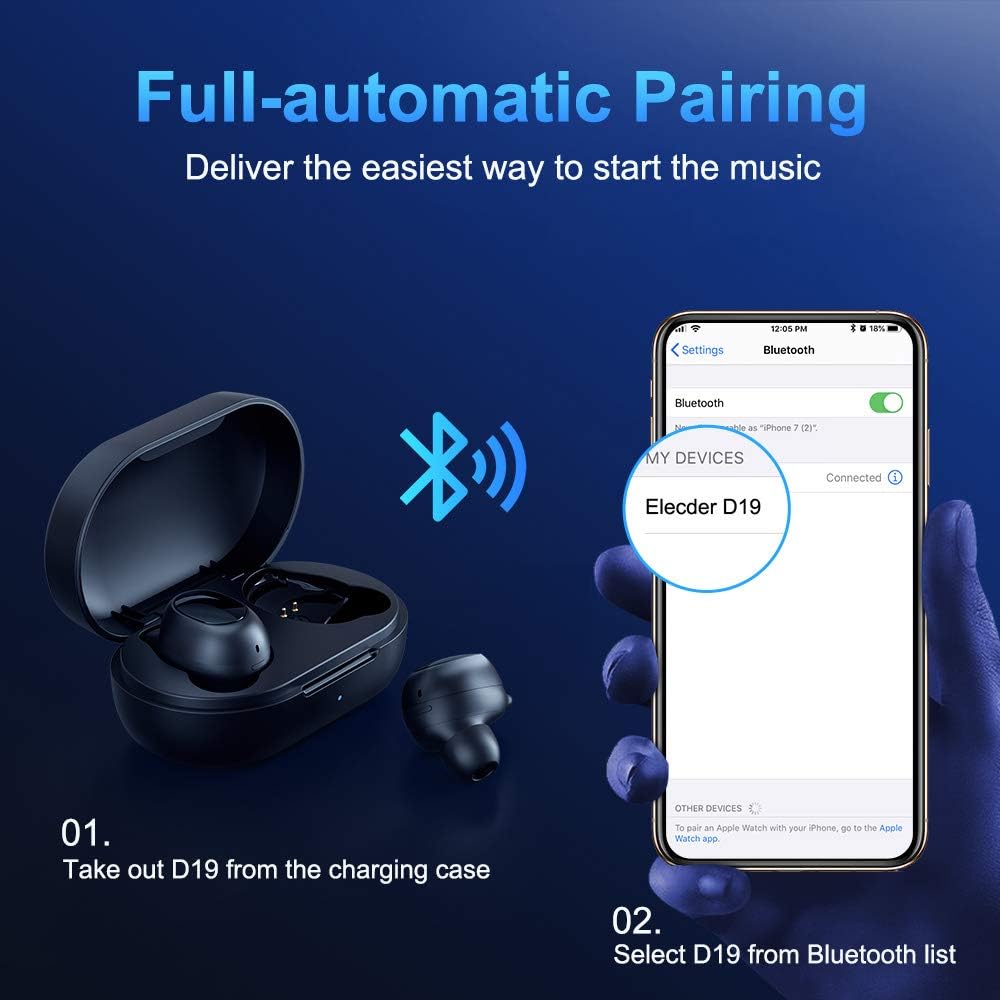
Figure 3.2: A visual guide demonstrating the automatic pairing process. The image shows the earbuds being taken out of the case and then the "Elecder D19" option appearing in a smartphone's Bluetooth settings for connection.
Ensimmäisen pariliitoksen muodostamisen jälkeen nappikuulokkeet yhdistyvät automaattisesti viimeksi pariliitettyyn laitteeseen, kun ne otetaan pois latauskotelosta.

Figure 3.3: An illustration showing the stable Bluetooth connection between the ELECDER D19 earbuds and various smart devices, including smartphones and tablets.
4. Käyttöohjeet
4.1 Korvanappikuulokkeiden käyttö
For optimal sound quality and comfort, choose the ear tips that best fit your ears. The earbuds come with S, M, and L sizes. Insert the earbuds into your ears and gently rotate them to find a secure and comfortable fit. The ergonomic ear-fin design helps ensure stability during movement.
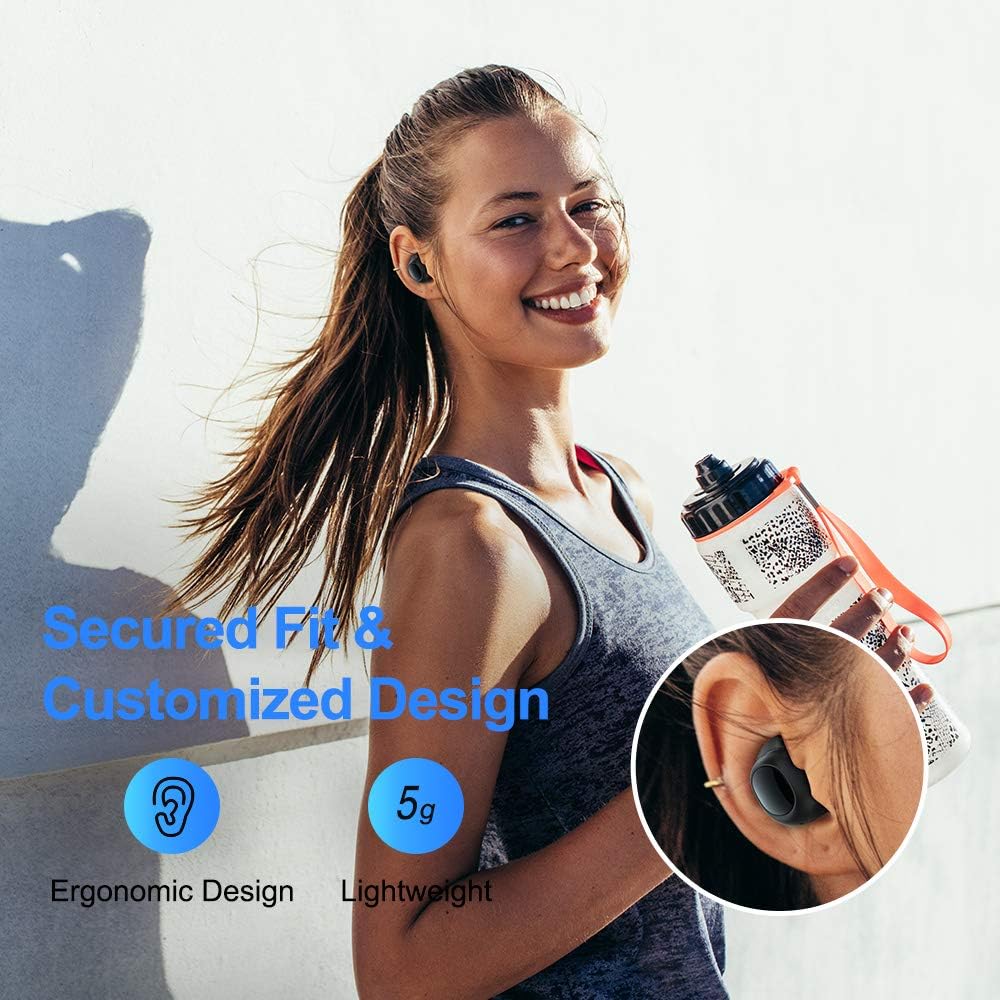
Figure 4.1: A person wearing the ELECDER D19 earbuds during a workout, demonstrating the secure and comfortable fit provided by the ergonomic design and customizable ear tips.
4.2 Medianhallinta
The ELECDER D19 earbuds feature physical buttons for media control. Specific button functions may vary slightly based on the device and operating system, but common controls include:
- Toista/tauko: Paina kerran jommassakummassa korvanapissa.
- Seuraava kappale: Kaksoisnapauta oikeaa korvanappia.
- Edellinen kappale: Kaksoisnapauta vasenta korvanappia.
- Ääni kovemmalle: Triple press on the right earbud.
- Äänenvoimakkuutta pienemmälle: Triple press on the left earbud.
4.3 Puheluiden hallinta
Hallitse puheluitasi suoraan nappikuulokkeista:
- Puhelun vastaaminen/lopetus: Paina kerran jommassakummassa korvanapissa.
- Hylkää puhelu: Paina ja pidä painettuna jompaakumpaa kuuloketta 2 sekunnin ajan.
- Aktivoi Voice Assistant: Paina jompaakumpaa korvanappia (esim. Siri tai Google Assistant) 3 sekunnin ajan.
5. Huolto ja hoito
Proper maintenance ensures the longevity and optimal performance of your ELECDER D19 earbuds.
5.1 Puhdistus
- Puhdista nappikuulokkeet ja latauskotelo säännöllisesti pehmeällä, kuivalla ja nukkaamattomalla liinalla.
- Irrota korvatulpat ja puhdista ne miedolla saippualla ja vedellä. Kuivaa ne huolellisesti ennen takaisin kiinnittämistä.
- Use a cotton swab or small brush to gently clean the charging contacts on both the earbuds and the case.
- Vältä hankaavien materiaalien, alkoholin tai kemiallisten puhdistusaineiden käyttöä.
5.2 Vedenkestävyys (IPX7)
The ELECDER D19 earbuds are IPX7 waterproof, meaning they can withstand submersion in up to 1 meter of water for 30 minutes. This makes them suitable for protection against sweat, rain, and accidental splashes.

Figure 5.1: The ELECDER D19 earbuds shown with water droplets, illustrating their IPX7 waterproof rating, which protects them from sweat, rain, and splashes.
Huomautus: The charging case is not waterproof. Ensure earbuds are dry before placing them back into the charging case.
5.3 Varastointi
Kun nappikuulokkeita ei käytetä, säilytä niitä latauskotelossa niiden suojaamiseksi ja latauksen ylläpitämiseksi. Säilytä koteloa viileässä, kuivassa paikassa, poissa äärimmäisistä lämpötiloista ja suorasta auringonvalosta.
6. Vianmääritys
If you encounter issues with your ELECDER D19 earbuds, refer to the following common solutions:
| Ongelma | Mahdollinen syy | Ratkaisu |
|---|---|---|
| Kuulokkeet eivät muodosta pariliitosta laitteen kanssa. | Bluetooth is off on device; earbuds not in pairing mode; previously paired device interfering. | Ensure Bluetooth is enabled. Place earbuds back in case, then take them out to re-enter pairing mode. Forget "Elecder D19" from your device's Bluetooth list and re-pair. |
| Vain yksi kuuloke toimii. | Earbuds not paired with each other; low battery on one earbud. | Place both earbuds back into the charging case, close the lid, wait a few seconds, then open and take them out again. Ensure both earbuds are charged. |
| Ei ääntä tai äänenvoimakkuus on alhainen. | Device volume too low; ear tips not properly sealed; debris in earbud nozzle. | Increase volume on your device. Adjust earbud position or try different sized ear tips for a better seal. Clean earbud nozzles. |
| Latauskotelo ei lataudu. | Faulty cable/charger; improper placement on wireless charger. | Try a different USB cable and power adapter. Ensure the case is correctly aligned on the wireless charging pad. |
| Bluetooth-yhteys epävakaa. | Interference; distance from device; low earbud battery. | Reduce distance between earbuds and device. Avoid environments with strong Wi-Fi or other Bluetooth signals. Ensure earbuds are fully charged. |
7. Tekniset tiedot
Detailed technical specifications for the ELECDER D19 True Wireless Earbuds:
| Ominaisuus | Yksityiskohta |
|---|---|
| Mallin nimi | ELECDER D19 |
| Yhteystekniikka | Langaton (Bluetooth 5.0) |
| Bluetooth-alue | 33 jalkaa |
| Korvien sijoitus | Korvassa |
| Muototekijä | Korvassa |
| Melunhallinta | Aktiivinen melunvaimennus (CVC8.0) |
| Mikrofoni | Mukana |
| Vedenkestävyystaso | IPX7 vedenpitävä |
| Akunkesto (nappikuulokkeet) | Up to 4.5 hours (music) / 4 hours (calling) |
| Charging Case Additional Playtime | 18 tuntia |
| Latausaika | Noin 2 tuntia |
| Latausliitäntä | Micro USB, Wireless Charging |
| Tuotteen paino | 1.92 ounces (total) / 5g (each earbud) |
| Tuotteen mitat | 3.89 x 3.89 x 1.65 tuumaa |
| Yhteensopivat laitteet | iOS and Android Smartphones |
| Materiaali | Silikoni (korvatyynyt) |
| Väri | Musta |

Figure 7.1: An infographic detailing the battery life of the ELECDER D19 earbuds and charging case, showing 4 hours for calls, 4.5 hours for music, and a total of 18 hours with the 500mAh charging case.
8. Takuu ja tuki
ELECDER products are manufactured to high quality standards. For information regarding warranty coverage, technical support, or service inquiries, please refer to the contact information provided with your product packaging or visit the official ELECDER websivusto.
Lisätietoja saat ottamalla yhteyttä myös jälleenmyyjään, jolta ostit tuotteen.
Ask a question about this manual
Ask about setup, troubleshooting, compatibility, parts, safety, or missing instructions. Manuals+ will review the question and use this page’s manual context to help answer it.