
1. Johdanto
This manual provides instructions for the Powerextra D-Tap Charger, designed for V Mount, V Lock, and Gold Mount batteries. It ensures efficient and safe charging for compatible camera batteries and other devices that utilize a D-Tap port for charging.

Image 1.1: Powerextra D-Tap Charger with its integrated D-Tap cable.
2. Pakkauksen sisältö
Varmista, että pakkauksessasi on kaikki tarvittavat osat:
- 1 x Powerextra D-Tap Charger
- 1 x 100cm AC Charging Cable
- 1 x mikrokuituinen puhdistusliina

Image 2.1: The D-Tap charger, AC power cable, and microfiber cloth included in the package.
3. Tekniset tiedot
| Ominaisuus | Erittely |
|---|---|
| AC-tulo | 100-240 V / 0.8 A |
| DC-lähtö | 16.8V-2.0A |
| Lähtö Voltage | 16.8 volttia |
| Tuotteen paino | 8.1 unssia (noin 230 g) |
| Pakkauksen mitat | 6.14 x 3.58 x 1.46 tuumaa |
| Sertifikaatit | CE |
4. Asennus
Follow these steps to set up your D-Tap Charger:
- Kytke verkkovirtajohto: Insert the included 100cm AC charging cable into the power input port on the charger unit.
- Liitä pistorasiaan: Plug the other end of the AC charging cable into a standard wall power outlet (100-240V).
- Liitä akkuun: Insert the D-Tap connector from the charger into the D-Tap port on your compatible V Mount, V Lock, or Gold Mount battery. Ensure a secure connection.

Image 4.1: The D-Tap connector for battery connection.


Kuva 4.2: Esim.amples of compatible V-Mount, Gold Mount, and other D-Tap port batteries.
5. Käyttöohjeet
Once the charger is connected to a power source and a compatible battery, it will begin charging automatically.
- Latausilmaisin: The charger features an LED indicator light to show the charging status.
- Punainen valo: Ilmaisee, että akku latautuu parhaillaan.
- Vihreä valo: Osoittaa, että akku on ladattu täyteen.
The charger utilizes automatic constant current control to optimize charging speed and prevent overcharging.
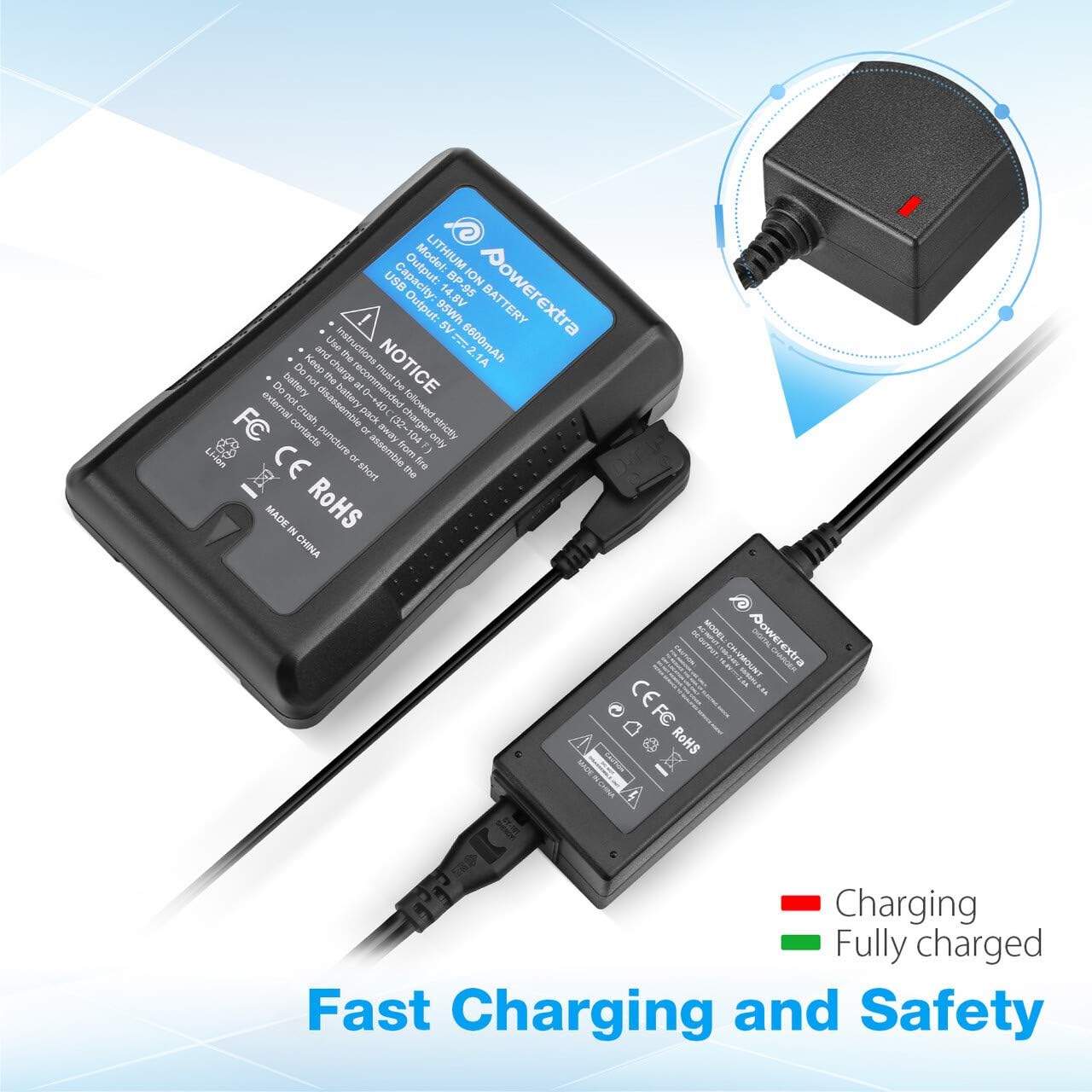
Image 5.1: Charger connected to a battery, with the red LED indicating active charging.
6. Turvallisuustiedot
To ensure safe operation and prolong the life of your charger and batteries, please observe the following safety precautions:
- Ylikuormitussuoja: The charger is designed to prevent batteries from overcharging.
- Oikosulkusuojaus: Built-in mechanisms protect against short circuits.
- Ylivirtasuoja: Suojaa liiallista virrankulkua vastaan.
- Ylikuumenemissuoja: Estää laturin ylikuumenemisen käytön aikana.
- Ylipurkaussuojaus: (Note: This protection is typically a feature of the battery itself, but the charger is designed to work safely with such batteries.)
- Use the charger only with compatible V Mount, V Lock, or Gold Mount batteries.
- Älä altista laturia kosteudelle, sateelle tai äärimmäisille lämpötiloille.
- Älä pura tai muuta laturia. Jätä kaikki huoltotyöt pätevän henkilöstön tehtäväksi.
- Pidä poissa lasten ulottuvilta.

Image 6.1: Visual representation of the multi-protection features including short circuit, over discharge, over current, over charge, and over heating protection.
7. Huolto
Proper maintenance ensures optimal performance and longevity of your charger:
- Puhdistus: Use the provided microfiber cleaning cloth to gently wipe the charger and cables. Do not use liquid cleaners or solvents.
- Varastointi: Säilytä laturia viileässä, kuivassa paikassa, poissa suorasta auringonvalosta ja äärimmäisistä lämpötiloista, kun sitä ei käytetä.
- Kaapelihuolto: Avoid bending or crimping the cables excessively. Always grasp the plug, not the cable, when disconnecting.
8. Vianmääritys
If you encounter issues with your Powerextra D-Tap Charger, refer to the following common problems and solutions:
- Laturi ei käynnisty:
- Varmista, että verkkovirtajohto on kytketty kunnolla sekä laturiin että pistorasiaan.
- Varmista, että pistorasia toimii, testaamalla sitä toisella laitteella.
- Akku ei lataudu:
- Check that the D-Tap connector is fully and correctly inserted into the battery's D-Tap port.
- Confirm that the battery is compatible with the charger and is not fully charged already (green LED).
- Inspect the D-Tap cable and connector for any visible damage.
- Indicator Light Not Functioning:
- If the charger is connected and the battery is not fully charged, but the light is off, contact customer support.
If the problem persists after attempting these solutions, please contact Powerextra customer support for further assistance.
9. Takuu ja tuki
Powerextra provides the following for this D-Tap Charger:
- Takuu: 12-month hassle-free warranty from the date of purchase.
- Tukea: Elinikäinen tekninen tuki.
For warranty claims, technical assistance, or any product-related inquiries, please contact Powerextra customer service through their official websivusto tai jälleenmyyjä, josta tuote ostettiin.