
NEXAS NexLINK
NEXAS NexLINK Bluetooth OBD2 -skannerin käyttöohje
Model: NexLINK
1. Johdanto
Welcome to Your NexLINK OBD2 Scanner
Thank you for choosing the NEXAS NexLINK Bluetooth OBD2 Scanner. This device is designed to provide comprehensive diagnostic capabilities for both cars and motorcycles, helping you understand and maintain your vehicle's health. This manual will guide you through the setup, operation, and maintenance of your NexLINK scanner.

Image: The NEXAS NexLINK Bluetooth OBD2 Scanner connected to a smartphone displaying its diagnostic interface.
Tärkeimmät ominaisuudet
- Laaja yhteensopivuus: Works with a wide range of OBDII-compliant cars, SUVs, minivans, and light trucks manufactured since 1996, and select motorcycles.
- Kattava diagnostiikka: Reads and clears Diagnostic Trouble Codes (DTCs), retrieves live data, freeze frames, O2 sensor data, and performs on-board monitor tests.
- 2-in-1-toiminnallisuus: Functions as both a car and motorcycle OBD2 scanner (with compatible Android apps like Motoscan and TuneECU).
- Langaton yhteys: Bluetooth 5.0 for stable connection with iOS, Android, and PC devices.
- Energiansäästö: Features intelligent auto-sleep and over-voltage protection to preserve vehicle battery life and ensure device safety.
- Third-Party App Support: Compatible with popular apps like Torque Lite/Pro, BimmerCode, OBD Fusion, and more.
2. Asennusopas
Pakkauksen sisältö
- NEXAS NexLINK Bluetooth OBD2 Scanner Unit
- Käyttöopas (tämä asiakirja)
Laite ohiview
The NexLINK scanner is a compact, blue device designed to plug directly into your vehicle's OBD2 port. It features an indicator light for connection status.
Pika -asennusvaiheet
- Lataa sovellus: Etsi a compatible OBD2 scanner app (e.g., "CAR SCANNER ELM OBD2") on your device's app store (iOS App Store or Google Play Store).
- Käynnistä auto: Turn on your vehicle's ignition to power the OBD2 port.
- Liitä laite: Locate your vehicle's 16-pin OBD2 diagnostic port (usually under the dashboard on the driver's side) and firmly plug in the NexLINK scanner.
- Turn Bluetooth On: Ota Bluetooth käyttöön iOS- tai Android-laitteellasi.
- Suorita sovellus: Open the downloaded diagnostic app and follow its in-app instructions to connect to the NexLINK device.

Image: Visual guide illustrating the quick setup process for the NexLINK scanner.
Note for iOS Users: Do NOT pair NexLINK adapter with your iPhone directly in Bluetooth settings. Make settings within the diagnostic app itself.
3. Käyttöohjeet
Main Diagnostic Functions
The NexLINK scanner, in conjunction with a compatible app, provides access to various diagnostic functions:

Image: A visual representation of the various diagnostic functions available with the NexLINK scanner.
- Lue koodit: Hakee diagnostiikkakoodit (DTC:t) ajoneuvon tietokoneelta.
- Tyhjennä koodit: Erases DTCs from the vehicle's computer and turns off the Check Engine Light (CEL/MIL).
- Lue akun tiedot: Valvoo ajoneuvon akun varaustatage.
- Read Freeze Frames: Tallentaa tilannekuvan ajoneuvon käyttöolosuhteista vikakoodin asettamishetkellä.
- O2-anturikoe: Hakee O2-anturin valvontatestien tulokset.
- On-board Monitoring Test: Hakee tuloksia päästöihin liittyvistä voimansiirron osista ja järjestelmistä.
- Komponenttitesti: Mahdollistaa tiettyjen komponenttien tai järjestelmien testaamisen.
- Perform I/M Readiness: Checks the readiness of the emission monitoring system to determine if the vehicle is ready for an emissions test.
- Read Powertrain Data: Accesses specific data related to the vehicle's powertrain.
- Lue ajoneuvon tiedot: Hakee ajoneuvon tunnistenumeron (VIN), kalibrointitunnuksen (CALID) ja kalibroinnin tarkistusnumeron (CVN).
Motorcycle Diagnosis
The NexLINK scanner can also be used for motorcycle diagnostics when paired with specific Android applications like Motoscan and TuneECU. This allows for reading/clearing fault codes, real-time data, and other functions for compatible motorcycle models.
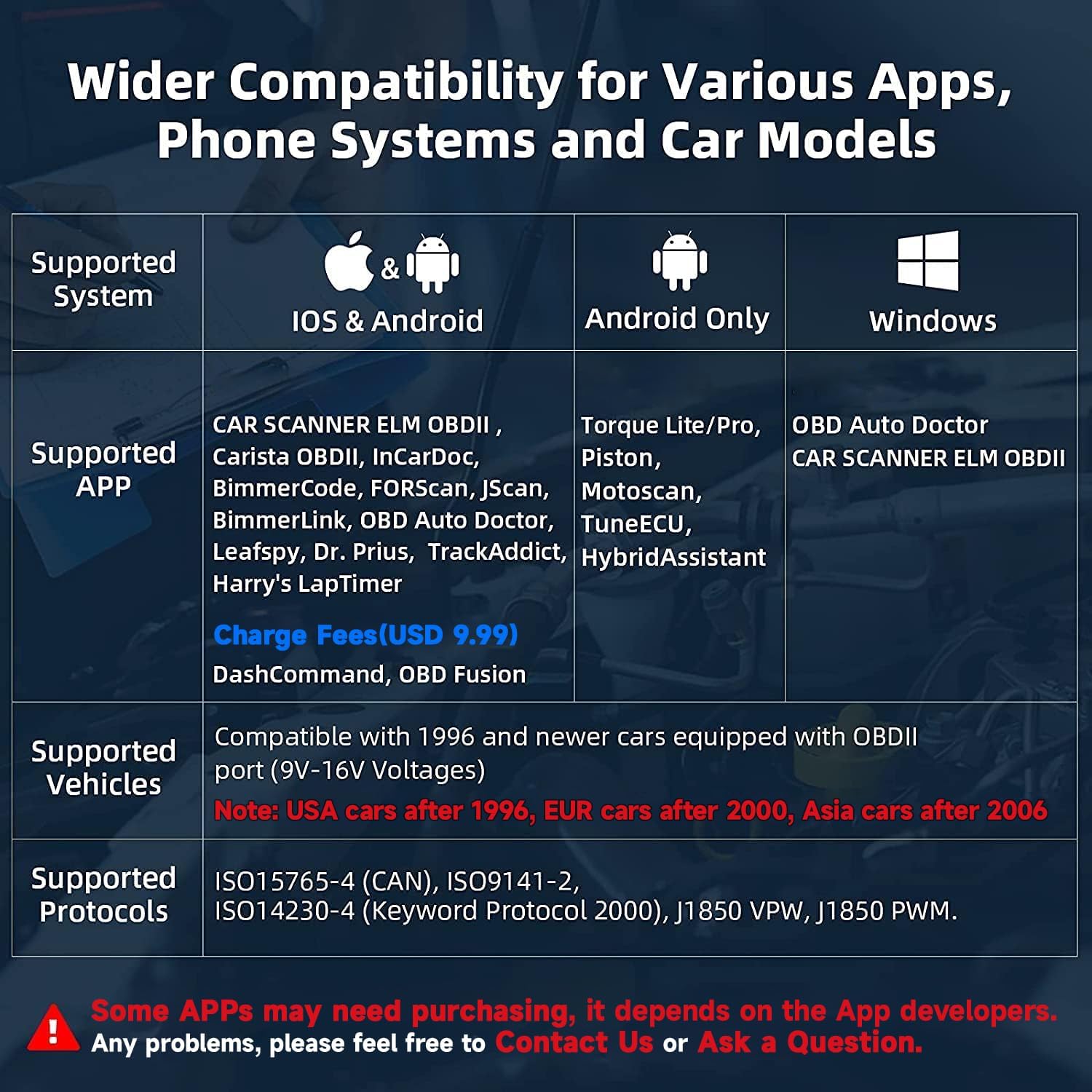
Image: The NexLINK scanner being used for motorcycle diagnostics with the MotoScan app.
Please note: NexLINK only supports diagnosing specific BMW (C, F, G, K, R, S, and Husqvarna series), Triumph, Aprilia, Benelli, Ducati & Moto Guzzi, Morini, Gilera, Husqvarna, KTM, CCM motorcycles.
Compatible Applications and Systems
The NexLINK scanner is designed to work with a variety of third-party applications, extending its functionality. Some apps may require separate purchase.

Image: A selection of compatible third-party applications that can be used with the NexLINK scanner.
| Luokka | Kuvaus |
|---|---|
| Tuetut järjestelmät | iOS & Android, Windows |
| Supported Apps (iOS & Android) | CAR SCANNER ELM OBDII, Carista OBDII, InCarDoc, BimmerCode, FORScan, JScan, BimmerLink, OBD Auto Doctor, Leafspy, Dr. Prius, TrackAddict, Harry's LapTimer, DashCommand, OBD Fusion |
| Supported Apps (Android Only) | Torque Lite/Pro, Piston, Motoscan, TuneECU, HybridAssistant |
| Supported Apps (Windows) | OBD Auto Doctor, CAR SCANNER ELM OBDII |
| Tuetut ajoneuvot | Compatible with 1996 and newer cars equipped with OBDII port (9V-16V Voltages). Note: USA cars after 1996, EUR cars after 2000, Asia cars after 2006. |
| Tuetut protokollat | ISO15765-4 (CAN), ISO9141-2, ISO14230-4 (Keyword Protocol 2000), J1850 VPW, J1850 PWM. |
4. Huolto
Laitteen puhdistaminen
To maintain the performance and appearance of your NexLINK scanner, wipe it with a soft, dry cloth. Avoid using harsh chemicals or abrasive cleaners.
Varastointi
Säilytä laitetta viileässä, kuivassa paikassa, poissa suorasta auringonvalosta ja äärimmäisistä lämpötiloista, kun sitä ei käytetä.
Akun suojausominaisuudet
The NexLINK scanner is designed with energy-saving features to protect your vehicle's battery:
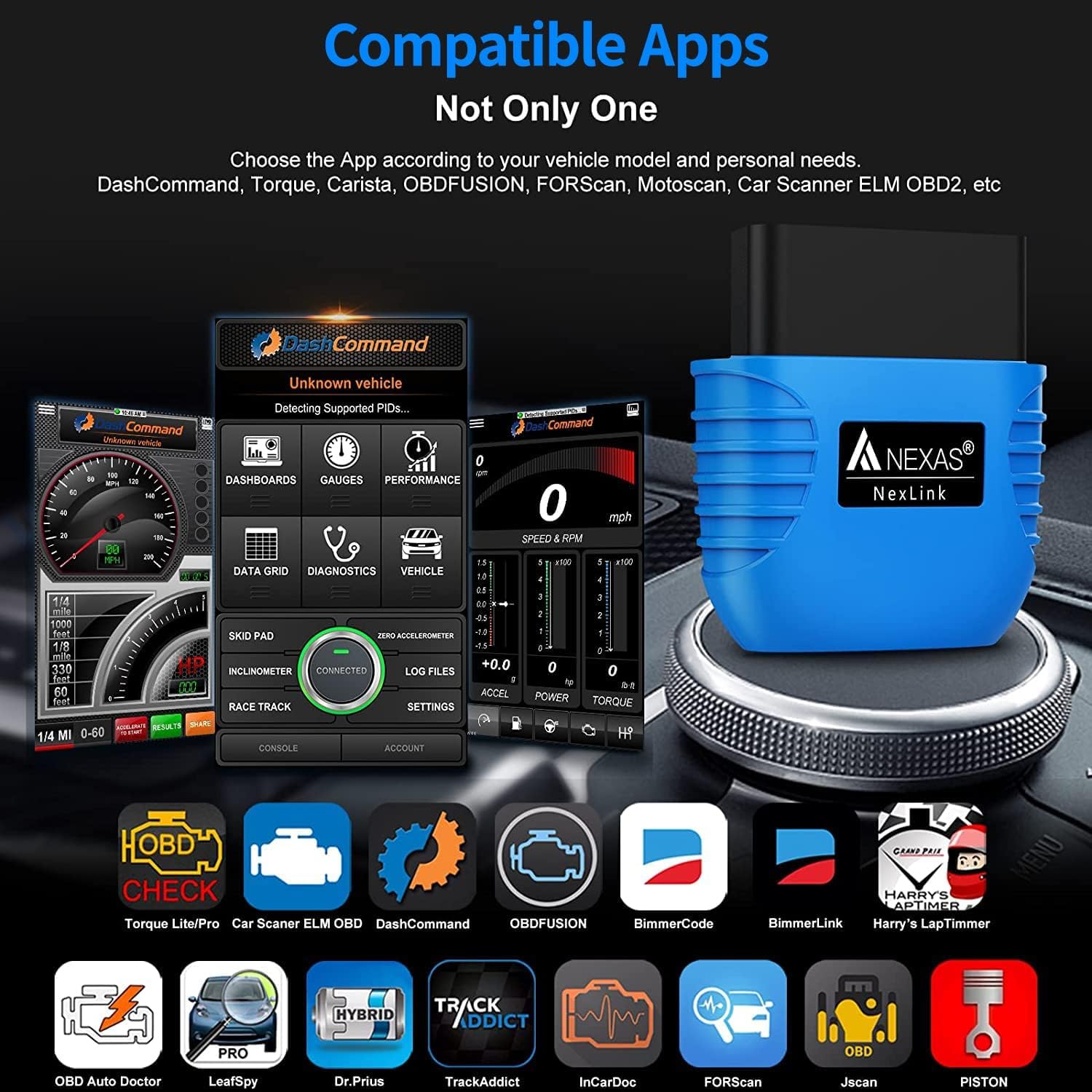
Image: Explanation of the NexLINK's battery protection and overvoltage suojaominaisuudet.
- Battery Drain Protection: When you turn off the ignition, the intelligent auto-sleep function activates instantly, cutting off power consumption to preserve your vehicle's battery life.
- Overvoltage Suojaus: Monitors your car's voltage in real-time and automatically disconnects the circuit if abnormalities are detected, ensuring device safety.
5. Vianmääritys
Yleisiä ongelmia ja ratkaisuja
- Laite ei käynnisty: Ensure the device is firmly plugged into the OBD2 port and the vehicle's ignition is on. Check the vehicle's OBD2 port for power issues.
- Ei voi muodostaa yhteyttä Bluetoothin kautta:
- Varmista, että Bluetooth on käytössä mobiililaitteellasi.
- For iOS, do not pair directly in phone settings; connect via the app.
- Try restarting your mobile device and the diagnostic app.
- Varmista, etteivät muut Bluetooth-laitteet häiritse.
- App not detecting the vehicle:
- Verify the app is compatible with your vehicle's make/model/year.
- Ensure the vehicle's ignition is on (engine can be off or running, depending on the test).
- Try a different compatible app if available.
- Check Engine Light (CEL) remains on after clearing codes:
- The underlying issue causing the code may still be present. Address the root cause of the DTC.
- Some codes require multiple drive cycles to clear or may reappear if the fault is persistent.
- Inaccurate readings or data:
- Ensure the app is correctly configured for your vehicle.
- Tarkista sovelluspäivitykset.
- Verify the device firmware is up to date (if applicable via the app).
6. Tekniset tiedot
| Erittely | Arvo |
|---|---|
| Merkki | NEXAS |
| Malli | NexLINK |
| Virtalähde | 12V DC (Vehicle Power) |
| Tuotteen mitat (P x L x K) | 2.68 cm x 0.71 cm x 2.68 cm |
| Käyttöjärjestelmän yhteensopivuus | iOS, Android, iPad, PC Devices |
| Bluetooth-versio | 5.0 |
| Kieli | englanti |
7. Takuu ja tuki
Takuutiedot
The NEXAS NexLINK Bluetooth OBD2 Scanner typically comes with a 2-year warranty. Please refer to your purchase documentation for specific warranty terms and conditions.
Asiakastuki
If you encounter any problems or have questions regarding your NexLINK scanner, please feel free to contact NEXAS customer support. You can often find support contact information within the diagnostic app or on the product's official websivusto.
For general inquiries or technical assistance, you may also reach out via email:
Email: nexas_support@163.com