
1. Johdanto
This manual provides detailed instructions for the installation, operation, and maintenance of your ASRock B550M Steel Legend motherboard. Designed for daily users and mainstream enthusiasts, this motherboard offers robust performance and a comprehensive feature set for AMD AM4 Ryzen processors.
Key features include support for 3rd Gen AMD AM4 Ryzen and future AMD Ryzen processors, a 10 Power Phase Design with Dr. MOS, DDR4 4733+ (OC) memory support, and multiple PCIe slots including PCIe 4.0 x16. It also features a flexible integrated I/O shield, USB 3.2 Gen2 Type-A+C (10Gbps), Dragon 2.5Gb LAN, and premium audio packages.

Figure 1.1: ASRock B550M Steel Legend Motherboard Overview
2. Asennus ja asennus
Ennen asennuksen aloittamista varmista, että järjestelmä on sammutettu ja irrotettu virtalähteestä. Käsittele emolevyä reunoista staattisen sähkön purkauksen välttämiseksi.
2.1 Komponenttien tunnistetiedot
Tutustu emolevyn eri komponentteihin ja liittimiin.
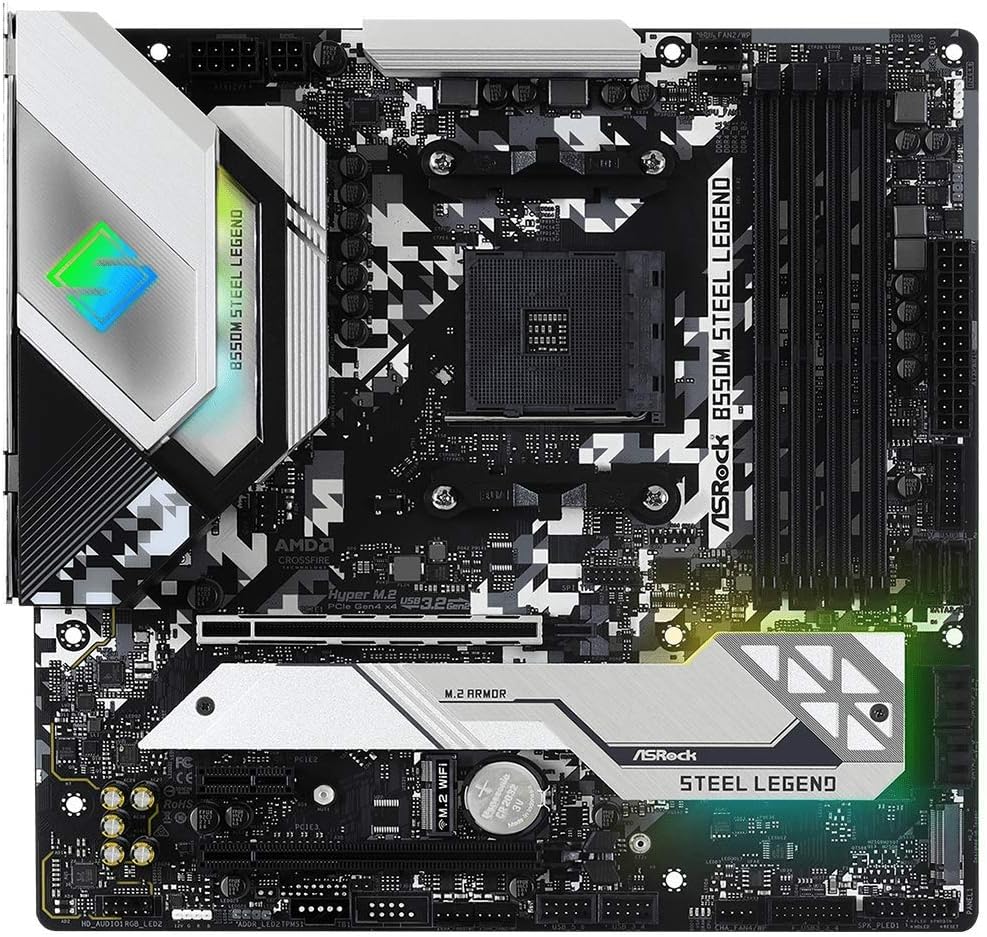
Figure 2.1: Motherboard Layout

Figure 2.2: Key Features - CPU, Memory, and M.2 Sockets

Figure 2.3: Key Features - I/O and Connectivity

Figure 2.4: Key Features - Power Delivery and Cooling
2.2 Suorittimen asennus
This motherboard supports AMD AM4 socket processors. Carefully align the CPU with the socket, ensuring the golden triangle on the CPU matches the triangle on the socket. Lower the retention arm to secure the CPU.
2.3 Muistin (RAM) asennus
Insert DDR4 memory modules into the DIMM slots. Ensure the notches on the modules align with the slots. Press down firmly on both ends until the clips lock into place. This motherboard supports DDR4 4733+ (OC) memory.
2.4 Tallennuslaitteen asennus
Install M.2 SSDs into the Hyper M.2 sockets (PCIe Gen4x4) and SATA drives into the available SATA 3 ports. Secure M.2 drives with the provided screw.
2.5 Laajennuskortin asennus
Install graphics cards into the PCIe 4.0 x16 slot and other expansion cards into the PCIe 3.0 x16 or PCIe 3.0 x1 slots. Ensure cards are seated firmly and secured with a screw to the chassis.
2.6 Virtaliitännät
Connect the 24-pin ATX power connector and the 8+4 pin Hi-Density power connector from your power supply to the motherboard.
2.7 Etupaneelin ja oheislaitteiden liitännät
Connect front panel headers (power button, reset button, USB, audio) according to the motherboard manual. Connect peripherals such as USB devices, display cables (HDMI, DisplayPort), and network cables to the rear I/O panel.
2.8 Alkukäynnistys ja BIOS-konfigurointi
After all components are installed and connected, power on your system. Access the BIOS/UEFI setup utility by pressing the designated key (usually DEL or F2) during startup. Configure boot order, system time, and other necessary settings. Ensure the latest BIOS version is installed for optimal compatibility with AMD Ryzen 5000/4000/3000 Series processors.
Video 2.1: Product Demonstration Video. This video provides a visual overview of the motherboard and its components, which can assist with initial setup and identification.
3. Käyttöohjeet
3.1 BIOS/UEFI-liitäntä
The UEFI (Unified Extensible Firmware Interface) provides a graphical interface for system configuration. Navigate using a mouse or keyboard. Key sections include:
- Pääasiallinen: System information, date, and time.
- OC Tweaker: Overclocking settings for CPU and memory.
- Lisäasetukset: Configuration for CPU, storage, chipset, and onboard devices.
- Työkalu: BIOS update utility (Instant Flash), Polychrome RGB.
- Käynnistys: Boot device priority and boot options.
- Turvallisuus: Salasana-asetukset.
- Poistu: Save and exit, discard changes.
3.2 Ohjaimen asennus
After installing your operating system (Windows 10 is supported), install the necessary drivers for the chipset, LAN, audio, and other onboard devices. These can typically be found on the ASRock support websivusto emolevysi mallille.
3.3 ASRock Software Utilities
ASRock provides various software utilities to enhance your experience, including:
- ASRock App Shop: For downloading and updating drivers and utilities.
- ASRock Polychrome SYNC: For controlling the motherboard's RGB lighting and synchronizing with compatible components.
- Nahimic-ääni: Parannetun äänikokemuksen takaamiseksi.
4. Huolto
4.1 BIOS-päivitykset
Tarkista ASRockin näytönohjain säännöllisesti website for BIOS updates. BIOS updates can improve system stability, add support for new CPUs, and fix bugs. Follow the instructions provided by ASRock carefully when performing a BIOS update to avoid system damage.
4.2 Ohjainpäivitykset
Keep your system drivers updated to ensure optimal performance and compatibility. Use the ASRock App Shop or visit the ASRock support websivusto uusimpien ajurien lataamiseksi.
4.3 Fyysinen puhdistus
Periodically clean your computer's interior to prevent dust buildup, which can lead to overheating and reduced performance. Use compressed air to remove dust from fans, heatsinks, and motherboard components. Ensure the system is powered off and unplugged before cleaning.
5. Vianmääritys
5.1 Ei virtaa / Ei käynnistystä
- Verify all power cables (24-pin ATX, 8+4 pin CPU) are securely connected to the motherboard and power supply.
- Varmista, että virtakytkin on ON-asennossa.
- Tarkista etupaneelin virtapainikkeen liitännät.
- Testaa virtalähde toisella järjestelmällä tai virtalähdetesterillä.
5.2 Ei näyttöä
- Ensure the monitor is connected to the correct graphics output (either integrated graphics on APU or dedicated graphics card).
- Aseta näytönohjain ja muistimoduulit uudelleen paikoilleen.
- If using a dedicated graphics card, ensure it is properly powered.
- Kokeile käynnistää kone vain yhdellä RAM-muistitikulla.
5.3 Komponenttia ei havaittu
- Varastointi: Check SATA data and power cables. For M.2 drives, ensure they are properly seated and secured. Verify settings in BIOS/UEFI.
- RAM: Reseat modules. Ensure they are in the correct slots for dual-channel operation (refer to motherboard manual for specific slot configuration).
- Oheislaitteet: Try different USB ports. Ensure drivers are installed.
5.4 Järjestelmän epävakaus / kaatumiset
- Varmista, että kaikki ajurit ovat ajan tasalla.
- Tarkista suorittimen ja näytönohjaimen lämpötilat ylikuumenemisen estämiseksi.
- Suorita muistidiagnostiikkatyökalut tarkistaaksesi viallisen RAM-muistin.
- Jos ylikellotat, palauta oletusasetukset tarkistaaksesi vakauden.
6. Tekniset tiedot
Below are the detailed specifications for the ASRock B550M Steel Legend Motherboard:
| Ominaisuus | Yksityiskohta |
|---|---|
| Merkki | ASRock |
| Mallin nimi | B550M STEEL LEGEND |
| CPU-liitäntä | Liitäntä AM4 |
| Yhteensopivat prosessorit | AMD Ryzen 5000/4000/3000 -sarja |
| Piirisarjan tyyppi | AMD B550 |
| RAM-muistitekniikka | DDR4 |
| Muistin kellonopeus | 2400 MHz (Supports up to 4733+ OC) |
| Muistipaikat saatavilla | 4 (kaksikanavainen) |
| Ram Memory Maximum Size | 128 Gt |
| Grafiikkakortin käyttöliittymä | PCI Express (1x PCIe 4.0 x16, 1x PCIe 3.0 x16, 1x PCIe 3.0 x1) |
| Total PCIe Ports | 4 |
| Grafiikkatulostusasetukset | HDMI, DisplayPort |
| SATA-porttien kokonaismäärä | 6 (SATA 3) |
| M.2 Slots | 2 (Hyper M.2 Sockets, PCIe Gen4x4) |
| USB 2.0 -portit | 2 (Internal headers) |
| USB-portteja yhteensä | 12 (Includes USB 3.2 Gen2 Type-A+C 10Gbps) |
| Ethernet-porttien lukumäärä | 1 (Dragon 2.5Gb LAN) |
| Äänikoodekki | Realtek ALC1220/ALC1200 Audio Codec, Nahimic Audio |
| Päävirtaliittimen tyyppi | 24-Pin ATX |
| CPU-virtaliitin | 8+4 Pin Hi-Density |
| Alusta | Windows 10 |
| Tuotteen mitat P x L x K | 11.5 cm P x 2.8 cm L x 12 cm K |
| Tuotteen paino | 1 kg |

Figure 6.1: Detailed CPU Support List
7. Takuu ja tuki
7.1 Tuotetakuu
The ASRock B550M Steel Legend motherboard comes with a 3 vuoden takuu from the date of purchase. This warranty covers defects in materials and workmanship under normal use. For specific terms and conditions, please refer to the warranty card included with your product or visit the official ASRock websivusto.
7.2 Tekninen tuki
For technical assistance, driver downloads, BIOS updates, or further troubleshooting, please visit the official ASRock support website. You can typically find FAQs, knowledge bases, and contact information for customer service there.
ASRockin virallinen Websivusto: www.asrock.com


