
Teenage Engineering PO modular400
Teenage Engineering PO modular400 Synthesizer Kit User Manual
Model: PO modular400
1. Johdanto
Welcome to the user manual for your Teenage Engineering PO modular400 analog synthesizer kit. The PO modular400 is a powerful and versatile modular synthesizer designed for creative sound exploration. This kit includes a built-in speaker and battery pack, making it a portable and self-contained instrument. This manual will guide you through the assembly, operation, maintenance, and troubleshooting of your new synthesizer.
2. Mitä laatikossa on
Upon unboxing your PO modular400 kit, please ensure all the following components are present:
- 1 x Assembled Chassis
- 14 x Modules
- 1 x akku
- 1 x Virranjakaja
- 37 x Trim Knobs
- 13 x Value Knobs
- 15 x Patch Cables
- 14 x Chassis Screws
3. Tuote ohiview
The PO modular400 is an analog synthesizer featuring a comprehensive set of modules for sound generation and manipulation. It includes a step sequencer, mixer, various oscillators (square wave, sawtooth wave, sine wave), a sample & hold module, LFO, envelope generators, voltage-ohjattu amplifiers (VCAs), a noise generator, and a filter. It operates on 8 AA batteries or an optional external power adapter.
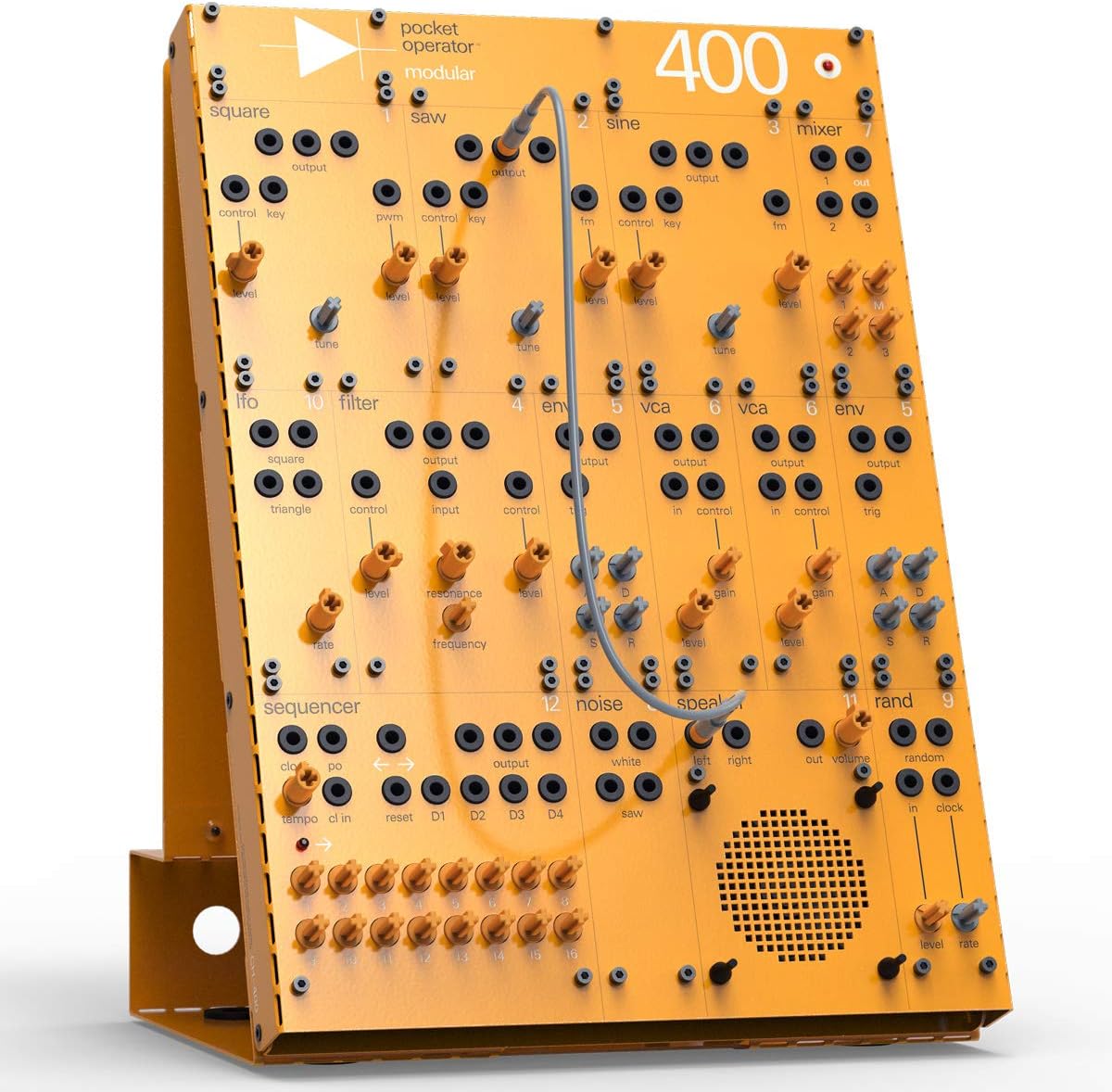
Kuva 3.1: Etuosa view of the PO modular400, showcasing its modular layout with various knobs, jacks, and the integrated speaker.
Key Modules:
- Oscillators (VCOs): Generate the primary sound waves (square, sawtooth, sine).
- Mikseri: Combines audio signals from different sources.
- Vaihejärjestäjä: Creates rhythmic patterns and melodies.
- Sample & Hold: Generates random or stepped voltages.
- LFO (Low-Frequency Oscillator): Produces slow oscillations for modulation effects.
- Envelope Generators (EG): Muotoilee amplitude or other parameters of a sound over time.
- VCA (Votage-ohjattu Ampelävämpi): Controls the volume of a signal using a control voltage.
- Noise Generator: Produces white noise for percussive sounds or effects.
- Suodattaa: Shapes the tonal characteristics of a sound by removing certain frequencies.
- Kaiutin: Integrated speaker for direct audio output.
4. Asennus
4.1 Kokoaminen
The PO modular400 comes as a kit requiring assembly. Follow the included visual instructions for attaching the modules to the chassis and securing them with the provided screws. Ensure all connections are firm before proceeding.

Kuva 4.1: Sivu view illustrating the assembled chassis and the battery compartment.

Kuva 4.2: Takaosa view showing the stand mechanism and the battery pack installation.
4.2 Laitteen virran kytkeminen
The PO modular400 can be powered by 8 AA batteries or an optional external power adapter (sold separately). Insert the batteries into the battery compartment located at the base of the unit, ensuring correct polarity. If using an external adapter, connect it to the designated power input jack.
4.3 Alkuliitännät
Before creating complex patches, familiarize yourself with the basic signal flow. A common starting point is to connect an oscillator's output to a VCA's input, then the VCA's output to the mixer, and finally the mixer's output to the speaker or an external audio interface.
5. Käyttöohjeet
5.1 Module Functions
Each module has specific inputs and outputs (jacks) and controls (knobs). Understanding their individual functions is key to creating sounds.
- Oscillators (Square, Saw, Sine): Käytä virittää knob to adjust pitch and taso to control output volume. The ohjausnäppäin input allows for pitch modulation.
- Mikseri: Features multiple inputs (1, 2, 3) and a single output. Use the individual taso knobs to blend signals.
- Sekvensoija: Controls include tempo, clock in, nollaa, and individual step outputs (D1-D4).
- LFO: Generates low-frequency waveforms (square, triangle) for modulation. Adjust korko to change speed.
- Suodattaa: Shapes the timbre. Taajuus controls the cutoff point, and resonanssi adds emphasis at the cutoff.
- Envelope (ENV): Generates a voltage contour. Typically used to control the VCA's gain over time.
- VCA: Acts as a voltage-controlled volume knob. The saada knob sets the maximum level, and the ohjata input modulates it.
- Melu: Provides white noise output.
- Kaiutin: Liitä äänisignaali laitteeseen ulos jack to hear sound directly from the built-in speaker.

Figure 5.1: Detail of the mixer module, illustrating its inputs and output.

Figure 5.2: Detail of the oscillator section and a patch cable connection.
5.2 Paikkaus
Patching involves connecting modules using the provided patch cables to create signal paths. Experiment with different connections to understand how modules interact. For example, an LFO output can be patched to an oscillator's control key input for vibrato, or to a filter's control input for wah-like effects.
5.3 Ulkoiset liitännät
The PO modular400 can be integrated with other modular systems or semi-modular synthesizers. You can connect additional envelopes or other modules from external systems to expand its capabilities. Ensure voltage compatibility when connecting to external gear.
6. Huolto
6.1 Puhdistus ja varastointi
To maintain your PO modular400, wipe the surface with a soft, dry cloth. Avoid using abrasive cleaners or solvents. Store the unit in a dry, dust-free environment away from direct sunlight and extreme temperatures.
6.2 Pariston vaihto
When the sound quality degrades or the unit fails to power on, it's likely time to replace the batteries. Open the battery compartment at the base of the unit and replace all 8 AA batteries with new ones, ensuring correct polarity. Dispose of old batteries responsibly.
7. Vianmääritys
If you encounter issues with your PO modular400, refer to the table below for common problems and their solutions.
| Ongelma | Mahdollinen syy | Ratkaisu |
|---|---|---|
| Ei äänilähtöä. | Incorrect patching; low batteries; speaker volume too low; external output not connected correctly. | Check all patch cable connections. Replace batteries. Increase speaker volume. Ensure external audio device is properly connected and powered. |
| Vääristynyt ääni. | Signal levels too high; faulty patch cable. | Reduce module output levels or mixer input levels. Try a different patch cable. |
| Yksikkö ei käynnisty. | Dead batteries; incorrect battery insertion; power adapter issue. | Replace batteries, ensuring correct polarity. Check power adapter connection and functionality. |
| Knobs are stiff or difficult to turn. | Manufacturing tolerance; dust accumulation. | This can be a characteristic of the design. Gentle, consistent use may ease them. Avoid forcing. |
8. Tekniset tiedot
| Ominaisuus | Yksityiskohta |
|---|---|
| Merkki | Teini-ikäisten tekniikka |
| Malli | PO modular400 |
| Tyyppi | Analog Modular Synthesizer Kit |
| Materiaali | Metalli |
| Virtalähde | 8 x AA Batteries (or optional external power adapter) |
| Mukana olevat komponentit | Synthesizer modules, chassis, battery pack, power splitter, knobs, patch cables, screws. |
9. Takuutiedot
Teenage Engineering products are covered by a limited warranty against defects in materials and workmanship. Please refer to the official Teenage Engineering webTarkemmat takuuehdot löytyvät verkkosivustolta tai ostodokumentaatiostasi. Säilytä ostokuitti takuuvaatimuksia varten.
10. Asiakastuki
For technical assistance, troubleshooting beyond this manual, or warranty inquiries, please visit the official Teenage Engineering support website or contact their customer service department. Contact information can typically be found on their official websivustolla tai tuotepakkauksessa.
Virallinen Websivusto: teini.insinööri
Ask a question about this manual
Ask about setup, troubleshooting, compatibility, parts, safety, or missing instructions. Manuals+ will review the question and use this page’s manual context to help answer it.