
Johdanto
Thank you for choosing the TONOR T30 Microphone Arm Stand. This manual provides detailed instructions for the proper setup, operation, and maintenance of your new microphone arm. Please read this manual carefully before use to ensure optimal performance and longevity of the product.
The TONOR T30 is designed for flexible microphone positioning, offering a wide range of motion and stable support for various microphones. Its heavy-duty construction and upgraded desk clamp ensure reliability and ease of use for recording, broadcasting, and other audio applications.
Pakkauksen sisältö
Varmista, että pakkauksessasi on kaikki alla luetellut tuotteet:
- 1 × Microphone Boom Arm
- 1 × Upgraded Desk Clamp
- 1 × Microphone Clip
- 1 × 3/8 inch to 5/8 inch Adapter
- 1 × Pop-suodatin
- 1 × Sponge Cover
- 4 × Nippusiteet
- 1 × Käyttöopas
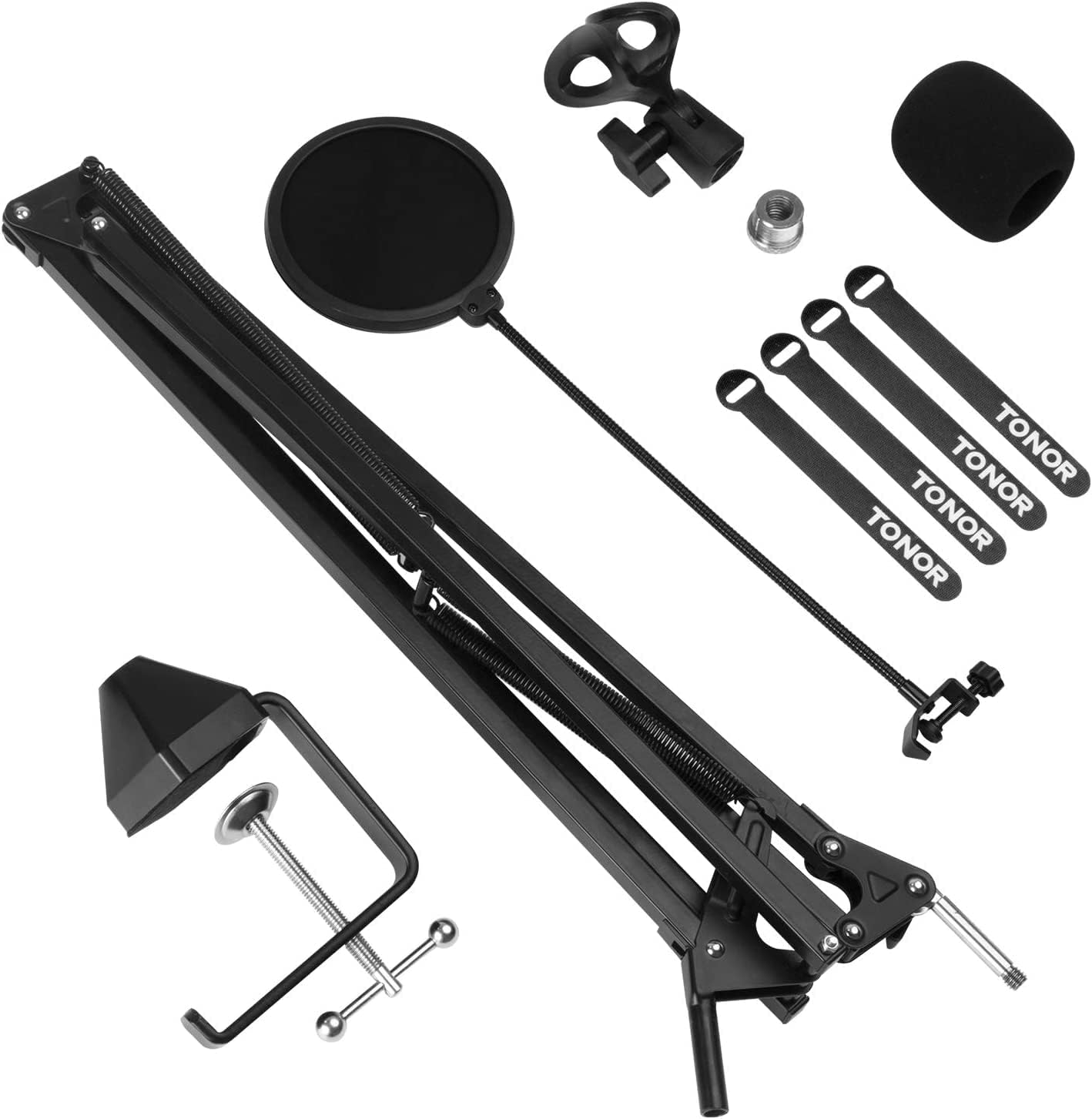
All components included in the TONOR T30 microphone arm stand package, including the boom arm, desk clamp, microphone clip, adapter, pop filter, sponge cover, and cable ties.
Asennusohjeet
- Install the Desk Clamp:
Attach the upgraded desk clamp to the edge of your desk. Ensure the desk thickness does not exceed 2.4 inches (60mm). Tighten the screw on the clamp firmly to secure it in place. The upgraded clamp offers a 4 times larger contact area for enhanced stability.
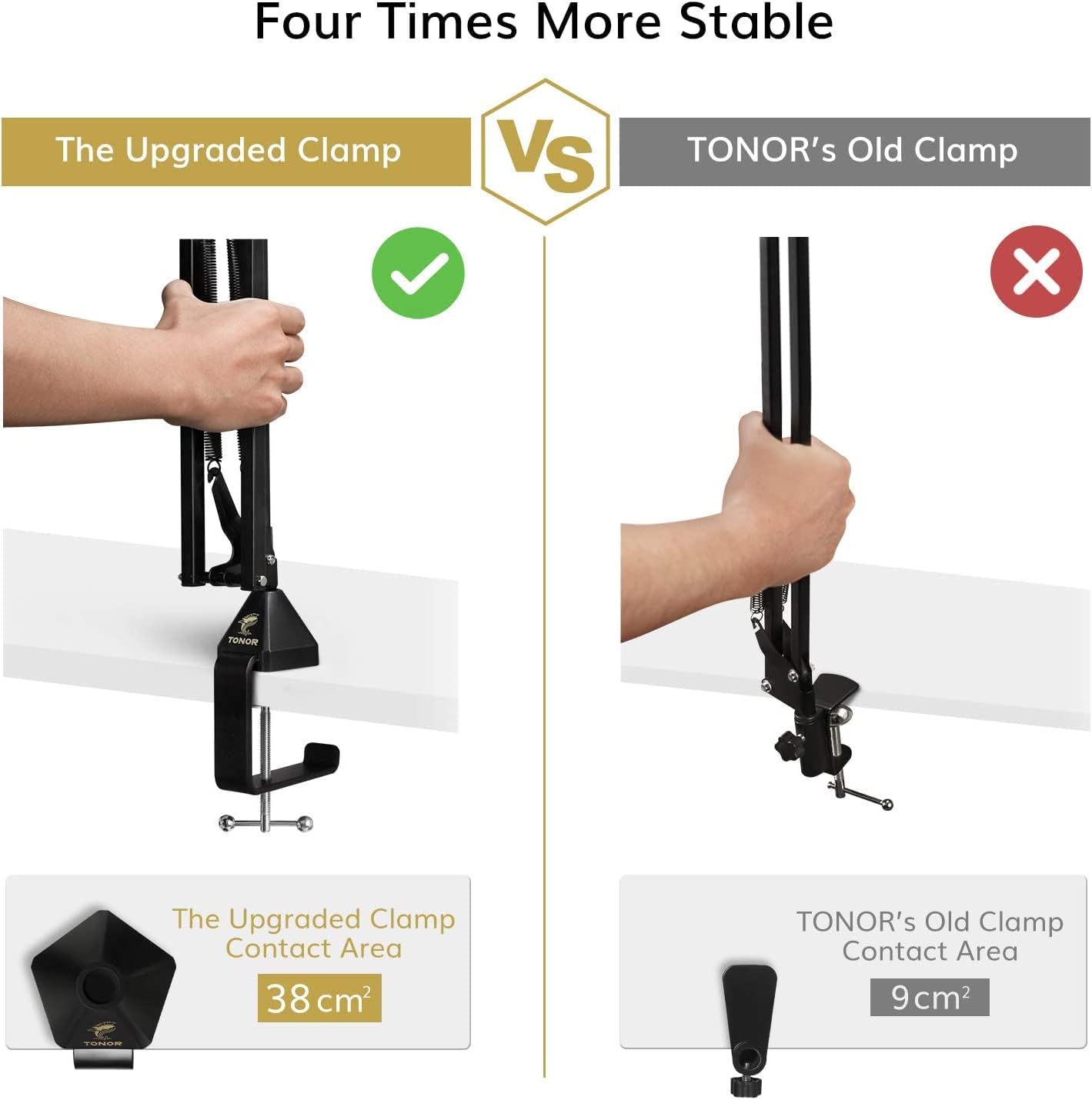
Comparison of the upgraded desk clamp with a larger contact area (38 cm²) versus the old clamp (9 cm²) highlighting improved stability.
- Attach the Boom Arm:
Aseta mikrofonipuomin varren pohja pöydän reikään.amp. Adjust the arm's position and tighten the knob on the clamp to fix the arm's vertical orientation.
- Kiinnitä mikrofoni:
Screw the microphone clip onto the 3/8 inch thread at the end of the boom arm. If your microphone or shock mount requires a 5/8 inch thread, use the provided 3/8 inch to 5/8 inch adapter. Ensure the microphone is securely attached.
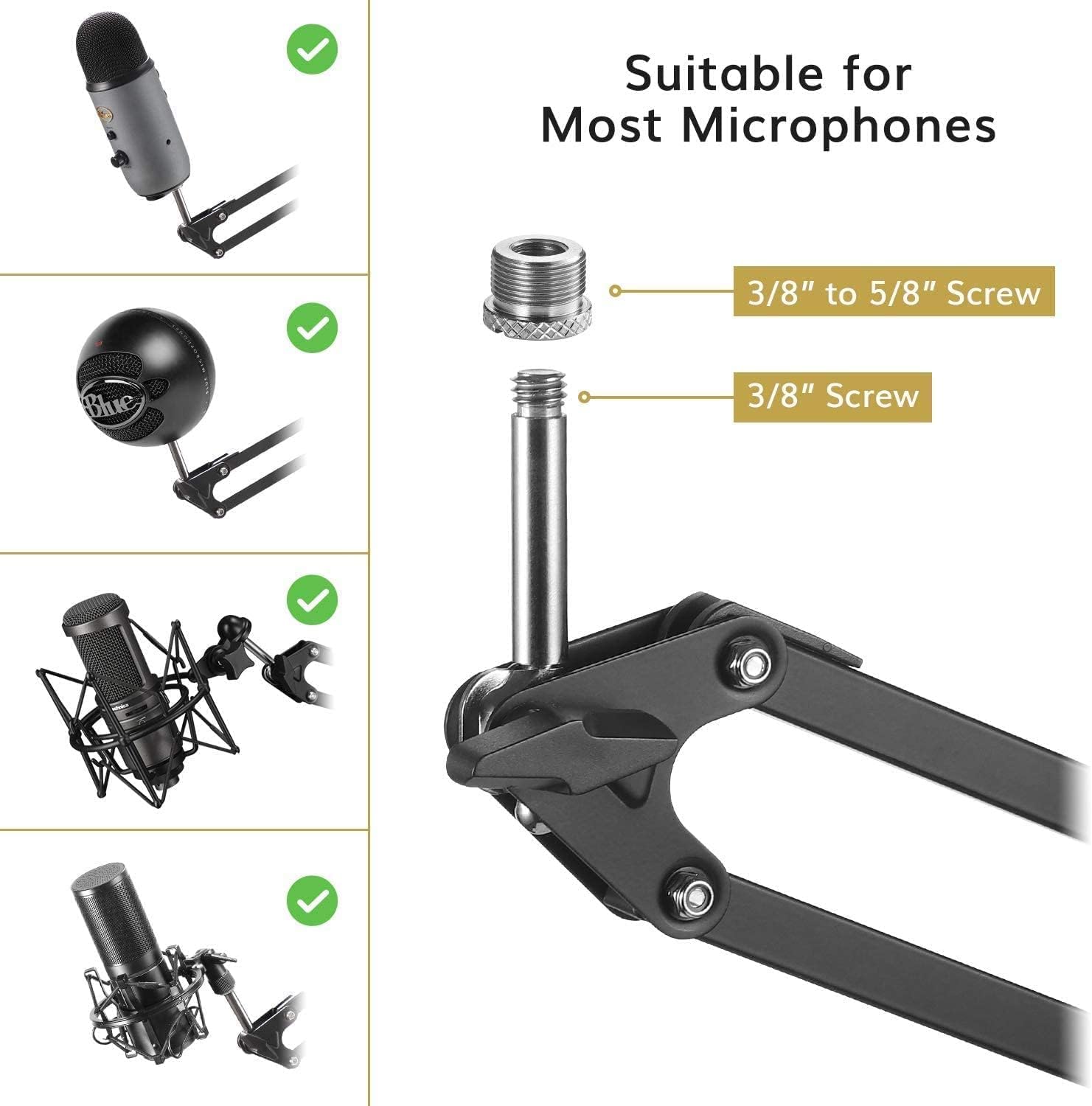
Image showing the 3/8 inch to 5/8 inch screw adapter and a 3/8 inch screw, demonstrating compatibility with various microphones like Blue Yeti and other popular models.
- Install the Pop Filter:
Attach the pop filter to the boom arm using its clamp. Position the pop filter approximately 2-3 inches (5-7 cm) in front of your microphone to reduce plosive sounds and protect the microphone from moisture.
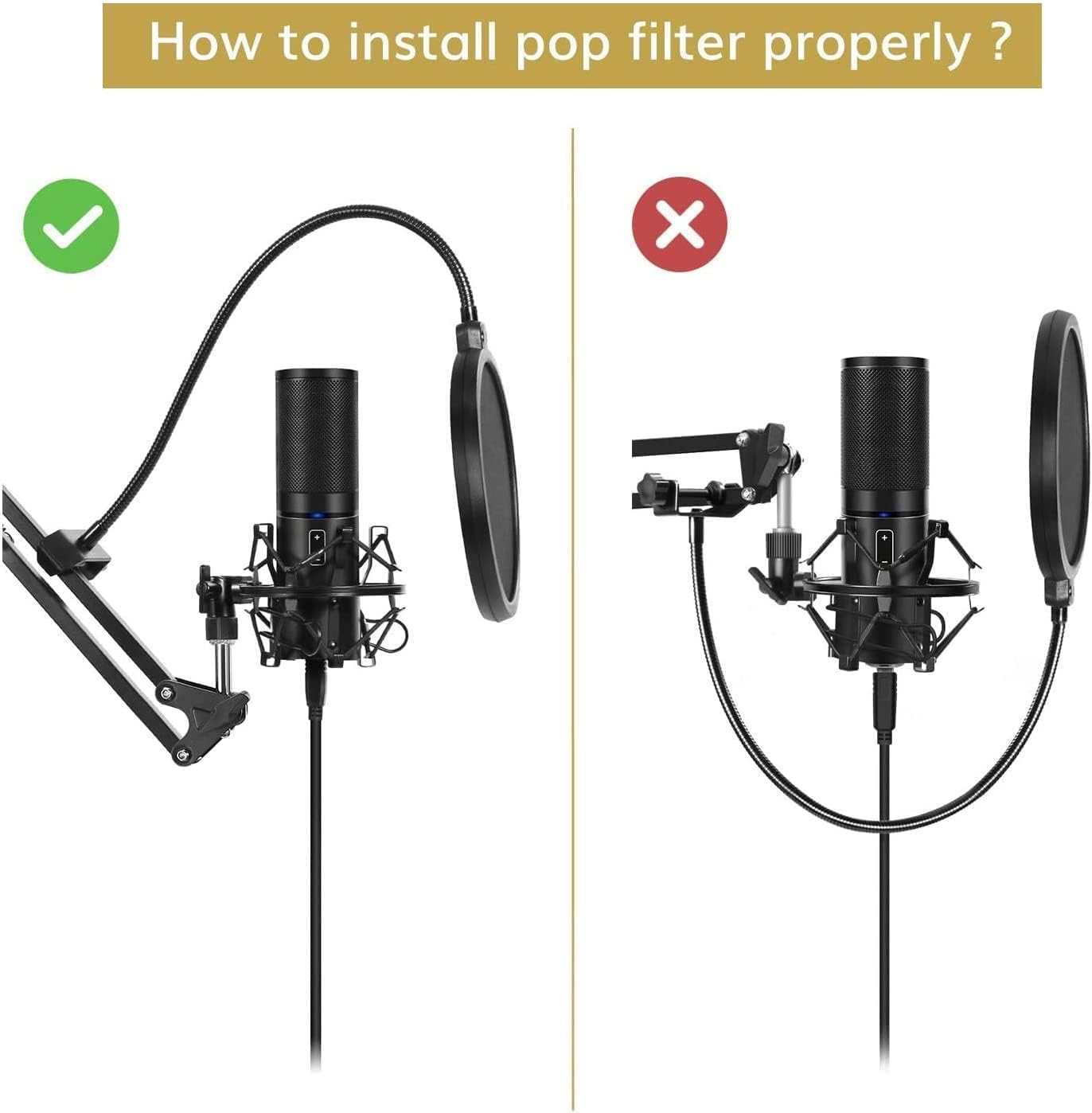
Diagram illustrating the correct and incorrect installation of a pop filter on a microphone arm, emphasizing proper placement for optimal sound.
- Kaapelin hallinta:
Use the provided cable ties to neatly secure your microphone cable along the boom arm. This helps prevent tangles and maintains a clean setup.
Käyttöohjeet
The TONOR T30 microphone arm offers flexible adjustment for optimal microphone placement:
- Säätöasento: The arm provides a horizontal and vertical reach of up to 940mm and a full 360-degree rotation. Gently move the arm to your desired position.
- Securing the Arm: The arm is designed to hold its position once adjusted. For additional stability, ensure all connection points and knobs are tightened appropriately.
- Optimaalinen mikrofonin sijoitus: Position your microphone to capture the best sound. Typically, this is 6-12 inches (15-30 cm) from your mouth, slightly off-axis to reduce plosives, even with the pop filter.

A person using the TONOR T30 microphone arm stand with a microphone attached, positioned over a desk with a laptop, illustrating typical usage.
Huolto
To ensure the longevity and proper functioning of your TONOR T30 Microphone Arm Stand, follow these maintenance guidelines:
- Puhdistus: Wipe the arm and clamp with a soft, dry cloth to remove dust and debris. Avoid using harsh chemicals or abrasive cleaners.
- Tarkista liitännät: Periodically check all screws and knobs to ensure they are tight and secure. Loose connections can affect stability.
- Jousen jännitys: The arm's internal springs are designed for durability. Avoid excessive force when adjusting to prevent damage.
Vianetsintä
If you encounter any issues with your TONOR T30 Microphone Arm Stand, refer to the following common problems and solutions:
- Ongelma: The microphone arm does not hold its position or sags.
Ratkaisu: Varmista, että työpöytä clamp is securely tightened to the desk. Check the tension knobs on the arm's joints and tighten them if they are loose. The arm is designed to support microphones up to 4.4 lbs (2 kg). Exceeding this weight limit may cause sagging. - Ongelma: My microphone does not fit the arm's thread.
Ratkaisu: The arm comes with a 3/8 inch thread. If your microphone or shock mount has a 5/8 inch thread, use the included 3/8 inch to 5/8 inch adapter. - Ongelma: Poor sound quality or popping noises.
Ratkaisu: Ensure the pop filter is correctly installed and positioned 2-3 inches in front of the microphone. Adjust microphone distance from your mouth.
Tekniset tiedot
| Merkki | TONOR |
| Malli | T30 |
| Väri | Musta |
| Materiaali | Solid Metal Alloy |
| Tyyli | Raskas Duty |
| Pohjatyyppi | Clamp |
| Viimeistelytyyppi | Jauhemaalattu |
| Tuotteen mitat (PxLxK) | 54.8 x 16 x 9.7 cm |
| Suurin korkeus | 54.8 cm |
| Microphone Holder Thread Size | 3/8 inch (with 5/8 inch adapter included) |
| Suurin kuormituskapasiteetti | 4.4 lbs (2 kg) |
| Horizontal/Vertical Reach | 940 mm |
| Kierto | 360 astetta |
Takuutiedot
TONOR products are designed for quality and reliability. This product comes with a standard manufacturer's warranty. Please refer to the warranty card included in your package or visit the official TONOR website for specific warranty terms and conditions. Keep your purchase receipt as proof of purchase for any warranty claims.
Tukea
For technical support, product inquiries, or assistance with your TONOR T30 Microphone Arm Stand, please contact TONOR customer service. You can find contact information on the official TONOR websivustolta tai jälleenmyyjältä, jolta ostit tuotteen.


