
1. Johdanto
This manual provides instructions for the operation and maintenance of your Crosley CR612B-AB Corsair Tabletop AM/FM Bluetooth Radio with CD Player and Dual Alarm Clock. Please read this manual thoroughly before using the product to ensure proper function and to prevent damage.

Figure 1: Crosley CR612B-AB Corsair Tabletop AM/FM Bluetooth Radio with CD Player and Dual Alarm Clock.
2. Mitä laatikossa on
Varmista, että pakkauksessasi on kaikki alla luetellut tuotteet:
- Crosley CR612B Corsair Radio Unit
- Verkkolaite
- Käyttöohje
3. Tuote ohiview
Familiarize yourself with the various components and controls of your Corsair radio.

Figure 2: Front Panel Controls and Features. This image highlights the headphone jack, alarm clock buttons (Alarm 1, Alarm 2), and the analog tuning dial.
- Äänenvoimakkuuden säädin: Säätää äänen ulostulon tasoa.
- Viritysnuppi: Selects AM/FM radio frequencies.
- Tilapainike: Switches between AM/FM radio, CD player, and Bluetooth modes.
- Unipainike: Aktivoi uniajastintoiminnon.
- Hälytys 1 / Hälytys 2 -painikkeet: Set and activate dual alarms.
- Aikapainike: Used for setting the clock.
- AM/FM-painike: Vaihtaa AM- ja FM-radiotaajuusalueiden välillä.
- CD-soittimen säätimet: Play/Pause, Stop, Display, CD Mode, Skip/Search (Forward/Backward), Program.
- Kuulokeliitäntä: Yksityiseen kuunteluun.
- Virtapainike: Kytkee laitteen päälle tai pois päältä.
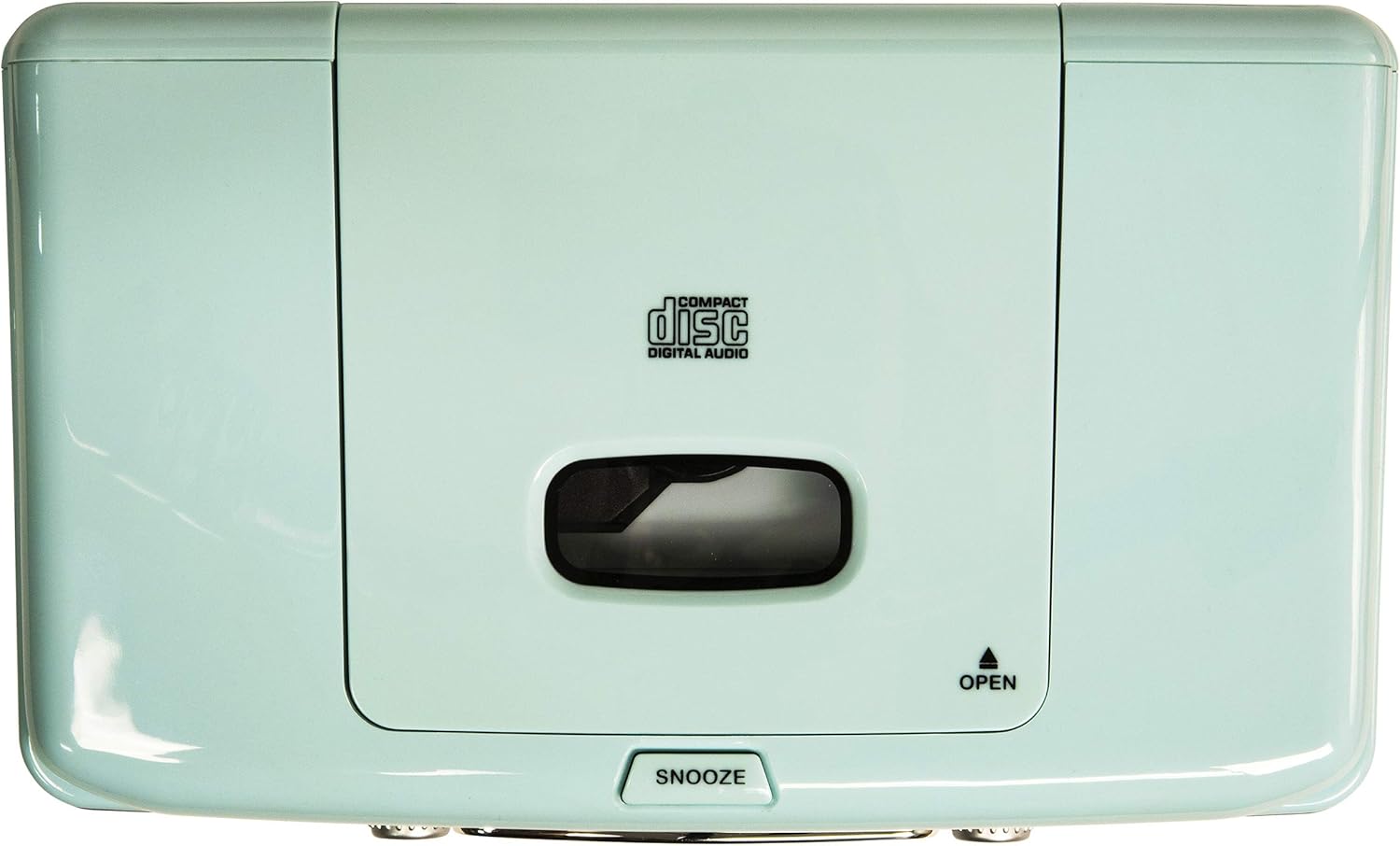
Figure 3: Top Panel. This image shows the top-loading CD player compartment and the Snooze button.

Figure 4: Rear Panel. This image displays the AC power input and the battery compartment for backup power.
4. Asennus
4.1 Virtaliitäntä
- Varmista, että laite on asetettu vakaalle ja tasaiselle alustalle.
- Connect the AC power adapter to the DC IN jack on the rear of the unit.
- Liitä verkkolaite tavalliseen pistorasiaan.
4.2 Akun varmuuskopiointi (valinnainen)
For alarm clock backup during power outages, install one 9V battery (not included) into the battery compartment on the rear of the unit. This will maintain time and alarm settings in case of a power interruption.
4.3 Antenniasetukset
The unit has a built-in AM antenna. For FM reception, extend the wire FM antenna located on the rear of the unit for optimal signal reception.
5. Käyttöohjeet
5.1 Virta päälle/pois
Paina POWER button located on the front panel to turn the unit on or off.
5.2 AM/FM-radion käyttö
- Paina MODE button until 'RADIO' is displayed.
- Paina AM/FM painiketta valitaksesi joko AM- tai FM-taajuusalueen.
- Kierrä TUNING nuppia valitaksesi haluamasi radioaseman.
- Säädä VOLUME kuuntelutasonuppi haluamallesi tasolle.
Video 1: Crosley CR612B-AB Corsair AM/FM Bluetooth Radio. This video demonstrates the radio's AM/FM tuning functionality.
5.3 CD-soittimen käyttö
- Paina MODE button until 'CD' is displayed.
- Paina AVATA avaa CD-lokero painamalla laitteen päällä olevaa painiketta.
- Place a CD with the label side facing up into the compartment.
- Sulje CD-lokeron kansi.
- Paina TOISTA/TAUKO -painiketta toiston aloittamiseksi.
- Käytä OHITA / HAKU painikkeita kappaleiden välillä navigointiin.
- Paina STOP -painiketta toiston lopettamiseksi.
- The OHJELMOIDA -painikkeella voit luoda kappaleille mukautetun toistojärjestyksen.

Figure 5: CD Player Open. This image shows the top-loading CD player ready for disc insertion.
5.4 Bluetooth-käyttö
- Paina MODE button until 'BT' (Bluetooth) is displayed. The unit will enter pairing mode, indicated by a flashing 'BT'.
- Ota Bluetooth käyttöön ulkoisessa laitteessa (esim. älypuhelimessa, tabletissa).
- Etsi 'Crosley Corsair' in your device's Bluetooth settings and select it to pair.
- Once paired, the 'BT' indicator will stop flashing, and you can stream audio from your device to the radio.
- Adjust the volume on both your external device and the radio for optimal sound.

Figure 6: Bluetooth Streaming. This image illustrates connecting an external device via Bluetooth to the radio.
Video 2: CR612B Corsair Tabletop AM/FM Bluetooth Radio with CD Player. This video provides an overview of the radio's features, including Bluetooth connectivity.
5.5 Herätyskellon toiminnot
- Asetusaika: Paina ja pidä painettuna AIKA -painiketta. Käytä OHITA / HAKU -painikkeilla säätääksesi tunteja ja minuutteja ja paina sitten AIKA uudelleen vahvistaaksesi.
- Hälytyksen 1/2 asettaminen: Paina ja pidä painettuna jompaakumpaa HÄLYTYS 1 or HÄLYTYS 2 -painiketta. Käytä OHITA / HAKU buttons to set the alarm time. Press the respective HÄLYTYS button again to select the alarm source (Buzzer, Radio, or CD) and confirm.
- Hälytyksen aktivointi/deaktivointi: Paina lyhyesti HÄLYTYS 1 or HÄLYTYS 2 to toggle the alarm on or off. An alarm icon will appear on the display when active.
- torkku: Kun hälytys soi, paina TORKUTA button on top of the unit to temporarily silence it. The alarm will sound again after a few minutes.
- Uniajastin: Paina NUKKUA -painiketta toistuvasti asettaaksesi uniajastimen (esim. 15, 30, 60 tai 90 minuuttia). Laite sammuu automaattisesti asetetun ajan kuluttua.
5.6 Kuulokkeiden käyttö
Liitä 3.5 mm:n kuulokkeet KUULOKELIITÄNTÄ on the front panel for private listening. The main speakers will be muted automatically.
6. Huolto
6.1 Puhdistus
- Pyyhi laitteen ulkopinta pehmeällä, kuivalla liinalla.
- Älä käytä hankaavia puhdistusaineita, vahoja tai liuottimia, sillä ne voivat vahingoittaa pintaa.
- Keep the CD compartment clean and free of dust.
6.2 Varastointi
When not in use for extended periods, unplug the unit from the power outlet and store it in a cool, dry place.
7. Vianmääritys
| Ongelma | Mahdollinen syy | Ratkaisu |
|---|---|---|
| Ei Virtaa | Virtajohto ei ole kunnolla kiinni. | Ensure the AC power adapter is firmly plugged into the unit and a working wall outlet. |
| Huono radiovastaanotto | Heikko signaali. | Adjust the position of the FM wire antenna. For AM, try repositioning the unit. |
| CD-levy ei soi | CD-levy on asetettu väärin laitteeseen tai se on likainen/naarmuuntunut. | Ensure the CD is inserted label-side up. Clean the CD with a soft cloth. Try a different CD. |
| Bluetooth Ei yhteyttä | Laite ei ole pariliitostilassa tai on liian kaukana. | Ensure the radio is in Bluetooth mode and 'BT' is flashing. Move your device closer to the radio. Check your device's Bluetooth settings. |
| Hälytys ei soi | Hälytystä ei ole asetettu tai se ei ole kytketty pois päältä. | Verify alarm time and source are set correctly and the alarm is activated (icon visible). |
8. Tekniset tiedot
| Merkki | Crosley |
| Mallinumero | CR612B-AB |
| Väri | Aqua Blue |
| Tuotteen mitat (P x L x K) | 6.75 cm P x 11.5 cm L x 7.25 cm K |
| Yhteystekniikka | Bluetooth |
| Tuetut radioyhtyeet | AM/FM |
| Äänilähtötila | Stereot |
| Virtalähde | AC-sovitin |
| Akun vaatimus | 1 x 9V battery (for backup, not included) |
| Näytön tyyppi | LED |
| Materiaali | Chrome (accents) |

Figure 7: Product Dimensions. This diagram provides the overall measurements of the unit.
9. Takuu ja tuki
9.1 Takuutiedot
Tämä tuote kuuluu a One Year Limited Manufacturer's WarrantyKatso pakkauksessa olevasta takuukortista täydelliset tiedot takuun kattavuudesta ja ehdoista.
9.2 Asiakastuki
For technical assistance, troubleshooting, or warranty claims, please contact Crosley customer support. Contact information can typically be found on the manufacturer's official websivustolla tai tuotepakkauksessa.