
1. Johdanto ja loppuview
The TP-Link AX1500 Wi-Fi 6 Range Extender, model RE505X, is designed to expand your existing Wi-Fi network coverage, eliminating dead zones and providing a stronger, more reliable wireless signal throughout your home or office. Utilizing the latest Wi-Fi 6 technology, it offers faster speeds, increased capacity, and reduced network congestion for a smoother online experience. This device supports dual-band Wi-Fi, operating on both 2.4 GHz and 5 GHz frequencies, and is compatible with any standard Wi-Fi router or access point. It also features a Gigabit Ethernet port for wired connections and supports TP-Link OneMesh for seamless whole-home coverage.
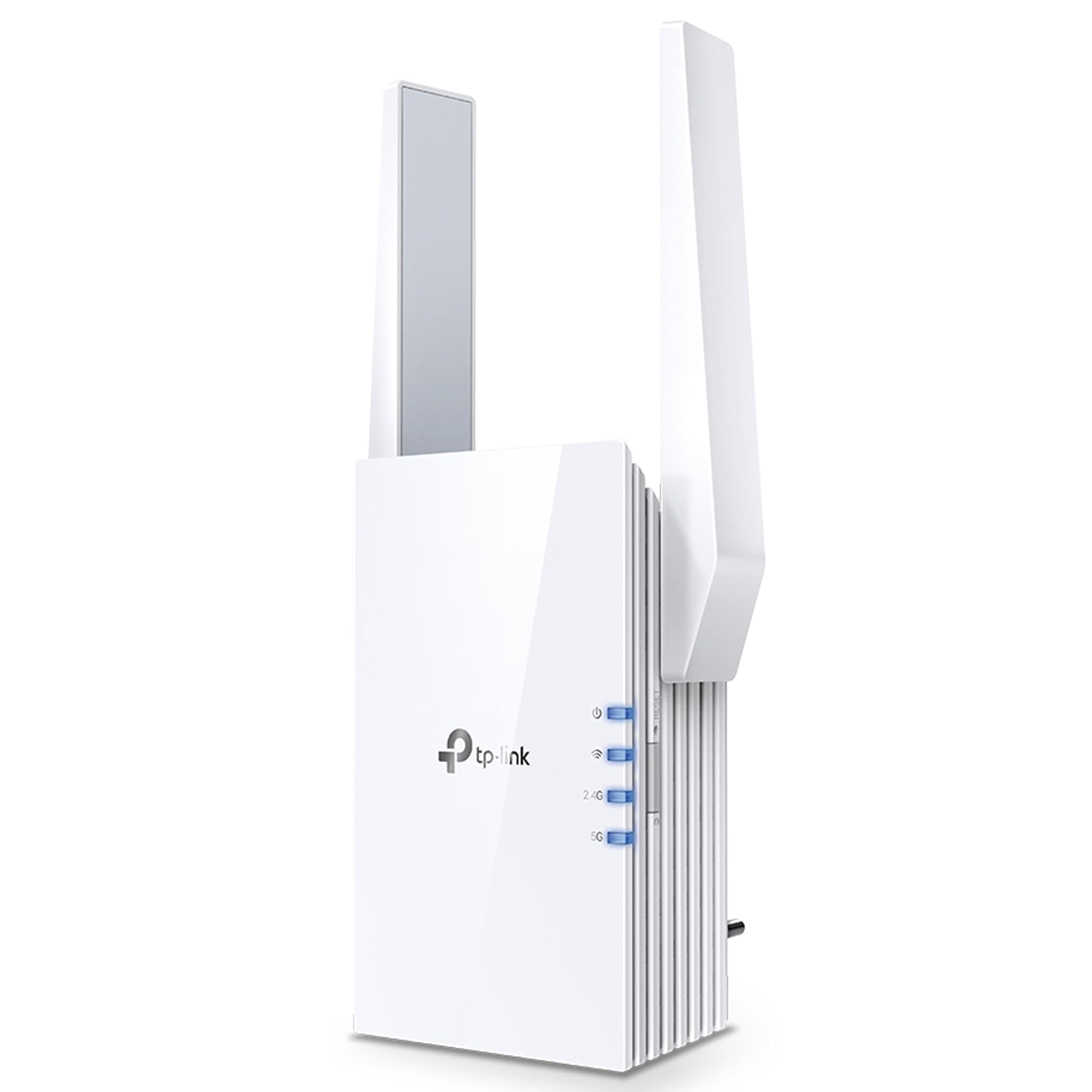
Kuva 1.1: Edessä view of the TP-Link RE505X Wi-Fi 6 Range Extender, showing its compact design and indicator lights.
2. Mitä laatikossa on
Varmista, että paketti sisältää seuraavat kohteet:
- TP-Link RE505X Wi-Fi Range Extender
- Pika-asennusopas

Kuva 2.1: The retail box for the TP-Link RE505X, indicating the product and its key features.
3. Tuotteen ominaisuudet
- Wi-Fi 6 -tekniikka: Equipped with the latest wireless technology for faster speeds, greater capacity, and reduced network congestion.
- Kaksikaistaiset nopeudet: Offers up to 1.5 Gbps (1200 Mbps on 5 GHz and 300 Mbps on 2.4 GHz) for smooth streaming, gaming, and downloading.
- OneMesh-yhteensopiva: Luo saumattoman mesh-verkon OneMesh-reitittimeen yhdistettynä ja tarjoaa koko kodin kattavuuden yhdellä Wi-Fi-nimellä.
- Gigabit Ethernet-portti: Provides a fast-wired connection for devices like smart TVs, computers, and gaming consoles.
- Älykäs merkkivalo: Helps determine the optimal placement for the extender by indicating the signal strength from your router.
- AP-tila: Functions as an access point, converting a wired internet connection into a dual-band wireless signal.
- TP-Link Tether -sovellus: Allows easy setup and management of your network from any iOS or Android mobile device.
- Yleinen yhteensopivuus: Extends the range of any standard Wi-Fi router or wireless access point.

Kuva 3.1: Sivu view of the RE505X, highlighting the Gigabit Ethernet port for wired connections.
4. Asennus
The RE505X offers two primary methods for setup: using the TP-Link Tether app or via a web selain.
4.1. Setup via TP-Link Tether App (Recommended)
- Lataa Tether-sovellus: Etsi "TP-Link Tether" in the Apple App Store or Google Play Store and install the app on your mobile device.
- Virta päälle: Kytke RE505X pääreitittimen lähellä olevaan pistorasiaan. Odota, että virran merkkivalo palaa tasaisesti sinisenä.
- Yhdistä laajentimeen: Connect your mobile device to the RE505X's Wi-Fi network (e.g., "TP-Link_Extender"). No password is required for the initial connection.
- Käynnistä sovellus: Open the Tether app. The app will detect your extender. Follow the on-screen instructions to select your host Wi-Fi network and set up the extended network.
- Optimaalinen sijoitus: Use the Intelligent Signal Light on the extender to find the best location. A solid blue light indicates a good connection, while a red light suggests moving closer to the router.

Kuva 4.1: The TP-Link Tether app interface, demonstrating the simple steps for setting up and managing the range extender.
4.2. Asennus kautta Web Selain
- Virta päälle: Kytke RE505X pääreitittimen lähellä olevaan pistorasiaan. Odota, että virran merkkivalo palaa tasaisesti sinisenä.
- Yhdistä laajentimeen: Connect your computer or mobile device to the RE505X's Wi-Fi network (e.g., "TP-Link_Extender").
- Pääsy Web Käyttöliittymä: Avaa a web selain ja kirjoita http://tplinkrepeater.net or http://192.168.0.254 osoiteriville. Luo kirjautumissalasana, kun sitä pyydetään.
- Seuraa ohjeita: Follow the on-screen instructions to select your host Wi-Fi network and configure the extended network settings.
- Optimaalinen sijoitus: Relocate the extender to a suitable position between your router and the Wi-Fi dead zone. Ensure the Intelligent Signal Light is solid blue for optimal performance.
5. Kantaman pidentäjän käyttö
Once set up, the RE505X operates to extend your Wi-Fi coverage. Here are key operational aspects:
5.1. Extended Network Connection
Your devices can connect to the extended network using the same Wi-Fi name (SSID) as your main router if OneMesh is enabled, or a new SSID if configured manually. The extender will automatically choose the best band (2.4 GHz or 5 GHz) for your devices.

Kuva 5.1: A diagram showing how the RE505X extends Wi-Fi coverage throughout a multi-story home, eliminating dead zones.
5.2. OneMesh-toiminnallisuus
If your main router supports TP-Link OneMesh, the RE505X can join the Mesh network. This creates a unified network with a single Wi-Fi name, allowing your devices to seamlessly roam between the router and extender without disconnections. To enable OneMesh, ensure your TP-Link router's firmware is updated to the OneMesh version.
5.3. Tukiasematila (AP)
The RE505X can also function as a wireless access point. Connect an Ethernet cable from your router (or any wired network source) to the Gigabit Ethernet port on the RE505X. The extender will then broadcast a new dual-band Wi-Fi network, converting your wired connection into a high-speed wireless signal.

Kuva 5.2: Illustration of the RE505X operating in Access Point mode, converting a wired connection into a wireless network.
5.4. Gigabit Ethernet Port Usage
The Gigabit Ethernet port can be used to provide a stable wired connection to a device such as a desktop computer, smart TV, or game console, even when the extender is operating wirelessly.
6. Huolto
To ensure optimal performance and longevity of your RE505X, consider the following maintenance tips:
- Laiteohjelmistopäivitykset: Tarkista ja asenna laiteohjelmistopäivitykset säännöllisesti Tether-sovelluksen tai web hallintaliittymä. Päivitykset sisältävät usein suorituskyvyn parannuksia, tietoturvakorjauksia ja uusia ominaisuuksia.
- Optimaalinen sijoitus: Periodically re-evaluate the extender's placement using the Intelligent Signal Light to ensure it maintains a strong connection to your router, especially if your network layout changes.
- Puhdistus: Pidä laite puhtaana ja pölyttömänä. Pyyhi ulkopinta pehmeällä, kuivalla liinalla. Vältä nestemäisten puhdistusaineiden tai hankaavien aineiden käyttöä.
- Ilmanvaihto: Ensure the extender's ventilation slots are not obstructed to prevent overheating.
- Käynnistä uudelleen: If you experience intermittent issues, try restarting the extender by unplugging it from the power outlet for 10 seconds and then plugging it back in.
7. Vianmääritys
If you encounter issues with your RE505X, refer to the following common troubleshooting steps:
7.1. Ei internetyhteyttä asennuksen jälkeen
- Check Signal Light: Ensure the Intelligent Signal Light on the extender is solid blue. If it's red or off, the connection to your router is weak or non-existent. Relocate the extender closer to your router.
- Reitittimen yhteyden tarkistaminen: Ensure your main router is working correctly and providing internet access.
- Määritä uudelleen: Try re-configuring the extender using the Tether app or web käyttöliittymä.
7.2. Frequent Disconnections or Unstable Connection
- Optimaalinen sijoitus: The most common cause of instability is poor placement. Ensure the extender is positioned where the Intelligent Signal Light is solid blue. Avoid placing it near large metal objects, concrete walls, or other electronic devices that may cause interference.
- Häiriöt: Other wireless devices (cordless phones, microwaves, Bluetooth devices) can cause interference. Try changing the Wi-Fi channel on your main router.
- Laiteohjelmiston päivitys: Varmista, että laajentimen laiteohjelmisto on ajan tasalla.
- Reitittimen ongelmat: Check if your main router is experiencing issues.
7.3. Unohdin Web Hallintosalasana
Jos unohdat salasanan web management interface, you will need to reset the extender to factory default settings. Locate the Reset button (usually a small pinhole) on the extender, press and hold it for about 5-10 seconds until the LEDs flash, then release. The extender will restart with default settings, and you can set up a new password during the re-configuration process.
7.4. Slow Speeds on Extended Network
- Sijoitus: Ensure the extender is placed optimally. While extending range, some speed reduction is normal, but poor placement can severely impact it.
- Yhtyevalinta: For high-bandwidth activities, ensure your devices are connecting to the 5 GHz band if possible.
- Verkon ruuhkat: Too many devices on the network or heavy internet usage can slow down speeds.
8. Tekniset tiedot
| Ominaisuus | Yksityiskohta |
|---|---|
| Merkki | TP-linkki |
| Mallinumero | RE505X |
| Langaton tiedonsiirtostandardi | 802.11ax (Wi-Fi 6), 802.11ac |
| Tiedonsiirtonopeus | Jopa 1500 Mbps (1200 Mbps 5 GHz:n taajuudella, 300 Mbps 2.4 GHz:n taajuudella) |
| Taajuuskaistaluokka | Kaksikaistainen (2.4 GHz, 5 GHz) |
| Erikoisominaisuudet | Wi-Fi 6, Gigabit Port, OneMesh Compatible, AP Mode, Intelligent Signal Light, Tether App |
| Yhteensopivat laitteet | Smartphone, PC, Gaming Consoles, Smart TVs |
| Alue | Up to 1500 square feet (approximate) |
| Liittimen tyyppi | RJ45 (Gigabit Ethernet) |
| Tuotteen paino | 380 grammaa |
| Tuotteen mitat (S x L x K) | 4.6S x 7.4L x 12.5K senttimetriä |
9. Takuu ja tuki
9.1. Takuutiedot
The TP-Link RE505X comes with a standard warranty. Please refer to the specific warranty terms provided with your product or on the official TP-Link websivustolta saat tarkempia tietoja kattavuudesta ja kestosta.
9.2. Asiakastuki
For technical assistance, troubleshooting, or warranty claims, please contact TP-Link customer support:
- Toll-Free Support (India): 1800-209-4168
- Sähköpostituki: tuki.in@tp-link.com
- Valmistajan yhteystiedot: TP-Link Systems Inc. 10 Mauchly, Irvine, CA 92618, USA or TP-Link India Private Limited Office No.1, Tower 2, Level 2, Raiaskaran Tech Park, Andheri Kurla Road, M.V Road, Andheri East-400072
Voit myös käydä TP-Linkin virallisella sivustolla website for FAQs, updated drivers, and additional support resources.