
Launch CRP239
LAUNCH CRP239 PREMIUM-KOODINLUKIJAN SKANNERI Käyttöohje
Model: CRP239
1. Johdanto
The LAUNCH CRP239 is an intelligent and networkable automotive diagnostic tool designed for passenger cars. It offers comprehensive OBD II full functionality and rapid testing capabilities for four major vehicle systems: Engine, Automatic Transmission (A/T), Anti-lock Braking System (ABS), and Supplemental Restraint System (SRS). Additionally, the CRP239 includes advanced reset functions such as Oil Reset, Steering Angle Reset, Brake-Pad Reset, Battery Matching, Throttle Adaptation, and Diesel Particulate Filter (DPF) Regeneration, catering to the needs of professional technicians and DIY enthusiasts.
2. Turvallisuustiedot
Always observe the following safety precautions when operating the LAUNCH CRP239:
- Ensure the vehicle's ignition is off before connecting or disconnecting the diagnostic tool.
- Älä käytä työkalua märissä olosuhteissa tai lähellä syttyviä nesteitä tai kaasuja.
- Käytä ajoneuvojen parissa työskennellessäsi asianmukaisia henkilönsuojaimia, kuten suojalaseja.
- Katso ajoneuvon huolto-oppaasta tarkemmat diagnostiikkamenettelyt ja turvallisuusvaroitukset.
- Keep the tool away from strong magnetic fields.
- Käytä vain laitteen mukana toimitettuja kaapeleita ja lisävarusteita.
3. Pakkauksen sisältö
Varmista, että pakkauksessa on kaikki tarvittavat osat:
- LAUNCH CRP239 Main Unit
- OBD II diagnostiikkakaapeli
- USB-kaapeli
- Käyttöopas
- Kantolaukku

Figure 3.1: Contents of the LAUNCH CRP239 package, showing the diagnostic tool, cables, and storage case.
4. Tuote ohiview
The LAUNCH CRP239 features a robust design with a 5.0-inch 720p touch screen for intuitive navigation. It includes physical buttons for common operations and a durable rubber exterior for protection.

Kuva 4.1: Etuosa view of the LAUNCH CRP239, highlighting the touch screen display and navigation buttons.
4.1. komponentit
- 5.0 tuuman kosketusnäyttö: High-resolution display for clear data presentation and touch input.
- Navigointipainikkeet: Directional pad, OK button, and Return button for menu navigation.
- OBD II -liitin: Standardi 16-nastainen liitin ajoneuvotiedonsiirtoon.
- USB-portti: Tietokoneeseen liittämistä varten päivityksiä tai tiedonsiirtoa varten.
- Virran ilmaisin: LED-valo, joka osoittaa virran tilan.
5. Asennus
Follow these steps for initial setup of your LAUNCH CRP239:
- Lataa laite: Connect the CRP239 to a power source using the provided USB cable to ensure the internal 4000mAh lithium-polymer battery is fully charged before first use.
- Virta päälle: Paina ja pidä virtapainiketta painettuna käynnistääksesi laitteen.
- Kielen valinta: On the initial setup screen, select your preferred language. The device supports multilingual operation.
- Wi-Fi-yhteys: Navigate to the 'Settings' menu and select 'Wi-Fi'. Connect to an available wireless network to enable online updates and diagnostic report sharing.
- Ohjelmistopäivitys: It is recommended to perform a software update immediately after connecting to Wi-Fi to ensure you have the latest features and vehicle coverage. Navigate to the 'Update' section and follow the on-screen prompts.

Figure 5.1: The LAUNCH CRP239 with its diagnostic cable connected, ready for vehicle communication.
6. Käyttöohjeet
The LAUNCH CRP239 provides a comprehensive suite of diagnostic functions. Below are instructions for common operations.
6.1. Yhdistäminen ajoneuvoon
- Locate the vehicle's 16-pin OBD II diagnostic port (usually under the dashboard).
- Varmista, että ajoneuvon sytytysvirta on OFF-asennossa.
- Connect the OBD II diagnostic cable to the vehicle's OBD II port and to the CRP239.
- Turn the vehicle's ignition to the ON position (engine off). The CRP239 will power on automatically.
6.2. Navigointi päävalikossa
Päävalikosta pääset käsiksi erilaisiin toimintoihin:
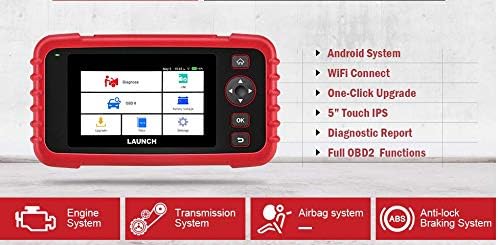
Figure 6.1: The main menu interface of the LAUNCH CRP239, providing access to all primary functions.
- Diagnoosi: For full system diagnostics (Engine, A/T, ABS, SRS).
- I/M: Readiness status for emissions.
- OBD II: Standard OBD II functions (read/clear DTCs, live data, freeze frame, O2 sensor test, etc.).
- Palauta: Access various maintenance reset functions.
- Akku Voltage: Displays real-time vehicle battery voltage.
- Päivittää: For software and firmware updates via Wi-Fi.
- Tiedot: Review saved diagnostic data and reports.
- Asetukset: Configure device settings such as language, Wi-Fi, and display.
6.3. Diagnostisen skannauksen suorittaminen
- Valitse päävalikosta "Diagnose".
- The tool will attempt to automatically identify the vehicle via VIN scan. If unsuccessful, you may need to manually select the vehicle make, model, and year.
- Choose the system you wish to diagnose (e.g., Engine, Transmission, ABS, SRS).
- Valitse "Read Fault Codes" to view Diagnostic Trouble Codes (DTCs).
- Valitse "Clear Fault Codes" vikakoodien poistamiseksi korjausten jälkeen. Caution: Clearing codes without addressing the underlying issue will result in the codes reappearing.
- Valitse "Read Data Stream" to view live sensor data.
6.4. Using Reset Functions
The CRP239 supports several common maintenance reset functions:
- Öljyn nollaus: Resets the oil life reminder after an oil change.
- Ohjauskulman nollaus: Resets the steering angle sensor after alignment or component replacement.
- Brake-Pad Reset (EPB): Nollaa sähköisen seisontajarrujärjestelmän jarrupalojen vaihdon jälkeen.
- Battery Matching (BMS): Registers a new battery with the vehicle's Battery Management System.
- Kaasun mukautus: Oppii kaasuläppäkotelon asennon uudelleen puhdistuksen tai vaihdon jälkeen.
- DPF-puhdistusaineen regenerointi: Käynnistää dieselhiukkassuodattimen regenerointiprosessin.
To use a reset function, select "Nollaa" from the main menu, then choose the desired function and follow the on-screen instructions.
6.5. Ohjelmistopäivitykset
The CRP239 supports one-click Wi-Fi updates for software and vehicle coverage, ensuring you always have the latest diagnostic capabilities.
- Varmista, että laite on yhdistetty vakaaseen Wi-Fi-verkkoon.
- Valitse päävalikosta "Päivittää".
- The device will check for available updates. Select the updates you wish to install and confirm.
- Anna päivitysprosessin valmistua keskeytyksettä. Laite saattaa käynnistyä uudelleen prosessin aikana.

Figure 6.2: The update screen on the LAUNCH CRP239, showing available software updates for various vehicle brands.
6.6. Diagnostic Report Generation
The CRP239 can automatically generate diagnostic reports, which can be shared via email.
- After completing a diagnostic session, the tool will prompt you to generate a report.
- Confirm to generate the report.
- Navigoi kohtaan "Data" valikosta view saved reports.
- Select a report and choose the option to share via email. Ensure your Wi-Fi is connected and email settings are configured in the 'Settings' menu.
7. Huolto
Proper maintenance ensures the longevity and optimal performance of your LAUNCH CRP239:
- Puhdistus: Puhdista laite pehmeällä, kuivalla liinalla. Älä käytä hankaavia puhdistusaineita tai liuottimia.
- Varastointi: Säilytä laitetta kantolaukussaan viileässä ja kuivassa paikassa, kun sitä ei käytetä. Vältä äärimmäisiä lämpötiloja.
- Akun hoito: Lataa akku säännöllisesti, vaikka laitetta ei käytettäisikään usein, akun kunnon ylläpitämiseksi. Vältä akun tyhjentymistä kokonaan pitkiä aikoja.
- Kaapelin tarkastus: Periodically inspect the diagnostic and USB cables for any signs of damage. Replace damaged cables immediately.
8. Vianmääritys
This section addresses common issues you might encounter with the LAUNCH CRP239.
| Ongelma | Mahdollinen syy | Ratkaisu |
|---|---|---|
| Laite ei käynnisty. | Akun varaus vähissä; viallinen yhteys ajoneuvoon. | Charge the device fully. Ensure the OBD II cable is securely connected to both the CRP239 and the vehicle. Check vehicle's ignition is ON. |
| Cannot communicate with vehicle. | Incorrect vehicle protocol; faulty OBD II port; damaged cable. | Verify vehicle compatibility. Check the vehicle's OBD II port for power. Try a different vehicle or cable if available. Ensure vehicle ignition is ON. |
| Ohjelmistopäivitys epäonnistuu. | Epävakaa Wi-Fi-yhteys; ei riittävästi tallennustilaa. | Varmista vahva ja vakaa Wi-Fi-yhteys. Tarkista laitteen käytettävissä oleva tallennustila. Käynnistä päivitysprosessi uudelleen. |
| Näyttö ei reagoi. | Ohjelmistohäiriö; fyysinen vaurio. | Perform a soft reset by holding the power button until the device restarts. If the issue persists, contact customer support. |
9. Tekniset tiedot
| Ominaisuus | Yksityiskohta |
|---|---|
| Malli | CRP239 (CREADER PROFESSIONAL 239) |
| Näyttö | 5.0-inch 720p Touch Screen |
| Akku | 4000mAh ladattava litiumpolymeeriakku (sisältyy pakkaukseen) |
| Yhteydet | OBD II, Wi-Fi, USB |
| Ajoneuvon kattavuus | Domestic, Asian, European vehicles (1996 and newer OBD2) |
| Tuetut järjestelmät | Engine, Automatic Transmission (A/T), ABS, SRS |
| Erikoistoiminnot | Oil Reset, Steering Angle Reset, Brake-Pad Reset (EPB), Battery Matching (BMS), Throttle Adaptation, DPF Regeneration |
| Mitat | 32.4 x 25.4 x 8 cm (pakkaus) |
| Tuotteen paino | 560 g |
| Ulkopintamateriaali | Kumi |
10. Takuutiedot
The LAUNCH CRP239 comes with a standard manufacturer's warranty. For specific warranty terms and conditions, please refer to the warranty card included in your product package or visit the official Launch websivusto. Säilytä ostokuitti ostotodistuksena takuuvaatimuksia varten.
Laajennettuja takuuvaihtoehtoja voi olla saatavilla kolmannen osapuolen toimittajilta. EsimerkiksiampSalama Care tarjoaa tälle tuotteelle 1 vuoden ja 2 vuoden pidennettyjä takuita.
11. Tukea
For technical assistance, product inquiries, or support, please contact Launch customer service through their official website or the contact information provided in your product documentation. Ensure you have your product model number (CRP239) and serial number ready when contacting support.
Lisätietoja on osoitteessa Launch Official Websivusto.