
1. Johdanto
Thank you for choosing the Spacetronik SPE-114 Electric Height Adjustable Desk Frame. This manual provides essential information for the safe and efficient assembly, operation, and maintenance of your new desk frame. Please read these instructions carefully before use and retain them for future reference.
This electric height adjustable desk frame is designed to promote a healthier work environment by allowing seamless transitions between sitting and standing positions. Its advanced features, including memory presets, ensure a personalized and ergonomic workspace.
2. Turvallisuusohjeet
- Varmista, että kaikki osat ovat mukana ja vahingoittumattomia ennen kokoamista. Älä käytä laitetta, jos jokin osa puuttuu tai on viallinen.
- Pidä lapset ja lemmikit poissa pöydältä käytön aikana, jotta liikkuvat osat eivät aiheuta vammoja.
- Do not place hands or other body parts near the moving parts of the frame to avoid pinching.
- Ensure the power cord is not damaged or pinched. Only use the provided power adapter.
- Älä ylikuormita pöytää. Katso teknisistä tiedoista suurin sallittu painokapasiteetti.
- Avoid placing liquids directly on the control panel or motor housing.
- If the desk frame makes unusual noises, stops moving, or shows error codes, discontinue use and consult the troubleshooting section or contact customer support.
- Tämä tuote on tarkoitettu vain sisäkäyttöön.
3. Pakkauksen sisältö
Varmista, että pakkauksessa on kaikki seuraavat osat. Jos jokin osa puuttuu tai on vaurioitunut, ota yhteyttä asiakastukeen.
- Desk Frame Legs (2)
- Poikkipalkki/Tukipalkki
- Moottorikokoonpano
- Ohjauspaneeli
- Virtalähde ja kaapeli
- Tarvikesarja (ruuvit, pultit, työkalut)
- Käyttöopas
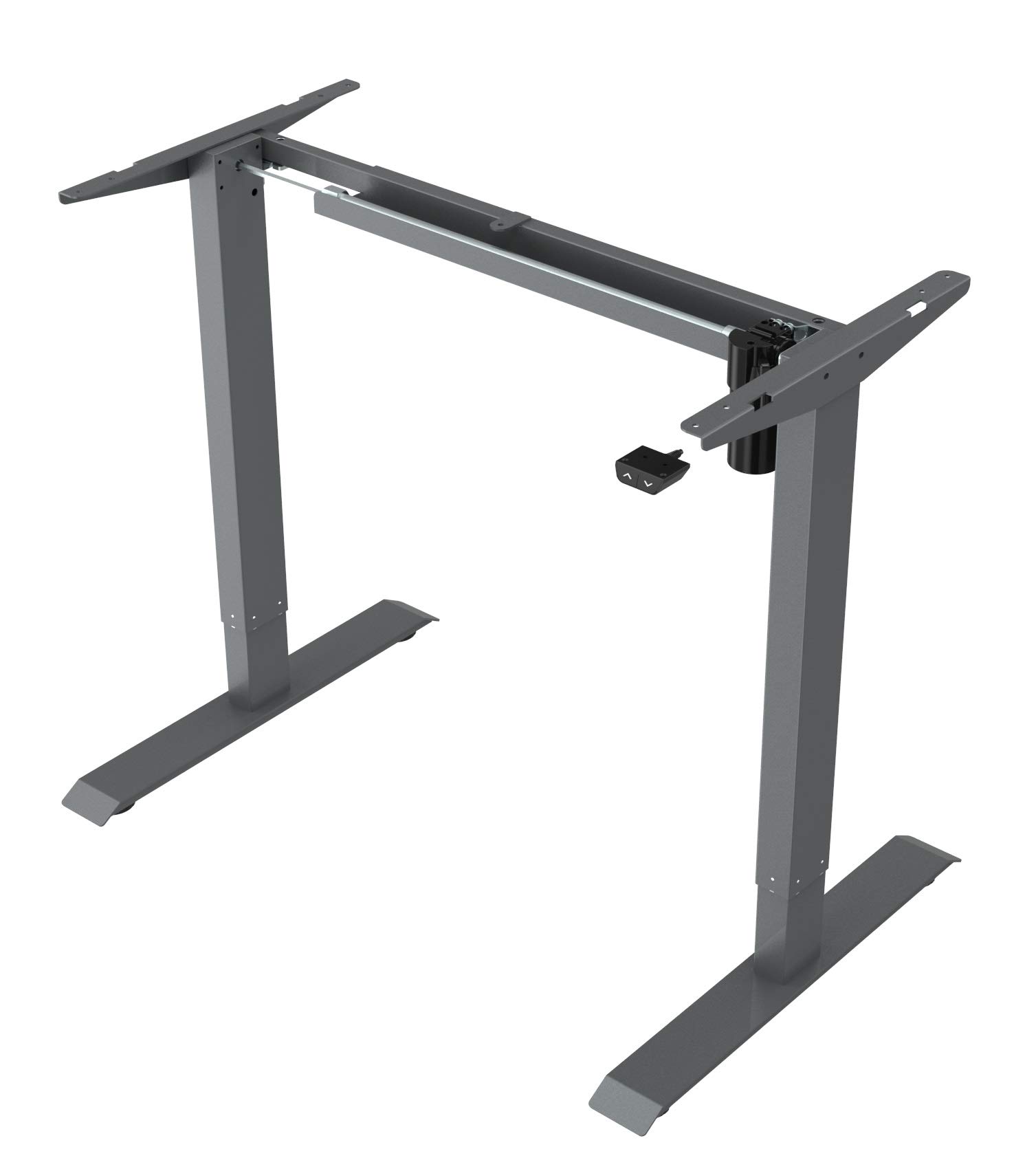
This image displays the main components of the Spacetronik SPE-114 electric height adjustable desk frame, including the legs, crossbar, and motor assembly, ready for assembly.
4. Asennus ja kokoonpano
Assembly typically requires two people. Ensure you have enough space and the necessary tools (usually included in the hardware kit).
- Pura komponentit: Poista kaikki osat varovasti pakkauksesta ja aseta ne puhtaalle, pehmeälle alustalle naarmujen välttämiseksi.
- Assemble Legs and Crossbar: Attach the desk legs to the crossbar/support beam using the provided screws and tools. Ensure all connections are secure.
- Asenna moottori ja ohjauskeskus: Mount the motor assembly and control box to the designated positions on the frame, following the diagrams in the detailed assembly guide (if provided separately).
- Kiinnitä ohjauspaneeli: Secure the control panel to the underside of your chosen desktop or to the frame in an easily accessible location.
- Kytke kaapelit: Connect the motor cable, control panel cable, and power adapter to the control box. Ensure all connections are firm.
- Mount Desktop (Not Included): Carefully place your desktop onto the assembled frame. Align the desktop with the pre-drilled holes (if applicable) or mark and drill new pilot holes. Secure the desktop to the frame using appropriate screws.
- Ensimmäinen käynnistys: Plug the power adapter into a wall outlet. The desk may perform an initial reset or calibration.

Kulmikas view of the fully assembled Spacetronik SPE-114 desk frame, showcasing its sturdy construction and grey finish.
5. Käyttöohjeet
5.1 Ohjauspaneeli ohiview

Yksityiskohtainen view of the control panel for the Spacetronik SPE-114 desk, featuring up/down buttons and memory preset buttons for three height positions.
The control panel typically features:
- Ylös (▲) / Alas (▼) -painikkeet: Pidä painettuna säätääksesi pöydän korkeutta. Vapauta pysäyttääksesi.
- Muistiasetukset (1, 2, 3): Buttons to save and recall preferred height settings.
- Näyttö: Shows the current desk height in centimeters or inches.
5.2 Korkeuden säätö
To adjust the desk height, press and hold the Ylös (▲) or Alas (▼) button until the desk reaches your desired height. Release the button to stop the movement.
5.3 Muistiasetusten määrittäminen
The desk frame allows you to save up to three preferred height positions:
- Säädä pöytä haluamallesi korkeudelle ylös/alas-painikkeilla.
- Press the 'M' or 'SET' button (if available, otherwise proceed to step 3). The display may flash.
- Immediately press one of the memory preset buttons (1, 2, or 3). The current height is now saved to that button.
- Repeat for other desired height positions.
5.4 Muistiasetusten hakeminen
To move the desk to a saved height, simply press the corresponding memory preset button (1, 2, or 3). The desk will automatically move to the saved position.

A person is shown working at a Spacetronik height adjustable desk while using an under-desk exercise bike, illustrating the desk's support for active work styles.
6. Huolto
- Puhdistus: Pyyhi pöydän runko pehmeällä,amp cloth. Avoid abrasive cleaners or solvents that could damage the finish. Ensure the desk is unplugged before cleaning.
- Kaapelin hallinta: Regularly check all cables for wear or damage. Ensure they are neatly organized to prevent tripping hazards or accidental disconnections.
- Kiinnittimien tarkistukset: Tarkista säännöllisesti kaikkien ruuvien ja pulttien kireys. Kiristä tarvittaessa.
- Voitelu: The moving parts of the desk frame are generally maintenance-free and do not require lubrication.
7. Vianmääritys
| Ongelma | Mahdollinen syy | Ratkaisu |
|---|---|---|
| Työpöytä ei liiku. | Virtakaapeli irti, moottorikaapeli löysällä, ylikuormitus tai järjestelmävirhe. | Check all cable connections. Reduce weight on the desk. Perform a reset (unplug for 30 seconds, then plug back in). |
| Pöytä liikkuu epätasaisesti. | Uneven weight distribution, loose fasteners, or calibration issue. | Distribute weight evenly. Check and tighten all fasteners. Perform a system reset. |
| Virhekoodi näytetty. | Järjestelmän erillinen toimintahäiriö. | Refer to the detailed error code list in a separate technical manual (if available) or contact customer support with the specific code. Often, a power cycle (unplug, wait, plug in) can resolve minor errors. |
| Pöytä pysähtyy kesken liikkeen. | Overheat protection, obstruction, or power interruption. | Allow the motor to cool down for 20 minutes. Check for any obstructions. Ensure stable power supply. |
8. Tekniset tiedot
- Tuotteen mitat (P x L x K): 65 x 129 x 121 cm (25.6 x 50.8 x 47.6 tuumaa)
- Paino: 22.5 kg (49.6 lbs)
- Valmistaja: Spacetronik
- ASIN: B084HFPW2N
- Artikkelin mallinumero: SPE-243
- Osanumero: SPE114
- Merkki: Spacetronik
- Muoto: Suorakulmainen
- Väri: Harmaa
- Erikoisominaisuudet: Ergonomic, Electric height adjustment
- Laatikoiden määrä: 1 (Note: This specification might refer to an optional accessory or a complete desk model, as the product is a frame without a worktop.)
- Asennus vaaditaan: Kyllä
9. Takuu ja tuki
Spacetronik products are manufactured to high-quality standards. For information regarding warranty coverage, please refer to the warranty card included with your purchase or visit the official Spacetronik websivusto.
If you encounter any issues or have questions not covered in this manual, please contact Spacetronik customer support for assistance. Have your model number (SPE-243) and purchase details ready when contacting support.