
1. Johdanto ja loppuview
The OSD Audio MX1680 GEN2 is a high-performance, multi-channel amplifier designed for distributed audio systems. This Class D amplifier provides 16 channels across 8 independent zones, delivering 80 Watts per channel into 4 Ohms or 50 Watts per channel into 8 Ohms. It is suitable for both residential and commercial audio installations, serving as a main amplifier for multi-room audio or integrating into home theater systems.
Key features include front-panel on/off buttons for each zone, efficient Class D amplification for low distortion, and built-in protection circuitry against thermal overload and short circuits. Its slim, 2U rack-mountable design (hardware included) allows for flexible installation.

Kuva 1.1: Edessä ja takana view of the OSD Audio MX1680 GEN2 Multi-Zone Digital Ampelävämpi.
2. Turvallisuustiedot
Lue ja ymmärrä kaikki turvallisuusohjeet ennen laitteen käyttöä. Säilytä tämä käyttöohje myöhempää tarvetta varten.
- Virtalähde: Yhdistä amplifier only to the type of power source indicated on the unit. Ensure the voltage is correct for your region.
- Ilmanvaihto: Älä tuki tuuletusaukkoja. Asenna valmistajan ohjeiden mukaisesti. Jätä laitteen ympärille riittävästi tilaa asianmukaisen ilmankierron varmistamiseksi.
- Vesi ja kosteus: Älä altista laitetta sateelle tai kosteudelle. Älä aseta laitteen päälle nesteitä sisältäviä esineitä, kuten maljakoita.
- Lämpö: Älä asenna lähelle mitään lämmönlähteitä, kuten lämpöpattereita, lämpöpattereita, liesiä tai muita laitteita (mukaan lukien ampnostimet), jotka tuottavat lämpöä.
- Maadoitus: This appliance must be grounded. Ensure the power cord is connected to a properly grounded outlet.
- Huolto: Älä yritä huoltaa tätä tuotetta itse. Anna kaikki huoltotoimenpiteet pätevän huoltohenkilöstön tehtäväksi.
- Puhdistus: Irrota laite pistorasiasta ennen puhdistamista. Käytä puhdistukseen kuivaa liinaa.
3. Asennus ja asennus
3.1 Pakkauksesta purkaminen
Poista varovasti amplifier from its packaging. Verify that all components listed in the 'What's in the Box' section are present. This includes the MX1680 GEN2 amplifier and the Quick Start Guide.
3.2 Sijoitus
The MX1680 GEN2 is designed for rack mounting (2U height) or placement on a flat, stable surface. Ensure adequate ventilation around the unit to prevent overheating. Avoid placing it near other heat-generating equipment.
3.3 Liitännät
Refer to the rear panel diagram for all input and output connections.
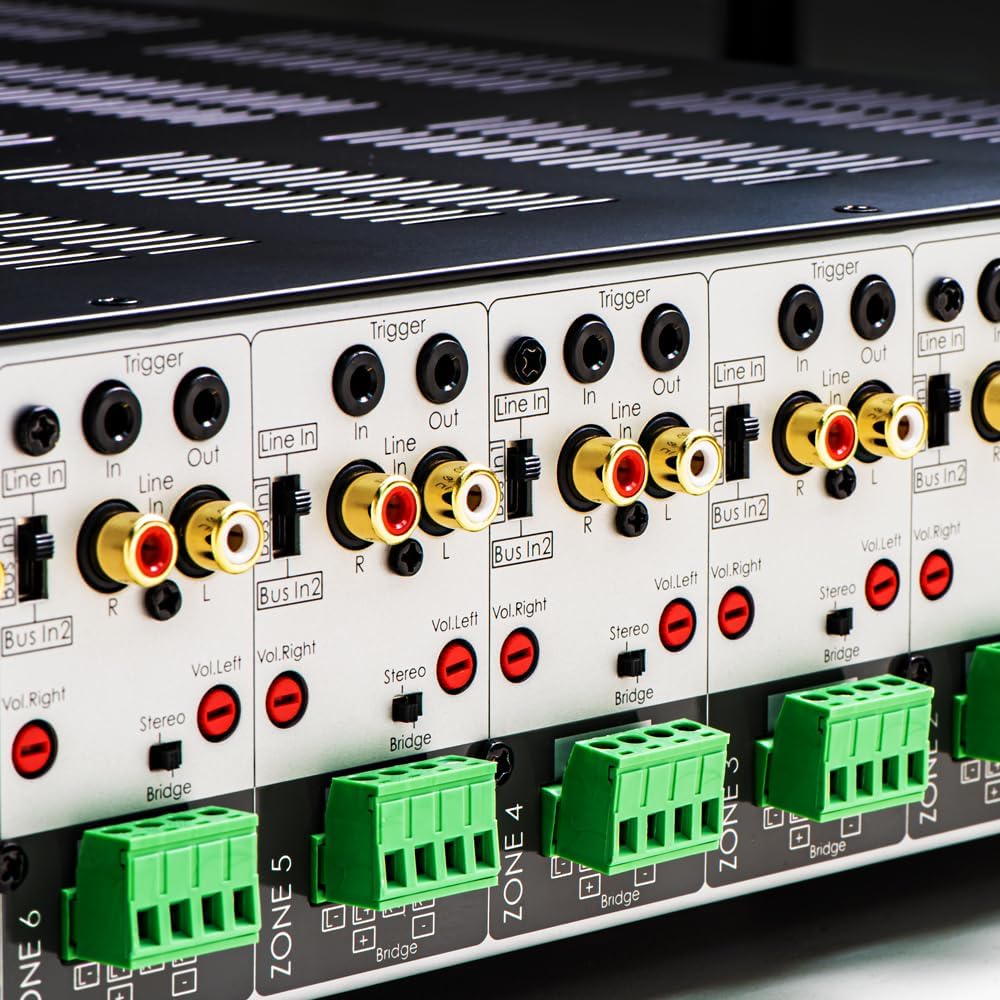
Kuva 3.1: Yksityiskohtainen view of the rear panel input and output connections.
- Kaiutinlähdöt: Connect your speakers to the corresponding zone terminals. Ensure correct polarity (+ to + and - to -). The amplifier supports both 4-ohm and 8-ohm speakers. For bridged mode operation, refer to section 4.3.
- Line Inputs (RCA): Each zone has a dedicated stereo RCA Line In. Connect your audio sources (e.g., pre-amplifier, media player) to these inputs.
- Bus Inputs (RCA): The amplifier features two stereo Bus Inputs (Bus In 1, Bus In 2). These allow a single audio source to be distributed to multiple zones.
- Linjalähdöt (RCA): Each zone also has a stereo RCA Line Out, allowing the audio signal from that zone to be passed to another ampnostin tai äänilaite.
- Trigger In/Out: The 12V Trigger In allows the amplifier to be turned on/off by an external device. The 12V Trigger Out can be used to control other devices.
- Verkkovirta: Connect the supplied power cord to the AC IN receptacle and then to a suitable wall outlet.

Kuva 3.2: Yksityiskohtainen view of Bus inputs and Trigger connections on the rear panel.
4. Käyttöohjeet
4.1 Virta päälle/pois
Press the main power button on the front panel to turn the amplifier on or off. A red LED indicator will illuminate when the unit is powered on.

Image 4.1: Front panel power button.
4.2 Vyöhykkeen ohjaus
Each of the 8 zones has a dedicated button on the front panel. Pressing a zone button will activate or deactivate that specific audio zone. The corresponding LED will indicate the zone's status.

Image 4.2: Front panel zone selection buttons.
4.3 Input Selection and Volume Adjustment
On the rear panel, each zone features switches for input selection and rotary controls for volume adjustment:
- Tulovalitsin: A slide switch allows you to select the audio input for each zone: Line sisään (dedicated input for that zone), Bus In 1, tai Bus In 2.
- Äänenvoimakkuuden säätimet: Separate rotary controls for Left and Right channels (Vol. Left, Vol. Right) allow for precise volume balancing within each zone.
- Stereo/Bridge Switch: A switch allows you to configure the zone for stereo operation or bridged mono operation. In bridged mode, two amplifier channels combine to deliver higher power to a single speaker. Ensure the speaker impedance is appropriate for bridged mode (typically 8 ohms minimum).
4.4 Audio Sensing
The amplifier incorporates an audio sense feature that automatically activates a zone when an input signal is detected and turns it off after a period of no signal. This helps conserve power and prolong the unit's lifespan.

Kuva 4.3: Esim.ample of multi-zone audio distribution with the ampelävämpi.
5. Huolto
The OSD Audio MX1680 GEN2 amplifier requires minimal maintenance. Follow these guidelines to ensure optimal performance and longevity:
- Puhdistus: Periodically wipe the exterior surfaces with a soft, dry cloth. Do not use liquid cleaners or aerosol sprays, as they may damage the finish or internal components.
- Ilmanvaihto: Ensure that the ventilation openings on the top and sides of the unit remain clear of dust and obstructions. Dust accumulation can impede airflow and lead to overheating.
- Liitännät: Occasionally check all cable connections to ensure they are secure and free from corrosion. Loose connections can lead to signal loss or degradation.
- Varastointi: Jos säilytät amppitkään aikaan, irrota se virtalähteestä ja säilytä sitä viileässä, kuivassa paikassa, poissa suorasta auringonvalosta ja äärimmäisistä lämpötiloista.
6. Vianmääritys
If you experience issues with your MX1680 GEN2 amplifier, consult the following troubleshooting guide. For problems not resolved here, please contact OSD Audio support.
| Ongelma | Mahdollinen syy | Ratkaisu |
|---|---|---|
| Ei virtaa | Virtajohto irti; Virtapistoke viallinen; AmpLifierin sulake palanut | Check power cord connection; Test outlet with another device; Contact service for fuse replacement. |
| No sound from a zone | Zone not activated; Incorrect input selected; Source device off/muted; Speaker wires loose/incorrectly connected; Volume too low | Press the zone button on the front panel; Verify input selector switch position; Check source device; Inspect speaker connections; Adjust zone volume controls. |
| Vääristynyt ääni | Input signal too high; Speaker impedance mismatch; Faulty speaker cable; Ampelinikäisempi ylikuumeneminen | Reduce source device output level; Ensure correct speaker impedance (4 or 8 ohms, or 8 ohms for bridged); Check speaker cables; Ensure proper ventilation. |
| Amplifier sammuu yllättäen | Overheating; Short circuit in speaker wiring; Protection circuit activated | Ensure proper ventilation; Check all speaker wiring for shorts; Allow unit to cool down before restarting. |
7. Tekniset tiedot
| Ominaisuus | Erittely |
|---|---|
| Mallinumero | MX1680-GEN2 |
| Kanavat | 16 Channels (8 Zones) |
| Lähtöteho (4 ohmia) | 80 Watts per channel (1KHz) |
| Lähtöteho (8 ohmia) | 50 Watts per channel (1KHz) |
| Ampeloisampi luokka | Luokka D |
| Tuotteen mitat (P x L x K) | 16.81 x 16.14 x 3.46 tuumaa |
| Tuotteen paino | 23 kiloa |
| Teline asennettava | Yes (2U, hardware included) |
| Valmistaja | OSD-ääni |
| Päivämäärä ensimmäinen saatavilla | 31. tammikuuta 2020 |
8. Takuutiedot
Warranty information for the OSD Audio MX1680 GEN2 amplifier is typically provided with your purchase documentation or can be found on the official OSD Audio websivusto. Katso lisätietoja takuun kattavuudesta, ehdoista ja edellytyksistä näistä resursseista.
9. Tukea
For technical assistance, product inquiries, or service requests, please contact OSD Audio customer support. You can typically find contact information, including phone numbers and email addresses, on the official OSD Audio websivusto:
Please have your model number (MX1680-GEN2) and purchase details ready when contacting support.