
TOPTECH JET-4-BLUE
TOPTECH Jet-4 Bluetooth-kaiuttimen käyttöohje
Model: JET-4-BLUE
Johdanto
Thank you for choosing the TOPTECH Jet-4 Portable Bluetooth Speaker. This manual provides essential information for setting up, operating, and maintaining your speaker to ensure optimal performance and longevity. Please read this manual thoroughly before using the product.

Image: The TOPTECH Jet-4 Bluetooth Speaker, showcasinsen kompaktin muotoilun ja eloisan LED-valaistuksen ansiosta.
Turvallisuustiedot
To prevent fire or shock hazards, always follow basic safety precautions when using this product:
- Älä altista kaiutinta sateelle tai kosteudelle.
- Älä pura tai muuta kaiutinta. Jätä kaikki huoltotyöt pätevän henkilöstön tehtäväksi.
- Keep the speaker away from direct sunlight, heat sources, and extreme temperatures.
- Vältä pudottamasta kaiutinta tai altistamasta sitä voimakkaille iskuille.
- Käytä vain määritettyä latauskaapelia ja virtalähdettä.
Pakkauksen sisältö
- TOPTECH Jet-4 Bluetooth Speaker
- USB-latauskaapeli
- Käyttöopas
Tuote loppuview
Ohjaimet ja portit
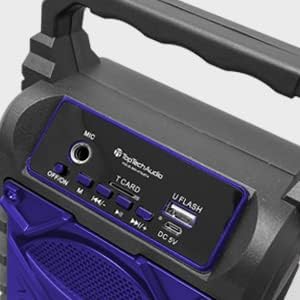
Kuva: Yksityiskohtainen view of the speaker's top control panel, showing various buttons and input ports.
- MIC-tulo: Connect an external microphone for karaoke.
- OFF/ON-kytkin: Kytke kaiutin päälle tai pois päältä.
- M (tila) -painike: Vaihda Bluetooth-, AUX-, USB- ja TF-korttitilojen välillä.
- Previous / Volume Down Button: Lyhyt painallus edelliseen kappaleeseen, pitkä painallus äänenvoimakkuuden vähentämiseksi.
- Toisto / tauko-painike: Toista tai keskeytä äänen toisto.
- Next / Volume Up Button: Lyhyt painallus seuraavaan kappaleeseen, pitkä painallus äänenvoimakkuuden lisäämiseksi.
- T CARD Slot: Insert a TF (MicroSD) card for direct audio playback.
- U FLASH (USB) Port: Insert a USB flash drive for direct audio playback.
- DC 5V portti: Connect the USB charging cable to power and charge the speaker.
Tärkeimmät ominaisuudet

Image: An infographic showing the TOPTECH Jet-4 speaker with icons representing its key features: easy portability, mic port, mode karaoke, disco light, TF card port, and USB port.
- Tehokas ääni: Dual-driver stereo output delivers crisp highs and deep bass for a premium audio experience.
- Monitilatoisto: Supports Bluetooth, AUX, USB, and TF card input for versatile music streaming.
- Karaoke valmiina: Built-in karaoke mode with light effects and mic support makes any party more fun.
- TWS Pairing Support: Connect two speakers wirelessly for immersive, room-filling sound.
- Pitkä akun käyttöikä: Enjoy up to 6 hours of playtime with a rechargeable battery, perfect for all-day events.
Asennus
Alkuveloitus
Before first use, fully charge the speaker. Connect the provided USB charging cable to the DC 5V port on the speaker and the other end to a USB power adapter (not included) or a computer USB port.

Image: A visual representation of a fully charged battery, symbolizing the speaker's long battery life.
The charging indicator light will illuminate during charging and turn off or change color when fully charged. A full charge typically takes a few hours.
Käyttöohjeet
Bluetooth-pariliitos
- Turn on the speaker by sliding the OFF/ON switch to the 'ON' position. The speaker will enter Bluetooth pairing mode automatically, indicated by a flashing LED light and an audible prompt.
- Ota Bluetooth käyttöön älypuhelimellasi, tabletillasi tai muulla Bluetooth-yhteensopivalla laitteella.
- Etsi available Bluetooth devices and select "JET-4" from the list.
- Kun yhteys on muodostettu, kaiutin antaa äänimerkin ja LED-valo lakkaa vilkkumasta.
- Voit nyt toistaa ääntä laitteestasi kaiuttimen kautta.
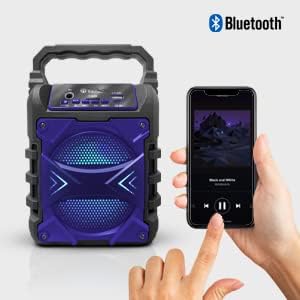
Image: The TOPTECH Jet-4 speaker positioned next to a smartphone, illustrating the seamless Bluetooth connection process.
Playback Modes (AUX, USB, TF Card)
Press the 'M' (Mode) button to cycle through available playback modes:
- AUX-tila: Connect an external audio device using a 3.5mm audio cable (not included) to the AUX input.
- USB-tila: Insert a USB flash drive into the 'U FLASH' port. The speaker will automatically detect and play compatible audio files.
- TF-korttitila: Insert a TF (MicroSD) card into the 'T CARD' slot. The speaker will automatically detect and play compatible audio files.
Karaoke-tila
To use the karaoke function, connect a microphone (not included) to the 'MIC' input port. Adjust the microphone volume as needed. The speaker's built-in light effects will enhance the karaoke experience.
TWS Pairing (True Wireless Stereo)
For an enhanced stereo sound experience, you can pair two TOPTECH Jet-4 speakers together:
- Ensure both Jet-4 speakers are powered on and not connected to any Bluetooth device.
- On one speaker (this will be the primary speaker), long press the 'M' (Mode) button until you hear a pairing tone.
- Kaiuttimet yhdistyvät automaattisesti toisiinsa. Kun yhteys on muodostettu, kuulet vahvistusäänen.
- Now, connect your Bluetooth device to the primary speaker as described in the 'Bluetooth Pairing' section. Audio will play through both speakers in stereo.

Image: Two TOPTECH Jet-4 speakers wirelessly connected to a smartphone, demonstrating the True Wireless Stereo (TWS) pairing feature for expanded sound.
Huolto
- Puhdista kaiutin pehmeällä, kuivalla liinalla. Älä käytä hankaavia puhdistusaineita tai liuottimia.
- Säilytä kaiutinta viileässä ja kuivassa paikassa, kun sitä ei käytetä.
- Avoid prolonged exposure to extreme temperatures or humidity.
Vianetsintä
| Ongelma | Ratkaisu |
|---|---|
| Kaiutin ei käynnisty. | Varmista, että akku on ladattu. Liitä kaiutin virtalähteeseen USB-kaapelilla. |
| Kaiuttimesta ei kuulu ääntä. | Tarkista sekä kaiuttimen että liitetyn laitteen äänenvoimakkuus. Varmista, että oikea toistotila on valittu. |
| Bluetooth-pariliitos epäonnistuu. | Ensure the speaker is in pairing mode. Turn off Bluetooth on your device and turn it back on. Try restarting both the speaker and your device. Make sure no other devices are connected to the speaker. |
| Huono äänenlaatu. | Siirrä kaiutinta lähemmäs Bluetooth-laitetta häiriöiden vähentämiseksi. Varmista, että äänilähde on hyvälaatuinen. |
Tekniset tiedot
| Ominaisuus | Yksityiskohta |
|---|---|
| Merkki | TOPTECH |
| Mallinumero | JET-4-BLUE |
| Virtalähde | Paristokäyttöinen |
| Yhteystekniikka | Bluetooth, USB |
| Äänitulo | Guitar Input, Karaoke Input, USB |
| Kanavien lukumäärä | 2 |
| Materiaali | Muovia, metallia |
| Tuotteen paino | 1.54 kiloa |
| Pakkauksen mitat | 9.29 x 6.38 x 4.17 tuumaa |
| UPC | 689259338593 |
Takuu ja tuki
For warranty information and customer support, please refer to the contact details provided on the product packaging or visit the official TOPTECH websivusto. Säilytä ostokuitti ostotodistuksena mahdollisten takuuvaatimusten varalta.
Ask a question about this manual
Ask about setup, troubleshooting, compatibility, parts, safety, or missing instructions. Manuals+ will review the question and use this page’s manual context to help answer it.