
Andoer HDV-201LM
Andoer HDV-201LM 1080p Digital Video Camera User Manual
Model: HDV-201LM
1. Johdanto
This manual provides detailed instructions for the safe and effective use of your Andoer HDV-201LM Digital Video Camera. Please read this manual thoroughly before operating the device and retain it for future reference.
The Andoer HDV-201LM is a 1080p Full HD digital video camera featuring a 5-megapixel CMOS sensor, capable of capturing video at 1920x1080p at 30 frames per second and still images up to 24 megapixels (interpolated). It includes a 16X digital zoom, a 3.0-inch TFT-LCD screen with 270-degree rotation, and supports external accessories via a hot shoe mount.
2. Pakkauksen sisältö
Varmista, että pakkauksessasi on kaikki alla luetellut tuotteet. Jos jokin tuote puuttuu tai on vaurioitunut, ota yhteyttä jälleenmyyjään.
- 1 x Andoer HDV-201LM Digital Video Camera
- 1 x Camera Bag
- 2 x Rechargeable 3.7V 800mAh Batteries (one pre-installed)
- 1 x USB-kaapeli
- 1 x AV-kaapeli
- 1 x kaukosäädin
- 1 x Camera User Manual (English)
- 1 x 0.39X Wide-Angle Lens
- 1 x ulkoinen mikrofoni
- 1 x Microphone Connection Cable
- 1 x Microphone User Manual (Chinese)
Note: A memory card is not included. A Class 10 or higher SD card (up to 32GB) is strongly recommended for optimal performance.
3. Osien tunnistus
Familiarize yourself with the various components of your digital video camera.

Kuva 3.1: Etuosa view of the Andoer HDV-201LM camera with attached wide-angle lens and external microphone.

Kuva 3.2: Yksityiskohtainen views highlighting the hot shoe mount, control buttons, battery compartment, and 1/4-inch tripod thread.
- Linssi: Tärkein optinen komponentti kuvien ja videoiden ottamiseen.
- LCD-näyttö: 3.0-inch TFT-LCD display for viewing and menu navigation. Rotates 270 degrees.
- Virtapainike: Kytkee kameran päälle tai pois päältä.
- Record/Stop Button: Aloittaa tai pysäyttää videotallennuksen.
- Valokuvapainike: Ottaa valokuvia.
- Zoomausvipu (L/T): Säätää digitaalista zoomia (laajakulma/tele).
- Valikkopainike: Avaa kameran asetukset.
- Navigointipainikkeet: Käytetään valikoissa navigointiin ja valintaan.
- Salamakenkäkiinnitys: For attaching external accessories like microphones or LED lights.
- Jalustan lanka: 1/4-inch thread for mounting the camera on a tripod.
- Akkulokero: Sisältää ladattavan akun.
- SD-korttipaikka: Muistikortin asettamista varten.
- USB-portti: For connecting to a computer or charging.
- AV-lähtö: Televisioon liittämistä varten.
- LED-täyttövalo: Tarjoaa lisävalaistusta hämärässä.
4. Asennus
4.1. Akun lataaminen
- Avaa paristolokeron kansi.
- Insert the provided 3.7V 800mAh battery, ensuring correct polarity. If an insulator tab is present, remove it before insertion.
- Sulje paristolokeron kansi.
- Connect the camera to a power source using the USB cable. The charging indicator will illuminate.
- Kun akku on ladattu täyteen, merkkivalo muuttuu tai sammuu.
4.2. Muistikortin asettaminen
- Varmista, että kameran virta on katkaistu.
- Paikanna SD-korttipaikka.
- Insert a Class 10 or higher SD card (up to 32GB) into the slot until it clicks into place.
- Irrota kortti painamalla sitä varovasti, kunnes se ponnahtaa ulos.
4.3. Attaching the Wide-Angle Lens
- Remove the protective cap from the camera lens.
- Carefully screw the 0.39X wide-angle lens onto the camera's main lens thread until secure.

Figure 4.1: The camera with the 0.39X super wide-angle lens attached, demonstrating its expanded field of view.
4.4. Ulkoisen mikrofonin kiinnittäminen
- Slide the external microphone into the hot shoe mount on top of the camera.
- Connect the microphone cable to the camera's external microphone input port.
5. Kameran käyttö
5.1. Virta päälle / pois
- To power on, open the LCD screen or press the Tehoa -painiketta.
- To power off, close the LCD screen or press and hold the Tehoa -painiketta.
5.2. Videoiden tallentaminen
- Ensure the camera is in video mode (indicated on the LCD screen). If not, press the tila painiketta vaihtaaksesi.
- Paina Tallenna/Pysäytä button to start recording. A red indicator will typically flash.
- Paina Tallenna/Pysäytä -painiketta uudelleen lopettaaksesi nauhoituksen.
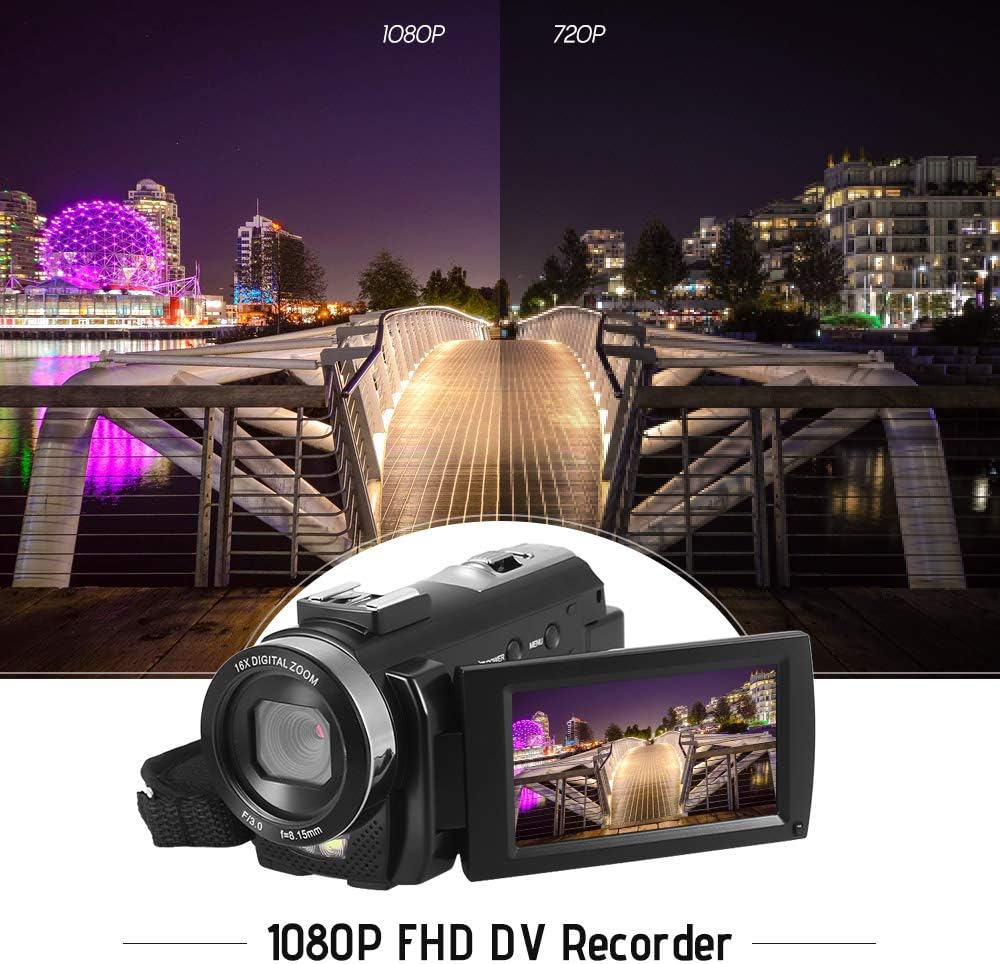
Figure 5.1: The camera is capable of recording in 1080p Full HD and 720p HD resolutions.
5.3. Valokuvien ottaminen
- Ensure the camera is in photo mode. If not, press the tila painiketta vaihtaaksesi.
- Rajaa kuvasi LCD-näytön avulla.
- Paina Kuva button to capture an image.
5.4. Digitaalisen zoomin käyttö
- Käytä L (Laajakulma) ja T (teleobjektiivi) lever to adjust the 16X digital zoom.

Figure 5.2: The camera's 16X digital zoom allows for closer views of subjects.
5.5. Valikkoasetukset
- Paina Valikko -painiketta päästäksesi asetuksiin.
- Use the navigation buttons to scroll through options such as:
- Valkotasapaino: Auto, Daylight, Cloudy, Fluorescent, Tungsten.
- Kohtaustila: Auto, Night, Portrait, Landscape, Backlight, Sport, Party, Beach, High Sensitivity.
- Kuvaustila: Single, Continuous.
- Altistuminen: Adjust ±3.0EV.
- Itselaukaisin: Off, 2s, 5s, 10s.
- Automaattinen virrankatkaisu: Off, 1min, 3min, 5min.
- Kieli: English, German, French, Spanish, Italian, Turkish, Russian, Portuguese, Dutch, Simplified Chinese, Traditional Chinese, Japanese, Polish.
- Muut toiminnot: Face Detection, Smile Capture, Beauty Face, Anti-Shake.
- Paina OK or Tallenna/Pysäytä -painiketta vahvistaaksesi valinnat.
- Paina Valikko painiketta uudelleen poistuaksesi.
5.6. Liittäminen televisioon
- Use the provided AV cable to connect the camera's AV output to your television's AV input.
- Select the correct AV input channel on your TV to view camera content.
6. Huolto
6.1. Kameran puhdistaminen
- Puhdista kameran runko pehmeällä, kuivalla liinalla.
- Käytä linssin ja LCD-näytön puhdistukseen erityistä linssinpuhdistusliinaa ja -liuosta. Vältä voimakkaita kemikaaleja.
6.2. Varastointi
- Säilytä kameraa viileässä, kuivassa paikassa, poissa suorasta auringonvalosta ja äärimmäisistä lämpötiloista.
- Poista akku, jos kameraa ei käytetä pitkään aikaan.
7. Vianmääritys
| Ongelma | Mahdollinen syy | Ratkaisu |
|---|---|---|
| Kamera ei käynnisty. | Akku on tyhjä tai se ei ole asetettu oikein. | Charge the battery fully. Ensure the battery is inserted with correct polarity and the insulator tab is removed. |
| Videon tallennus tai valokuvien ottaminen ei onnistu. | Muistikortti on täynnä, ei ole paikallaan tai vioittunut. | Aseta muistikortti. Poista tarpeettomat files or format the card (this will erase all data). Replace the card if corrupted. |
| Huono videon/kuvan laatu. | Insufficient lighting, dirty lens, or incorrect settings. | Ensure adequate lighting. Use the LED fill light if necessary. Clean the lens. Adjust white balance and scene mode settings. |
| Kamera jumiutuu tai lakkaa reagoimasta. | Ohjelmistohäiriö tai akku vähissä. | Remove and reinsert the battery to reset the camera. Ensure the battery is charged. |
8. Tekniset tiedot
| Ominaisuus | Erittely |
|---|---|
| Merkki | Andoer |
| Malli | HDV-201LM |
| Kuvan anturi | 5 megapikselin CMOS-kenno |
| Videon resoluutio | 1920x1080P (FHD 30fps), 1280x720 (HD 30fps), 640x480 (VGA 30fps), 320x240 (VGA 30fps) |
| Videomuoto | AVI |
| Kuvan resoluutio | 24MP (Interpolated), 20MP (Interpolated), 16MP (Interpolated), 12MP (Interpolated), 10MP (Interpolated), 7M Wide (Interpolated), 5MP, 3MP, 2M Wide, VGA |
| Kuvan muoto | JPG |
| Digitaalinen zoom | 16X |
| Linssi | ff (F/3.0 f=8.15mm) |
| Suurin aukko | 8.15 F |
| LCD-näyttö | 3.0-inch TFT-LCD (16:9), 270-degree rotation |
| Varastointi | SD Card (up to 32GB, Class 10 recommended) |
| Yhteydet | USB 2.0, AV Output (NTSC/PAL) |
| Virtalähde | 1 x 3.7 V 800 mAh ladattava akku |
| Kaukosäätimen akku | 1 x 3 V CR2025 -paristo |
| Käyttöjärjestelmän tuki | Windows XP/Vista/7/8/10 |
| Erikoisominaisuudet | Anti-shake, Face Detection, Smile Capture, Beauty Face, Self-Timer, LED Fill Light, Hot Shoe Mount |
| Mitat | 13.5 x 5.5 x 6.5 cm (5.3 x 2.2 x 2.6 tuumaa) |
| Paino | 273g (9.6oz) with battery |
| Väri | Musta |
9. Takuu ja tuki
Takuutietoja ja teknistä tukea varten katso ostoksesi mukana toimitettuja asiakirjoja tai ota yhteyttä jälleenmyyjään. Säilytä ostokuittisi mahdollisia takuuvaatimuksia varten.
Ask a question about this manual
Ask about setup, troubleshooting, compatibility, parts, safety, or missing instructions. Manuals+ will review the question and use this page’s manual context to help answer it.