
Johdanto
This manual provides detailed instructions for the installation, operation, and maintenance of your YuanLey 5 Port Gigabit PoE Switch. This unmanaged switch features 4 PoE+ ports and 1 Gigabit uplink port, designed for reliable network expansion and Power over Ethernet (PoE) device connectivity.

The YuanLey 5 Port Gigabit PoE Switch, a compact and efficient networking solution.
Pakkauksen sisältö
Varmista, että pakkauksessasi on kaikki alla luetellut tuotteet:
- 1 x 5 Ports 100/1000Mbps PoE+ Switch
- 1 x AC virtajohto
- 4 x Screws with nuts
- 2 x Hanger (Mounting Brackets)
- 1 x Käyttöohje
The YuanLey 5 Port Gigabit PoE Switch and its included accessories, such as the power cable and mounting brackets.
Video demonstrating the unboxing and contents of the YuanLey 5 Port Gigabit PoE Switch.
Tuote loppuview ja tärkeimmät ominaisuudet
All Gigabit Ports
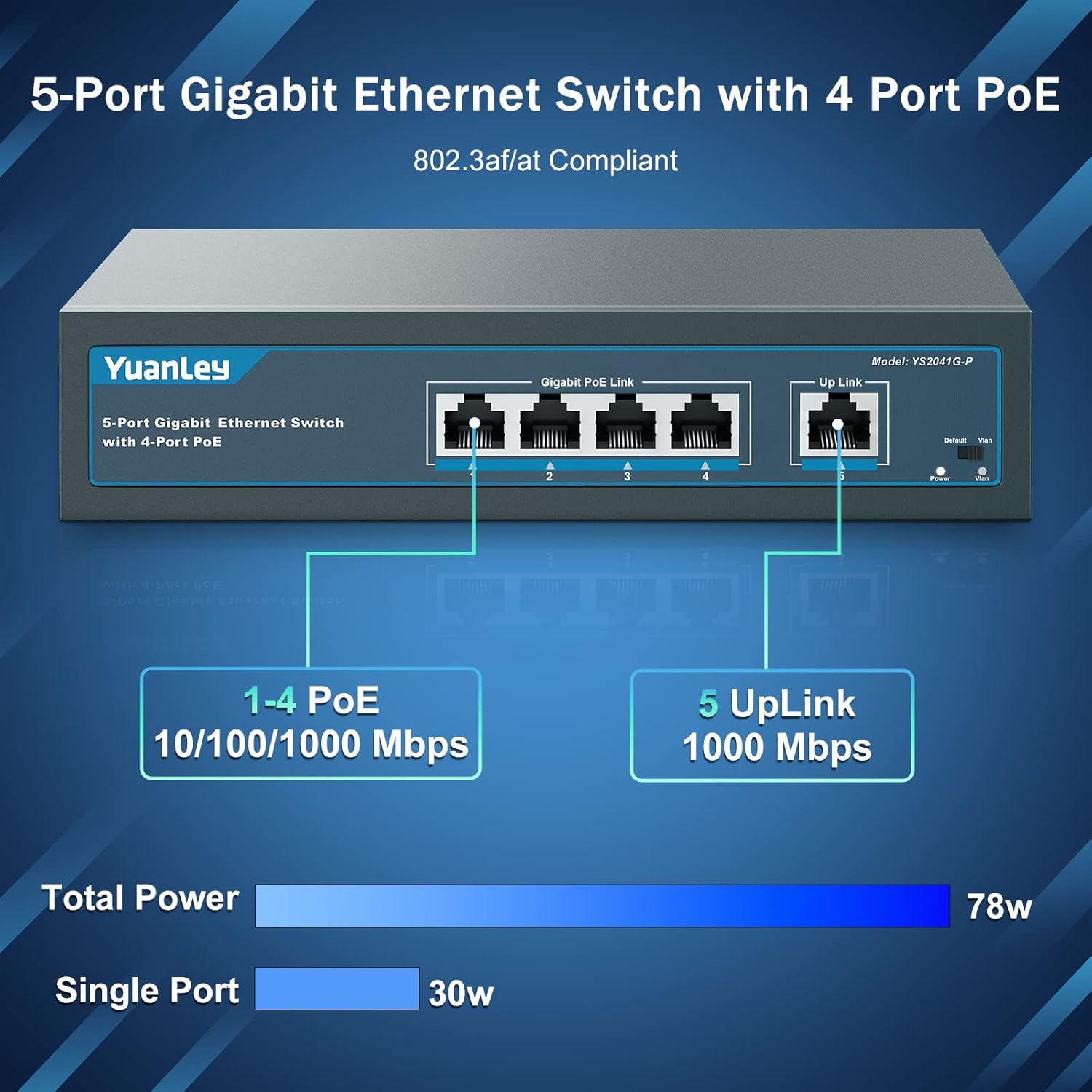
The switch includes 4 Gigabit PoE+ ports and 1 Gigabit uplink Ethernet port. All ports support speeds up to 100/1000Mbps, ensuring excellent network performance.
Edessä view of the YuanLey 5 Port Gigabit PoE Switch, highlighting the 4 PoE+ ports and 1 uplink port.
High PoE Power
Supports IEEE 802.3af/at PoE power supply standards. The total power budget is 78W, with up to 30W available per port. This is suitable for powering multiple PoE devices.

Diagram illustrating the 78W total PoE power and 30W per port capability of the YuanLey switch.
Unmanaged Plug & Play
This is an unmanaged switch, meaning no configuration is required. Simply plug in your devices, and it will automatically detect and connect both PoE and non-PoE devices such as PoE cameras, wireless access points (APs), computers, NVRs, and routers.

Illustration of the YuanLey PoE switch connecting various PoE and non-PoE devices.
One-Key VLAN
When VLAN mode is enabled, all PoE ports (1-4) are isolated from each other but can communicate with the uplink port. This feature enhances network security by segmenting traffic.

Diagram demonstrating the one-key VLAN function, isolating PoE ports while allowing communication with the uplink.
Kestävä metalli Casing & Fanless Design
Kytkimessä on kestävä metallinen casing and a fanless design, ensuring silent operation and efficient heat dissipation for long-term reliability.

Close-up of the YuanLey PoE switch's metal casing and cooling vents.
Sisäänrakennettu virtalähde
The switch has a built-in power supply (AC/IN 100-240V 50-60Hz), eliminating the need for an external power adapter.

Takaosa view of the YuanLey PoE switch, showing the integrated AC power input.
4KV salamasuoja
Equipped with 4KV lightning protection to safeguard the device and connected equipment from electrical surges.

Graphic illustrating the 4KV lightning protection feature of the switch.
Asennusohjeet
Step 1: Unpack the Switch
Carefully remove the PoE switch and all accessories from the packaging. Inspect for any damage.
Vaihe 2: Kytke virta
Connect the provided AC power cable to the power input on the rear of the switch and then to a standard electrical outlet. The power LED indicator should illuminate.
Vaihe 3: Yhdistä verkkolaitteet
Connect your PoE-powered devices (e.g., IP cameras, wireless access points, IP phones) to any of the 4 PoE+ ports (ports 1-4) using standard Ethernet cables.
Connect your non-PoE devices (e.g., computer, NVR, router) to the uplink port (port 5) or any other available PoE+ port if not powering a PoE device.

Diagram showing how to connect various devices to the YuanLey PoE switch for plug-and-play operation.
Step 4: Optional: Enable VLAN Mode
If network segmentation is desired, locate the VLAN switch on the device and toggle it to the "VLAN" position. This will isolate traffic between PoE ports 1-4, enhancing security.

Close-up of the VLAN switch on the YuanLey PoE switch.
Step 5: Optional: Mounting
Use the included mounting brackets and screws to secure the switch to a wall, desk, or rack unit if desired. The switch also has pre-drilled holes on the bottom for direct wall mounting.

Illustration of the YuanLey PoE switch with mounting brackets and showing it installed in a rack.
Käyttöohjeet
Virta päälle
Once connected to power, the switch will automatically power on. The Power LED will indicate its operational status.
Link/Act Indicators
Each port has LED indicators. A green light indicates a successful network link and activity. A yellow light indicates PoE power is being supplied.
Tiedonsiirto
The switch operates automatically to facilitate data transfer between connected devices at Gigabit speeds.

The YuanLey 5 Port Gigabit PoE Switch in an office setting, demonstrating its compact design.
Videoesitysasing the 5-Port Gigabit PoE Switch with 4-Port PoE in operation.
Huolto
Puhdistus
Puhdista kytkimen ulkopinta säännöllisesti pehmeällä, kuivalla liinalla. Älä käytä nestemäisiä tai aerosolipuhdistusaineita.
Ilmanvaihto
Ensure that the cooling vents on the sides of the switch are not obstructed to allow for proper heat dissipation.
Ympäristöolosuhteet
Operate the switch within the specified temperature range (0°C to 55°C) and humidity levels to ensure optimal performance and longevity.

Diagram illustrating the operating temperature range of the YuanLey PoE switch.
Vianetsintä
Ei Virtaa
Check if the power cable is securely connected to both the switch and the electrical outlet. Verify the outlet is functional.
No Link/Activity
Ensure Ethernet cables are properly connected to both the switch port and the device. Try a different cable or port. Verify the connected device is powered on and functioning correctly.
PoE-laite ei käynnisty
Confirm the device is PoE-compatible (IEEE 802.3af/at). Check the PoE LED indicator for the port; if it's not lit, the device might not be drawing power or there might be an issue with the cable. Ensure the total power consumption of all connected PoE devices does not exceed the switch's 78W budget.

Graphic depicting power usage levels on the PoE switch, indicating potential overload if too many devices are connected.
Hidas verkon nopeus
Ensure all connected devices and cables support Gigabit Ethernet for optimal performance. Check for network congestion or faulty cables.
VLAN Isolation Issues
If devices on PoE ports 1-4 cannot communicate with each other, verify the VLAN switch is in the "VLAN" position. If they cannot communicate with the uplink, ensure the uplink port is correctly connected.
Tekniset tiedot
| Ominaisuus | Erittely |
|---|---|
| Malli | YS2041G-P |
| Porttien määrä | 5 (4 PoE+, 1 Uplink) |
| Tiedonsiirtonopeus | 1000 megabittiä sekunnissa (gigabitti) |
| PoE-standardi | IEEE 802.3af / at |
| Maksimaalinen PoE-teho | 78 wattia (yhteensä) |
| Per PoE Port Power | Jopa 30 wattia |
| Tulo Voltage | AC 100--240 V, 50-60 Hz |
| Kotelon materiaali | Metalli |
| Ilman tuuletinta | Kyllä |
| Mitat | 7.87 x 4.65 x 1.57 tuumaa |
| Tuotteen paino | 1.96 puntaa (0.89 kiloa) |
| Käyttölämpötila | 0 °C - 55 °C |
| Salamansuojaus | 4KV |
Takuu ja tuki
YuanLey provides a 100% Satisfaction Guarantee. For technical support or warranty inquiries, please refer to the contact information provided in the included user manual or visit the official YuanLey websivusto.
Video review of the 5 Port Gigabit PoE Switch, provided by YuanLey.


