
HoldPeak HP-870P
HoldPeak HP-870P KW Power Meter Clamp Mittarin käyttöopas
Model: HP-870P (YF-US-870P)
1. Johdanto
The HoldPeak HP-870P is a versatile and robust KW Power Meter Clamp Meter designed for comprehensive electrical testing. This device combines the functions of an AC/DC Voltmeter, Ammeter, and Multimeter, capable of measuring active power, apparent power, reactive power, active energy, temperature, and frequency. Its high accuracy, large LCD display with backlight, and auto power-off feature make it an essential diagnostic tool for professionals and enthusiasts in various fields, including electronic product manufacturing, computer component inspection, automobile maintenance, home appliance installation, and general electrical maintenance.
2. Turvallisuustiedot
Please read and understand all safety information and operating instructions before using this meter. Failure to do so may result in injury or damage to the meter or equipment under test.
Yleiset turvallisuusohjeet:
- Noudata aina paikallisia ja kansallisia turvallisuusmääräyksiä.
- Älä käytä mittaria, jos se näyttää vaurioituneelta tai jos mittausjohtojen eristys on vaurioitunut.
- Älä käytä enempää kuin nimellistilavuustage, kuten mittarissa on merkitty, napojen väliin tai minkä tahansa liittimen ja maadoituksen väliin.
- Ole erittäin varovainen, kun työskentelet voltages yli 60 V DC tai 30 V AC RMS. Sellainen voltagse aiheuttaa sähköiskuvaaran.
- Pidä sormesi mittausjohtojen sormisuojien takana mittausten aikana.
- Irrota mittausjohdot mittarista ennen paristokotelon kannen avaamista.
- Ensure the rotary switch is in the correct position for the desired measurement before connecting the test leads.
- Älä käytä mittaria räjähdysherkissä kaasu-, höyry- tai pölyympäristöissä.
3. Tuote ohiview
Tärkeimmät ominaisuudet:
- Monikäyttöisyys: Measures active power, apparent power, reactive power, AC/DC voltage, AC/DC current, temperature, frequency, power factor, and active energy.
- Korkea näyttökertojen määrä: 9999 counts display for precise readings.
- LCD-taustavalo: Ensures clear visibility of data even in low-light conditions.
- Tietojen pito: Jäädyttää näytetyn lukeman kätevää tallennusta varten.
- Automaattinen toimintasäde: Valitsee automaattisesti sopivan mittausalueen.
- Max/Min-toiminto: Tallentaa mittaussession aikana mitatut maksimi- ja minimiarvot.
- Automaattinen virrankatkaisu: Säästää akun käyttöikää sammumalla automaattisesti tietyn käyttämättömyysajan jälkeen.
- Large Jaw Caliber: 1.77 inches (45mm) jaw opening to accommodate thick cables.
- Turvallisuusluokitus: Double insulation safety rating.
Paketin sisältö:
The HoldPeak HP-870P package includes the following items:
- 1 x Digitaalinen kytkinamp Multimeter (HP-870P)
- 2 x mittausjohtoa (punainen ja musta)
- 1 x kantolaukku
- 1 x lämpötila-anturi
- 1 x 9V (6F22) Battery

Kuva 3.1: The HoldPeak HP-870P Clamp Meter shown with its complete set of accessories, including test leads, temperature probe, 9V battery, and carrying bag.
Paneelin asettelu:
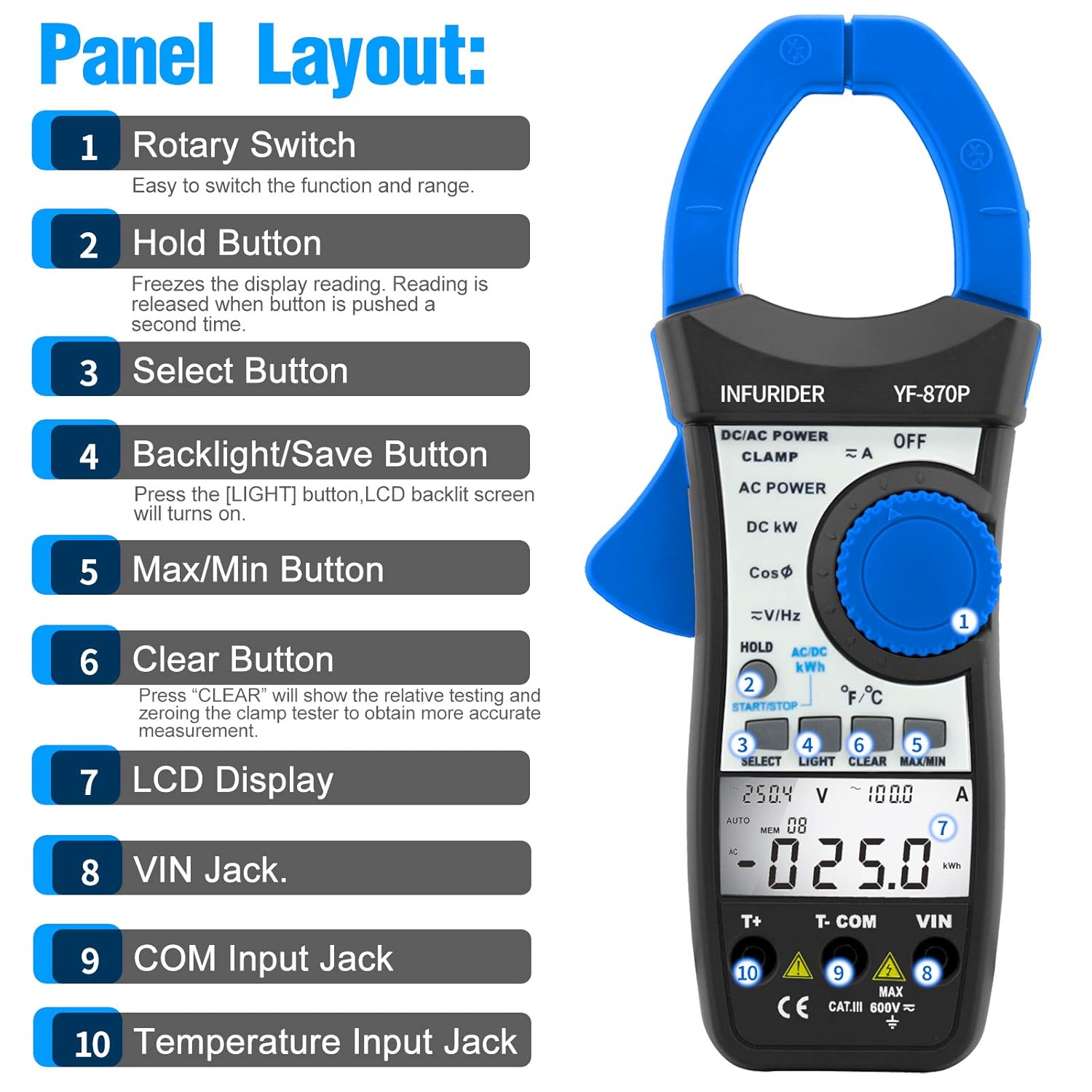
Kuva 3.2: Yksityiskohtainen view of the HP-870P clamp meter's front panel, indicating the location and function of each control and input jack.
- Kiertokytkin: Käytetään halutun mittaustoiminnon ja -alueen valitsemiseen.
- Pidä painike: Jäädyttää nykyisen näytön lukeman. Paina uudelleen vapauttaaksesi.
- Valitse painike: Toggles between different measurement modes within a single rotary switch position (e.g., AC/DC, temperature units).
- Backlight/Save Button: Press to turn on the LCD backlight.
- Max/Min-painike: Toggles between maximum, minimum, and current readings.
- Tyhjennä-painike: Used to clear relative testing or zero the clamp tester for more accurate measurements.
- LCD-näyttö: Näyttää mittauslukemat, yksiköt ja toimintojen ilmaisimet.
- VIN Jack: Tuloliitin voltage and other measurements (typically for red test lead).
- COM-tuloliitin: Common input terminal (typically for black test lead).
- Lämpötilatuloliitin: Dedicated input for the temperature probe.
4. Asennus
Akun asennus:
- Varmista, että mittari on sammutettu.
- Paikanna paristolokero mittarin takaa.
- Avaa paristokotelon kansi ruuvitaltalla.
- Insert the provided 9V (6F22) battery, observing the correct polarity (+ and -).
- Aseta akun kansi takaisin paikalleen ja kiinnitä se ruuvilla.
Mittausjohtojen kytkeminen:
- Voltage, resistance, frequency, and other measurements requiring test leads: Insert the black test lead into the COM tuloliitin ja punainen mittausjohto liittimeen VIN tuloliitin.
- For temperature measurements: Insert the temperature probe into the dedicated Lämpötilan syöttöliitin.
5. Käyttöohjeet
Yleinen toiminta:
- Virta päälle/pois: Rotate the rotary switch from the OFF position to any desired function to turn the meter ON. To turn OFF, rotate the switch back to the OFF position.
- LCD-taustavalo: Paina VALOA button to activate the display backlight. Press again to turn it off.
- Tietojen pito: Paina PIDÄ -painiketta pysäyttääksesi nykyisen lukeman näytössä. Paina uudelleen vapauttaaksesi painikkeen.
- Automaattinen virrankatkaisu: The meter will automatically power off after a period of inactivity to save battery. To disable this feature temporarily, refer to the full user manual.
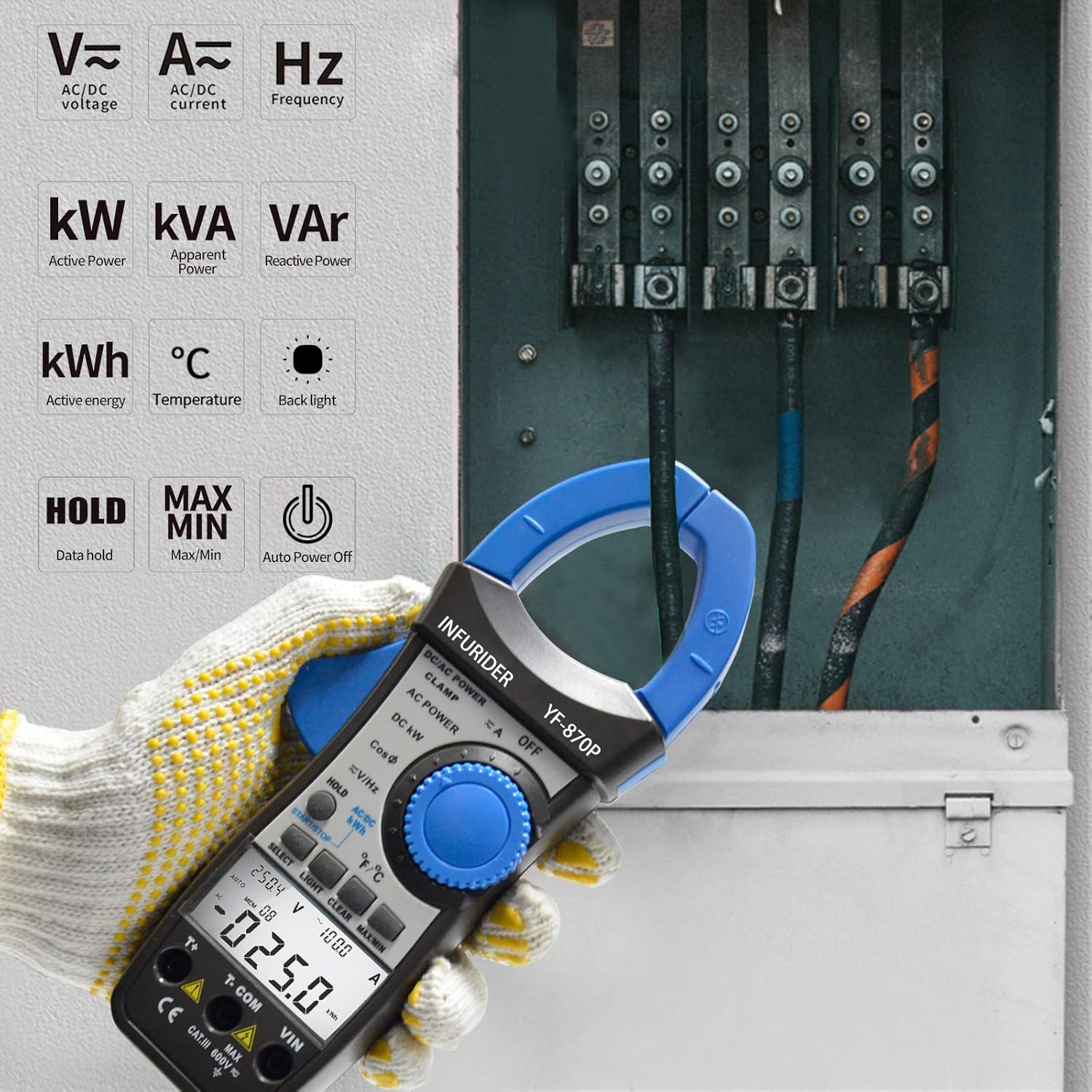
Kuva 5.1: The HP-870P clamp meter displaying various measurement functions such as AC/DC voltage, current, frequency, active power (kW), apparent power (kVA), reactive power (VAr), active energy (kWh), and temperature (°C).
Mittaustoiminnot:
AC/DC Voitage Mittaus:
- Aseta kiertokytkin asentoon V≈ (AC-tilavuustage) tai V- (DC Voltage) sijainti.
- Liitä musta mittausjohto COM liittimeen ja punainen mittausjohto VIN Jack.
- Kytke mittausjohtimet rinnan testattavan piirin tai komponentin kanssa.
- Lue voltage -arvo nestekidenäytössä.
AC/DC-virran mittaus (Clamp Toiminto):
- Aseta kiertokytkin asentoon A≈ (Vaihtovirta) tai A- (tasavirta) -asento.
- Avaa clamp leuat painamalla liipaisinta.
- Sulje vain yksi virtapiirin johdin suojakannen sisään.amp leuat. Varmista, että leuat ovat täysin kiinni.
- Lue nykyinen arvo LCD-näytöltä.
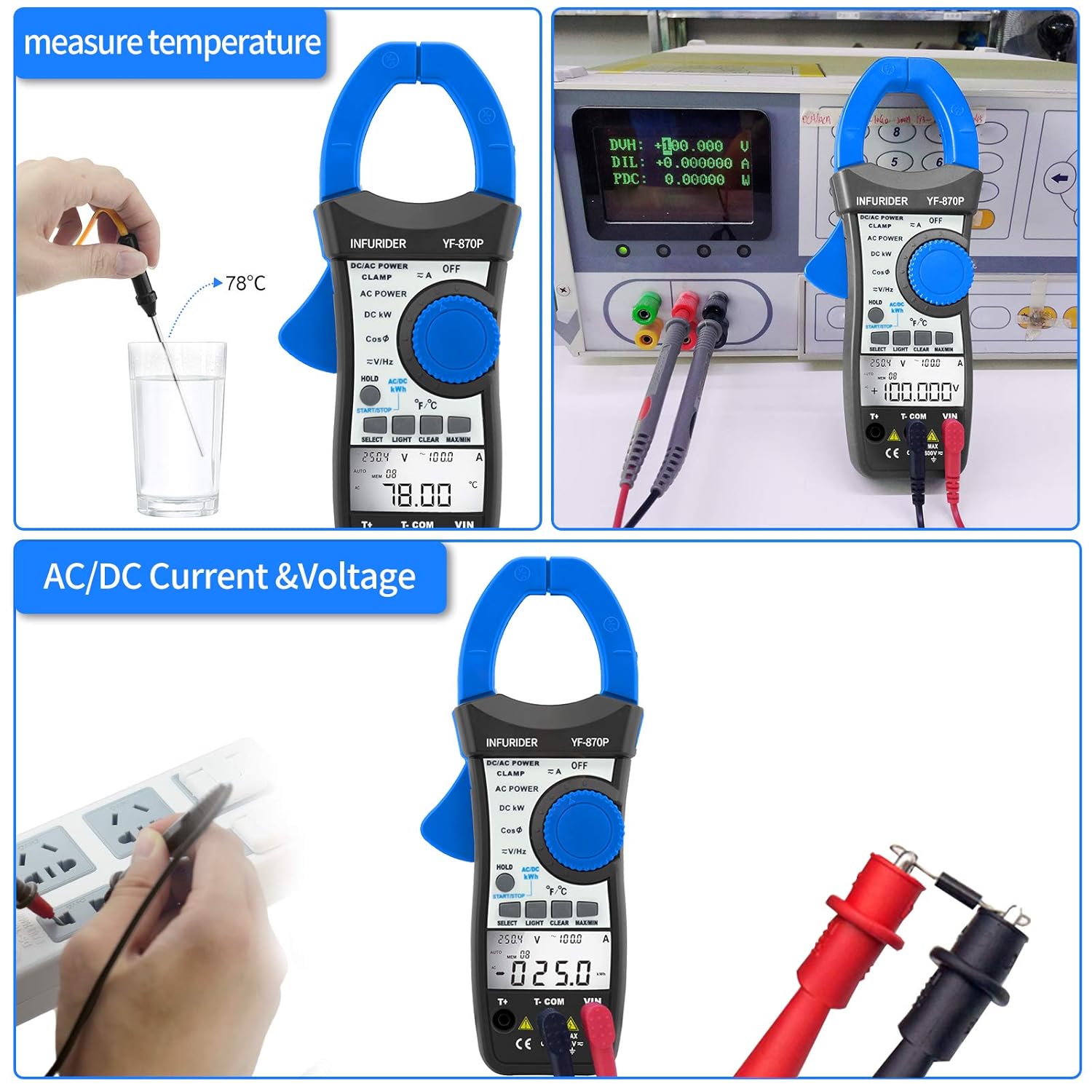
Kuva 5.2: Demonstrates the HP-870P's capability to measure temperature using the included probe and to measure AC/DC current and voltage by connecting the test leads to a power outlet.
Power Measurement (Active, Apparent, Reactive):
- Aseta kiertokytkin asentoon DC KW or VAIHTOVIRTA asema.
- Connect the test leads as required for voltage measurement and clamp the jaws around the current-carrying conductor.
- Käytä VALITSE button to cycle through Active Power (KW), Apparent Power (KVA), and Reactive Power (KVAr) readings.
Active Energy Measurement (kWh):
- Aseta kiertokytkin asentoon AC/DC KWH asema.
- Connect the test leads and clamp the jaws as for power measurement.
- The meter will display the accumulated active energy.
Lämpötilan mittaus:
- Aseta kiertokytkin asentoon ℃ / ℉ asema.
- Insert the temperature probe into the dedicated temperature input jack.
- Aseta lämpötila-anturin kärki mitattavan kohteen päälle tai sisään.
- Käytä VALITSE -painiketta vaihtaaksesi Celsius- (℃) ja Fahrenheit- (℉) yksiköiden välillä.
Taajuusmittaus:
- Aseta kiertokytkin asentoon V≈/Hz asema.
- Kytke mittausjohdot virtapiiriin, josta taajuus mitataan.
- Read the frequency value in Hertz (Hz) on the LCD display.
Power Factor Measurement:
- Aseta kiertokytkin asentoon CosΦ asema.
- Connect the test leads and clamp the jaws as for power measurement.
- The power factor value will be displayed.

Kuva 5.3: Illustrates the 40mm jaw caliber of the HP-870P, allowing measurement on larger conductors, and highlights the large LCD screen for clear observation of measurement data, along with the meter's overall dimensions.
6. Huolto
Puhdistus:
- Pyyhi kotelo mainoksellaamp liinalla ja miedolla pesuaineella. Älä käytä hankaavia aineita tai liuottimia.
- Keep the terminals clean to ensure proper contact.
Akun vaihto:
When the battery symbol appears on the LCD display, the battery needs to be replaced. Refer to the Battery Installation section (4.1) for instructions.
Varastointi:
- If the meter is not to be used for a long period, remove the battery to prevent leakage and damage to the meter.
- Säilytä mittaria viileässä, kuivassa paikassa, poissa suorasta auringonvalosta ja äärimmäisistä lämpötiloista.
- Use the provided carrying bag for protection during storage and transport.
7. Vianmääritys
If the meter does not operate correctly, check the following common issues before seeking service.
| Ongelma | Mahdollinen syy | Ratkaisu |
|---|---|---|
| Mittari ei käynnisty. | Tyhjä tai väärin asennettu akku. | Vaihda paristo tai tarkista napaisuus. |
| Ei lukemaa tai näytössä näkyy "OL". | Overload, incorrect range, or open circuit. | Select higher range (if not auto-ranging), check circuit continuity, ensure proper connection. |
| Epätarkkoja lukemia. | Low battery, dirty terminals, or external interference. | Replace battery, clean terminals, move away from strong electromagnetic fields. |
| Taustavalo ei toimi. | Low battery or backlight function not activated. | Replace battery, press the LIGHT button. |
8. Tekniset tiedot
| Mittaustoiminto | Alue / tarkkuus |
|---|---|
| Aktiivinen teho | 99.99KW / 100KW~300KW (3% of rdg + 12dgt) |
| Näennäinen voima | 99.99KVA~245KVA (3% of rdg + 15dgt) |
| Loisteho | 0.01VAr~120KVAr (3% of rdg + 15dgt) |
| AC/DC Voitage | 1.0~600V (1.0% of rdg + 8dgt) |
| AC / DC-virta | 1.0~999.9A (2.5% of rdg + 15dgt) |
| Lämpötila | -20℃~1370℃ (-4℉~2498℉) (3% of rdg + 2dgt) |
| Taajuus | 45Hz~250MHz (0.1% + 5dgt) |
| Tehotekijä | ±0.05 |
| Aktiivinen energia | 0~99.99kwh (3% of rdg + 10dgt), 100~700kwh (3% of rdg + 5dgt) |
Yleiset tiedot:
- Näyttö: 9999 lukemaa LCD-näyttö
- Jaw Caliber: 1.77 tuumaa (45 mm)
- Akun tyyppi: 9V (6F22)
- Mitat: 225 x 97 x 40 mm
- Paino: 450 g
- Turvallisuusstandardi: CE
9. Takuutiedot
Katso valmistajan virallinen website or the warranty card included with your product for detailed warranty terms and conditions. Typically, HoldPeak products come with a limited warranty covering defects in materials and workmanship for a specified period from the date of purchase.
10. Asiakastuki
For technical assistance, troubleshooting beyond this manual, or service inquiries, please contact HoldPeak customer support through their official website or the contact information provided in your product packaging. When contacting support, please have your product model number (HP-870P) and purchase details ready.