
1. Tärkeitä turvallisuusohjeita
Lue kaikki turvallisuus- ja käyttöohjeet huolellisesti ennen television käyttöä. Säilytä nämä ohjeet myöhempää tarvetta varten.
- Virtalähde: Connect the TV only to the power supply indicated on the label.
- Ilmanvaihto: Varmista asianmukainen ilmanvaihto. Älä tuki tuuletusaukkoja.
- Puhdistus: Irrota televisio pistorasiasta ennen puhdistamista. Käytä pehmeää, kuivaa liinaa. Älä käytä nestemäisiä puhdistusaineita tai aerosolipuhdistusaineita.
- Vesi ja kosteus: Do not use this TV near water, such as a bathtub, washbowl, kitchen sink, laundry tub, swimming pool, or in a wet basement.
- Lämpö: Position the TV away from heat sources such as radiators, heat registers, stoves, or other products (including ampnostimet), jotka tuottavat lämpöä.
- johdot: Protect the power cord from being walked on or pinched, particularly at plugs, convenience receptacles, and the point where they exit from the TV.
- Salama: Irrota tämä TV ukkosmyrskyjen aikana tai kun sitä ei käytetä pitkään aikaan.
- Huolto: Älä yritä huoltaa tätä televisiota itse. Jätä kaikki huoltotyöt pätevän huoltohenkilöstön tehtäväksi.
2. Tuote ohiview
The CHIQ L40H7N is a 40-inch Full HD Smart TV designed to provide an immersive viewing experience with integrated smart features. It offers a resolution of 1080p and includes connectivity options such as Wi-Fi and Bluetooth.
Tärkeimmät ominaisuudet:
- Full HD (1080p) Resolution: Tarjoaa selkeitä ja yksityiskohtaisia kuvia.
- Smart TV:n toiminnot: Access popular streaming services like Netflix, YouTube, and Prime Video.
- Integrated Wi-Fi and Bluetooth: For wireless connectivity and device pairing.
- Useita liitäntäportteja: Includes 3 HDMI and 2 USB ports for various external devices.
- Kolmoisviritin: Supports DVB-T/T2/C/S/S2 for versatile broadcast reception.
- Dolby Audio: Parannettu äänikokemus.
- HDR10-tuki: Provides improved contrast and color reproduction.
- Quad Core CPU: Ensures smooth performance for smart features and applications.

Kuva: Edessä view of the CHIQ L40H7N Smart TV, showcasing its slim bezel and display.
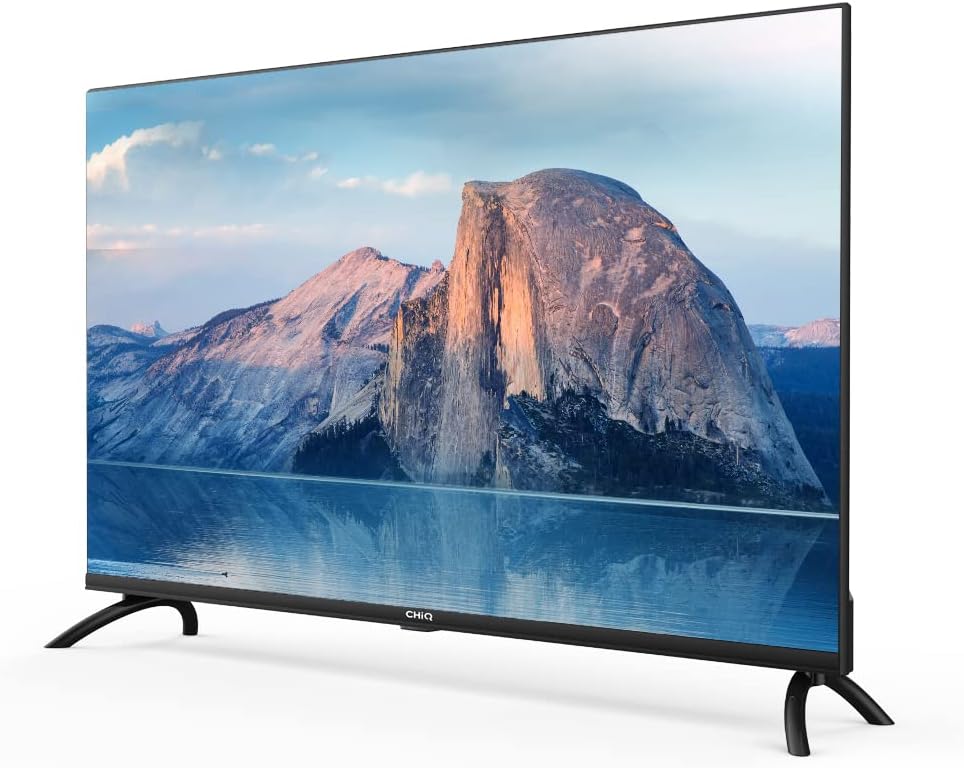
Kuva: Sivu view of the CHIQ L40H7N Smart TV, highlighting its thin profile.
3. Asennus
3.1 Pakkauksesta purkaminen
- Avaa pakkaus varovasti ja poista televisio ja kaikki lisävarusteet.
- Ensure all components are present: TV unit, remote control, batteries, power cord, stand components, and user manual.
- Säilytä pakkausmateriaalit tulevaa kuljetusta tai huoltoa varten.
3.2 Jalustan asennus
TV-jalustan asentaminen:
- Aseta televisio kuvaruutu alaspäin pehmeälle, tasaiselle alustalle (esim. huovalle tai vaahtomuoville) estääksesi näytön vaurioitumisen.
- Kohdista jalustan jalat television pohjassa oleviin vastaaviin uriin.
- Kiinnitä jalustan jalat mukana toimitetuilla ruuveilla. Varmista, että ne on kiristetty tiukasti.

Image: Diagram showing the dimensions of the CHIQ L40H7N TV, including height with stand (568.9mm), width (900.3mm), and depth with stand (178.9mm).
3.3 Seinäkiinnitys (valinnainen)
If you choose to wall mount your TV, please consult a professional installer and refer to the specific instructions provided with your wall mount bracket. Ensure the wall mount is compatible with the TV's VESA mounting pattern.
3.4 Oheislaitteiden liittäminen
Liitä ulkoiset laitteet television portteihin:
- HDMI: Connect Blu-ray players, game consoles, or set-top boxes to the HDMI ports (HDMI1, HDMI2, HDMI3).
- USB: Insert USB drives for media playback into the USB ports (USB1, USB2).
- Antenni/kaapeli: Connect your antenna or cable TV signal to the appropriate input.
- Ethernet: Vakaan langallisen internetyhteyden saamiseksi liitä Ethernet-kaapeli LAN-porttiin.
3.5 Virtaliitäntä
After connecting all necessary cables, plug the power cord into the TV's power input, then into a wall outlet.
3.6 Ensimmäinen käynnistys
Press the power button on the remote control or on the TV. Follow the on-screen instructions to complete the initial setup, including language selection, network connection, and channel scanning.
4. Television käyttö
4.1 Kaukosäätimen toiminnot
Kaukosäätimellä voit selata television ominaisuuksia:
- Virtapainike: Kytkee television päälle tai pois päältä.
- Äänenvoimakkuus +/-: Säätää äänenvoimakkuutta.
- Kanava +/-: Vaihtaa TV-kanavia.
- Tulo/lähde: Valitsee tulolähteen (HDMI, USB, TV).
- Navigointipainikkeet (ylös/alas/vasemmalle/oikealle/OK): Navigoi valikoissa ja vahvistaa valinnat.
- Etusivu/Älykeskus: Avaa Smart TV:n käyttöliittymän.
- Sovelluspainikkeet: Dedicated buttons for Netflix, YouTube, Prime Video, etc.
4.2 Älytelevision ominaisuudet
Your CHIQ L40H7N TV provides access to a range of smart features and applications:
- Sovellusten käyttäminen: Press the Home button or dedicated app buttons to launch applications like Netflix, YouTube, and Prime Video.
- App Store: Lataa ja asenna lisäsovelluksia integroidusta sovelluskaupasta.
- Näytön peilaus: Suoratoista sisältöä yhteensopivista älypuhelimista tai tableteista televisioosi.

Image: The CHIQ Smart TV displaying the Netflix application interface, along with other streaming apps like YouTube and Prime Video.

Image: A CHIQ Smart TV screen showing a variety of content from streaming services, indicating a rich media experience.
4.3 Verkkoyhteys
To use Smart TV features, connect your TV to the internet:
- Wi-Fi: Go to Settings > Network > Wi-Fi, select your network, and enter the password.
- Ethernet: Connect an Ethernet cable from your router to the TV's LAN port. The TV will automatically detect the wired connection.
4.4 Bluetooth-yhteys
Pair Bluetooth devices like headphones or speakers:
- Enable Bluetooth on your external device and set it to pairing mode.
- On the TV, go to Settings > Remotes & Accessories > Bluetooth.
- Valitse laitteesi luettelosta ja muodosta pariliitos noudattamalla näytön ohjeita.
4.5 Tulon valinta
Press the 'Input' or 'Source' button on your remote to switch between connected devices (HDMI1, HDMI2, HDMI3, USB, TV Tuner).
4.6 Kuva- ja ääniasetukset
Adjust display and audio preferences via the Settings menu:
- Kuvatila: Valitse vakio-, dynaamisista, elokuva- tai mukautetuista asetuksista.
- Kirkkaus/Kontrasti/Väri: Hienosäädä kuvanlaatua.
- Äänitila: Valitse äänen esiasetukset, kuten vakio, musiikki, elokuva tai mukautettu.
- Dolby Audio: The TV supports Dolby Audio for enhanced sound.
- HDR10: Experience improved contrast and color with HDR10 content.

Image: The CHIQ L40H7N TV displaying a scene with the Dolby Audio logo, indicating support for enhanced sound.

Image: A split-screen comparison on the CHIQ L40H7N TV, demonstrating the visual improvement with HDR10 technology, showing richer colors and contrast.

Image: An illustration of a Quad Core CPU, representing the processing power within the CHIQ L40H7N TV for smooth operation.

Image: The CHIQ L40H7N TV positioned on a media console in a living room, showcasing sen esteettistä integrointia kotiympäristöön.
5. Huolto
5.1 Television puhdistaminen
Television ulkonäön ja suorituskyvyn ylläpitämiseksi:
- Näyttö: Pyyhi näyttö varovasti pehmeällä, nukkaamattomalla liinalla. Pinttyneisiin tahroihin hankaa kevyestiampKostuta liina vedellä tai erikoisnäytönpuhdistusaineella (älä suihkuta suoraan näytölle).
- Kaappi: Pyyhi television kotelo pehmeällä, kuivalla liinalla. Vältä hankaavien puhdistusaineiden tai liuottimien käyttöä.
- Irrota aina televisio pistorasiasta ennen puhdistamista.
5.2 Ohjelmistopäivitykset
Säännölliset ohjelmistopäivitykset voivat parantaa suorituskykyä ja lisätä uusia ominaisuuksia:
- Automaattiset päivitykset: Varmista, että televisiosi on yhteydessä internetiin automaattisia päivityksiä varten.
- Manuaalinen tarkistus: You can manually check for updates in the Settings menu (e.g., Settings > About > System Update).
6. Vianmääritys
Jos televisiossasi on ongelmia, katso seuraavat yleiset ongelmat ja ratkaisut:
- Ei virtaa:
- Check if the power cord is securely plugged into the TV and the wall outlet.
- Ensure the wall outlet is functioning by testing it with another device.
- Try pressing the power button on the TV itself, not just the remote. - Ei kuvaa, mutta ääni kuuluu:
- Check the input source. Ensure it matches the device you are trying to view (e.g., HDMI1 for a Blu-ray player).
- Verify that the external device is powered on and functioning correctly.
- Try a different HDMI cable or port. - Ei ääntä, mutta kuva näkyy:
- Check the volume level and ensure the TV is not muted.
- Verify audio output settings in the TV menu (e.g., internal speakers, external audio system).
- If using an external device, check its volume and audio settings. - Kaukosäädin ei toimi:
- Vaihda kaukosäätimen paristot.
- Varmista, ettei kaukosäätimen ja television infrapunatunnistimen välissä ole esteitä.
- Point the remote directly at the TV. - Verkkoyhteysongelmat:
- Restart your router and modem.
- Check Wi-Fi password if connecting wirelessly.
- If using a wired connection, ensure the Ethernet cable is properly connected.
If the problem persists, consult the CHiQ customer support or a qualified technician.
7. Tekniset tiedot
Below are the technical specifications for the CHIQ L40H7N Smart TV:
| Ominaisuus | Erittely |
|---|---|
| Merkki | CHiQ |
| Mallin nimi | L40H7N |
| Näytön koko | 40 tuumaa |
| Näyttötekniikka | LCD |
| Resoluutio | 1080p (Full HD) |
| Päivitystaajuus | 60 Hz |
| Erikoisominaisuus | Full HD, Smart TV, HDR10, Dolby Audio |
| Yhteystekniikka | Bluetooth, Ethernet, HDMI (3 porttia), USB (2 porttia), Wi-Fi |
| Tuetut Internet-palvelut | Amazon Instant Video, Netflix, YouTube |
| Yhteensopivat laitteet | Laptop, Smart Speaker, Smart Watch, Tablet, Car Audio System, Cellphone |
| Virrankulutus (SDR) | 47.0 W |
| Energiatehokkuusluokka (SDR) | G |
| Screen Diagonal (cm) | 100.3 cm |
| Screen Resolution (pixels) | 1920 x 1080 |
| Minimum Guaranteed Software Updates Until | 20-01-2030 |
| Minimum Guaranteed Spare Parts Until | 20-01-2029 |
For detailed energy information, please refer to the EPREL database: https://eprel.ec.europa.eu/qr/454406

Image: The EU Energy Label for the CHIQ L40H7N TV, showing an energy efficiency class G and consumption of 47 kWh/1000h.
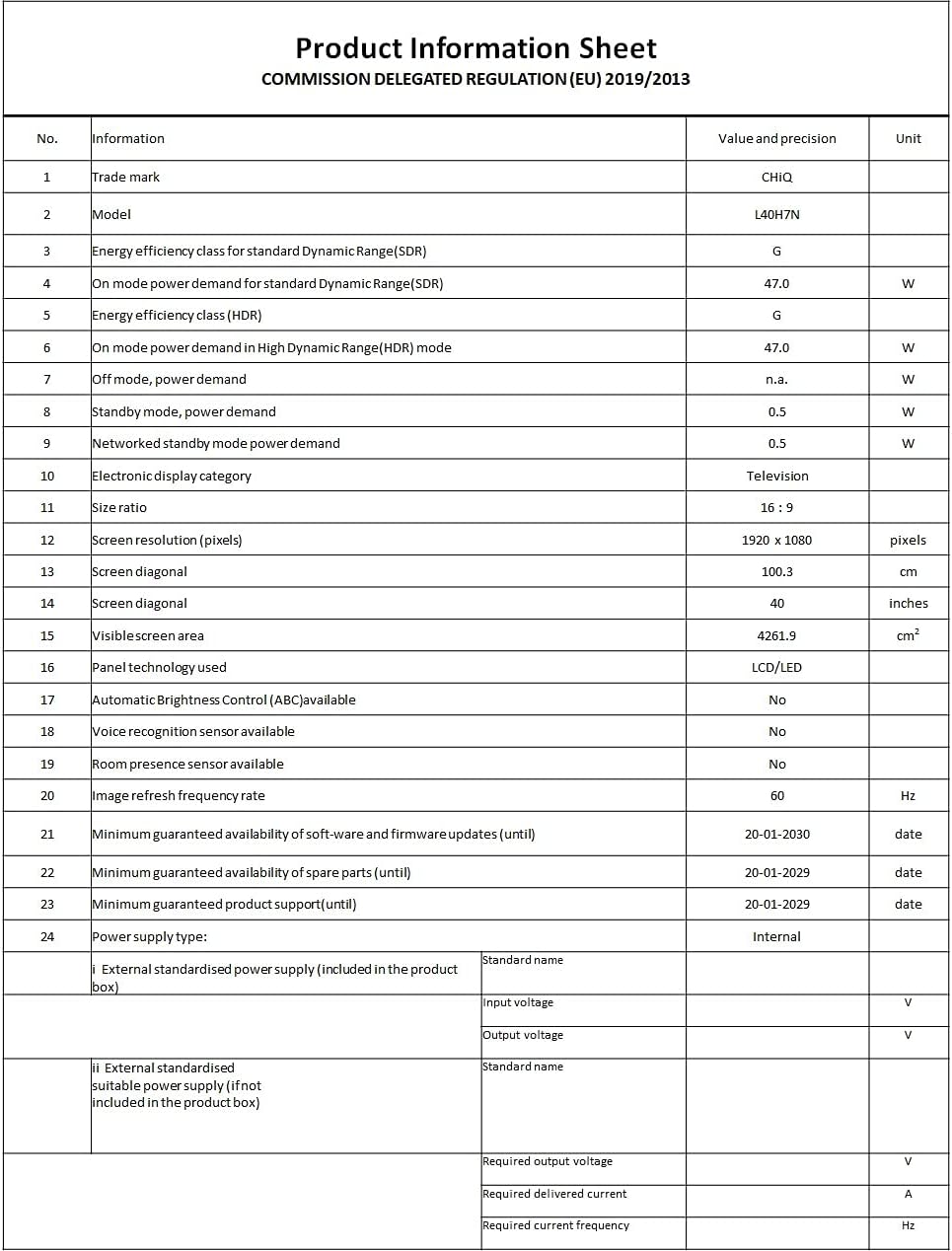
Image: A Product Information Sheet for the CHIQ L40H7N, detailing various specifications and compliance with COMMISSION DELEGATED REGULATION (EU) 2019/2013.
8. Takuu ja tuki
Your CHIQ L40H7N Smart TV comes with a manufacturer's warranty. Please refer to the warranty card included in your product packaging for specific terms and conditions, including warranty period and coverage details.
Asiakastuki:
For technical assistance, troubleshooting, or warranty claims, please contact CHiQ customer support. Contact information can typically be found on the CHiQ official websivustolla tai tuotedokumentaatiossa.