
BTMETER BT-38B
BTMETER Digital Pen Multimeter BT-38B User Manual
Model: BT-38B (2000 Counts)
1. Johdanto
Thank you for choosing the BTMETER Digital Pen Multimeter BT-38B. This compact and versatile instrument is designed for accurate measurement of AC/DC voltage, resistance, and continuity. Its pen-type design, backlit screen, and integrated flashlight make it ideal for various electrical testing applications in residential, industrial, and DIY settings. Please read this manual thoroughly before operation to ensure safe and proper use.
2. Turvallisuustiedot
Noudata aina turvaohjeita sähköisiä testauslaitteita käyttäessäsi. Näiden noudattamatta jättäminen voi aiheuttaa sähköiskun, vamman tai vahingoittaa mittaria tai testattavaa laitetta.
- Älä ylitä kullekin mittausalueelle määritettyjä enimmäistuloarvoja.
- Ole erittäin varovainen, kun työskentelet voltagyli 30 V AC RMS, 42 V huippu tai 60 V DC. Nämä jännitteettagse aiheuttaa sähköiskuvaaran.
- Tarkista mittausjohdot vaurioiden varalta ennen jokaista käyttökertaa. Älä käytä, jos eristys on vaurioitunut.
- Varmista, että toimintokytkin on oikeassa asennossa halutulle mittaukselle ennen piiriin kytkemistä.
- Älä käytä mittaria, jos se näyttää vaurioituneelta tai ei toimi kunnolla.
- Keep hands and fingers behind the probe barriers during testing.
- Vaihda paristot viipymättä, kun heikon pariston varoitusvalo tulee näkyviin, jotta mittaustulokset ovat tarkkoja.
3. Pakkauksen sisältö

Kuva 3.1: Pakkauksen sisältö
The BTMETER BT-38B package typically includes:
- 1 x BTMETER Digital Pen Multimeter (BT-38B)
- 1 x Käyttöohje
- 2 x AAA Batteries (may be included separately or pre-installed)
4. Tuote ohiview ja näppäintoiminnot

Kuva 4.1: Keskeiset toiminnotview
The BT-38B is designed for ease of use with clearly labeled components:
- Lamp Valo: Provides illumination for working in dim environments.
- Test Lead Fixture: Securely holds the test leads.
- LCD-näyttö: Näyttää mittaustulokset, yksiköt ja indikaattorit.
- Vaihtokytkin: Used to select between OFF, Voltage (V), and Ohms (Ω) / Continuity / Diode Test modes.
- HOLD-näppäin: Press to hold the current reading on the display. Press again to exit.
- Taustavalo/Taskulamppu-painike: Press for more than 2 seconds to turn on the backlight. Press again for more than 2 seconds to turn it off. The backlight automatically turns off after 15 seconds. A short press activates the front LED flashlight.
- SELECT-näppäin: In the Ohms/Continuity/Diode Test range, press this key to cycle through Resistance, Diode, and Continuity test modes. In Voltage mode, it switches between DC and AC voltage mittaukset.
- Akun kansi: Access point for battery installation and replacement.
- COM Input Test Lead: Common (negative) input for measurements.
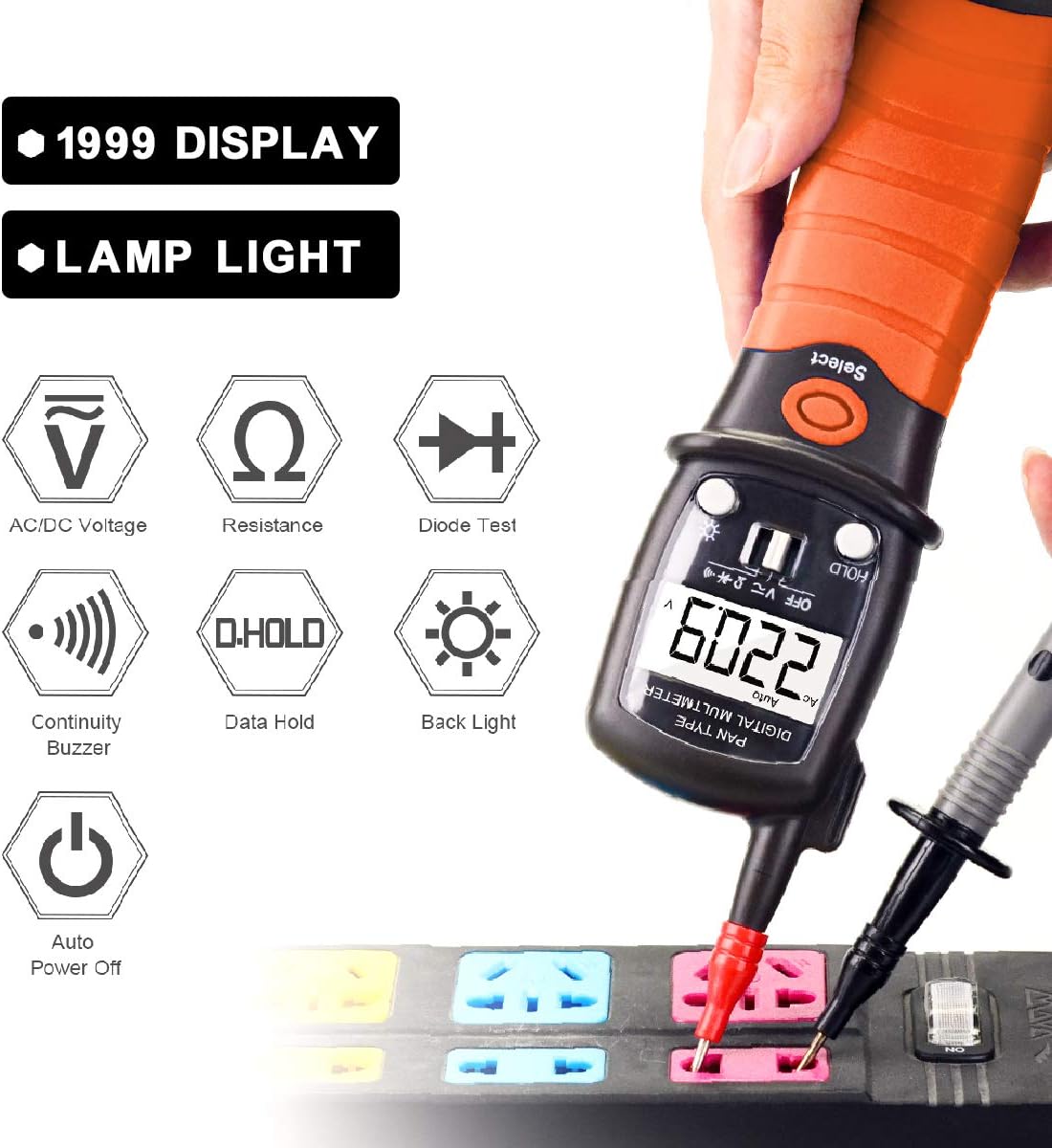
Figure 4.2: Functional Icons
5. Asennus
5.1 Akun asennus
The BTMETER BT-38B requires two AAA batteries for operation.

Kuva 5.1: Pariston vaihtaminen
- Locate the battery cover at the bottom of the multimeter.
- Rotate the battery bin counter-clockwise until it pops up.
- Carefully pull out the battery bin.
- Aseta kaksi AAA-paristoa paikoilleen varmistaen oikea napaisuus (+/-).
- Slide the battery bin back into the multimeter and rotate clockwise to secure it.
Kun akkukuvake 🔋 lights up on the screen, it indicates that the battery needs to be replaced.
6. Käyttöohjeet
6.1 Yleinen käyttö
- Turn the toggle switch from OFF to the desired measurement function (Voltage or Ohms/Continuity/Diode).
- Kytke mittausjohdot testattavaan piiriin tai komponenttiin.
- Lue mittausarvo LCD-näytöltä.
- The meter features an Auto Power Off function after 15 minutes of inactivity to conserve battery life. A "BEEP" warning will sound before auto power off.
6.2 AC/DC Voitage Mittaus
The BT-38B can measure AC voltage from 2V to 600V and DC voltage 200 mV:sta 600 V:iin.
- Turn the toggle switch to the "V" position.
- Paina VALITSE button to switch between AC and DC voltage modes as needed. The display will indicate "AC" or "DC".
- Connect the red test lead to the positive (+) side of the circuit and the black test lead (COM) to the negative (-) side or ground.
- Lue voltage -arvo nestekidenäytössä.
6.3 Resistanssin mittaus
Measure resistance from 200 Ohm to 20M Ohm.
- Turn the toggle switch to the "Ω" position.
- Varmista, että virtapiiri on jännitteetön ennen resistanssin mittaamista.
- Connect the test leads across the component whose resistance you wish to measure.
- Lue vastusarvo LCD-näytöltä.
6.4 Jatkuvuustesti
The built-in buzzer sounds if resistance is less than 50Ω.
- Turn the toggle switch to the "Ω" position.
- Paina VALITSE button until the continuity symbol (a sound wave icon) appears on the display.
- Kytke mittausjohdot piiriin tai komponenttiin.
- Jos jatkuvuus on olemassa (matala resistanssi), summeri soi.
6.5 Tietojen säilytystoiminto
Nykyisen lukeman jäädyttäminen näytössä:
- Paina PIDÄ button during a measurement. The "HOLD" indicator will appear.
- Paina PIDÄ button again to release the data hold and resume live readings.
6.6 Taustavalo ja taskulamppu

Kuva 6.1: LED-taskulamppu käytössä
- Taustavalo: Press and hold the backlight button (sun icon) for more than 2 seconds to turn on the LCD backlight. Press and hold again for more than 2 seconds to turn it off. The backlight will automatically turn off after 15 seconds.
- Taskulamppu: A short press of the backlight button (sun icon) will activate the front LED flashlight, useful for illuminating dark work areas.
7. Huolto
7.1 Puhdistus
Wipe the meter with a dry, clean cloth. Do not use abrasives or solvents.
7.2 Pariston vaihto
Refer to Section 5.1 for detailed instructions on battery replacement. Always use fresh AAA batteries.
7.3 Varastointi
If the meter is not used for an extended period, remove the batteries to prevent leakage and damage. Store in a cool, dry place away from direct sunlight.
8. Vianmääritys
| Ongelma | Mahdollinen syy | Ratkaisu |
|---|---|---|
| Mittari ei käynnisty. | Tyhjät tai väärin asennetut paristot. | Tarkista paristojen napaisuus tai vaihda paristot. |
| Epätarkkoja lukemia. | Low battery; incorrect function selected; damaged test leads. | Replace batteries; ensure correct function mode; inspect and replace test leads if damaged. |
| Ei jatkuvuusääntä. | Not in continuity mode; open circuit; resistance too high. | Press SELECT to enter continuity mode; check circuit for breaks; ensure resistance is below 50Ω. |
| Näytössä näkyy "OL" (ylikuormitus). | Measurement exceeds the selected range. | Ensure the measurement is within the meter's specified range. |
9. Tekniset tiedot
| Parametri | Arvo |
|---|---|
| Merkki | BTMETER |
| Malli | BT-38B (2000 Counts) |
| Mittaustyyppi | Yleismittari, volttimittari |
| AC Voitage Alue | 2V ~ 600V |
| DC Voitage Alue | 200mV ~ 600V |
| Resistanssialue | 200 Ohm ~ 20M Ohm |
| Jatkuvuustesti | Summeri soi, jos resistanssi on < 50 Ω |
| Näyttö | Backlit LCD, 12mm tall digits |
| Virtalähde | 2 x AAA-paristot |
| Automaattinen virrankatkaisu | Kolmen minuutin käyttämättömyyden jälkeen |
| Tuotteen paino | 200 grammaa (noin 7.1 unssia) |
| Materiaali | ABS |
| Erittely Met | CE |
10. Takuu ja tuki
BTMETER products are designed for reliability and performance. For warranty information, technical support, or any inquiries regarding your BT-38B Digital Pen Multimeter, please refer to the contact details provided with your purchase or visit the official BTMETER websivusto.
BTMETER offers fast and effective 24x7 professional tech support.
Ask a question about this manual
Ask about setup, troubleshooting, compatibility, parts, safety, or missing instructions. Manuals+ will review the question and use this page’s manual context to help answer it.