
Johdanto
This manual provides detailed instructions for the safe and efficient use of your FONESTAR DOTS-N Bluetooth TWS Speaker. Please read this manual thoroughly before operating the device and retain it for future reference.
The FONESTAR DOTS-N is a portable Bluetooth TWS speaker featuring Bluetooth 4.2 and NFC connectivity. It offers powerful sound with enhanced bass, playback controls, and hands-free calling. Equipped with a rechargeable Li-Ion battery providing up to 10 hours of autonomy, it also includes a 3.5mm auxiliary input. Its compact design makes it suitable for home use.
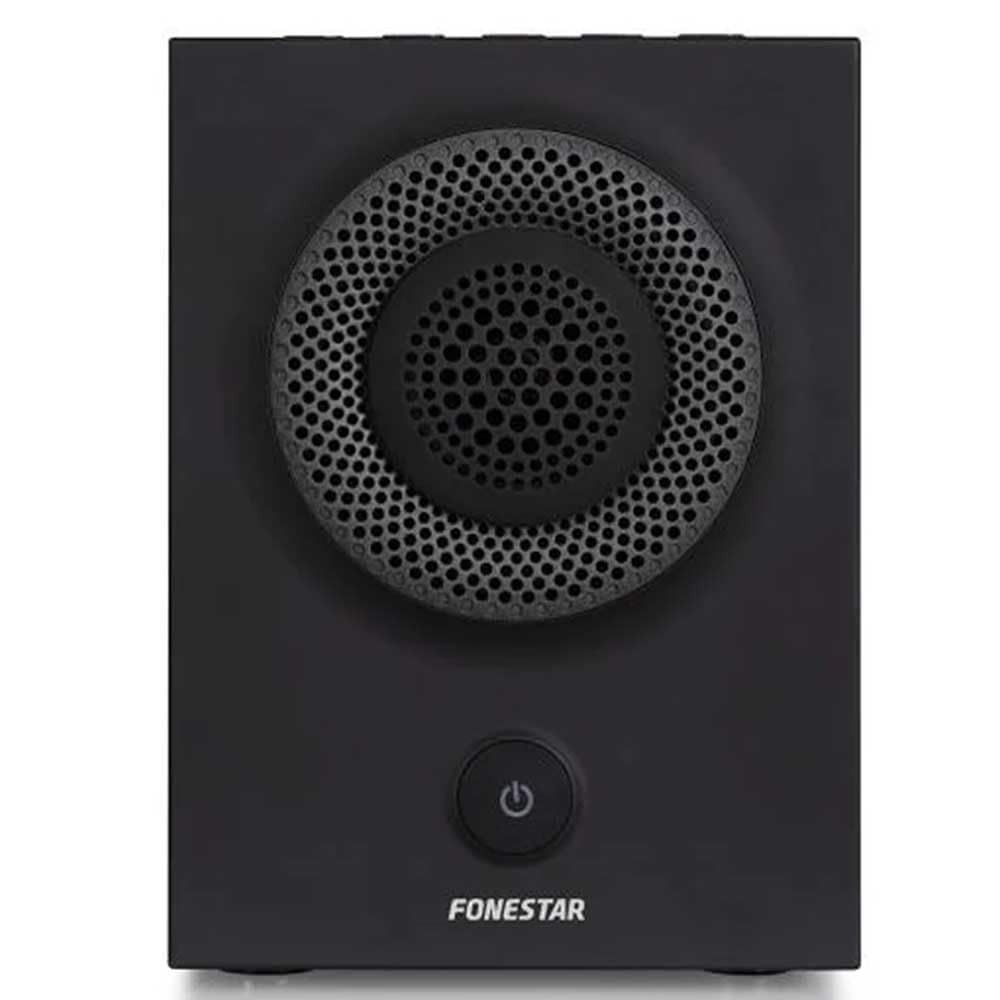
Kuva 1: Etuosa view of the FONESTAR DOTS-N Bluetooth TWS Speaker.
Asennus
1. Purkaminen
Poista kaikki osat varovasti pakkauksesta. Varmista, että kaikki alla luetellut osat ovat mukana:
- FONESTAR DOTS-N Bluetooth TWS Speaker
- USB - Micro USB -latauskaapeli
- 3.5 mm:n stereoäänikaapeli
- Käyttöopas (tämä asiakirja)
2. Kaiuttimen lataaminen
Before first use, fully charge the speaker. Connect the Micro USB end of the charging cable to the speaker's charging port and the USB-A end to a compatible USB power adapter (not included) or a computer's USB port.
- Latauksen merkkivalo palaa latauksen aikana.
- Latausaika on noin 3 tuntia täydellä latauksella.
- Merkkivalo muuttuu tai sammuu, kun lataus on valmis.
3. Virta päälle / pois
To power on the speaker, press and hold the power button (usually indicated by a ⏻ symbol) for a few seconds until you hear an audible prompt or see an indicator light. To power off, repeat the process.
Käyttöohjeet
1. Bluetooth-pariliitos
The speaker supports Bluetooth 4.2 for wireless audio streaming.
- Ensure the speaker is powered on and in pairing mode (usually indicated by a flashing LED). If not, press the Bluetooth pairing button or power button briefly to enter pairing mode.
- Siirry älypuhelimellasi, tabletillasi tai muulla Bluetooth-laitteellasi Bluetooth-asetuksiin.
- Etsi available devices and select "FONESTAR DOTS-N" from the list.
- Once paired, the speaker will emit an audible confirmation, and the LED indicator will typically become solid.
2. NFC-pariliitos (lähikenttäviestintä)
For devices with NFC, pairing can be done quickly:
- Varmista, että NFC on käytössä laitteessasi ja kaiuttimeen on kytketty virta.
- Tap your NFC-enabled device gently against the NFC area on the speaker (refer to product diagram for exact location, if available).
- Vahvista pariliitospyyntö laitteellasi.
3. True Wireless Stereo (TWS) -toiminto
The TWS function allows you to pair two FONESTAR DOTS-N speakers together for a stereo sound experience.
- Ensure both DOTS-N speakers are powered on and not connected to any other Bluetooth device.
- On one speaker (this will be the primary speaker), press and hold the TWS button (if available) or a designated button for TWS pairing.
- Ensisijainen kaiutin etsii toissijaista kaiutinta. Kun yhteys on muodostettu, molemmat kaiuttimet lähettävät vahvistusäänen.
- Now, connect your Bluetooth device to the primary speaker as described in the "Bluetooth Pairing" section. Audio will play in stereo through both speakers.
4. Lisälaitetulo (AUX)
For non-Bluetooth devices, use the included 3.5mm stereo audio cable.
- Liitä 3.5 mm:n äänikaapelin toinen pää kaiuttimen AUX-in-porttiin.
- Liitä toinen pää laitteen kuulokeliitäntään tai äänilähtöön.
- Kaiutin vaihtaa automaattisesti AUX-tilaan tai se voi vaatia manuaalisen valinnan tilapainikkeella.
5. Playback Control and Hands-Free Calls
The speaker features integrated controls for music playback and managing calls:
- Toista/tauko: Press the Play/Pause button (often combined with the power button or a dedicated button).
- Äänenvoimakkuus ylös/alas: Käytä äänenvoimakkuuspainikkeita (+ / -) on the speaker.
- Seuraava / edellinen kappale: Long press or double-press the volume buttons, or use dedicated track skip buttons if present.
- Puhelun vastaaminen/lopetus: Press the Play/Pause button during an incoming call to answer, and again to end the call.
- Hylkää puhelu: Pidä Toista/Tauko-painiketta painettuna saapuvan puhelun aikana.
Huolto
1. Puhdistus
- Katkaise aina kaiuttimen virta ennen puhdistamista.
- Pyyhi ulkopinnat pehmeällä, kuivalla ja nukkaamattomalla liinalla.
- Älä käytä hankaavia puhdistusaineita, vahoja tai liuottimia, sillä ne voivat vahingoittaa pintaa.
- Vältä kosteuden joutumista aukkoihin.
2. Varastointi
- Säilytä kaiutinta viileässä, kuivassa paikassa, poissa suorasta auringonvalosta ja äärimmäisistä lämpötiloista.
- Jos akkua säilytetään pitkään, lataa se noin 50-prosenttisesti muutaman kuukauden välein akun kunnon ylläpitämiseksi.
3. Akun hoito
- Do not expose the battery to excessive heat, fire, or direct sunlight.
- Vältä akun usein tapahtuvaa täydellistä tyhjentymistä, sillä se voi lyhentää sen käyttöikää.
- Käytä ainoastaan laitteen mukana toimitettua latauskaapelia tai vastaavaa sertifioitua kaapelia.
Vianetsintä
| Ongelma | Mahdollinen syy | Ratkaisu |
|---|---|---|
| Kaiutin ei käynnisty. | Akku on tyhjä. | Lataa kaiutin mukana toimitetulla USB-kaapelilla. |
| Pariliitos Bluetoothin kautta ei onnistu. | Kaiutin ei ole pariliitostilassa; laite on liian kaukana; häiriöitä. | Ensure speaker is in pairing mode. Move device closer (within 10m). Turn off other Bluetooth devices. |
| Ei ääntä tai äänenvoimakkuus on alhainen. | Kaiuttimen tai lähdelaitteen äänenvoimakkuus liian alhainen; väärä syöttötila. | Increase volume on both speaker and source device. Check if the correct input (Bluetooth/AUX) is selected. |
| TWS-pariliitos epäonnistuu. | Speakers are already paired to another device; incorrect TWS pairing procedure. | Varmista, että molemmat kaiuttimet on irrotettu muista laitteista. Noudata TWS-pariliitoksen muodostamisen vaiheita huolellisesti. |
| Äänen vääristymä. | Liian suuri äänenvoimakkuus; heikko akku; heikko signaali. | Reduce volume. Charge the speaker. Move source device closer to the speaker. |
Tekniset tiedot

Figure 2: Dimensions of the FONESTAR DOTS-N Bluetooth TWS Speaker.
| Mallin nimi | DOTS-N |
| Merkki | FONESTAR |
| Yhteystekniikka | Bluetooth 4.2, NFC, 3.5mm AUX |
| Wireless Range | Jopa 10 metriä (33 jalkaa) |
| Äänilähtötila | Stereo (TWS-kaiuttimilla) |
| Kaiuttimen tyyppi | 3" Coaxial Woofer with Tweeter, 3" Subwoofer, 4" Passive Radiator |
| Kaiuttimen maksimilähtöteho | 12 watin tehollisarvo |
| Taajuusvaste | 80–20 000 Hz |
| Signaali-kohinasuhde | ≥ 75 dB |
| Virtalähde | Akkukäyttöinen (ladattava litiumioniakku) |
| Akun kapasiteetti | 2200 mAh, 7.4 V |
| Akun autonomia | Jopa 10 tuntia (50 % tilavuudella) |
| Latausaika | Noin 3 tuntia |
| Valvontamenetelmä | Taktiili (kosketus) |
| Erikoisominaisuudet | High-res audio, Bluetooth, Integrated microphone, USB port (for charging) |
| Yhteensopivat laitteet | Älypuhelimet, tabletit |
| Suositeltu käyttö | For home |
| Väri | Musta |
| Mitat (L x K x S) | 125 x 175 x 158 mm (noin 4.9 x 6.9 x 6.2 tuumaa) |
| Tuotteen paino | 1.82 kg (noin 4.01 lbs) |
| Vedenpitävä | Ei |
Note: Specifications are subject to change without prior notice. Battery autonomy may vary depending on usage, volume level, and music type.
Takuutiedot
FONESTAR products are designed and manufactured to the highest quality standards. This product is covered by a limited warranty against manufacturing defects from the date of purchase. The specific terms and duration of the warranty may vary by region and retailer.
Please retain your proof of purchase (receipt or invoice) as it will be required for any warranty claims. The warranty does not cover damage caused by misuse, accident, unauthorized modification, or normal wear and tear.
For detailed warranty terms and conditions, please refer to the warranty card included with your product or contact your local FONESTAR distributor or retailer.
Asiakastuki
If you encounter any issues that are not resolved by the troubleshooting guide, or if you require further assistance, please contact FONESTAR customer support or your authorized retailer.
Kun otat yhteyttä tukeen, ole hyvä ja valmistaudu antamaan seuraavat tiedot:
- Product Model: FONESTAR DOTS-N
- Ostopäivämäärä
- ongelman kuvaus
- Yhteystietosi
For the most up-to-date support information, including contact details and FAQs, please visit the official FONESTAR websivusto.