
Johdanto
Thank you for choosing the Ksix Fitness Band GPS. This manual provides essential information for setting up, operating, and maintaining your device. Please read it carefully to ensure optimal performance and longevity of your fitness band.
The Ksix Fitness Band GPS is designed to monitor your physical activity comprehensively, featuring integrated GPS for route tracking, a dynamic 24-hour heart rate monitor, and a multi-sport mode to enhance your training sessions.
Tuote loppuview
The Ksix Fitness Band GPS is a versatile smartband equipped with advanced features to support your fitness journey. Its lightweight design and 1.3-inch TFT color screen offer a comfortable and clear user experience.
- Integroitu GPS: Records your route during outdoor activities.
- 24-Hour Dynamic Heart Rate Monitor: Seuraa jatkuvasti sykettäsi.
- Moniurheilutila: Monitors various types of workouts.
- Vedenkestävyys: IP68 rated, waterproof up to 3 meters for 1 hour.
- Liitettävyys: Bluetooth 4.0 for seamless connection with your smartphone.
- Yhteensopivuus: Works with Android 4.4 and later, and iOS 8.0 and later.
- Akun kesto: Up to 7-8 hours with GPS and real-time heart rate monitoring, and up to 30 days in standby mode.

Image 1: Ksix Fitness Band GPS displaying time and date.
Asennusopas
1. Laitteen lataaminen
Before first use, fully charge your Ksix Fitness Band GPS. Connect the charging cable to the designated port on the device and a USB power source. The screen will indicate charging status.
2. Installing the Hi Move App
- Etsi "Hi Move" in your smartphone's app store (Google Play Store for Android or Apple App Store for iOS).
- Lataa ja asenna sovellus.
- Avaa sovellus ja seuraa näytön ohjeita luodaksesi tilin ja määrittääksesi ammattilaisen.file.
3. Yhdistäminen älypuhelimeen
- Varmista, että Bluetooth on käytössä älypuhelimellasi.
- Open the Hi Move app.
- Siirry sovelluksen laitteiden pariliitososioon.
- The app will search for available devices. Select "Ksix Fitness Band GPS" from the list.
- Confirm the pairing request on both your smartphone and the fitness band, if prompted.
- Once paired, the time and date on your fitness band will synchronize with your phone.
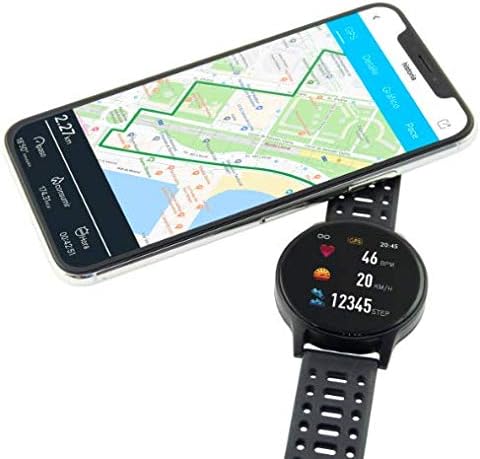
Image 2: Ksix Fitness Band GPS connected to a smartphone displaying a GPS-tracked route.
Käyttöohjeet
Liikkuminen käyttöliittymässä
The fitness band features a touch-sensitive screen. Swipe left/right or up/down to navigate through different functions and menus. Tap to select an option or confirm an action.
GPS-seuranta
Tarkan GPS-paikannuksen varmistamiseksi varmista, että olet avoimella ulkoalueella, jossa on esteetön valo. view of the sky. Start your activity from the multi-sport mode, and the device will automatically attempt to acquire a GPS signal. Your route will be recorded and can be viewed in the Hi Move app after synchronization.
Sykemittaus
The fitness band continuously monitors your heart rate. Wear the band snugly on your wrist, about one finger's width above your wrist bone, for accurate readings. You can view your current heart rate on the device and detailed historical data in the Hi Move app.
Moniurheilutila
Access the multi-sport mode from the main menu to select specific activities such as running, walking, cycling, etc. Selecting an activity will initiate tracking of relevant metrics like duration, distance, calories burned, and heart rate. End the activity when finished to save the data.

Image 3: Ksix Fitness Band GPS showing a person running, highlighting features like pedometer, multi-sport mode, heart rate monitoring, and distance tracking.
Huolto
Puhdistus
Regularly clean your fitness band and strap to prevent skin irritation and maintain device hygiene. Use a soft, damp pyyhi laite liinalla. Vältä voimakkaiden kemikaalien tai hankaavien materiaalien käyttöä.
Vedenkestävyys
The device is IP68 waterproof, meaning it can withstand immersion in water up to 3 meters deep for a maximum of 1 hour. It is suitable for swimming in shallow water but not recommended for diving, high-pressure water activities, or prolonged immersion. Ensure the charging port is dry before charging.
Varastointi
When not in use for extended periods, store the fitness band in a cool, dry place. Avoid extreme temperatures and direct sunlight.
Vianetsintä
- Laite ei käynnisty: Varmista, että laite on ladattu täyteen. Liitä se laturiin ja odota muutama minuutti.
- Ei voi yhdistää älypuhelimeen:
- Varmista, että Bluetooth on käytössä puhelimessasi.
- Make sure the fitness band is within Bluetooth range of your phone.
- Restart both your phone and the fitness band.
- Try unpairing and re-pairing the device through the Hi Move app.
- Epätarkat sykelukemat:
- Ensure the band is worn snugly on your wrist, not too loose or too tight.
- Puhdista laitteen takana oleva anturi.
- Vältä liiallista liikettä mittauksen aikana.
- GPS ei löydä signaalia:
- Varmista, että olet avoimella ulkoalueella, jossa on esteetön view taivaalta.
- Odota muutama minuutti, että laite löytää signaalin.
- Ensure the device's firmware is up to date via the Hi Move app.
- Tiedot eivät synkronoidu sovellukseen:
- Ensure the fitness band is connected to your phone via Bluetooth.
- Open the Hi Move app and manually initiate a sync if available.
- Tarkista puhelimesi internet-yhteys.
Tekniset tiedot
| Mallinumero | BXBZGPS01 |
| Merkki | Ksix |
| Näytön koko | 1.3 tuumaa |
| Näytön tyyppi | TFT Color |
| Akun kapasiteetti | 230 mAh (litiumioniakku) |
| Battery Life (GPS + HR) | 7-8 tuntia |
| Akun kesto (valmiustila) | Jopa 30 päivää |
| Vedenkestävyys | IP68 (up to 3 meters for 1 hour) |
| Yhteydet | Bluetooth 4.0 |
| Yhteensopivuus | Android 4.4+ / iOS 8.0+ |
| Paino | 38 grammaa |
| Materiaali | Muovi, PVC |
| Väri | Musta |
Takuu ja tuki
For warranty information and technical support, please refer to the documentation provided with your purchase or visit the official Ksix websivusto. Säilytä ostokuitti takuuvaatimuksia varten.
Valmistaja: KSIX
Ota yhteyttä: Please refer to the Ksix official websivustolta asiakaspalvelun yhteystiedot.


