
Johdanto
The NEDIS Universal Programmable Remote Control (model TVRC1140BK) is designed to manage up to 4 different devices. This remote can be programmed via a personal computer (PC) to replace original remote controls for various electronic devices, including televisions (TV), video cassette recorders (VCR), digital versatile disc players (DVD), and digital video broadcasting terrestrial receivers (DVB-T). It is engineered to replicate most functions of your original remotes, providing a consolidated control solution.
Turvallisuustiedot
- Do not expose the remote control to direct sunlight, heat, or moisture.
- Vältä kaukosäätimen pudottamista tai voimakkaiden iskujen kohteeksi altistamista.
- Älä yritä purkaa tai muokata kaukosäädintä. Tämä mitätöi takuun.
- Pidä paristot poissa lasten ulottuvilta. Jos ainetta on nielty, hakeudu välittömästi lääkärin hoitoon.
- Hävitä käytetyt paristot paikallisten määräysten mukaisesti. Älä hävitä paristoja tulessa.
- Use only the specified battery type (2x AAA Alkaline).
Pakkauksen sisältö
Tarkista pakkauksesta seuraavat tuotteet:
- NEDIS Universal Programmable Remote Control (TVRC1140BK)
- USB-ohjelmointikaapeli
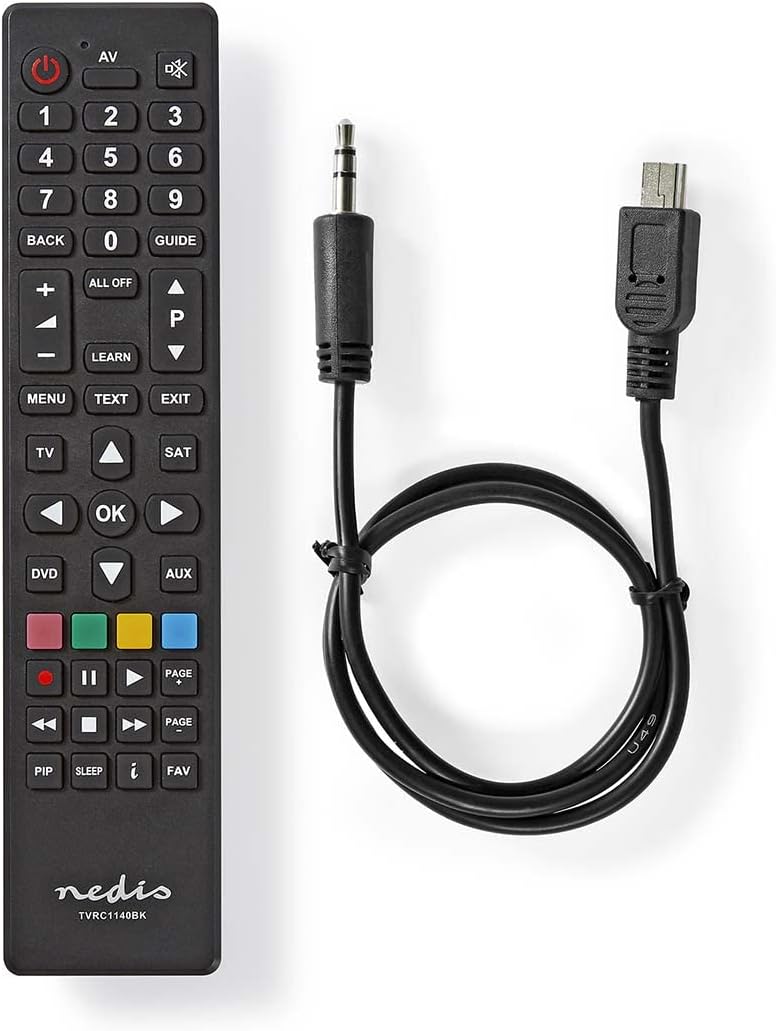
Image: The NEDIS Universal Remote Control TVRC1140BK shown alongside its USB programming cable.
Tuote loppuview
The remote control features a clear button layout for intuitive operation. Familiarize yourself with the various buttons and their functions before use.

Kuva: Edessä view of the NEDIS Universal Remote Control TVRC1140BK, displaying all control buttons.
Tärkeimmät painikkeet ja toiminnot:
- Virtanappi (): Kytkee laitteet päälle tai pois päältä.
- Device Selection Buttons (TV, DVD, SAT, AUX): Valitsee laitteen, jota haluat ohjata.
- Numeronäppäimistö (0-9): For channel selection and data input.
- Äänenvoimakkuus ylös/alas (+/-): Säätää äänenvoimakkuutta.
- Kanava ylös/alas (P/P): Vaihtaa kanavia.
- Navigointipainikkeet (ylös, alas, vasemmalle, oikealle, OK): Valikon navigointia ja valintaa varten.
- Valikko/Poistu: Accesses or exits device menus.
- Opi-painike: Used for programming functions from an original remote.
- Värilliset painikkeet (punainen, vihreä, keltainen, sininen): Often used for specific functions in menus or teletext.
Asennus
1. Akun asennus
- Avaa kaukosäätimen takana oleva paristolokeron kansi.
- Insert two (2) AAA Alkaline batteries, ensuring the correct polarity (+ and -) as indicated inside the compartment.
- Sulje paristolokeron kansi kunnolla.
2. PC-ohjelmointi
The NEDIS TVRC1140BK remote control is programmed using dedicated software on a PC. This method allows for comprehensive device code loading and customization.
- Ohjelmiston lataus: Visit the official NEDIS support website to download the latest programming software for the TVRC1140BK model.
- Ohjelmiston asennus:
- If you have previously installed an older version of the software, uninstall it completely before proceeding.
- For new users, install the downloaded software directly by following the on-screen instructions.
- Liitä kaukosäädin: Use the provided USB programming cable to connect the remote control to an available USB port on your PC.
- Programming Process: Follow the instructions within the software to select your device types (TV, DVD, VCR, DVB-T, etc.) and load the appropriate control codes onto the remote. The software typically guides you through the process of assigning functions to buttons.
Huomautus: For optimal performance and access to the latest device codes, always use the most current version of the programming software available from the manufacturer.
Kaukosäätimen käyttö
Once programmed, the remote control functions similarly to your original device remotes.
- Valitse laite: Paina vastaavaa laitteen painiketta (esim. TV, DVD, SAT, AUX) to select the device you wish to control. The indicator light on the remote may illuminate to confirm selection.
- Point and Operate: Point the remote control directly at the device's infrared receiver.
- Use Functions: Press the desired function buttons (e.g., Power, Volume, Channel, Menu, Play, Pause) to control your selected device.
Huolto
- Puhdistus: Pyyhi kaukosäädin pehmeällä, kuivalla liinalla. Älä käytä hankaavia puhdistusaineita tai liuottimia.
- Akun vaihto: Replace batteries when the remote's performance degrades or if the indicator light does not illuminate. Always replace both batteries at the same time with new AAA Alkaline batteries.
- Varastointi: Jos kaukosäädintä ei käytetä pitkään aikaan, poista paristot vuotojen estämiseksi.
Vianetsintä
- Kaukosäädin ei vastaa:
- Tarkista, että paristot on asetettu oikein ja että niissä on riittävästi virtaa. Vaihda tarvittaessa.
- Ensure there is a clear line of sight between the remote control and the device's infrared receiver.
- Verify that the correct device mode (TV, DVD, etc.) is selected on the remote.
- Device functions not working correctly after programming:
- The device code may be incorrect or incomplete. Re-program the remote using the PC software, ensuring you select the correct manufacturer and model for your device.
- Some specific functions might not be available if the original remote had unique features not supported by the universal remote's code database.
- Consult the NEDIS support website for updated software or additional programming tips.
- PC programming software issues:
- Ensure you have uninstalled any previous versions of the software before installing the latest one.
- Check your PC's operating system compatibility with the software.
- Kokeile käyttää toista USB-porttia tai käynnistä tietokone uudelleen.
Tekniset tiedot
| Merkki | NEDIS |
| Mallinumero | TVRC1140BK |
| Yhteystekniikka | Infrapuna |
| Tuettujen laitteiden enimmäismäärä | 4 |
| Yhteensopivat laitteet | TV, DVD/Blu-ray Player, Set-top Box, VCR |
| Ohjaimen tyyppi | Painikkeiden ohjaus |
| Suurin kantama | 10 metriä |
| Paristot vaaditaan | 2x AAA alkalinen (ei sisälly) |
| Väri | Musta |
Takuu ja tuki
For warranty information, please refer to the terms and conditions provided by your retailer at the time of purchase or contact NEDIS customer support directly. For technical assistance, software updates, and additional resources, please visit the official NEDIS websivusto.