
1. Johdanto
This manual provides essential information for the safe and efficient operation of your DEWIN AT1-2200X Variable Frequency Drive (VFD). This VFD is designed to convert single-phase 220V AC input into three-phase output, suitable for controlling 2.2kW three-phase asynchronous motors. Please read this manual thoroughly before installation and operation to ensure proper usage and to prevent damage or injury.
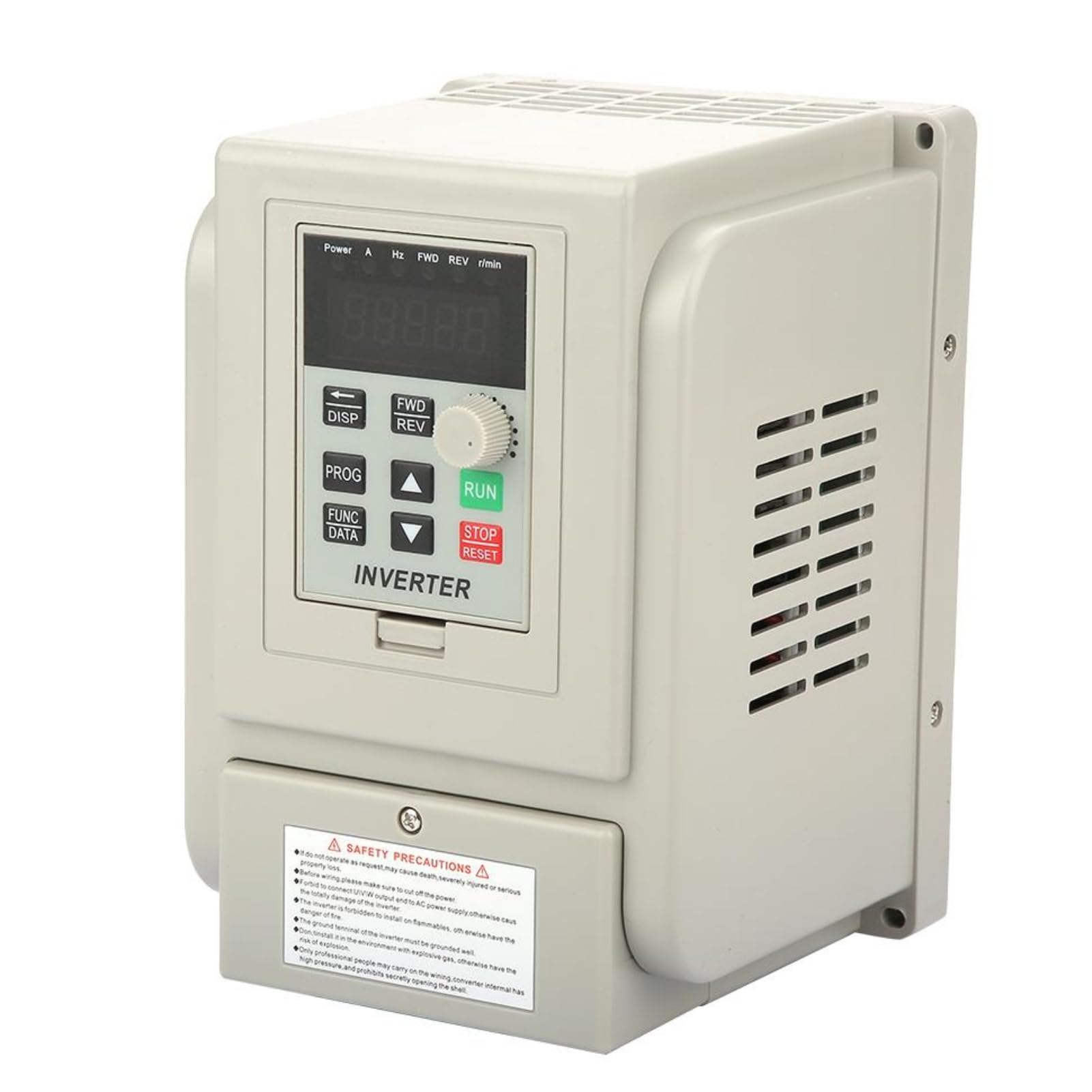
Kuva 1: Etuosa view of the DEWIN AT1-2200X VFD, showing the control panel and safety label.
Tärkeimmät ominaisuudet:
- Useita suojaustoimintoja: Includes protection against overcurrent, overvoltage, aliarvioitage, module failure, overheating, short circuit, input/output phase loss, and more.
- Erinomainen suorituskyky: Achieves high torque, high precision, and a wide range of driving speeds with quick start/stop response and high torque at low speeds.
- Vakaa toiminta: Features good anti-trip performance and adaptability to power supply fluctuations, temperature, humidity, and dust. Equipped with a large heatsink for efficient heat dissipation.
- Anti-interference Capability: Optimized PWM control technology and electromagnetic compatibility reduce noise and electromagnetic interference.
- Yksinkertainen johdotus: Connections are made via screw terminals for straightforward installation.
2. Turvaohjeet
VAROITUS: Näiden turvallisuusohjeiden noudattamatta jättäminen voi aiheuttaa sähköiskun, tulipalon, vakavan loukkaantumisen tai omaisuusvahingon.
- Always read this manual carefully before operating the VFD.
- Varmista, että virtalähde on irrotettu ennen johdotuksen tai huollon suorittamista.
- Only qualified personnel should perform wiring and installation to avoid electric shock or fire.
- Do not install the inverter in environments with flammable materials.
- The ground terminal of the inverter must be reliably grounded.
- Avoid touching the inverter terminals immediately after disconnecting power, as residual voltage voi olla läsnä.

Figure 2: Safety precautions label on the VFD unit.
3. Asennus ja johdotus
Proper wiring is crucial for the safe and correct operation of the VFD. Refer to the wiring diagram below for connections.

Kuva 3: Asennuskytkentäkaavio.
Pääteliitännät:
| Terminaali | Toiminto | Yksityiskohdat |
|---|---|---|
| 15V/24V | Tehotulo/lähtö | 15V/24V power input, 200mA/15V/24V power supply output. |
| X6 | Input Terminal 6 | Wire control CW/CCW. Connects to COM for effective input signal. |
| X5 | Input Terminal 5 | Wire control CCW. Connects to COM for effective input signal. |
| X4 | Input Terminal 4 | Wire control CW. Connects to COM for effective input signal. |
| X3 | Input Terminal 3 | Speed range 3. Connects to COM for effective input signal. |
| X2 | Input Terminal 2 | Speed range 2. Connects to COM for effective input signal. |
| X1 | Input Terminal 1 | Speed range 1. Connects to COM for effective input signal. |
| COM | Yhteinen terminaali | Common terminal for control signals. |
| VI1 | External Analog Voltage Tulo | 0-5V/10V analog voltage -tulo. |
| SP1 | Avaa Collector Output 1 | |
| SP2 | Avaa Collector Output 2 | |
| 5V/10V | Virtalähteen lähtö | 5V/10V 20mA power supply output. |
Ensure all connections are secure and correctly matched to your motor and power supply specifications. The VFD requires a single-phase 220V input and provides a three-phase output for the motor.

Kuva 4: Takaosa view showing power terminals (L, N, W, V, U).
4. Käyttöohjeet
The DEWIN AT1-2200X VFD features an intuitive control panel for easy operation. Familiarize yourself with the buttons and display functions.

Kuva 5: Ohjauspaneelin painikkeet.
Ohjauspaneelin toiminnot:
- 5-numeroinen LED-näyttö: Näyttää nykyiset käyttöparametrit ja asetukset.
- DISP (Liikeavain): Used to switch between monitoring parameters in the monitoring state or to move the data frame to edit bits in the second-level menu.
- PROG (Ohjelman avain): Exits the current operating state and switches to other states, primarily used to enter the monitoring state.
- FUNC/DATA (Toiminto-/Tallennusnäppäin): Enters the menu step-by-step and saves the configured parameters.
- ▼ (Miinus-näppäin): A short or long press decreases data values or function codes.
- ▲ (Plus-näppäin): A short or long press increases data values or function codes.
- ETEEN/TAAKSEPÄIN (Myötä-/Vastapäivään-näppäin): Press to run the motor in the forward direction (CW). Release to stop. Can also be configured for counter-clockwise (CCW) operation.
- STOP/RESET (Stop/Reset Key): Stops the VFD operation and can be used to recover from a previous error interface.
- RUN (toimintonäppäin): Initiates the VFD operation.
5. Tekniset tiedot
Below are the technical specifications for the DEWIN AT1-2200X Variable Frequency Drive:
| Parametri | Arvo |
|---|---|
| Merkki | DEWIN |
| Mallinumero | AT1-2200X |
| Tulo Voltage | Yksivaiheinen 220 V AC |
| Lähtö Voltage | Three-phase 220V AC |
| Nimellisteho | 2.2 kW |
| Mitat (P x L x K) | 18 cm x 31.8 cm x 12.5 cm |
| Paino | 1283 grammaa |
| Virtalähde | Kaapeli sähkö |
| GTIN-koodi / UPC-koodi | 723645761883 |

Figure 6: DEWIN AT1-2200X VFD units showing dimensions.
6. Huolto
Regular maintenance helps ensure the longevity and reliable performance of your VFD.
- Puhdistus: Periodically clean the exterior of the VFD with a soft, dry cloth. Ensure ventilation openings are free from dust and debris to maintain proper airflow for cooling.
- Yhteyden tarkistukset: Regularly inspect all wiring connections for tightness and signs of wear or corrosion. Loose connections can lead to overheating or intermittent operation.
- Ympäristöolosuhteet: Ensure the VFD is operated within its specified environmental conditions (temperature, humidity, dust levels) to prevent premature failure.
- Ammattimainen tarkastus: For complex issues or internal inspections, it is recommended to consult a qualified technician.

Kuva 7: Sisäinen view showing heatsink and cooling fans.
7. Vianmääritys
If you encounter issues with your VFD, refer to the following basic troubleshooting steps:
- Ei virtaa: Check the main power supply and all input wiring connections. Ensure the circuit breaker or fuse is not tripped.
- Moottori ei käy: Verify that the RUN command is active and that the motor is correctly wired to the VFD output terminals. Check for any error codes on the LED display.
- Ylivirta/Ylikuormitus: Reduce the motor load or check for mechanical issues with the motor. Verify that the VFD's current limits are set appropriately for your motor.
- Ylikuumeneminen: Ensure adequate ventilation around the VFD. Clean any dust from the heatsink and fans. Check ambient temperature.
- Näyttövirheet: If an error code appears, consult the full product manual (if available) for specific code meanings and resolutions. Try pressing the STOP/RESET key to clear temporary errors.
For persistent issues or complex problems, contact customer support or a qualified electrician.
8. Takuu ja tuki
For warranty information, technical support, or service inquiries, please refer to the documentation included with your purchase or contact your retailer. Keep your purchase receipt as proof of purchase for warranty claims.