
1. Tuote ohiview
The OOYCYOO 100 Amp MPPT Solar Charge Controller, Model KP60 100, is designed for efficient management of solar power systems. It automatically identifies 12V or 24V battery systems and is compatible with various battery types, including AGM, Sealed, Gel, Flooded, and Lithium. This controller features advanced Maximum Power Point Tracking (MPPT) technology to maximize energy harvest from solar panels, ensuring optimal charging for your battery bank.
Key features include a backlit LCD display for real-time monitoring, enhanced safety protections, and a high DC/DC transfer efficiency of up to 98.7%.

Kuva 1: Etuosa view of the OOYCYOO 100 Amp MPPT Solar Charge Controller, showing the LCD display and connection terminals.
2. Turvallisuusohjeet
Lue kaikki ohjeet ja varoitukset huolellisesti ennen asennusta ja käyttöä. Näiden ohjeiden noudattamatta jättäminen voi aiheuttaa sähköiskun, tulipalon tai vakavan vamman.
- Ensure all wiring is correctly polarized and securely connected to prevent damage to the controller and connected devices.
- Always disconnect the solar panel array and battery before installing or adjusting the controller.
- Asenna ohjain hyvin ilmastoituun tilaan, kauas syttyvistä materiaaleista ja suorasta auringonvalosta.
- Do not disassemble or attempt to repair the controller. Refer to qualified personnel for service.
- Use appropriate circuit breakers or fuses for all connections to protect against overcurrent.
- Wear appropriate personal protective equipment, including eye protection and insulated gloves, during installation.
3. Tuotteen osat ja liitännät
The controller features clearly labeled terminals for solar panel input, battery connection, and load output. It also includes a remote temperature sensor port and USB charging ports.

Kuva 2: Yksityiskohtainen view of the controller's LCD display, 5S Reset button, Solar Panel Terminal, Battery Terminal, Load Terminal, USB 5V2A ports, Remote Temp Sensor port, and RS485 Communication Port.
Paketin sisältö:
- 1 x OOYCYOO 100A MPPT Solar Charge Controller (Model K2500W)
- 1 x lämpötila-anturi
- 1 x Käyttöohje (englanti)
4. Tekniset tiedot
The following table outlines the technical specifications for the OOYCYOO 100 Amp MPPT Solar Charge Controller (Model KP60 100).
| Parametri | Erittely |
|---|---|
| Nimellislatausvirta | 100A |
| System Nominal Voltage | 12V/24VDC Auto Identifying |
| 12V System Max. PV Input Power | 1300W |
| 24V System Max. PV Input Power | 2600W |
| Max. PV Open Circuit Voltage (ääni) | 100VDC |
| Akku Voltage Alue | 9V ~ 32V |
| Power Terminal Wire Gauge | 10 AWG |
| Mitat (P x L x K) | 12 x 7.8 x 3.2 tuumaa (30.5 x 19.8 x 8.1 cm) |
| Paino | 8.84 puntaa (4 kg) |
| Näytön tyyppi | LCD |
| Käyttölämpötila | Jopa 45 °C (113 °F) |
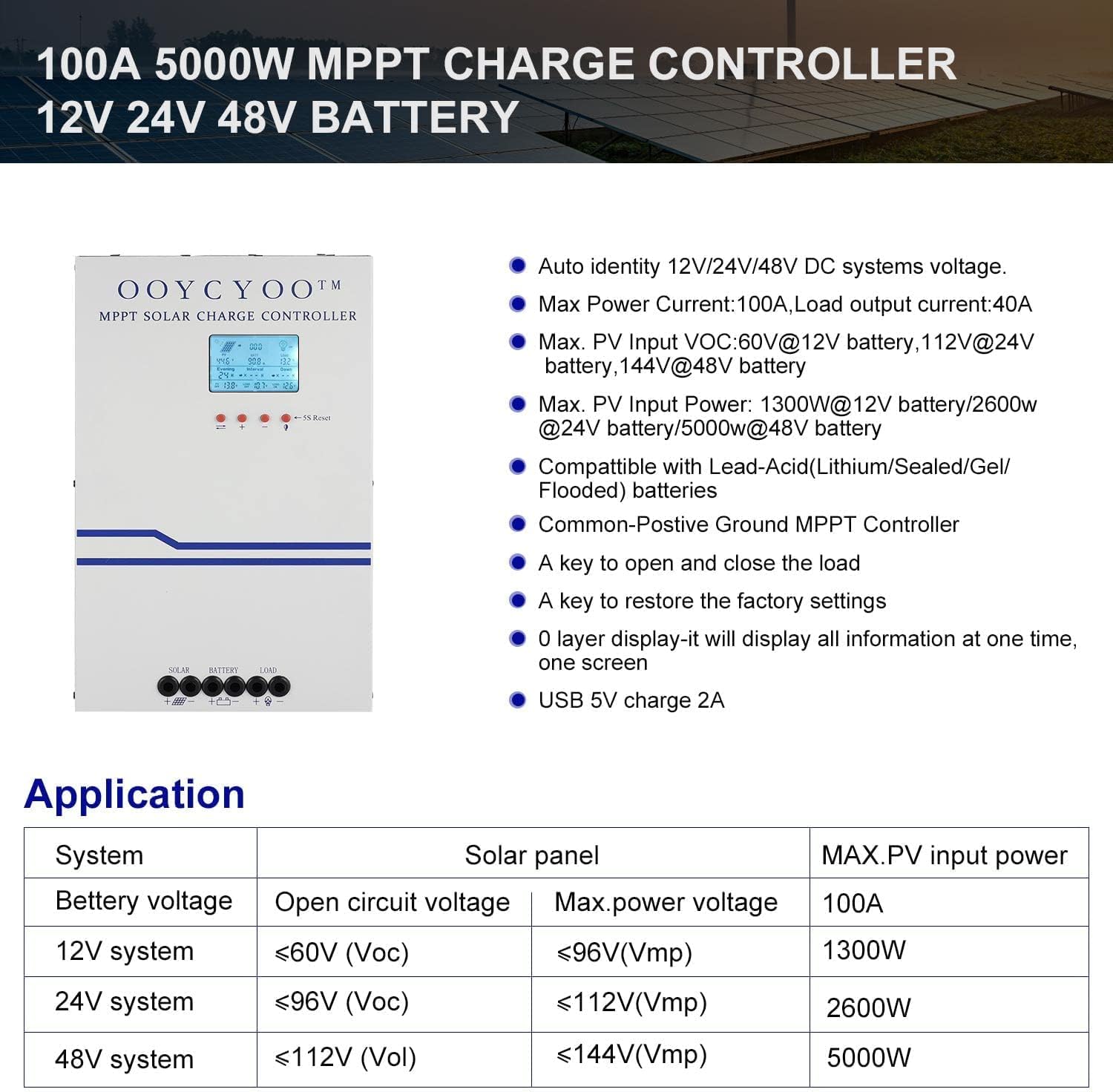
Figure 3: Application table detailing maximum PV input power and voltage for 12V, 24V, and 48V systems.
5. Asennusopas
Oikea asennus on ratkaisevan tärkeää aurinkolataussäätimen turvallisen ja tehokkaan toiminnan kannalta. Noudata näitä ohjeita huolellisesti:
5.1 Ohjaimen asennus
- Valitse kuiva, hyvin ilmastoitu paikka, suojassa suoralta auringonvalolta, korkeilta lämpötiloilta ja kosteudelta.
- Ensure sufficient clearance around the controller for proper airflow, especially around the cooling vents.
- Asenna ohjain pystysuoraan palamattomalle alustalle sopivilla kiinnikkeillä.
5.2 Johdotusliitännät
Connect the components in the following order: Battery > Solar Panel > Load. Always ensure correct polarity.
- Liitä akku: Connect the battery cables to the battery terminals on the controller. Ensure the positive (+) and negative (-) terminals are correctly matched. The controller will automatically detect the battery voltage (12V tai 24V).
- Liitä aurinkopaneeli: Connect the solar panel cables to the PV input terminals on the controller. Verify correct polarity. Ensure the open circuit voltage (Voc) of your solar array does not exceed 100VDC.
- Kytke kuorma: Connect your DC load to the load output terminals. Ensure the load current does not exceed the controller's rated load current.
- Lämpötila-anturin kytkeminen: Plug the remote temperature sensor into its designated port. This sensor helps the controller optimize charging based on battery temperature.
The controller is compatible with various battery types:

Figure 4: The controller supports AGM, Sealed, Gel, Flooded, and Lithium-Iron phosphate batteries for 12V/24V/48V systems.
6. Käyttöopas
Once installed, the controller will begin operation. The LCD display provides real-time system status and allows for configuration.
6.1 LCD-näyttö
The backlit LCD display shows various parameters such as battery voltage, latausvirta, aurinkopaneelin tilavuustage, load status, and accumulated energy (KWH). Use the buttons below the display to navigate through the different screens and access settings.
6.2 Perusasetukset
The controller allows users to set parameters for different battery types (Lithium, LiFePO4, Li(NiCoMn)O2, Flooded, Sealed, Gel). Refer to the on-screen menu for specific adjustments to absorption voltage, float voltage, ja alhainen voltage disconnect settings. A load timer function is also available for controlling DC loads.
6.3 Jäähdytystuulettimen toiminta
The built-in cooling fan activates automatically when the internal temperature exceeds 45°C (113°F) and turns off when the temperature drops below 40°C (104°F). This mechanism ensures optimal performance and extends the lifespan of the controller.
7. Huolto
Säännöllinen huolto auttaa varmistamaan aurinkolataussäätimesi pitkän käyttöiän ja optimaalisen suorituskyvyn.
- Puhdistus: Periodically clean the controller's exterior with a dry cloth. Ensure cooling vents are free from dust and debris.
- Liitännät: Tarkasta vuosittain kaikkien johtojen liitännät kireyden ja korroosion varalta. Löysät liitännät voivat aiheuttaa ylikuumenemista ja vaurioita.
- Ympäristö: Verify that the installation environment remains dry and well-ventilated.
8. Vianmääritys
The controller incorporates multiple protection functions to safeguard your system. If an issue arises, check the LCD display for error codes or indicators.
8.1 Suojaustoiminnot
- PV Over Current/Power Protection
- PV Short Circuit Protection
- PV käänteisen napaisuuden suojaus
- Night Reverse Charging Protection
- Akun käänteisen napaisuuden suojaus
- Akku yli voltage Suojaus
- Akun ylipurkautumissuoja
- Battery Overheating, Controller Overheating Protection
- Lithium Battery Low Temperature Protection
- Kuorman oikosulkusuojaus
- Kuorman ylikuormitussuoja
- TVS High Voltage Transienttien suojaus
8.2 Yleiset ongelmat
- Ei latausta: Check solar panel connections, ensure sufficient sunlight, and verify battery voltage on toiminta-alueen sisällä.
- Lataus ei toimi: Check load connections, ensure battery voltage on matalan volyymin yläpuolellatage disconnect setting, and verify load timer settings.
- Ylikuumeneminen: Ensure adequate ventilation around the controller and that cooling vents are clear.
- Väärä Voltage Lukemat: Verify all connections are secure and the temperature sensor is properly installed.
Jos ongelmat jatkuvat näiden kohtien tarkistamisen jälkeen, ota yhteyttä asiakastukeen.
9. Takuu ja tuki
The OOYCYOO 100 Amp MPPT Solar Charge Controller is a professional product. For any questions or technical assistance, please contact us directly via email. We are committed to providing prompt support and ensuring your satisfaction.
Katso tarkemmat takuuehdot ostoasiakirjoista.