Geekee G350

Geekee G350 True Wireless Earbuds Instruction Manual

Malli: G350

1. Johdanto

The Geekee G350 True Wireless Earbuds offer a high-fidelity audio experience with advanced Bluetooth 5.0 technology. Designed for comfort and versatility, these in-ear headphones feature deep bass, crystal clear treble, and noise-cancelling capabilities. They are sweatproof with an IPX5 rating, making them suitable for sports and active use. The earbuds provide a stable connection, instant pairing, and extended battery life with their portable charging case.

Geekee G350 True Wireless Earbuds in charging case

Image 1: Geekee G350 True Wireless Earbuds in their charging case.

2. Pakkauksen sisältö

Varmista, että pakkauksessasi on kaikki tarvittavat osat:

  • Geekee G350 Earphone x 2 (Left and Right Earbuds)
  • Latauskotelo x 1
  • Regular Ear Tips (Sizes S, M, L, XL) x 4 Pairs
  • Rubber Ear Pieces x 2 Pairs
  • Latauskaapeli x 1
  • Käyttöohje x 1
Contents of the Geekee G350 Earbuds package

Image 2: All items included in the Geekee G350 package.

3. Asennus

3.1 Alkuperäinen pariliitos

For the first-time use, follow these steps to pair your Geekee G350 earbuds:

  1. Poista suojakalvo: Before charging or first use, remove the plastic protective film from the charging contact points located on the bottom of each earbud.
  2. Latausnappikuulokkeet: Place both earbuds back into the charging case and allow them to charge for a short period.
  3. Automatic Power On & Pairing Mode: Ota molemmat nappikuulokkeet latauskotelosta. Ne käynnistyvät automaattisesti ja siirtyvät pariliitostilaan.
  4. Yhdistä Bluetoothin kautta: On your smartphone or Bluetooth-enabled device, go to the Bluetooth settings menu and select "Geekee G350" to connect.

After the initial connection, the earbuds will automatically turn on and connect to your smartphone when removed from the case, and automatically turn off and charge when placed back in the case.

Steps for instant pairing of Geekee G350 earbuds

Image 3: Visual guide for initial pairing of the earbuds.

3.2 Lataus

The earbuds and charging case have separate battery capacities and charging times:

  • Kuulokkeiden akun kapasiteetti: 50mAh/3.7V per earbud.
  • Korvanapin latausaika: Noin 1.5 tuntia täydellä latauksella.
  • Latauskotelon akun kapasiteetti: 500mAh/3.7V.
  • Latauskotelon latausaika: Noin 2.5 tuntia täydellä latauksella.

The charging case provides additional power, extending the total playtime. A fully charged case can boost the earbuds' playtime from 3-3.5 hours to 15 hours. In mono mode, using one earbud while the other charges, playtime can be extended up to 28 hours.

Battery life and charging times for Geekee G350 earbuds

Kuva 4: ohiview of battery life and charging specifications.

4. Käyttöohjeet

4.1 Kuulokkeiden säätimet

Each earbud features a multi-function button and an LED indicator. Refer to the diagram below for control functions:

Geekee G350 earbud function button and LED indicator guide

Image 5: Detailed functions of the earbud button and LED indicator.

  • Toista/tauko: Paina toimintopainiketta kerran.
  • Seuraava kappale: Press the function button for 2 seconds (Right earbud).
  • Edellinen kappale: Press the function button for 2 seconds (Left earbud).
  • Aktivoi ääniavustaja (Siri): Paina toimintopainiketta kahdesti.
  • Puhelun vastaaminen/lopetus: Paina toimintopainiketta kerran.
  • Hylkää puhelu: Paina toimintopainiketta 2 sekunnin ajan.

The LED indicator displays charging status and Bluetooth connection status.

4.2 Kuuntelutilat

The Geekee G350 earbuds support two listening modes:

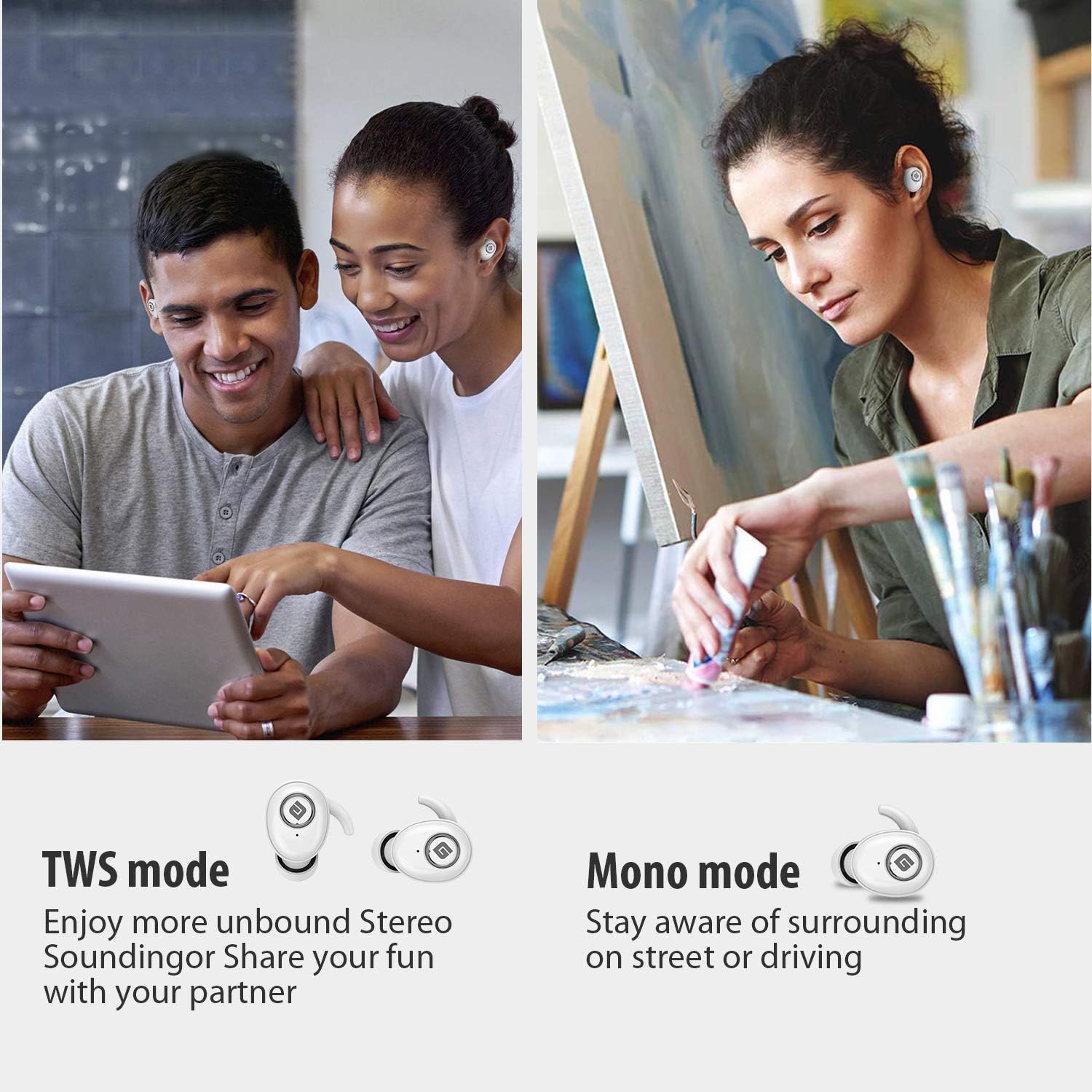
  • TWS (True Wireless Stereo) -tila: Use both earbuds simultaneously for a full stereo sound experience. This mode is ideal for immersive audio.
  • Mono-tila: Use a single earbud (only the Right earbud supports mono mode) to stay aware of your surroundings, such as when driving or walking in public.
Illustration of TWS and Mono listening modes for earbuds

Image 6: Comparison of TWS and Mono listening modes.

5. Huolto

  • Akun hoito: Keep your headphones charged when the battery life is low to ensure optimal Bluetooth connection and protect the battery's longevity.
  • Korvatyynyjen valinta: Choose suitable ear tips and wear your headphones snugly, especially during physical activities like running or cycling. This helps reduce wind noise and ensures a secure fit.
  • Puhdistus: Regularly clean the earbuds and charging case with a soft, dry cloth to prevent dust and debris buildup. Avoid using harsh chemicals or abrasive materials.
  • Varastointi: Kun nappikuulokkeita ei käytetä, säilytä niitä latauskotelossa niiden suojaamiseksi ja latauksen ylläpitämiseksi. Säilytä viileässä, kuivassa paikassa, poissa äärimmäisistä lämpötiloista.
  • Vedenkestävyys: The earbuds are IPX5 sweatproof, meaning they can resist a sustained, low-pressure water jet spray. They are not designed for submersion in water.

6. Vianmääritys

If you encounter issues with your Geekee G350 earbuds, please refer to the following common solutions:

  • Kuulokkeet eivät lataudu:
    • Ensure the plastic protective film has been removed from the charging contacts on the earbuds.
    • Varmista, että latauskaapeli on kytketty kunnolla sekä koteloon että virtalähteeseen.
    • Tarkista, onko latauskotelossa itsessään riittävästi akkua.
  • Kuulokkeet eivät muodosta pariliitosta/yhteyttä:
    • Varmista, että Bluetooth on käytössä laitteessasi.
    • Ensure the earbuds are fully charged and out of the charging case.
    • Forget "Geekee G350" from your device's Bluetooth settings and attempt to pair again.
    • Kokeile käynnistää laite ja nappikuulokkeet uudelleen.
  • Sound Issues (Low Volume, Distortion):
    • Säädä äänenvoimakkuutta sekä yhdistetyssä laitteessa että nappikuulokkeissa.
    • Ensure ear tips are correctly sized and provide a snug fit to optimize sound quality and noise isolation.
    • Puhdista korvanappien kaiuttimista mahdolliset roskat.
  • Vain yksi kuuloke toimii:
    • Varmista, että molemmat kuulokkeet on ladattu.
    • Place both earbuds back into the charging case, close the lid, wait a few seconds, then take them out again to re-establish the stereo connection.
    • If the issue persists, try resetting the earbuds (refer to the full user manual for specific reset instructions if available).

7. Tekniset tiedot

Ominaisuus Yksityiskohta
Bluetooth-standardi V5.0
Langaton Profile HFP, HSP, A2DP, AVRCP
Toiminta-alue 10 m (33 jalkaa)
Lataus Voltage DC 5V 1A
Valmiusaika 160 tuntia
Talk / Playing Time 2~3 hours (single charge), up to 15 hours with charging case, up to 28 hours in mono mode
Latausaika (kuulokkeet) 1.5 tuntia
Latausaika (latauskotelo) 2.5 tuntia
Akun kapasiteetti (kuulokkeet) 50 mAh / 3.7 V
Akun kapasiteetti (latauskotelo) 500 mAh / 3.7 V
Tuotteen paino 1.76 unssia (noin 50 g)
Tuotteen mitat 0.8 x 0.4 x 0.4 inches (per earbud)
Vedenkestävyys IPX5 hienkestävä
Melunhallinta Aktiivinen melunvaimennus
Mikrofoni Mukana

8. Takuu ja tuki

Geekee is committed to providing high-quality service and professional support for its products. For any technical assistance or inquiries, please contact our support team.

  • Tekninen tuki: Lifetime technical help is available.
  • Vastausaika: Tiedusteluihin vastataan yleensä 24 tunnin kuluessa.
  • Yhteydenotto Sähköposti: support@getgeekee.com
Geekee customer support contact information

Image 7: Geekee customer support details.

Virallinen tuotevideo

Video 1: Virallinen yliview of the Geekee G350 True Wireless Earbuds, highlighting key features and design.

Ask a question about this manual

Ask about setup, troubleshooting, compatibility, parts, safety, or missing instructions. Manuals+ will review the question and use this page’s manual context to help answer it.