
1. Johdanto
This manual provides instructions for the proper setup, operation, and maintenance of your Ohaus CR5200 Compass Series Portable Balance. Please read this manual thoroughly before using the balance to ensure correct operation and to prevent damage.
The Ohaus CR5200 is a portable digital balance designed for accurate weighing with a capacity of 5200 grams and a readability of 1 gram. It supports multiple weighing units including grams (g), ounces (oz), pounds:ounces (lb:oz), troy ounces (ozt), and pennyweights (dwt).

Kuva 1.1: Yläosa view of the Ohaus CR5200 Compass Series Portable Balance, showing the display and control buttons.
2. Turvallisuustiedot
- Operate the balance on a stable, level surface free from vibrations and drafts.
- Vältä vaa'an altistamista äärimmäisille lämpötiloille, kosteudelle tai suoralle auringonvalolle.
- Do not overload the balance beyond its maximum capacity of 5200 grams.
- Pidä vaaka puhtaana ja vapaana pölystä ja roskista.
- Use only the specified power source (3 AA batteries or compatible AC adapter).
3. Asennus
3.1 Pakkauksesta purkaminen
Carefully remove the balance from its packaging. Inspect the balance for any signs of damage. Retain the packaging for future transport or storage.
3.2 Powering the Balance
The Ohaus CR5200 can be powered by three AA alkaline batteries or an external AC adapter (not included, but compatible with the side power port).
Akun asennus:
- Locate the battery compartment on the underside of the balance.
- Avaa paristolokeron kansi.
- Insert three AA alkaline batteries, ensuring correct polarity (+/-).
- Sulje paristolokeron kansi kunnolla.

Kuva 3.1: Alapuoli view of the balance with the battery compartment open, showing three AA batteries installed.
Ulkoinen virtaliitäntä:
If using an AC adapter, connect it to the power input port located on the side of the balance. Ensure the adapter meets the specified voltage and current requirements (e.g., 12V 0.5A).

Kuva 3.2: Sivu view of the balance, highlighting the external power input port.
3.3 Sijoitus
Place the balance on a firm, level, and stable surface. Avoid locations near air vents, windows, or equipment that generates vibrations or electromagnetic interference.
4. Käyttöohjeet
4.1 Virta päälle/pois
- Virran kytkeminen päälle: Paina [ON/OFF] button. The display will show a self-test sequence and then settle at 0.0 g.
- Virran katkaiseminen: Pidä painettuna [ON/OFF] -painiketta, kunnes näyttö sammuu.
4.2 Selecting Weighing Units
The balance supports multiple weighing units: grams (g), ounces (oz), pounds:ounces (lb:oz), troy ounces (ozt), and pennyweights (dwt).
- To change the weighing unit: Press the [YKSIKKÖ] button (often labeled with 'g' and an arrow). Each press cycles through the available units.
4.3 Taaratoiminto
The tare function allows you to zero out the weight of a container, so only the weight of the contents is measured.
- Place the empty container on the weighing pan. The display will show its weight.
- Paina [TARE/ZERO] button (often labeled with '→0←'). The display will reset to 0.0.
- Lisää punnittava materiaali astiaan. Näytössä näkyy materiaalin nettopaino.
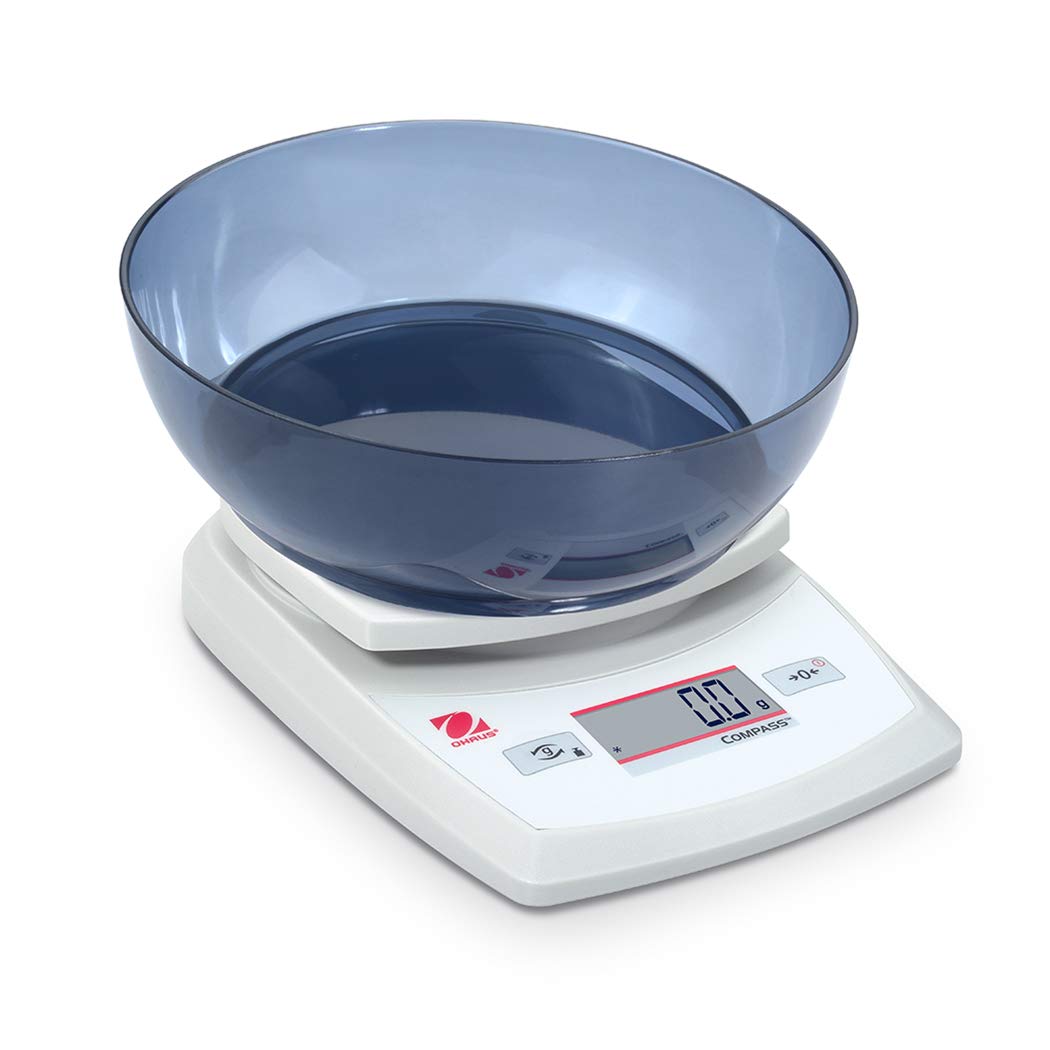
Image 4.1: The balance with an empty bowl on the weighing pan, ready for the tare function.
4.4 Peruspunnitus
- Ensure the balance is powered on and the display shows 0.0 in the desired weighing unit.
- Aseta punnittava esine varovasti punnituslevyn keskelle.
- Odota näytön vakautumista. Näytölle tulee vakaa paino.
- Remove the item from the pan.
4.5 Ulkoinen kalibrointi
The Ohaus CR5200 features external calibration. This process requires a known calibration weight (not included) to ensure accuracy. Refer to the full Ohaus CR Series manual for detailed calibration procedures specific to your model.

Image 4.2: The balance with a cylindrical calibration weight placed on the weighing pan.
5. Huolto
5.1 Puhdistus
- Pyyhi vaa'an ulkopinta pehmeällä,amp kangas. Älä käytä hankaavia puhdistusaineita tai liuottimia.
- Ensure no liquids enter the balance housing or display.
- Keep the weighing pan clean to ensure accurate readings.
5.2 Pariston vaihto
When the battery indicator appears on the display, replace the three AA alkaline batteries as described in Section 3.2.
5.3 Varastointi
When not in use for extended periods, remove the batteries to prevent leakage. Store the balance in a dry, dust-free environment. The Ohaus CR5200 is designed for portability and can be stored in a protective case (if available).

Image 5.1: The Ohaus CR5200 balance shown alongside its protective carrying case.
6. Vianmääritys
| Ongelma | Mahdollinen syy | Ratkaisu |
|---|---|---|
| Vaaka ei käynnisty. | Dead or incorrectly installed batteries; no AC power. | Replace batteries or check AC adapter connection. Ensure correct battery polarity. |
| Epätarkat tai epävakaat lukemat. | Unstable surface; drafts; electromagnetic interference; balance needs calibration. | Move balance to a stable, level surface. Shield from drafts. Recalibrate the balance (refer to Section 4.5). |
| Näytössä näkyy "Err" tai virhekoodi. | Ylikuormitus; sisäinen virhe. | Remove excess weight if overloaded. Power cycle the balance. If error persists, contact Ohaus support. |
| Taaraustoiminto ei toimi. | Balance not stable; button not pressed correctly. | Ensure balance is stable and display is settled. Press the TARE/ZERO button firmly. |
7. Tekniset tiedot
| Ominaisuus | Erittely |
|---|---|
| Mallinumero | CR5200 |
| Kapasiteetti | 5200 5.2 g (XNUMX kg) |
| Luettavuus | 1 g |
| Punnitusyksiköt | g, oz, lb:oz, ozt, dwt |
| Kalibrointityyppi | Ulkoinen |
| Virtalähde | 3 AA alkaline batteries (included) or AC adapter (not included) |
| Näytön tyyppi | Digitaalinen |
| Materiaali | Muovi |
| Tuotteen mitat (P x L x K) | 23.62 x 17.02 x 5.59 cm |
| Tuotteen paino | 408.23 g (noin 14.4 unssia) |
| Erikoisominaisuudet | Kannettava |
8. Takuu ja tuki
For warranty information, technical support, or service inquiries, please contact Ohaus customer service or visit the official Ohaus websivusto. Säilytä ostokuitti ostotodistuksena.