
1. Johdanto ja loppuview
This manual provides comprehensive instructions for the setup, operation, maintenance, and troubleshooting of your SHARP 4T-C55BJ3EF2NB 55-inch 4K UHD Smart LED TV. Please read this manual thoroughly before using your television to ensure proper functionality and safety.
The SHARP 4T-C55BJ3EF2NB is a 55-inch 4K Ultra HD Smart LED TV, offering a resolution of 3840 x 2160 pixels. It features Active Motion 400, HDR10, HLG, Aquos UltraClear, and Aquos Motion technologies for smooth and clear image movements. The integrated Harman/Kardon speaker system, with 2 x 10W output, Dolby Digital, Dolby Digital Plus, DTS-HD, DTS Studio Sound, and Sound Equalizer, delivers an immersive audio experience. This TV also includes a Triple Tuner for satellite, cable, and antenna reception, along with a range of pre-installed smart applications.

Kuva 1.1: Etuosa view of the Sharp 4T-C55BJ3EF2NB 55-inch 4K UHD Smart LED TV, displaying colorful content and smart app logos.
2. Turvallisuustiedot
Noudata aina televisiota käyttäessäsi perusturvallisuusohjeita tulipalon, sähköiskun ja loukkaantumisen riskin vähentämiseksi.
- Älä altista televisiota sateelle tai kosteudelle.
- Älä tuki tuuletusaukkoja.
- Varmista, ettei virtajohdon päälle kävellä eikä sitä puristeta.
- Irrota televisio pistorasiasta ukkosmyrskyjen aikana tai jos sitä ei käytetä pitkään aikaan.
- Anna kaikki huoltotoimenpiteet pätevän huoltohenkilöstön tehtäväksi.
3. Pakkauksen sisältö
Pura televisio varovasti pakkauksesta ja tarkista, että kaikki seuraavat osat ovat mukana:
- 1 x SHARP 4T-C55BJ3EF2NB 55-inch 4K UHD Smart LED TV
- 1 x Remote Control (including 2 x AAA batteries)
- 1 x TV Stand with Installation Package (screws, etc.)
- 1 x Pika-aloitusopas
- 1 x Käyttöohje (tämä asiakirja)
4. Asennus
4.1 Physical Setup (Stand or Wall Mount)
You can either install the TV on its included stand or mount it on a wall. Ensure the TV is placed on a stable, level surface if using the stand.
Jalustan asennus:
- Aseta televisio näyttö alaspäin pehmeälle ja tasaiselle alustalle vaurioiden välttämiseksi.
- Attach the stand components to the bottom of the TV using the provided screws from the installation package.
- Varmista, että kaikki ruuvit on kiristetty kunnolla.
Seinäasennus:
The TV supports VESA standard mounting 400 x 200 mm. Use a compatible wall mount bracket (not included) and follow the instructions provided with the wall mount. Ensure the wall can support the TV's weight (approximately 21.4 kg).
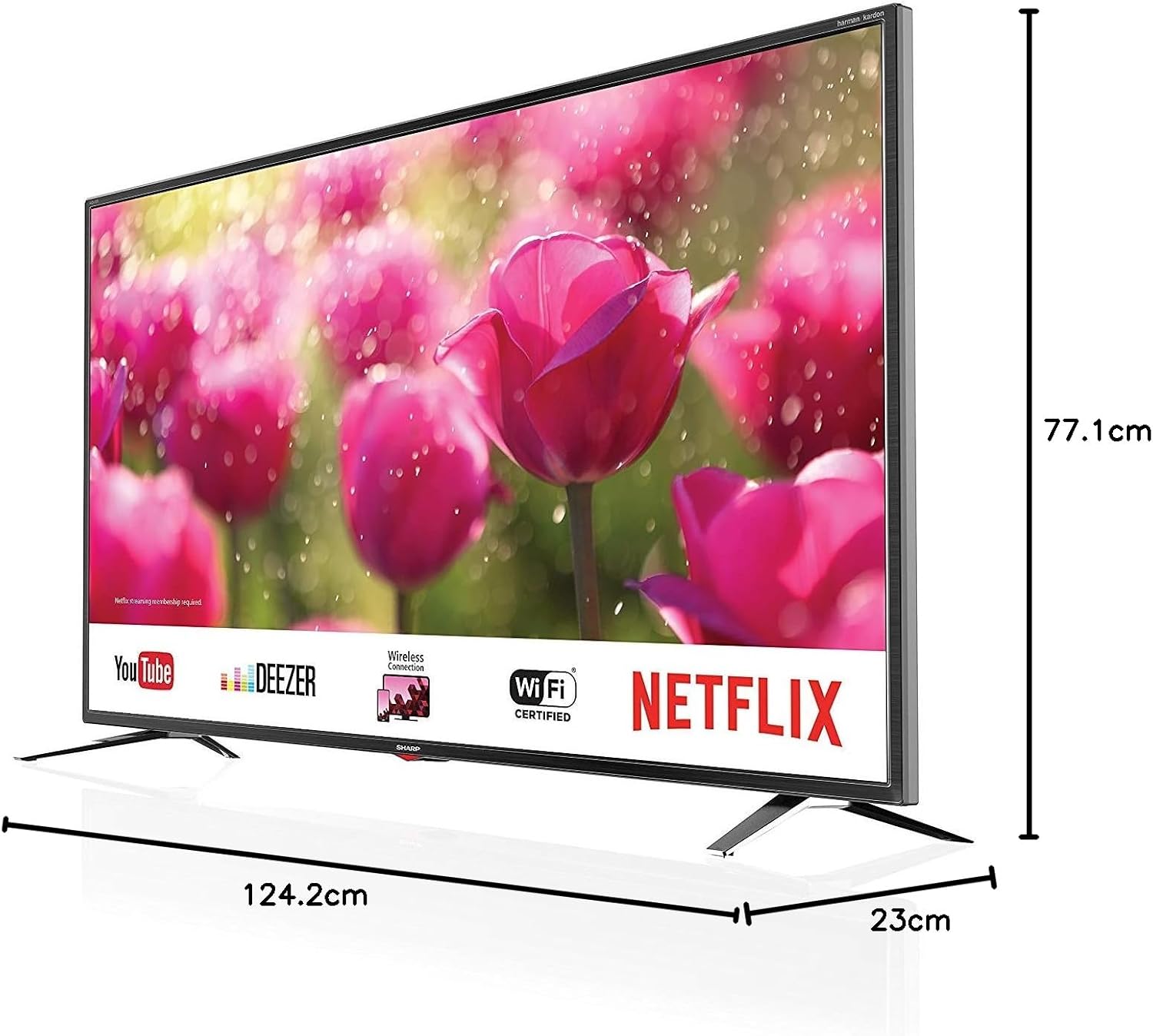
Figure 4.1: Product dimensions of the Sharp 4T-C55BJ3EF2NB 55-inch 4K UHD Smart LED TV.
4.2 Liitännät
Connect your external devices to the TV using the appropriate ports located on the rear panel.

Kuva 4.2: Takaosa view näyttää liitäntäportit.
- HDMI: Liitä jopa 3 HDMI-laitetta (esim. Blu-ray-soitin, pelikonsoli).
- USB: Connect USB storage devices for media playback (3 ports available).
- Antenni/Kaapeli/Satelliitti: Connect your antenna, cable, or satellite feed to the Triple Tuner input.
- Lähiverkko (RJ-45): Kiinteää internetyhteyttä varten.
- Digitaalinen optinen audiolähtö: Ulkoiseen äänijärjestelmään liittämistä varten.
- Audio/Headphone (3.5 mm jack): Kuulokkeille tai ulkoisille kaiuttimille.
- CI+ -paikka: For Conditional Access Modules (CAM) for encrypted channels.
- SD-korttipaikka: Median toistoon SD-korteilta.
4.3 Ensimmäinen asennuskerta
After connecting all necessary cables and plugging in the power cord, press the power button on the remote control or TV. The TV will guide you through the initial setup process, including language selection, network connection (Wi-Fi or LAN), channel scanning, and time zone settings.
5. Käyttö
5.1 Peruskäyttö
- Virta päälle/pois: Paina kaukosäätimen virtapainiketta.
- Äänenvoimakkuuden säätö: Käytä äänenvoimakkuuden säätönäppäimiä (VOL +/-).
- Kanavan valinta: Use the CH +/- buttons or number buttons.
- Syöttölähde: Press the SOURCE button to select between HDMI, TV (Tuner), USB, etc.
- Valikon navigointi: Navigoi valikoissa nuolinäppäimillä ja OK-painikkeella.
5.2 Älytelevision ominaisuudet
Your SHARP TV is equipped with smart functionalities, allowing access to various online content and applications via the Sharp Aquos Net+ App Store.
- Esiasennetut sovellukset: Access popular services like YouTube, Deezer, Rakuten TV, Chili, Netflix, Eurosport Player, Joyn, and Prime Video directly from the home screen.
- Web Selain: Selaa internetiä suoraan televisiostasi.
- Langaton yhteys (WLAN): Yhdistä kotisi Wi-Fi-verkkoon internetyhteyttä varten.
5.3 Kuva- ja ääniasetukset
Mukauta omasi viewkuuntelukokemusta television asetusvalikon kautta.
- Kuvatilat: Select from various preset picture modes (e.g., Standard, Movie, Game) or customize brightness, contrast, color, and sharpness.
- HDR-tuki: The TV supports HDR10 and HLG for enhanced contrast and color with compatible content.
- Äänitilat: Choose from preset sound modes or adjust bass, treble, and balance. The Harman/Kardon speaker system provides high-quality audio.
- Äänen taajuuskorjain: Fine-tune audio frequencies for a personalized sound profile.
5.4 Kolmen virittimen käyttö
The integrated Triple Tuner supports DVB-T/T2 (terrestrial), DVB-C (cable), and DVB-S/S2 (satellite) signals. After initial channel scanning, you can access digital channels directly.
- Kanavaluettelo: View and manage your scanned channels.
- Sähköinen ohjelmaopas (EPG): Access program information and schedules.
6. Huolto
6.1 Puhdistus
- Näyttö: Pyyhi näyttö varovasti pehmeällä, nukkaamattomalla liinalla. Pinttyneisiin tahroihin käytä televisioille tarkoitettua näytönpuhdistusliuosta. Levitä sitä liinaan, älä suoraan näyttöön.
- Kaappi: Pyyhi television kotelo pehmeällä, kuivalla liinalla. Älä käytä hankaavia puhdistusaineita tai liuottimia.
6.2 Ohjelmistopäivitykset
Periodically check for software updates to ensure optimal performance and access to the latest features. Updates can typically be performed via the TV's settings menu when connected to the internet.
7. Vianmääritys
Jos televisiossasi on ongelmia, katso seuraavat yleiset ongelmat ja ratkaisut:
| Ongelma | Mahdollinen ratkaisu |
|---|---|
| Ei virtaa | Tarkista, että virtajohto on kytketty kunnolla televisioon ja pistorasiaan. Kokeile toista pistorasiaa. |
| Ei kuvaa, mutta ääni kuuluu | Varmista, että oikea tulolähde on valittu. Tarkista ulkoisten laitteiden kaapeliliitännät. |
| Ei ääntä, mutta kuva näkyy | Tarkista äänenvoimakkuus ja mykistyksen tila. Tarkista äänikaapelin liitännät. Tarkista television äänilähtöasetukset. |
| Kaukosäädin ei toimi | Vaihda paristot. Varmista, ettei kaukosäätimen ja television infrapunatunnistimen välissä ole esteitä. |
| Ei voi muodostaa yhteyttä Wi-Fi-verkkoon | Tarkista Wi-Fi-salasana. Käynnistä reititin uudelleen. Varmista, että televisio on Wi-Fi-signaalin kantaman sisällä. |
For more complex issues, consult the full user manual (if available in print) or contact Sharp customer support.
8. Tekniset tiedot
| Ominaisuus | Kuvaus |
|---|---|
| Mallinumero | 4T-C55BJ3EF2NB |
| Merkki | Terävä |
| Näytön koko | 55 tuumaa (139 cm) |
| Näyttötekniikka | LED |
| Resoluutio | 4K Ultra HD (3840 x 2160 pikseliä) |
| Päivitystaajuus | 60 Hz |
| HDR-tuki | HDR10, HLG |
| Liiketekniikka | Active Motion 400, Aquos UltraClear, Aquos Motion |
| Äänijärjestelmä | Harman/Kardon, 2 x 10W (8 Ohm), Dolby Digital, Dolby Digital Plus, DTS-HD, DTS Studio Sound, Sound Equalizer |
| Virittimet | Triple Tuner (DVB-T/T2/C/S/S2) with HEVC/H.265 (10-bit), MPEG4/H.264, VP9 support |
| Yhteydet | 3x HDMI 4K, 3x USB, Audio/Headphone (3.5 mm jack), Digital Optical Audio Output, LAN (RJ-45), WLAN (2.412 GHz – 2.472 GHz), 1x SD Card Slot, CI+ Slot |
| Älykkäät ominaisuudet | Web Browser, Sharp Aquos Net+ App Store, Pre-installed apps (YouTube, Netflix, Deezer, Prime Video, etc.) |
| Tuotteen mitat (jalustan kanssa) | 124.2 x 77.1 x 23 cm (L x K x S) |
| Tuotteen paino (jalustan kanssa) | 21.4 kg |
| VESA-asennusstandardi | 400 x 200 mm |
| Valmistaja | Terävä |
| Ensimmäinen vapaapäivä | 15. tammikuuta 2020 |
9. Takuu ja tuki
Takuutiedot löytyvät tuotteen mukana toimitetusta takuukortista tai käymällä Sharpin virallisella verkkosivustolla. website. For technical support, troubleshooting assistance beyond this manual, or service requests, please contact Sharp customer service.
Online-tuki: www.sharp.eu