
Nestling HK-688
Nestling HK-688 Walkie Talkies User Manual
Malli: HK-688
1. Johdanto
This manual provides comprehensive instructions for the safe and effective operation of your Nestling HK-688 Walkie Talkies. These mini 2-way radios are designed for clear communication over long distances, making them ideal for children's outdoor adventures, camping, hiking, and general play.
The Nestling HK-688 Walkie Talkies feature 22 UHF channels, a generous range, and user-friendly controls. Please read this manual thoroughly before using the device to ensure proper functionality and to maximize your experience.

Image: Three Nestling HK-688 walkie talkies in camo blue, camo pink, and camo green, displayed with their product packaging.
2. Tuote ohiview
2.1 Pakkauksen sisältö
Vakiopaketti sisältää seuraavat tuotteet:
- 3x Nestling HK-688 Camo Kids Walkie Talkies (Camo Blue, Camo Pink, Camo Green)
- 1x Käyttöohje (tämä asiakirja)
- Huomautus: AAA-paristot eivät sisälly toimitukseen ja ne on ostettava erikseen.
2.2 Tärkeimmät ominaisuudet
- 22 FRS/GMRS Channels: Tarjoaa useita viestintävaihtoehtoja.
- Pitkän kantaman: Up to 3km (1.9 miles) in typical conditions, and up to 5km (3.1 miles) in open fields.
- Selkeä äänenlaatu: Varmistaa tehokkaan viestinnän.
- Taustavalaistu LCD-näyttö: Helppoa viewing of channel, battery status, and other indicators.
- Built-in Mini LED Torch: Useful for low-light conditions.
- Automaattinen kanavahaku: Quickly finds active channels.
- Automatic Squelch: Reduces background noise for clearer reception.
- CTCSS 99 Sub-codes: Enhances privacy by filtering unwanted signals.
- Soita hälytys: Notifies you of incoming calls.
- Kanavan lukitus: Estää tahattomat kanavanvaihdot.
- PTT/VOX Function: Push-to-Talk for manual transmission or Voice Operated Exchange for hands-free communication.
- Akun säästötoiminto: Pidentää akun käyttöikää.
- Virransäästöhälytys: Indicates when batteries are running low.
- Säädettävä äänenvoimakkuus: Control the listening level.
- Kevyt ja kannettava: Designed for easy carrying with a built-in belt clip.
- Drop Resistant Design: Enhanced durability for active use.

Image: Visual representation of the walkie talkie's dimensions and key features like drop resistance, low battery alert, flashlight, and communication range.

Image: Features of the walkie talkie, including 22 channels with privacy codes, extended range, noise reduction, drop resistance, and a built-in flashlight.
2.3 Laitteen osat

Image: Detailed diagram illustrating the various parts of the walkie talkie, including buttons, display, and audio components.
- Antenni: Signaalien lähettämiseen ja vastaanottamiseen.
- Lamp (Flashlight): Sisäänrakennettu LED-valo.
- Mikrofoni: For speaking into the device.
- PTT-painike (Push-to-Talk): Pidä painettuna lähettääksesi äänesi.
- LCD-näyttö: Shows channel, battery level, and other indicators.
- Call Lock Button: Locks the current channel.
- Monitoripainike: Allows listening to weak signals on the current channel.
- Lamp Skannauspainike: Activates the flashlight and initiates channel scan.
- Alas-painike: Selaa valikoita tai vähentää arvoja.
- Virta-/valikkopainike: Turns the device on/off and accesses the menu.
- Kaiutin: For listening to incoming transmissions.
3. Asennus
3.1 Akun asennus
Each Nestling HK-688 Walkie Talkie requires 4x AAA batteries (not included).
- Release the Belt Clip: Press the lock on the top of the belt clip and lift the clip up to detach it from the radio.
- Avaa paristolokero: Locate the battery cover on the back of the walkie talkie. Gently push down on the tab and slide the cover off.
- Aseta paristot: Insert 4x AAA batteries into the compartment, ensuring correct polarity (+/-) as indicated inside the compartment.
- Sulje paristolokero: Replace the battery cover and slide it until it clicks securely into place. Reattach the belt clip if desired.
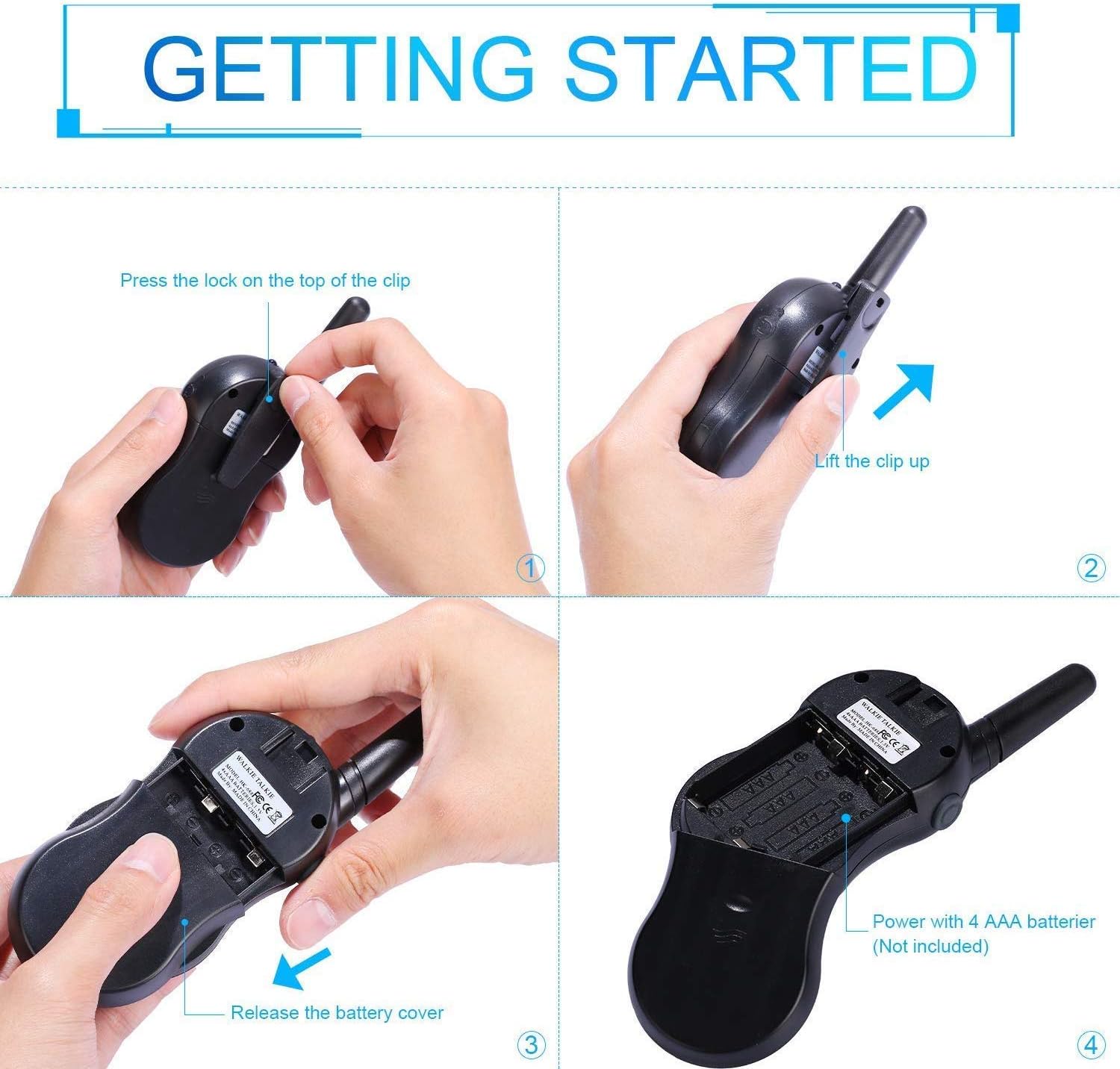
Image: Step-by-step instructions for opening the battery compartment and inserting AAA batteries into the walkie talkie.

Image: An open battery compartment of the walkie talkie, ready for battery insertion.
3.2 Virran kytkeminen päälle/pois
To turn the walkie talkie on or off, press and hold the Virta/Valikko button until the LCD screen illuminates or turns off.
4. Käyttöohjeet
4.1 Perusviestintä (Push-to-Talk)
- Valitse kanava: Ensure all walkie talkies you wish to communicate with are set to the same channel and sub-code. Use the Up ja Alas painikkeita vaihtaaksesi kanavia.
- Lähetys: Paina ja pidä painettuna PTT button (located on the side of the radio). Speak clearly into the microphone, holding the radio approximately 2-3 inches from your mouth.
- Vastaanota: Vapauta PTT button to listen for incoming transmissions.
Tip: For optimal range and clarity, avoid obstructions like buildings, dense foliage, or large metal objects. Adverse weather conditions can also affect range.
4.2 Channel Selection and Sub-codes (CTCSS/DCS)
Your walkie talkie supports 22 FRS/GMRS channels and 99 CTCSS/DCS sub-codes. Sub-codes help filter out unwanted conversations on the same channel, enhancing privacy.
- Paina Valikko -painiketta kerran siirtyäksesi kanavanvalintatilaan. Kanavan numero vilkkuu.
- Käytä Up or Alas painikkeita valitaksesi haluamasi kanavan (1–22).
- Paina Valikko button again to enter sub-code selection mode. The sub-code number will flash.
- Käytä Up or Alas buttons to select your desired sub-code (0-99). Setting to 0 disables the sub-code.
- Paina PTT button or wait a few seconds for the setting to be saved and exit the menu.
4.3 VOX-toiminto (ääniohjattu vaihto)
VOX-toiminto mahdollistaa handsfree-viestinnän. Kun se on aktivoitu, radio lähettää automaattisesti, kun se havaitsee äänesi.
- Paina Valikko button multiple times until the VOX icon (VOX) appears on the LCD and flashes.
- Käytä Up or Alas buttons to select the VOX sensitivity level (e.g., 1-3, with 1 being most sensitive). Select "OFF" to disable VOX.
- Paina PTT button or wait a few seconds to save the setting and exit.
4.4 Taskulampun käyttö
To turn the built-in LED flashlight on or off, briefly press the Lamp button (often combined with the Scan button).
4.5 Call Alert Tone
To send a call alert tone to other radios on the same channel, briefly press the Soittaa button (often represented by a musical note icon).
4.6 Kanavan lukitus
To prevent accidental channel changes, you can lock the current channel.
- Paina ja pidä painettuna Call Lock button (often represented by a key icon) until a key icon appears on the LCD.
- Avaa lukitus pitämällä painiketta painettuna Call Lock button again until the key icon disappears.

Kuva: esimamples of suitable scenarios for using the walkie talkies, such as outdoor play, family activities, and leisure.

Image: Illustrations of walkie talkies being used for communication in both play and household settings.
5. Huolto
5.1 Akun hoito
- Käytä aina uusia, korkealaatuisia AAA-paristoja.
- Remove batteries from the walkie talkie if it will not be used for an extended period to prevent leakage and damage.
- Hävitä käytetyt paristot vastuullisesti paikallisten määräysten mukaisesti.
5.2 Puhdistus ja varastointi
- Clean the walkie talkie with a soft, damp kangas. Älä käytä voimakkaita kemikaaleja tai hankaavia puhdistusaineita.
- Do not immerse the walkie talkie in water, as it is not water-resistant.
- Säilytä radiopuhelinta viileässä, kuivassa paikassa, poissa suorasta auringonvalosta ja äärimmäisistä lämpötiloista.
6. Vianmääritys
| Ongelma | Mahdollinen syy | Ratkaisu |
|---|---|---|
| Ei virtaa | Paristot ovat tyhjiä tai ne on asennettu väärin. | Vaihda paristot uusiin varmistaen oikean napaisuuden. |
| Ei voi lähettää tai vastaanottaa | Not on the same channel/sub-code; out of range; PTT button not pressed/released. | Ensure all radios are on the same channel and sub-code. Move closer to the other radio. Press and hold PTT to transmit, release to receive. |
| Huono äänenlaatu / Staattinen ääni | Out of range; obstructions; low battery; squelch setting. | Move closer. Avoid obstructions. Replace batteries. Check squelch settings. |
| Kanava vaihtuu vahingossa | Channel lock is not activated. | Activate the channel lock function. |
| Ääniohjaus ei toimi | VOX sensitivity too low or VOX is off. | Adjust VOX sensitivity to a higher level or ensure VOX is enabled. |
7. Tekniset tiedot
| Ominaisuus | Yksityiskohta |
|---|---|
| Merkki | Untuvikko |
| Malli | HK 688 |
| Taajuusalue | 400-470 MHz |
| Kanavat | 22 FRS/GMRS-kanavaa |
| Alakoodit | CTCSS 99 |
| Lähetysteho | <=0.5W |
| Modulaatiotyyppi | FM-F3E |
| Alue | Up to 3km (1.9 miles) typical, MAX 5km (3.1 miles) in open field |
| litinä | Automaattinen squelch |
| Näytön tyyppi | LCD-taustavalaistu |
| Kuulokeliitäntä | 2.5mm / 0.1inch |
| Virtalähde | 4x AAA batteries per radio (Not Included) |
| Product Dimensions (H x L x D) | 14 cm x 5.5 cm x 3.5 cm (5.5 x 2.2 x 1.4 tuumaa) |
| Pakkauksen paino | 370 g |
| Väri | Camo Blue, Camo Pink, Camo Green |
| Vedenkestävyystaso | Ei vedenkestävä |
8. Takuu ja tuki
Nestling HK-688 Walkie Talkies come with a 12 kuukauden takuu ostopäivästä alkaen.
For any support inquiries, troubleshooting assistance beyond this manual, or warranty claims, please refer to the contact information provided on the product packaging or the retailer's websivusto, josta tuote on ostettu.
Ask a question about this manual
Ask about setup, troubleshooting, compatibility, parts, safety, or missing instructions. Manuals+ will review the question and use this page’s manual context to help answer it.