
1. Johdanto
Thank you for choosing the Dacom Athlete G05 Bluetooth Headset. This manual provides comprehensive instructions to help you set up, operate, and maintain your new wireless headphones. Please read this manual carefully before use to ensure optimal performance and longevity of your device.
2. Pakkauksen sisältö
Varmista, että pakkauksessasi on kaikki alla luetellut tuotteet:
- 1 x Dacom Athlete G05 Bluetooth Headset
- 1 x USB-latauskaapeli
- 1 x Käyttöohje (tämä asiakirja)
3. Tuote ohiview
The Dacom Athlete G05 is a wireless stereo earphone designed for sports and running, featuring a comfortable in-ear design with ear hooks for secure fit. It connects via Bluetooth V4.1.
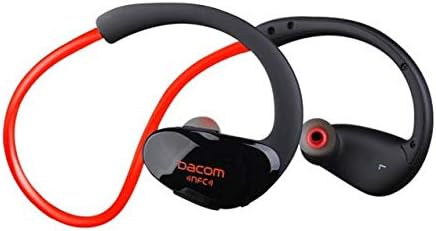
Kuva 3.1: Edessä view of the Dacom Athlete G05 Bluetooth Headset, showing the earbud and ear hook design.
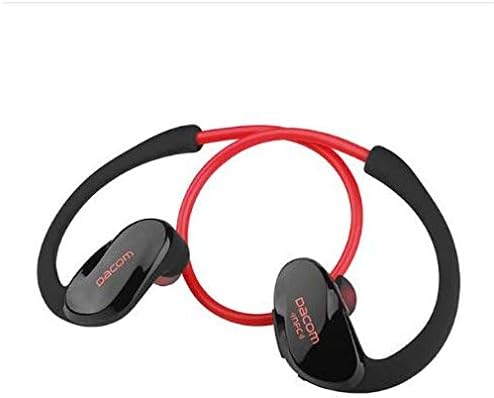
Kuva 3.2: Takaosa view of the Dacom Athlete G05 Bluetooth Headset, illustrating the connecting cable between the two earbuds.
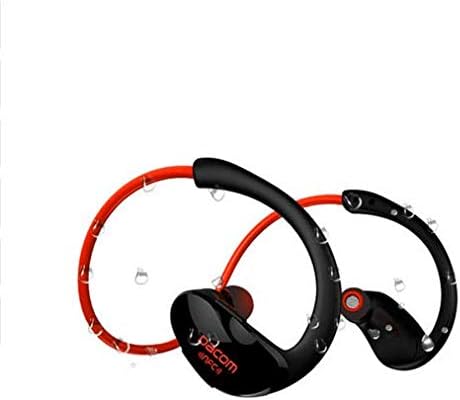
Kuva 3.3: Dacom Athlete G05 Bluetooth Headset demonstrating water resistance, suitable for sports activities.
4. Asennus
4.1 Kuulokkeiden lataaminen
Before first use, fully charge your Dacom Athlete G05 headset. A full charge typically takes approximately 1.5 to 2 hours.
- Connect the provided USB charging cable to the charging port on the headset.
- Connect the other end of the USB cable to a power adapter (DC5V 150mAh output recommended) or a computer's USB port.
- The battery indicator light will illuminate during charging and change color or turn off once fully charged.
A fully charged headset provides approximately 8 hours of talk time or music playback, and up to 180 hours of standby time.
4.2 Bluetooth -pariliitos
To connect your headset to a Bluetooth-enabled device (e.g., smartphone, tablet):
- Ensure the headset is fully charged and turned off.
- Press and hold the multi-function button on the headset until the Bluetooth indicator light flashes red and blue alternately, indicating it is in pairing mode.
- Ota Bluetooth käyttöön laitteessasi ja etsi käytettävissä olevia laitteita.
- Select "Dacom Athlete G05" (or similar name) from the list of found devices.
- Jos sinulta kysytään salasanaa, kirjoita "0000" (neljä nollaa).
- Once paired, the Bluetooth indicator light will flash blue slowly or turn solid blue, and you will hear a confirmation tone.
The headset supports Bluetooth V4.1 and profiles such as Headset, Handsfree, A2DP, AVRC, and APT-X.
5. Käyttöohjeet
5.1 Virta päälle/pois
- Virta päälle: Press and hold the multi-function button for approximately 3 seconds until the indicator light flashes blue and you hear a power-on tone.
- Virta pois: Press and hold the multi-function button for approximately 5 seconds until the indicator light flashes red and you hear a power-off tone.
5.2 Puheluiden hallinta
- Vastaa puheluun: Paina monitoimipainiketta lyhyesti, kun puhelu saapuu.
- Lopeta puhelu: Paina monitoimipainiketta lyhyesti puhelun aikana.
- Hylkää puhelu: Paina monitoimipainiketta ja pidä sitä painettuna kahden sekunnin ajan, kun puhelu saapuu.
- Uudelleenvalinta viimeinen numero: Paina monitoimipainiketta kahdesti, kun puhelu ei ole käynnissä.
5.3 Musiikin toisto
- Toista/tauko: Paina lyhyesti monitoimipainiketta.
- Seuraava kappale: Paina pitkään äänenvoimakkuus + -painiketta.
- Edellinen kappale: Paina äänenvoimakkuuspainiketta pitkään.
- Ääni kovemmalle: Paina lyhyesti äänenvoimakkuuden lisäyspainiketta.
- Äänenvoimakkuutta pienemmälle: Paina lyhyesti äänenvoimakkuuspainiketta.
Note: The headset features touch control for various functions.
6. Huolto ja hoito
- Keep the headset dry. Do not expose it to extreme temperatures or humidity.
- Puhdista nappikuulokkeet ja latauskosketuspinnat säännöllisesti pehmeällä, kuivalla liinalla.
- Vältä kuulokkeiden pudottamista tai voimakkaiden iskujen kohteeksi altistamista.
- Säilytä kuulokkeita viileässä ja kuivassa paikassa, kun sitä ei käytetä.
- Älä yritä purkaa tai muokata kuulokkeita, sillä se mitätöi takuun.
7. Vianmääritys
| Ongelma | Mahdollinen ratkaisu |
|---|---|
| Kuulokemikrofoni ei käynnisty. | Varmista, että kuulokkeet ovat täyteen ladatut. Liitä virtalähteeseen ja yritä uudelleen. |
| Laitteen pariliitos ei onnistu. |
|
| Ei ääntä tai äänenvoimakkuus on alhainen. |
|
| Ajoittainen yhteys. |
|
8. Tekniset tiedot
| Ominaisuus | Yksityiskohta |
|---|---|
| Tuotteen nimi | Athlete sports Bluetooth headset |
| Mallinumero | G05 |
| Bluetooth-versio | V4.1 |
| Bluetooth-luokka | Luokka 2 |
| Tuettu Profiles | Headset, Handsfree, A2DP, AVRC, APT-X |
| Lataustulo | DC5V 150mAh (Power adapter output) |
| Akun tyyppi | High-performance lithium polymer battery |
| Puheaika | Noin 8 tuntia |
| Peliaika | Noin 8 tuntia |
| Valmiusaika | Noin 180 tuntia |
| Äänen taajuusalue | 20Hz-20kHz |
| BT Radio Frequency | 2.400-2.481 GHz |
| Lähtöimpedanssi | 16Ω 3mW |
| Herkkyys | 100-105dB |
| Kuulokkeiden muototekijä | Korvassa |
| Yhteystekniikka | Langaton |
| Valvontamenetelmä | Kosketa |
| Materiaali | Muovi |
| Väri | Punainen |
9. Takuu ja tuki
Dacom products are manufactured to the highest quality standards. For warranty information or technical support, please refer to the warranty card included with your purchase or visit the official Dacom websivusto. Säilytä ostokuitti takuuvaatimuksia varten.