
Johdanto
This manual provides instructions for the proper setup, operation, and maintenance of your Calvas 2020B0-B1 remote control. This remote is designed to be compatible with Shaw LCD LED televisions, offering a convenient replacement or secondary control unit. Please read this manual thoroughly before using the device.

Kuva: Edessä view of the Calvas 2020B0-B1 remote control.
Asennus
1. Akun asennus
- Paikanna paristolokero kaukosäätimen takana.
- Paina salpaa alas ja liu'uta akkukotelon kansi pois.
- Aseta kaksi AAA-paristoa (eivät sisälly toimitukseen) lokeroon ja varmista, että positiiviset (+) ja negatiiviset (-) navat ovat oikein lokeron sisällä olevien merkintöjen kanssa.
- Liu'uta akun kansi takaisin paikalleen, kunnes se napsahtaa tukevasti.

Kuva: Selkä view kaukosäätimestä paristolokeron ollessa auki.
2. Quick Setup for TV Control
The remote features a quick setup function for initial pairing with your television. Follow these steps:
- Paina ja pidä painettuna ASETUS button until the LED light blinks twice.
- Paina TV-VIRTA -painiketta.
- Paina ja pidä painettuna OK -painiketta.
- Vapauta OK key when your TV turns off. This indicates successful pairing.
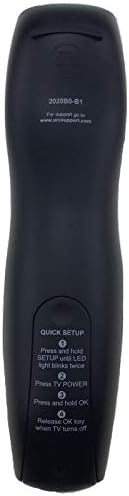
Image: Back of the remote control displaying quick setup instructions.
Note: If the TV does not turn off, repeat the steps or consult the TV's manual for specific remote programming codes if available.
Käyttöohjeet
The Calvas 2020B0-B1 remote control utilizes infrared (IR) technology. Ensure a clear line of sight between the remote's IR emitter and your TV's IR receiver for optimal performance.
Painikkeiden toiminnot:
- VIRTA: Kytkee television päälle tai pois päältä.
- VOL +/-: Lisää tai vähentää äänenvoimakkuutta.
- CH +/-: Vaihtaa kanavaa ylös tai alas.
- MYKISTÄ: Mykistää television äänen tai poistaa mykistyksen.
- NUMERONÄPPÄIMET (0-9): Syöttää kanavanumerot suoraan.
- OPAS: Näyttää ohjelmaoppaan.
- VALIKKO: Avaa television päävalikon.
- TIEDOT: Näyttää tiedot nykyisestä ohjelmasta.
- OK / Navigointinäppäimet: Vahvistaa valinnat ja navigoi valikoissa.
- EXIT: Poistuu nykyisestä valikosta tai näytöstä.
- KESTÄÄ: Palaa edelliseen viewed kanava.
- DAY +/-: Navigates through days in the program guide.
- MUSIC / FAV: Accesses music channels or favorite channels (functionality may vary by TV model).
Huolto
Puhdistus:
- Pyyhi kaukosäädin pehmeällä, kuivalla liinalla.
- Pinttyneeseen likaan, kevyesti dampfi pyyhi liina vedellä tai miedolla, hankaamattomalla puhdistusaineella.
- Älä käytä voimakkaita kemikaaleja, liuottimia tai hankaavia puhdistustyynyjä, sillä ne voivat vahingoittaa kaukosäätimen pintaa tai sisäisiä osia.
Akun vaihto:
- Replace batteries when the remote's response becomes sluggish or the LED indicator fails to light up.
- Always replace both batteries at the same time with new AAA batteries.
- Älä sekoita vanhoja ja uusia paristoja tai erityyppisiä paristoja.
- Poista paristot vuotojen estämiseksi, jos kaukosäädintä ei käytetä pitkään aikaan.
Varastointi:
- Säilytä kaukosäädintä viileässä, kuivassa paikassa, poissa suorasta auringonvalosta ja äärimmäisistä lämpötiloista.
- Vältä kaukosäätimen pudottamista tai altistamista liialliselle kosteudelle.
Vianetsintä
- Kaukosäädin ei vastaa:
- Tarkista, että paristot on asetettu oikein ja että ne eivät ole tyhjentyneet. Vaihda tarvittaessa.
- Varmista, että kaukosäätimen ja television infrapunavastaanottimen välillä on esteetön näköyhteys. Poista mahdolliset esteet.
- Try re-pairing the remote with the TV using the "Quick Setup" steps.
- Vain jotkut painikkeet toimivat:
- This might indicate a partial pairing issue or a specific button malfunction. Try re-pairing the remote.
- Clean the remote's surface, especially around the unresponsive buttons, to ensure no debris is interfering.
- Lyhyt toiminta-alue:
- Vaihda paristot uusiin.
- Varmista, ettei infrapunasignaaliin kohdistu häiriöitä voimakkaiden valonlähteiden (kuten suoran auringonvalon tai kirkkaiden loisteputkien) lähetyksessä.
Tekniset tiedot
| Merkki | kaljuja kohtia |
| Mallinumero | 2020B0-B1 (Mfr Part Number: CLS-D41D8CD98F00B204E9800998ECF8427E) |
| Yhteensopivat laitteet | Television (Shaw LCD LED TVs) |
| Yhteystekniikka | Infrapuna (IR) |
| Ohjaimen tyyppi | Painikkeiden ohjaus |
| Tuettujen laitteiden enimmäismäärä | 1 |
| Suurin kantama | 10 metriä |
| Erikoisominaisuus | Ergonominen muotoilu |
Takuutiedot
This product is typically covered by a limited warranty provided by the seller or manufacturer. Please refer to your purchase documentation or contact the retailer directly for specific warranty terms and conditions. Keep your proof of purchase for any warranty claims.
Tukea
For further assistance, technical support, or inquiries regarding your Calvas 2020B0-B1 remote control, please contact the seller or manufacturer through the platform where the product was purchased. Provide your model number (2020B0-B1) and any relevant purchase details when seeking support.