
1. Johdanto
Thank you for choosing the Targus W620 Wireless Optical Mouse. This manual provides detailed instructions for setting up, operating, and maintaining your mouse to ensure optimal performance and longevity. The Targus W620 offers reliable 2.4 GHz wireless connectivity, a precise 1600 DPI optical sensor, and a compact design suitable for both office and mobile use.
2. Pakkauksen sisältö
Tarkista pakkauksesta seuraavat tuotteet:
- Targus W620 Wireless Optical Mouse
- USB-vastaanotin
- 2 x AAA-paristot
3. Tuote ohiview
Familiarize yourself with the components of your Targus W620 Wireless Optical Mouse.
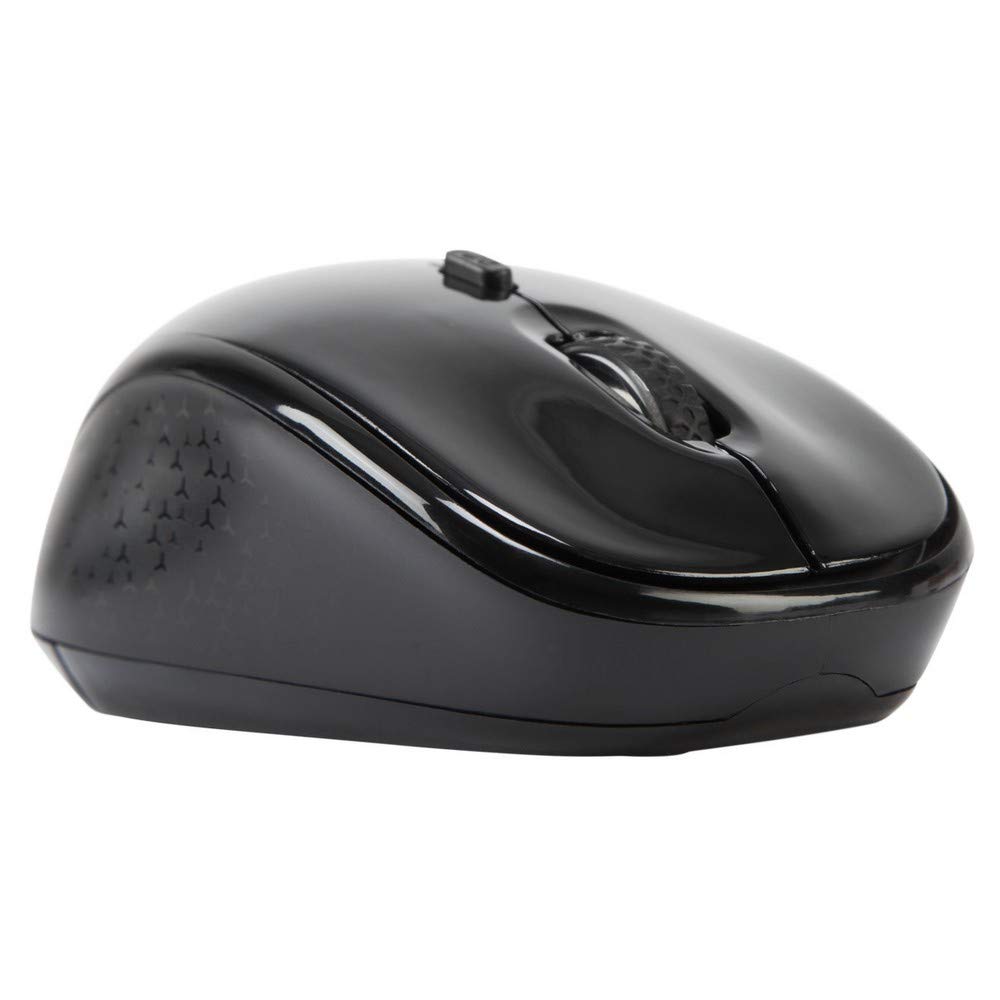
Kuva 3.1: Yläosa view of the Targus W620 Wireless Optical Mouse. This image displays the primary buttons and scroll wheel.
- Vasen napsautuspainike: Normaali ensisijainen napsautustoiminto.
- Hiiren oikeanpuoleinen painike: Normaali toissijainen napsautustoiminto.
- Vierityspyörä: Pystysuuntaista vieritystä ja keskipainikkeen napsautusta varten.
- DPI-painike: Säätää hiiren herkkyyttä (DPI).
- Optinen anturi: Located on the bottom, detects mouse movement.
- Akkulokero: Located on the bottom, holds two AAA batteries.
- USB-vastaanottimen tallennustila: A dedicated slot on the bottom for storing the USB receiver when not in use.

Kuva 3.2: Pohja view of the mouse, highlighting the battery compartment and optical sensor.
4. Asennusohjeet
Follow these steps to set up your Targus W620 Wireless Optical Mouse:
- Asenna paristot:
- Paikanna hiiren pohjassa oleva paristolokeron kansi.
- Liu'uta kansi auki.
- Aseta kaksi AAA-paristoa paikoilleen varmistaen oikea napaisuus (+/-).
- Sulje paristolokeron kansi kunnolla.
- Liitä USB-vastaanotin:
- The USB receiver is typically stored in a slot on the bottom of the mouse for transport. Gently remove it.
- Liitä USB-vastaanotin tietokoneesi vapaaseen USB-porttiin.

Kuva 4.1: The mouse with its USB receiver, ready for connection.
- Virta päälle:
- There is no explicit power switch on this model; the mouse activates upon movement and connection.
- Tietokoneesi pitäisi automaattisesti tunnistaa ja asentaa tarvittavat ajurit. Tämä voi kestää hetken.
- Once drivers are installed, the mouse is ready for use.
5. Käyttöohjeet
The Targus W620 Wireless Optical Mouse is designed for intuitive use. Here are its primary functions:
- Perusnavigointi: Liikuta hiirtä tasaisella alustalla hallitaksesi kohdistinta näytöllä.
- Vasen painallus: Use for selecting items, opening files, or activating functions.
- Oikealla painikkeella: Use for accessing context menus or secondary functions.
- Vierityspyörä: Rotate the wheel to scroll vertically through documents and web pages. Press the scroll wheel for a middle-click function, often used for opening links in new tabs or auto-scrolling.
- DPI-säätö: Press the DPI button (located behind the scroll wheel) to cycle through the available DPI settings (800, 1200, 1600 DPI). This changes the sensitivity of the mouse cursor. A higher DPI means the cursor moves further with less physical mouse movement.
6. Huolto
Oikea huolto varmistaa hiiresi pitkän käyttöiän ja suorituskyvyn.
- Puhdistus: Puhdista hiiren ulkopinta pehmeällä, kuivalla ja nukkaamattomalla liinalla. Pinttyneeseen likaan pyyhi kevyesti.ampKostuta liina vedellä. Vältä voimakkaiden kemikaalien tai hankaavien puhdistusaineiden käyttöä.
- Optinen anturi: Keep the optical sensor area on the bottom of the mouse clean and free from dust or debris to ensure accurate tracking.
- Akun vaihto: When the mouse performance degrades or stops responding, it is likely time to replace the batteries. Follow the steps in Section 4.1 to replace the two AAA batteries.
- Varastointi: When transporting or storing the mouse, always place the USB receiver back into its dedicated storage slot on the bottom of the mouse to prevent loss.
7. Vianmääritys
If you encounter issues with your Targus W620 mouse, try the following solutions:
| Ongelma | Mahdollinen ratkaisu |
|---|---|
| Mouse not responding or cursor not moving. |
|
| Kohdistimen liike on epätasaista tai nykivää. |
|
| DPI-painike ei muuta herkkyyttä. |
|
| Langattoman yhteyden ongelmat. |
|
8. Tekniset tiedot
| Merkki | Targus |
| Mallinumero | AMW620AP |
| Yhteystekniikka | 2.4 GHz:n langaton (radiotaajuus) |
| Liiketunnistustekniikka | Optical (BlueTrace Technology) |
| DPI-tasot | 800 / 1200 / 1600 DPI (säädettävä) |
| Painikkeiden lukumäärä | 4 (vasen, oikea, vierityspyörä, DPI) |
| Käsien suuntautuminen | Right (Comfortable for ambidextrous use) |
| Virtalähde | 2 x AAA-paristot (mukana) |
| Tuotteen paino | 26 grammaa |
| Käyttöjärjestelmän yhteensopivuus | Linux, Windows XP (Compatible with modern Windows and macOS) |
| Laitteistoalusta | Mac, PC |
| Väri | Musta |
9. Takuu ja tuki
Takuutiedot: The Targus W620 Wireless Optical Mouse comes with a 3 vuoden valmistajan takuu ostopäivästä lukien. Tämä takuu kattaa materiaali- ja valmistusvirheet normaalissa käytössä. Säilytä ostokuitti takuuvaatimuksia varten.
Asiakastuki: For technical assistance, troubleshooting beyond this manual, or warranty inquiries, please visit the official Targus website or contact their customer support service. Refer to the contact information provided with your product packaging or on the Targus official websivusto.