
1. Johdanto
Thank you for choosing the HOTT CD511 Portable CD Player. This manual provides detailed instructions for the proper setup, operation, and maintenance of your device. Please read this manual thoroughly before use to ensure optimal performance and longevity of your CD player.
2. Tuote ohiview
2.1 Tärkeimmät ominaisuudet
- CD/MP3 Compatibility: Supports CD, CD-R, CD-RW, and MP3 discs.
- Electronic Anti-Skip/Anti-Shock Protection (ESP/ASP): Ensures smooth playback even during movement.
- Virtalähdevaihtoehdot: Can be powered by batteries or via USB charging.
- Painikkeiden lukitustoiminto: Prevents accidental button presses during use.
- Useita äänitehosteita: Includes BBS, Classic, Jazz, Pop, and Rock EQ modes.
- Various Play Modes: Offers play in order, repeat a track, repeat all, intro (first 10 seconds), and shuffle.
- Jatka-toiminto: Remembers the last played position even after power off.
2.2 Komponentit ja hallintalaitteet
Familiarize yourself with the various parts and controls of your HOTT CD511 CD player.
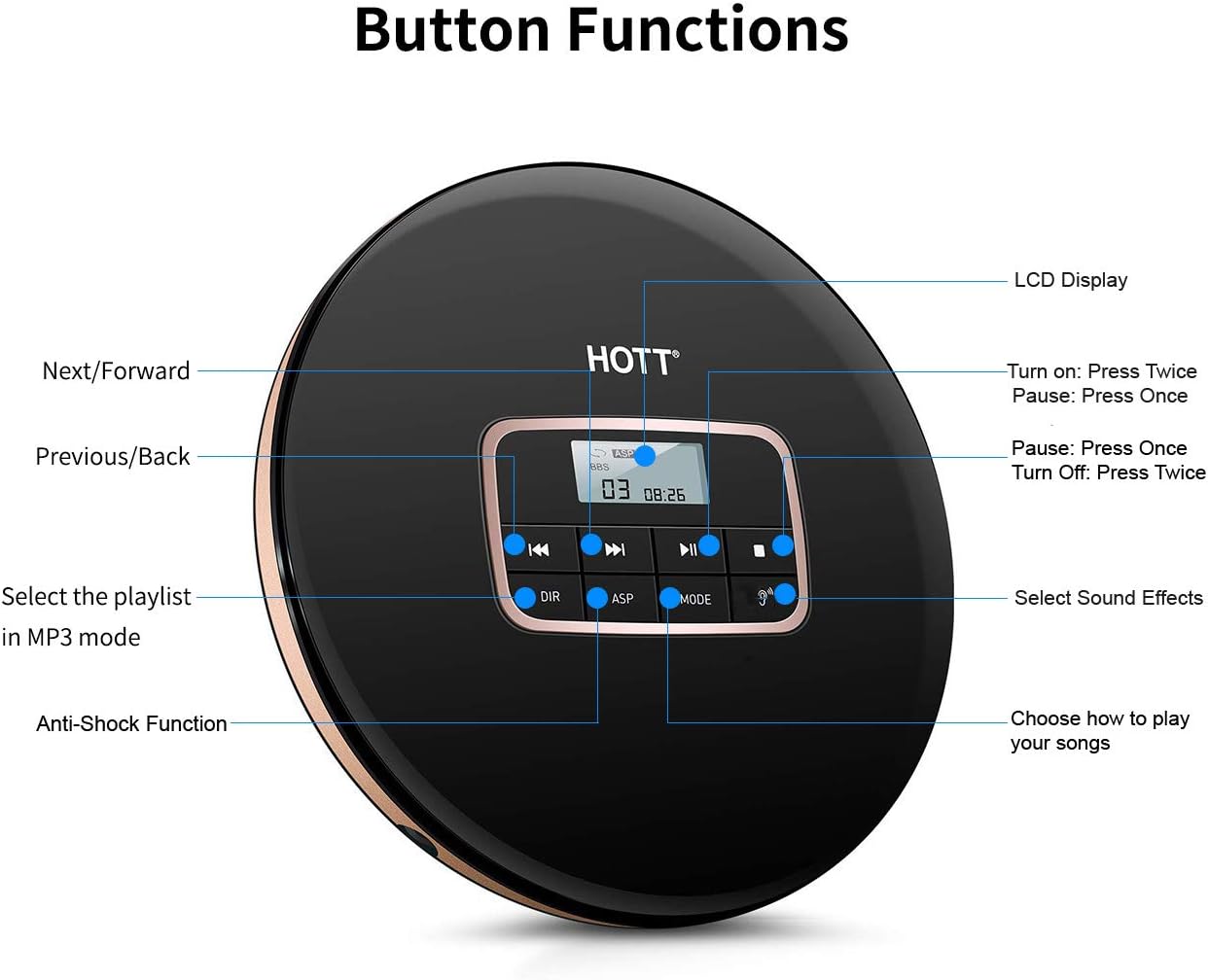
Kuva 1: Yläosa view of the HOTT CD511 Portable CD Player, highlighting the LCD display and various control buttons for navigation, sound effects, and play modes.
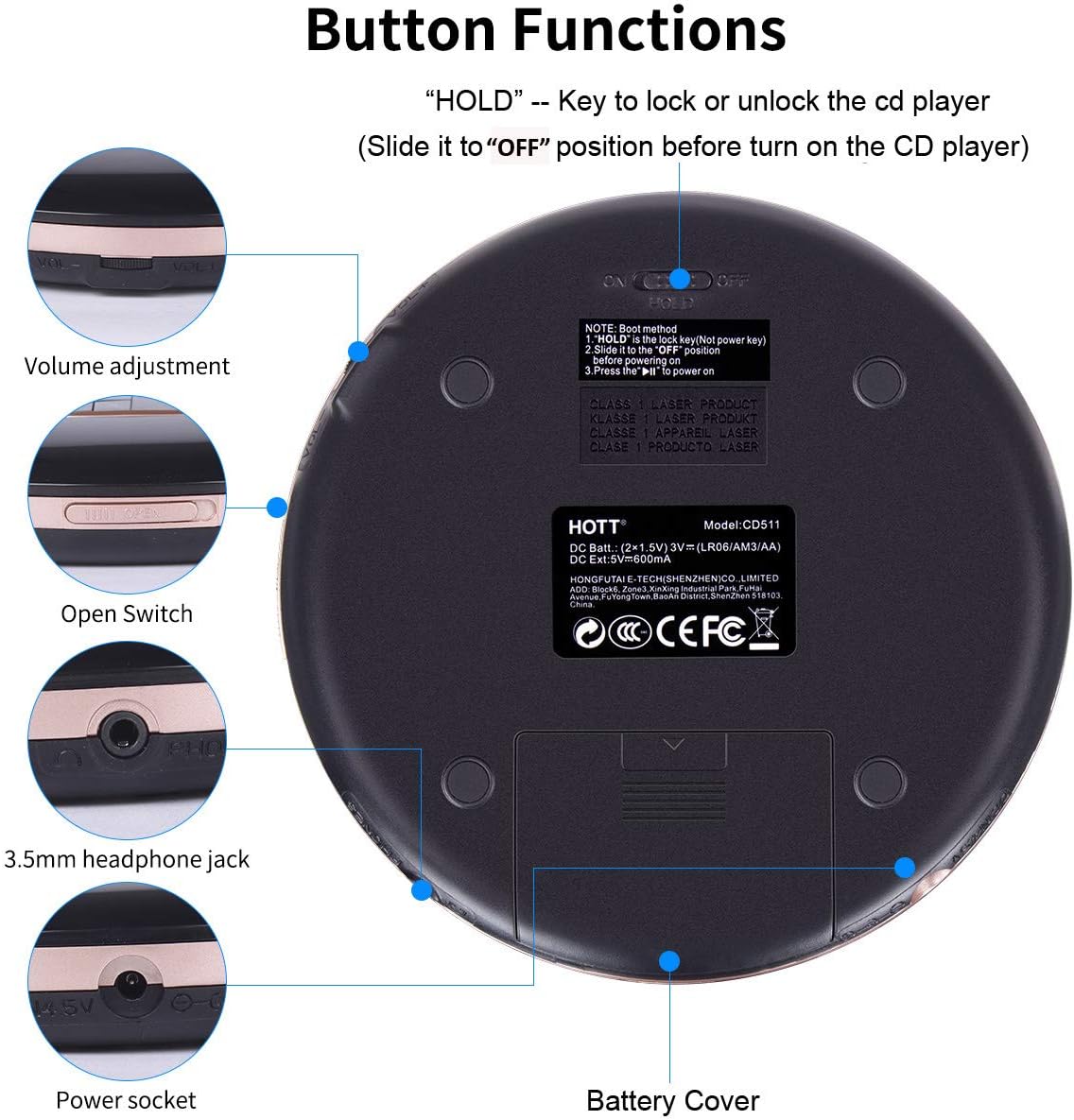
Kuva 2: Pohja ja sivu view of the HOTT CD511 Portable CD Player, showing the HOLD switch, volume control, disc compartment open switch, headphone jack, power socket, and battery cover.
2.3 Yhteensopivuus

Kuva 3: The HOTT CD511 CD player supports various disc formats including standard CD, CD-R, CD-RW, and MP3 discs.
3. Asennus
3.1 Laitteen virran kytkeminen
The HOTT CD511 can be powered in two ways:
- Akut: Open the battery cover on the bottom of the player. Insert two (2) 1.5V AA batteries, ensuring correct polarity. Close the battery cover securely.
- USB-virtalähde: Connect the provided USB cable to the power socket on the side of the player and to a USB power adapter (not included) or a computer's USB port.
Note: Ensure the "HOLD" switch is in the "OFF" position before turning on the CD player.
3.2 CD-levyn asettaminen
- Slide the "OPEN" switch to open the disc compartment lid.
- Carefully place the CD onto the center spindle with the label side facing up.
- Paina CD-levyä varovasti, kunnes se napsahtaa paikalleen.
- Close the disc compartment lid firmly until it latches.
3.3 Kuulokkeiden liittäminen
Insert your 3.5mm headphones into the headphone jack located on the side of the player.
4. Käyttöohjeet
4.1 Perustoisto
- Virta päälle: Paina TOISTA/TAUKO painiketta kahdesti.
- Toista/tauko: Paina TOISTA/TAUKO button once to play or pause.
- Stop: Paina STOP -painiketta.
- Virta pois: Paina STOP painiketta kahdesti.
4.2 Navigointi
- Seuraava kappale: Paina SEURAAVA/ETEENPÄIN -painiketta.
- Edellinen kappale: Paina PREVIOUS/BACK -painiketta.
- Pikakelaus eteen/taakse: Paina ja pidä painettuna SEURAAVA/ETEENPÄIN or PREVIOUS/BACK -painiketta toiston aikana.
4.3 Äänenvoimakkuuden säätö
Säädä äänenvoimakkuutta ÄÄNENVOIMAKKUUS +/- buttons located on the side of the player.
4.4 Play Modes and Sound Effects

Kuva 4: The HOTT CD511 offers various play modes and sound effects for a customized listening experience.
- MODE-painike: Press to cycle through play modes: Single Repeat, All Repeat, Intro, Shuffle.
- EQ-painike: Press to cycle through sound effects: BBS, Pop, Jazz, Rock, Classic.
- DIR Button (MP3 mode only): Selects the playlist or folder when playing MP3 discs.
4.5 HOLD-toiminto
Liu'uta PIDÄ switch on the side of the player to the "ON" position to lock all buttons. This prevents accidental operation during transport. Slide it to "OFF" to unlock the buttons.
4.6 Anti-Skip/Anti-Shock Protection (ASP)
The ASP feature is automatically activated to prevent interruptions during playback caused by minor shocks or vibrations. The duration of anti-shock protection varies depending on the disc type (e.g., CD: 40 seconds, MP3 CD: 120 seconds).
4.7 Car Connectivity

Kuva 5: The HOTT CD511 can be connected to a car's auxiliary input using a 3.5mm audio cable for playback through the car's sound system.
The CD player supports connection to car audio systems via a 3.5mm auxiliary cable. Connect one end of the cable to the player's headphone jack and the other end to your car's AUX input. This feature is compatible with most car models including Toyota, Honda, and Hyundai.
4.8 Käyttöskenaariot

Kuva 6: The HOTT CD511 is suitable for various activities such as relaxation, learning, prenatal education, and travel.
5. Huolto
- Puhdistus: Puhdista soittimen ulkopinta pehmeällä, kuivalla liinalla. Käytä linssin puhdistukseen erityistä CD-levyjen linssinpuhdistussarjaa. Älä käytä hankaavia puhdistusaineita tai liuottimia.
- Levyn hoito: Käsittele CD-levyjä reunoista. Pidä ne puhtaina ja naarmuttomina. Säilytä levyjä koteloissaan, kun niitä ei käytetä.
- Akun vaihto: Replace batteries when the low battery indicator appears on the LCD screen or when playback becomes inconsistent. Remove batteries if the player will not be used for an extended period.
- Varastointi: Säilytä soitinta viileässä, kuivassa paikassa, poissa suorasta auringonvalosta, korkeista lämpötiloista ja kosteudesta.
6. Vianmääritys
| Ongelma | Mahdollinen syy | Ratkaisu |
|---|---|---|
| Soitin ei käynnisty. | Batteries are dead or incorrectly inserted. USB cable is not connected or faulty. HOLD switch is ON. | Replace batteries, check polarity. Ensure USB cable is securely connected. Turn HOLD switch OFF. |
| Levyä ei voi toistaa. | Disc is dirty, scratched, or inserted incorrectly. Disc format is not supported. | Clean the disc, check for damage. Reinsert the disc correctly. Ensure disc is CD, CD-R, CD-RW, or MP3. |
| Sound skipping or interruption. | Disc is dirty or scratched. Player is subjected to excessive shock. | Clean the disc. Avoid strong vibrations. ASP function is active but has limits. |
| Kuulokkeista ei kuulu ääntä. | Headphones not connected properly. Volume is too low. Headphones are faulty. | Varmista, että kuulokkeet on kytketty kokonaan. Lisää äänenvoimakkuutta. Testaa eri kuulokkeilla. |
7. Tekniset tiedot
- Malli: CD511
- Tuotteen mitat: 5.6 x 5.6 x 0.6 tuumaa
- Tuotteen paino: 15.5 unssia
- Merkki: KUUMA
- Väri: Musta
- Yhteystekniikka: Lisälaite, USB
- Erikoisominaisuus: Kannettava
- Levyjen määrä: 1
- Valmistaja: KUUMA
- Ensimmäisenä saatavilla: 10. maaliskuuta 2019
8. Virallinen tuotevideo
Video 1: An official product video demonstrating the features and usage of the HOTT CD Player.
9. Takuu ja tuki
For warranty information or technical support, please refer to the contact details provided with your product packaging or visit the official HOTT websivusto. Säilytä ostokuitti ostotodistuksena takuuvaatimuksia varten.


