
1. Tärkeitä turvallisuustietoja
Please read all safety instructions carefully before using your monitor. Keep this manual for future reference.
- Älä aseta näyttöä epävakaalle vaunulle, jalustalle, jalustalle, kannattimelle tai pöydälle.
- Varmista näytön ympärillä oleva asianmukainen ilmanvaihto. Älä tuki tuuletusaukkoja.
- Käytä ainoastaan näytön mukana toimitettua virtajohtoa ja sovitinta.
- Avoid exposing the monitor to rain or moisture to prevent fire or electric shock.
- Älä avaa näyttöä casing. Anna kaikki huoltotoimenpiteet pätevän huoltohenkilöstön tehtäväksi.
- Unplug the monitor from the wall outlet during lightning storms or when unused for long periods.
2. Pakkauksen sisältö
Varmista, että tuotepakkauksessa on kaikki tarvittavat osat:
- Samsung LC27F396FHNXZA 27-Inch Curved Monitor
- Jalustan jalusta
- Seistä kaula
- Power Adapter and Power Cable (1.5 m)
- HDMI kaapeli
- Pika-asennusopas
- Takuukortti
3. Asennus
3.1 Jalustan kokoaminen
- Aseta näyttö varovasti kuvaruutu alaspäin pehmeälle, puhtaalle liinalle naarmujen välttämiseksi.
- Kiinnitä jalustan kaula monitorin takaosaan, kunnes se napsahtaa paikalleen.
- Connect the stand base to the stand neck by aligning the tabs and tightening the screw at the bottom of the base.

3.2 Liitäntäkaapelit
Varmista, että näyttö ja tietokone ovat sammutettuina ennen kaapeleiden kytkemistä.
- Sähköjohto: Connect the power adapter to the monitor's power input, then plug the power cable into the adapter and a wall outlet.
- Video Cable (HDMI or VGA): Connect one end of the HDMI or VGA cable to the corresponding port on your computer's graphics card and the other end to the HDMI or VGA input on the monitor. Ensure cables are tightened securely.
- Audio Cable (Optional): If you wish to use external speakers or headphones, connect a 3.5mm audio cable from your computer's audio output to the monitor's 3.5mm audio input.
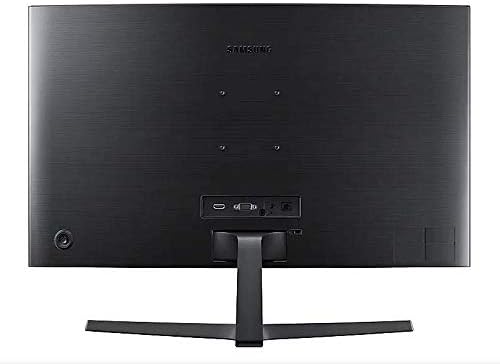
3.3 Virran kytkeminen päälle
Kun olet kytkenyt kaikki tarvittavat kaapelit, käynnistä tietokone ja paina sitten näytön virtapainiketta. Näytön pitäisi tunnistaa tulosignaali automaattisesti.
4. Näytön käyttö
4.1 Basic Functions and OSD Menu
The monitor features a single joystick button located on the back for navigating the On-Screen Display (OSD) menu. Press the joystick to open the OSD menu, then move it up/down/left/right to select and adjust settings.
4.2 Kuva -asetukset
Adjust picture quality settings via the OSD menu:
- Kirkkaus/kontrasti: Adjust these to your preferred viewtasot.
- Resoluutio: The optimal resolution for this monitor is 1920 x 1080 (FHD 1080p).
- Kuvasuhde: Set to 16:9 for widescreen content.
- MagicBright: Select from various preset modes (e.g., Standard, Cinema, Dynamic Contrast) for optimized viewympäristöissä.
- Active Crystal Color: Enhances color reproduction for a more vibrant display.

4.3 AMD FreeSync and Game Mode
This monitor supports AMD FreeSync technology, which synchronizes the screen refresh rate with your graphics card's frame rate to reduce input latency and minimize image tearing and stutter during gaming. Enable FreeSync through the OSD menu for a smoother gaming experience.

4.4 Curved Display Benefits
The 1800R curvature of this monitor is designed to match the natural curve of the human eye, providing a more immersive viewing experience. This curvature helps to reduce peripheral distractions and enhances depth perception, drawing you deeper into your content.

5. Huolto
5.1 Näytön puhdistaminen
- Irrota näyttö aina ennen puhdistamista.
- Käytä pehmeää, nukkaamatonta liinaa kevyesti dampvedellä tai erikoisnäytönpuhdistusaineella.
- Älä suihkuta puhdistusainetta suoraan näytölle.
- Vältä hankaavien puhdistusaineiden, vahojen tai liuottimien käyttöä.
5.2 Varastointi
When storing the monitor for an extended period, ensure it is kept in a cool, dry place, preferably in its original packaging to protect it from dust and physical damage.
6. Vianmääritys
Jos kohtaat ongelmia näytön kanssa, noudata seuraavia yleisiä vianmääritysohjeita:
| Ongelma | Mahdollinen ratkaisu |
|---|---|
| Ei Virtaa | Ensure the power cable is securely connected to the monitor, power adapter, and wall outlet. Check if the wall outlet is functioning. |
| Ei signaalia / Tyhjä näyttö | Verify that the video cable (HDMI/VGA) is firmly connected to both the monitor and the computer. Try a different video input source on the monitor if available. Ensure the computer is powered on and not in sleep mode. |
| Distorted Image / Incorrect Resolution | Adjust the display resolution on your computer to 1920 x 1080. Check the video cable for damage. |
| Screen Tearing / Stuttering (during gaming) | Ensure AMD FreeSync is enabled in the monitor's OSD menu and your graphics card settings. |
| Monitor does not wake up from sleep | Try unplugging and replugging the monitor's power cable. Check your computer's power management settings. |
7. Tekniset tiedot
| Ominaisuus | Yksityiskohta |
|---|---|
| Mallinumero | LC27F396FHNXZA |
| Näytön koko | 27 tuumaa |
| Resoluutio | 1920 x 1080 (FHD 1080p) |
| Kuvasuhde | 16:9 |
| Näytön kaarevuus | 1800R |
| Paneelin tyyppi | VA |
| Vastausaika | 4 millisekuntia |
| Päivitystaajuus | 60 Hz |
| Yhteydet | 1x HDMI, 1x VGA, 1x 3.5mm Audio Out |
| Mukautuva synkronointitekniikka | AMD FreeSync |
| Virrankulutus | 25 Watts (Typical) |
| Mitat (jalustalla) | 62.28 x 24.26 x 46.61 cm (24.5 x 9.6 x 18.4 tuumaa) |
| Paino (jalustan kanssa) | 4.1 kg (9.04 paunaa) |
| Asennustyyppi | Seinäasennus |
8. Takuu ja tuki
8.1 Valmistajan takuu
This Samsung monitor is covered by a 1 vuoden valmistajan takuu ostopäivästä lukien. Säilytä ostokuitti takuuvaatimuksia varten. Takuu kattaa materiaali- ja valmistusvirheet normaalissa käytössä.
8.2 Asiakastuki
For technical assistance, troubleshooting, or warranty service, please contact Samsung Customer Support. You can find contact information on the official Samsung webalueesi sivusto.
Valmistajan yhteystiedot: Mississauga, ON L5M 9Z9, CA
Lisätietoja saat viralliselta sivulta Samsung Canada Support websivusto.


