
1. Johdanto
Thank you for choosing the RCF F-6X 6 Channel Mixing Console. This manual provides essential information for the safe and efficient operation of your new mixer. Please read it thoroughly before connecting or operating the unit to ensure proper setup and to maximize its performance and longevity. The F-6X is designed for professional audio applications, offering high-quality sound, versatile connectivity, and integrated PRO DSP effects.
2. Tärkeitä turvallisuustietoja
Always observe the following basic precautions when using this product to avoid the risk of electric shock, short circuit, damage, fire, or other hazards.
- Virtalähde: Use only the specified external universal power supply. Ensure the voltage is correct for your region.
- Maadoitus: Do not defeat the grounding purpose of the polarized or grounding-type plug.
- Kosteus: Do not expose this equipment to rain or moisture. Do not place objects filled with liquids, such as vases, on the unit.
- Ilmanvaihto: Varmista riittävä ilmanvaihto. Älä tuki tuuletusaukkoja. Asenna valmistajan ohjeiden mukaisesti.
- Lämpö: Älä asenna lähelle mitään lämmönlähteitä, kuten lämpöpattereita, lämpöpattereita, liesiä tai muita laitteita (mukaan lukien ampnostimet), jotka tuottavat lämpöä.
- johdot: Suojaa virtajohtoa kävelemiseltä tai puristumiselta, erityisesti pistokkeiden, pistorasian kohdalta ja kohdasta, jossa ne tulevat ulos laitteesta.
- Huolto: Anna kaikki huoltotoimenpiteet pätevän huoltohenkilöstön tehtäväksi. Huolto on tarpeen, jos laite on jollain tavalla vaurioitunut, kuten virtajohto tai pistoke on vaurioitunut, nestettä on roiskunut tai esineitä on pudonnut laitteen sisään, laite on altistunut sateelle tai kosteudelle, ei toimi normaalisti. , tai se on pudonnut.
Warning: To reduce the risk of fire or electric shock, do not expose this equipment to rain or moisture.

Kuva 2.1: Rear panel of the RCF F-6X, displaying the power input (12V DC - 2000 mA), power on/off switch, serial number, and important safety warnings regarding electric shock and moisture exposure. The CE compliance mark is also visible, indicating conformity with European safety standards.
3. Tuote ohiview
The RCF F-6X is a compact yet powerful 6-channel mixing console designed for a variety of audio applications. It features two Mic/Line inputs, two stereo line inputs, and a balanced main output audio path. The mixer also includes a 16-preset PRO DSP internal effects processor for enhanced sound shaping.
3.1 Etupaneelin asettelu
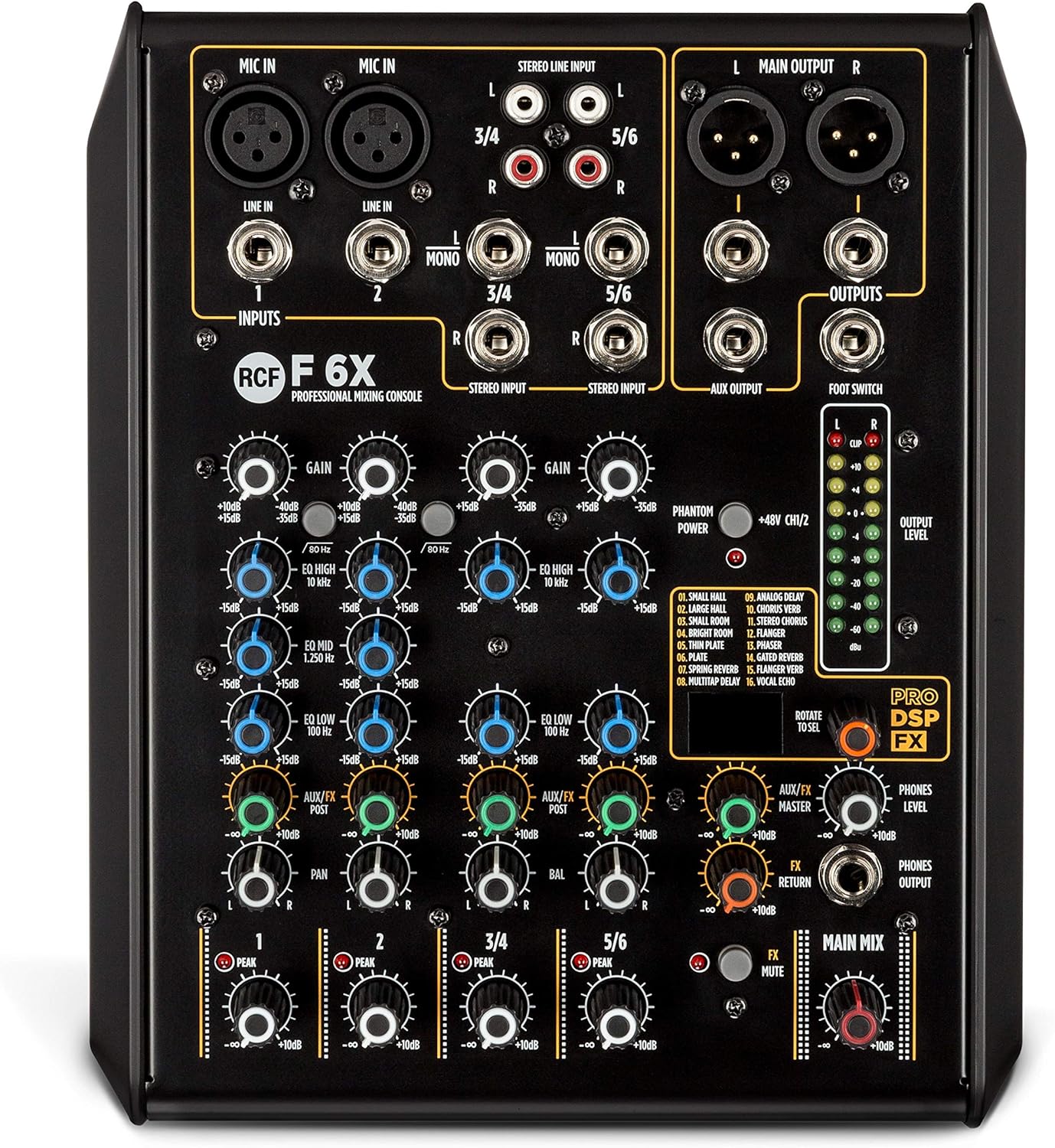
Kuva 3.1: The RCF F-6X front panel, showcasing the input section with XLR/Jack combo inputs for Mic/Line channels 1 and 2, and stereo line inputs for channels 3/4 and 5/6. Each channel features GAIN, EQ (HIGH, MID, LOW), AUX/FX, and PAN controls. The master section includes FX MASTER, FX RETURN, PHONES LEVEL, and MAIN MIX controls, along with the PRO DSP FX section and output level meters.
3.2 Tärkeimmät ominaisuudet
- 2 Mic/Line inputs with XLR/Jack combo connectors.
- 2 stereo line inputs (channels 3/4 and 5/6).
- One AUX/FX (POST) send.
- Balanced main output audio path from input to output.
- 16 presets PRO DSP internal FX processor.
- Sturdy metal chassis for durability.
- External universal power supply.
- Designed and engineered in Italy.
4. Asennusopas
4.1 Pakkauksesta purkaminen
Carefully remove the mixer and all accessories from the packaging. Retain the packaging for future transport or storage.
4.2 Virtaliitäntä
- Varmista, että mikserin virtakytkin on OFF-asennossa.
- Connect the provided external power supply to the 12V DC input on the rear panel of the mixer.
- Kytke virtalähde sopivaan pistorasiaan.
- Turn the power switch to the ON position. The power indicator LED will illuminate.
4.3 Audiolaitteiden liittäminen
Before making any connections, ensure all audio equipment is turned off to prevent damage to speakers or other devices.
- Microphones (Mic In 1-2): Connect microphones to the XLR or 1/4" Jack inputs. For condenser microphones requiring phantom power, activate the +48V PHANTOM POWER switch.
- Mono Line Inputs (Line In 1-2): Connect mono line-level sources (e.g., instruments, preamps) to the 1/4" Jack inputs for channels 1 and 2.
- Stereo Line Inputs (Line In 3/4, 5/6): Connect stereo line-level sources (e.g., keyboards, media players) to the 1/4" Jack (L/R) or RCA (L/R) inputs for channels 3/4 and 5/6.
- Main Outputs (Main Output L/R): Connect the mixer's main outputs to your power amplifier, powered speakers, or recording device using XLR or 1/4" Jack cables.
- AUX Output (AUX Output): Connect this output to external effects processors or monitor systems.
- Phones Output (Phones Output): Connect your headphones to the 1/4" Jack for monitoring.
- Jalkakytkin: Connect an optional footswitch to control the internal effects bypass.
5. Käyttöohjeet
5.1 Kanavaohjaimet
- SAADA: Adjusts the input sensitivity for each channel. Set this to achieve a healthy signal level without clipping (indicated by the PEAK LED).
- Taajuuskorjain (korkea, keskitaso, matala): Kolmikaistainen taajuuskorjain kunkin kanavan sävyn muokkaamiseen.
- KORKEA: +/-15 dB @ 10 kHz Shelving.
- MID: +/-15 dB @ 1.25 kHz Bell.
- MATALA: +/-15 dB @ 100 Hz Shelving.
- LISÄVARUSTE/EFEKTI: Controls the amount of signal sent from the channel to the internal effects processor or external AUX output. This is a POST-fader send.
- PAN (monokanavat) / BAL (stereokanavat): Adjusts the stereo position of the channel's signal in the main mix.
- TASO: Säätää yksittäisen kanavan kokonaislähtötasoa päämiksaukseen nähden.
5.2 Pääosa
- MAIN MIX: The master fader controls the overall output level of the main stereo mix.
- FX MASTER: Controls the overall level of the internal effects return to the main mix.
- FX RETURN: Adjusts the level of the signal returning from the internal effects processor.
- PUHELIMIEN TASO: Säätää kuulokkeiden ulostulon äänenvoimakkuutta.
- OUTPUT LEVEL METERS: LED meters display the output level of the main mix. Aim for levels around 0 dB to avoid clipping.
5.3 Internal Effects (PRO DSP FX)
The RCF F-6X features a high-quality PRO DSP effects processor with 16 selectable presets:
- PIENI SALI
- SUURI SALI
- VALKAS HUONE
- WARM ROOM
- LEVY
- SPRING REV
- ANALOGINEN VIIVE
- CHORUS VERB
- FLANGER VERB
- ROTARY VERB
- TREMOLO VERB
- PHASER VERB
- ANALOGINEN VIIVE
- KUORO
- Laippa
- PYÖRIVÄ
To select an effect, rotate the 'ROTATE TO SEL' knob to browse through the presets. Press the knob to confirm your selection. Adjust the FX MASTER and individual channel AUX/FX sends to control the effect amount.
5.4 Footswitch Functionality
A footswitch can be connected to the dedicated input to remotely bypass (turn on/off) the internal effects, providing hands-free control during performance.
6. Huolto ja hoito
Proper maintenance ensures the longevity and optimal performance of your RCF F-6X mixer.
- Puhdistus: Puhdista laitteen ulkopinta pehmeällä, kuivalla liinalla. Älä käytä hankaavia puhdistusaineita, vahoja tai liuottimia.
- Varastointi: Kun mikseriä ei käytetä pitkään aikaan, säilytä sitä viileässä, kuivassa paikassa, poissa suorasta auringonvalosta ja äärimmäisistä lämpötiloista.
- Ilmanvaihto: Ensure that the ventilation openings are not obstructed by dust or debris.
- Kaapelin hallinta: Vältä kaapeleiden liiallista taivuttamista tai taittamista. Irrota kaapelit vetämällä pistokkeesta, älä itse johdosta.
7. Vianmääritys
If you encounter issues with your RCF F-6X mixer, refer to the following common problems and solutions:
| Ongelma | Mahdollinen syy | Ratkaisu |
|---|---|---|
| Ei virtaa | Power cable not connected; Power supply faulty; Power switch off. | Tarkista virtajohdon liitäntä; Kokeile toista pistorasiaa; Varmista, että virtakytkin on ON-asennossa. |
| No sound from a channel | GAIN too low; Channel LEVEL too low; Input cable faulty; Mute engaged (if applicable). | Increase GAIN and LEVEL; Check input cable; Ensure no mute is active. |
| No sound from main output | MAIN MIX fader too low; Output cables faulty; Connected ampkaiuttimet pois päältä tai mykistetty. | Increase MAIN MIX fader; Check output cables; Verify ampkaiuttimen tila. |
| Vääristynyt ääni | GAIN too high (clipping); Output level too high; Faulty cable/device. | Reduce GAIN and output levels; Check all cables and connected devices. |
| Efektit eivät toimi | AUX/FX send too low; FX MASTER too low; Effect not selected; Footswitch engaged. | Increase AUX/FX send and FX MASTER; Select an effect; Disengage footswitch. |
If the problem persists after trying these solutions, please contact RCF customer support or a qualified service technician.
8. Tekniset tiedot
| Luokka | Erittely |
|---|---|
| Kenraali | |
| Malli | F-6X |
| Kanavat | 6 |
| Kaapin/kotelon materiaali | Metalli |
| Väri | Musta |
| Turvallisuusvirasto | CE-yhteensopiva |
| Elektroniset tekniset tiedot | |
| Taajuusvaste | 20 Hz – 20 kHz |
| THD+N (20dB gain, 0dBu out) | <0.02% A-Weighted |
| Dynaaminen alue | > 85dB |
| Tulotiedot | |
| Mic -tulot | 2 (XLR, Jack) |
| Mic Gain Range | 0 dB – -50 dB |
| Mikrofonin tuloimpedanssi | 14 kohm |
| Matalaleikkaussuodatin | 80 Hz |
| haamuvoimaa | +48V |
| Mono Line -tulot | 2 (Jack) |
| Mono Line Gain Selection | 20 dB – -30 dB |
| Mono Line Input Impedance | 21 kohm |
| Stereo linjatulot | 2 (Jack, RCA) |
| Stereo Line Gain Selection | 20 dB – -30 dB |
| Stereo Line Input Impedance | 15 kohm |
| Lähtötiedot | |
| Main MIX Outputs | 1 (XLR, Jack) |
| Main Out Level | 28 dBu |
| AUX-lähtö | 1 (Jack) |
| Aux Out Level | 28 dBu |
| Puhelimen lähtö | 1 (Jack) |
| Phones Out Impedance | 150 ohmia |
| EQ | |
| Korkea | +/-15 dB @ 10 kHz Hyllyt |
| Mid | +/-15 dB @ 1.25 kHz Bell |
| Matala | +/-15 dB @ 100 Hz Hyllyt |
| Fyysiset tiedot | |
| Korkeus | 79 mm / 3.11 tuumaa |
| Leveys | 210 mm / 8.27 tuumaa |
| Syvyys | 255 mm / 10.04 tuumaa |
| Paino | 1.8 kg / 3.97 lbs |
9. Takuu ja tuki
RCF products are designed and manufactured to the highest quality standards. This product is covered by a limited warranty against defects in materials and workmanship. For specific warranty terms and conditions, please refer to the warranty card included with your product or visit the official RCF websivusto.
For technical support, service, or spare parts, please contact your authorized RCF dealer or distributor. You can also find additional resources and contact information on the official RCF websivusto: www.rcf.it
Please have your product model number (F-6X) and serial number ready when contacting support.