
Johdanto
This manual provides instructions for the Calvas USARMT LTV-914 Universal Remote Control, designed for use with various LG TV models, including AKB73715634, AKB73715679, and 3D Smart TV LN577S. This remote operates via infrared (IR) technology and is intended as a direct replacement, requiring no programming for most compatible LG televisions.
Pakkauksen sisältö
- 1 x USARMT LTV-914 Universal Remote Control
Tekniset tiedot
- Mallinumero: LTV-914
- Merkki: kaljuja kohtia
- Tyyppi: TV:n kaukosäädin
- Viestintä: Infrapuna (IR)
- Taajuus: 433 MHz
- Kanavat: 1
- Virtalähde: 2 x AAA-alkaliparistoa (eivät sisälly toimitukseen)
- Materiaali: ABS
- Yhteensopivat laitteet: LG Televisions (e.g., AKB73715634, AKB73715679, 3D Smart TV LN577S)
- Erikoisominaisuus: Universaali yhteensopivuus
Asennus
Paristojen asentaminen
- Paikanna paristolokero kaukosäätimen takana.
- Liu'uta paristolokeron kantta alaspäin tai paina salpaa ja nosta avataksesi sen.
- Aseta kaksi (2) AAA-alkaliparistoa paikoilleen varmistaen, että positiiviset (+) ja negatiiviset (-) navat ovat oikein lokeron sisällä olevien merkintöjen kanssa.
- Sulje paristolokeron kansi liu'uttamalla sitä takaisin paikalleen, kunnes se napsahtaa tukevasti kiinni.

Image: Back of the remote control with the battery compartment open, illustrating battery insertion.
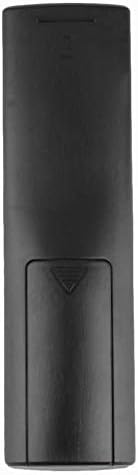
Kuva: Takaosa view of the remote control with the battery cover closed.
Käyttöohjeet
Alkukäyttö
The Calvas USARMT LTV-914 remote control is designed to work directly with most compatible LG TV models without requiring any programming. Simply insert the batteries and point the remote towards your television.
Direct Use and Basic Functions
Most functions, such as power on/off, volume control, channel selection, and navigation, should operate immediately upon pointing the remote at your LG TV.

Kuva: Edessä view kaukosäätimen painikkeiden asettelun näyttäminen.
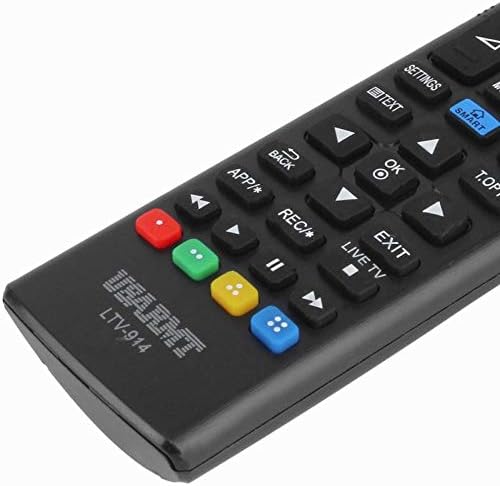
Image: Close-up of the remote's buttons, showing details of the control interface.
Factory Reset / Reconfiguration (If direct use fails)
In rare cases, if the remote does not operate your TV directly, you may need to perform a factory reset or attempt a reconfiguration.
- To reset to factory settings: Press and hold the POWER button and the number 0 -painiketta samanaikaisesti muutaman sekunnin ajan.
- To attempt re-pairing (if applicable, though typically not required for this universal remote): Press and hold the POWER button and the number 1 -painiketta samanaikaisesti muutaman sekunnin ajan.
After performing either of these steps, release the buttons and test the remote's functionality with your TV.
Vianetsintä
- Kaukosäädin ei vastaa:
- Tarkista, että paristot on asetettu oikein päin ja oikea napaisuus on oikea.
- Vaihda vanhat tai tyhjentyneet paristot uusiin AAA-alkaliparistoihin.
- Varmista, ettei kaukosäätimen ja television infrapunavastaanottimen välissä ole esteitä.
- Varmista, että olet television infrapunavastaanottimen tehokkaan kantaman sisällä.
- Jotkin toiminnot eivät toimi:
- While this is a universal remote, some advanced or specific smart TV functions might not be fully supported on all LG models.
- Try the factory reset/reconfiguration steps mentioned in the "Operating Instructions" section.
- Remote LED indicator not lighting up:
- This usually indicates dead batteries or incorrect battery insertion. Replace batteries.
Huolto
- Keep the remote control dry. Avoid exposure to liquids.
- Älä pudota kaukosäädintä tai altista sitä voimakkaille iskuille.
- Puhdista kaukosäädin pehmeällä, kuivalla liinalla. Älä käytä hankaavia puhdistusaineita tai liuottimia.
- Jos kaukosäädintä ei käytetä pitkään aikaan, poista paristot vuotojen estämiseksi.
Takuu ja tuki
Specific warranty information for this product is not provided in the available data. For support or warranty inquiries, please contact your retailer or the manufacturer, Calvas.