
Johdanto
Welcome to the Ipega PG-9033 Bluetooth Gamepad user manual. This guide provides detailed instructions for setting up, operating, maintaining, and troubleshooting your new wireless controller. Please read this manual carefully before use to ensure optimal performance and longevity of your device.
Tuote loppuview
The Ipega PG-9033 is a versatile Bluetooth gamepad designed for an enhanced gaming experience across multiple platforms, including Android, iOS, and PC. It features an adjustable phone holder, dual analog sticks, a D-pad, and action buttons.

Figure 1: The Ipega PG-9033 Bluetooth Gamepad with a smartphone securely mounted in its adjustable holder, actively displaying a racing game. This illustrates the controller's primary use for mobile gaming.
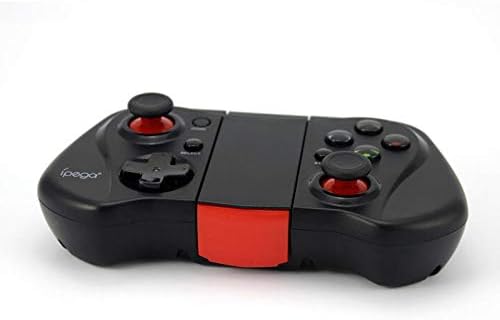
Kuva 2: A-puoli view of the Ipega PG-9033 Bluetooth Gamepad, showcasing its ergonomic design and compact form factor when not in use. The red accent on the central hinge is visible.
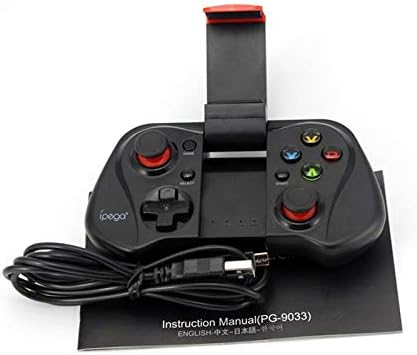
Figure 3: The Ipega PG-9033 Bluetooth Gamepad displayed alongside its USB charging cable and the included instruction manual, which clearly indicates the model number PG-9033.

Kuva 4: Takaosa view of the Ipega PG-9033 Bluetooth Gamepad, featuring a label with technical details such as "BLUETOOTH CONTROLLER," working voltage, working current, and input specifications.
Asennus
Peliohjaimen lataaminen
Before first use, fully charge the gamepad using the provided USB cable.
- Connect the micro-USB end of the charging cable to the gamepad's charging port.
- Connect the USB-A end to a USB power source (e.g., computer, USB wall adapter).
- The charging indicator light will illuminate. It will typically turn off or change color when fully charged.
Pariliitos laitteen kanssa
The PG-9033 supports different pairing modes for various operating systems.
Android-pariliitos
- Ensure the gamepad is off.
- Paina ja pidä painettuna KOTIIN -painiketta ja X button simultaneously until the indicator light flashes rapidly. This puts the gamepad into Android pairing mode.
- On your Android device, go to Bluetooth settings and search for available devices.
- Select "PG-9033" from the list to pair. The indicator light will become solid when connected.
iOS Pairing (iCade Mode)
- Ensure the gamepad is off.
- Paina ja pidä painettuna KOTIIN -painiketta ja B button simultaneously until the indicator light flashes rapidly. This puts the gamepad into iOS iCade pairing mode.
- On your iOS device, go to Bluetooth settings and search for available devices.
- Select "PG-9033" from the list to pair. The indicator light will become solid when connected.
Note: iCade mode has limited game compatibility. For broader iOS compatibility, check specific game requirements.
PC-pariliitos
- Ensure the gamepad is off.
- Paina ja pidä painettuna KOTIIN -painiketta ja A button simultaneously until the indicator light flashes rapidly. This puts the gamepad into PC pairing mode.
- On your PC, go to Bluetooth settings and search for available devices.
- Select "PG-9033" from the list to pair. The indicator light will become solid when connected.
Note: A Bluetooth adapter may be required for PCs without built-in Bluetooth.
Käyttöohjeet
Älypuhelimen liittäminen
- Gently extend the adjustable phone holder located on the top of the gamepad.
- Carefully place your smartphone into the holder, ensuring it is securely gripped and centered.
- Säädä kulma optimaaliseksi viewing.
Game Mode Selection
The gamepad automatically enters the last used mode upon reconnection. To switch modes, disconnect the gamepad and re-pair using the desired mode's button combination (HOME + X for Android, HOME + B for iOS, HOME + A for PC).
Virta päälle/pois
Kytke virta päälle painamalla KOTIIN -painiketta. Sammuta virta pitämällä -painiketta painettuna KOTIIN button for approximately 5 seconds until the indicator light turns off. The gamepad will automatically power off after a period of inactivity.
Huolto
To ensure the longevity and proper functioning of your Ipega PG-9033 gamepad, follow these maintenance guidelines:
- Pidä laite kuivana. Vältä altistumista kosteudelle tai nesteille.
- Puhdista peliohjain pehmeällä, kuivalla liinalla. Älä käytä voimakkaita kemikaaleja tai hankaavia puhdistusaineita.
- Säilytä peliohjainta viileässä, kuivassa paikassa, poissa suorasta auringonvalosta ja äärimmäisistä lämpötiloista.
- Vältä peliohjaimen pudottamista tai voimakkaiden iskujen kohteeksi altistamista.
- Lataa akku säännöllisesti, vaikka et käyttäisikään sitä, akun kunnon ylläpitämiseksi.
Do not attempt to disassemble the gamepad. This will void the warranty and may cause damage.
Vianetsintä
Gamepad not connecting or pairing:
- Varmista, että peliohjain on ladattu täyteen.
- Varmista, että Bluetooth on käytössä laitteessasi.
- Make sure the gamepad is in the correct pairing mode for your device (Android, iOS, or PC).
- Kokeile unohtaa laite Bluetooth-asetuksista ja muodosta pariliitos uudelleen.
- Käynnistä sekä peliohjain että laitteesi uudelleen.
Painikkeet tai ohjaussauvat eivät reagoi:
- Tarkista, onko peliohjain kytketty oikein.
- Ensure the game you are playing supports external controllers.
- Some games may require specific controller mapping or settings adjustments within the game.
- If the issue persists, try resetting the gamepad (if a reset button is available, typically a small pinhole).
Viive tai syöttöviive:
- Ensure your device is not too far from the gamepad. Maintain a clear line of sight.
- Vähennä muiden langattomien laitteiden aiheuttamia häiriöitä.
- Sulje tarpeettomat taustasovellukset laitteellasi.
Phone not fitting in holder:
- The holder is designed for most smartphones. Ensure your phone's dimensions are within the supported range.
- Poista kaikki kömpelöt puhelinkuoret, jotka saattavat estää puhelimen turvallisen istuvuuden.
Tekniset tiedot
| Ominaisuus | Yksityiskohta |
|---|---|
| Malli | PG-9033 |
| Merkki | Ipega |
| Yhteydet | Bluetooth |
| Yhteensopivuus | Android, iOS (iCade), PC |
| Työvoimatage | DC 3.7V |
| Työvirta | 30mA |
| Tulo Voltage | DC 5V 500mA |
| ASIN | B07P52YH7M |
Takuu ja tuki
For warranty information and technical support, please refer to the official Ipega websivustolta tai ota yhteyttä jälleenmyyjään. Säilytä ostokuitti ostotodistuksena.
Tämä käyttöohje on tarkoitettu vain tiedoksi. Tekniset tiedot voivat muuttua ilman erillistä ilmoitusta.


