
Johdanto
The Victrola Journey portable suitcase record player offers a classic design combined with modern features, allowing you to enjoy your music anywhere. This 3-speed belt-driven turntable includes built-in Bluetooth speakers for seamless smartphone audio playback. It features upgraded sound quality with reduced bass vibration and a custom-tuned Pre-Amp for improved audio clarity and bass levels, suitable for both home and on-the-go use.
- Three Speed Belt-Driven Turntable: Plays 33 1/3, 45, and 78 rpm records with upgraded premium sound quality and sound isolating feet.
- Kannettava muotoilu: Sijaitsee viininpunaisessatage suitcase with an easy carry handle for flexible music listening.
- Laajennetut yhteysvaihtoehdot: Stream smartphone audio via built-in Bluetooth speakers, connect external speakers via stereo RCA outputs, use the Line input for non-Bluetooth devices, or connect headphones.
- Vaivaton asennus: No stereo system or extra equipment required; ready to use in minutes.
- Käyttäjäystävälliset säätimet: Sisältää tulosignaalin valintanupin, virta-/äänenvoimakkuusnupin ja automaattisen pysäytyksen kytkimen.
Asennus
Purkaminen ja alkusijoitus
Carefully remove the record player from its packaging. Place the unit on a flat, stable surface. Open the lid of the suitcase record player.
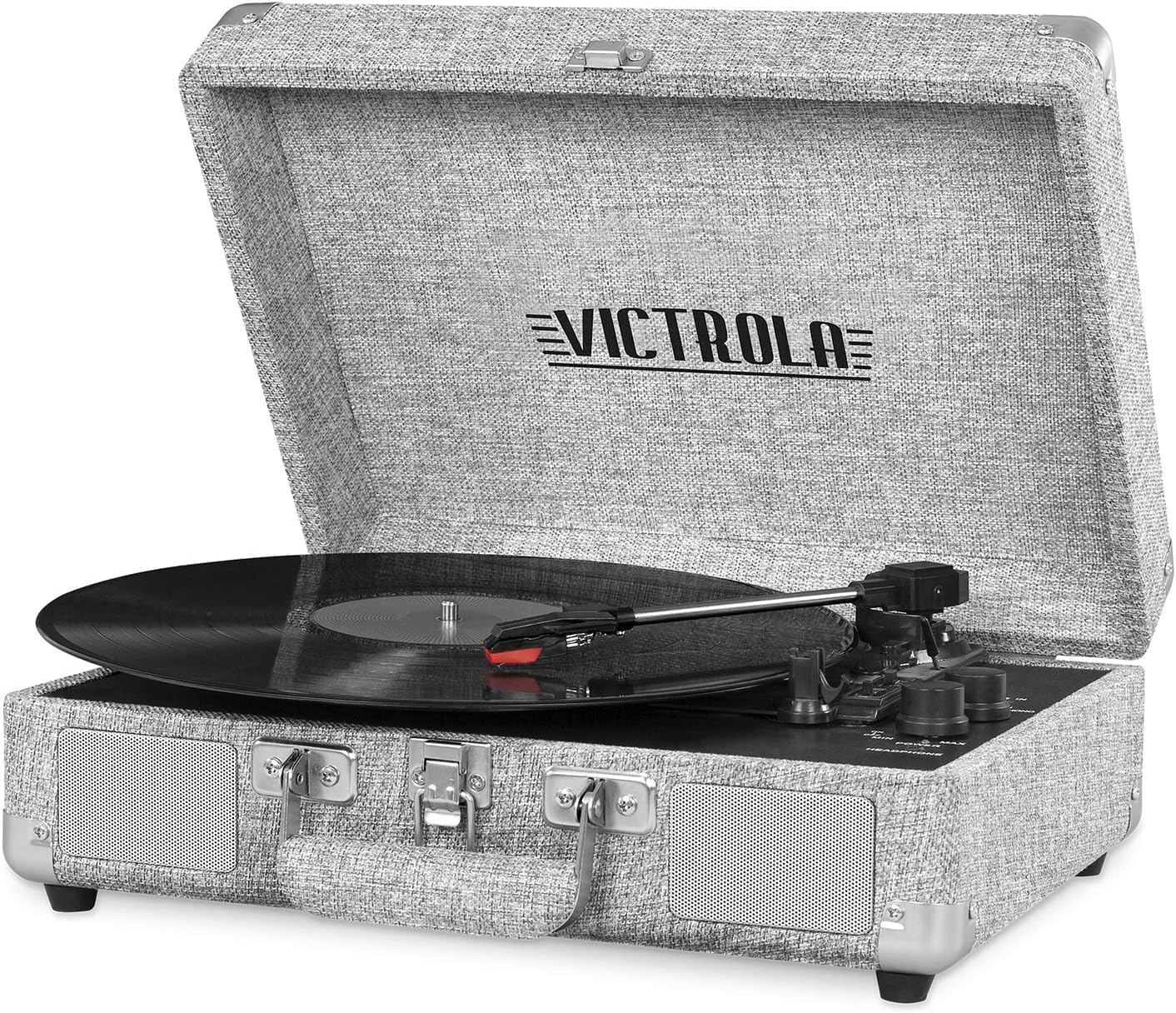
Image: The Victrola Journey Record Player in Light Grey Linen, with its lid open, revealing the turntable, tonearm, and control panel. The unit is ready for initial setup.
Virtaliitäntä
Connect the provided power adapter to the DC IN jack on the back of the unit and then plug it into a wall outlet. Ensure the power switch is in the OFF position before connecting.
Stylus Guard Removal
Before playing a record, gently remove the clear plastic stylus guard from the stylus (needle) at the end of the tonearm. Be careful not to bend the stylus.
Toiminnassa
Vinyylilevyn soittaminen
- Aseta vinyylilevy levysoittimelle.
- Select the appropriate speed (33 1/3, 45, or 78 RPM) using the speed selector switch located on the turntable deck. For 45 RPM records, place the included 45 RPM adapter on the center spindle.
- Turn the Power/Volume knob clockwise to turn on the unit and adjust to a low volume.
- Lift the tonearm from its rest using the cue lever.
- Siirrä äänivarsi levyn halutun aloitusraidan päälle.
- Gently lower the tonearm onto the record using the cue lever. The record will begin to play.
- At the end of the record, the auto-stop function (if enabled) will stop the platter. Lift the tonearm and return it to its rest.

Kuva: Lähikuva view of the Victrola Journey turntable with a vinyl record spinning. The tonearm with its stylus is positioned on the record, illustrating the playback process.
Bluetooth-suoratoisto
Äänen suoratoisto Bluetooth-laitteesta:
- Turn the Input Select knob to the 'BT' position. The Bluetooth indicator light will flash.
- Enable Bluetooth on your external device (e.g., smartphone, tablet) and search for 'Victrola Journey'.
- Select 'Victrola Journey' to pair. Once paired, the indicator light will stop flashing and remain solid.
- Voit nyt toistaa laitteesi musiikkia levysoittimen kaiuttimien kautta.
Video: An official Victrola video demonstrating the Bluetooth pairing process and features of the Journey turntable.
External Audio Connections
The Victrola Journey offers several options for connecting to other audio equipment:
- RCA-lähtö: Use the RCA L/R output jacks on the back of the unit to connect to an external ampnostin tai teholliset kaiuttimet.
- Rivisyöttö: Connect non-Bluetooth audio devices (e.g., CD player, MP3 player) to the LINE IN jack using a 3.5mm audio cable. Select 'LINE IN' using the Input Select knob.
- Kuulokeliitäntä: For private listening, plug standard 3.5mm headphones into the HEADPHONE jack on the front panel.

Image: The rear panel of the Victrola Journey Record Player, highlighting the RCA output jacks and the power input for connecting to external audio systems or power sources.
Huolto
Puhdistus Records
Regularly clean your vinyl records with a soft, anti-static brush or cloth to remove dust and debris. Always wipe in the direction of the grooves, not across them.
Stylus Care
The stylus (needle) is a delicate component. Clean it periodically with a soft brush, brushing from back to front. Avoid touching the stylus with your fingers. Replace the stylus if you notice a decrease in sound quality or visible damage.
Kaapin puhdistus
Wipe the exterior of the record player with a soft, dry cloth. Avoid using harsh chemicals or abrasive cleaners, as these can damage the finish.
Vianetsintä
If you encounter issues with your Victrola Journey Record Player, please refer to the following common solutions:
| Ongelma | Mahdollinen syy | Ratkaisu |
|---|---|---|
| Ei virtaa | Virtasovitin ei ole kytketty tai pistorasia ei ole aktiivinen. | Ensure power adapter is securely connected to the unit and a working wall outlet. Check if the power switch is ON. |
| Kaiuttimista ei kuulu ääntä | Volume too low, input mode incorrect, or headphones connected. | Increase volume. Ensure correct input mode (PHONO, BT, LINE IN) is selected. Disconnect headphones if connected. |
| Ennätyksen ohittaminen | Record is dirty or scratched, or unit is not on a stable surface. | Clean the record. Place the unit on a stable, level surface away from vibrations. Check stylus for damage. |
| Bluetooth ei muodosta pariliitosta | Unit not in BT mode, or device too far. | Ensure Input Select knob is set to 'BT'. Keep your Bluetooth device within 33 feet (10 meters) of the record player. Try restarting both devices. |
| Levysoitin ei pyöri | Auto-stop engaged, or belt issue. | Check the auto-stop switch. If the issue persists, consult the full troubleshooting guide. |
Tarkempia vianmääritysohjeita varten katso virallinen Vianmääritysopas (PDF).
Tekniset tiedot
Key technical specifications for the Victrola Journey Bluetooth Suitcase Record Player:
- Merkki: Victrola
- Mallin nimi: Victrola Vintage 3 Speed Bluetooth Suitcase Record Player
- Mallinumero: VSC-550BT-LGY
- Väri: Light Grey Linen
- Materiaali: Muovi
- Tuotteen paino: 5.5 kiloa
- Tuotteen mitat (P x L x K): 13.9 cm x 10.1 cm x 5 cm
- Suurin pyörimisnopeus: 78 rpm (supports 33 1/3, 45, 78 rpm)
- Yhteystekniikka: Langallinen, Langaton (Bluetooth)
- Virtalähde: Battery Powered (DC Motor, 120 watts)
- Mukana tulevat komponentit: Levysoitin
- UPC: 816203019226

Image: A diagram illustrating the dimensions of the Victrola Journey Record Player, showing its length, width, and height measurements.
Takuutiedot
The Victrola Journey Bluetooth Suitcase Record Player comes with a 1 vuoden takuu from the manufacturer. For specific details regarding coverage and claims, please refer to the warranty documentation included with your product or contact Victrola customer support.
Additionally, products purchased from Amazon typically include a 30-day return/replacement policy. Please check your purchase details for the most accurate return information.
Asiakastuki
For further assistance, technical support, or warranty inquiries, please contact Victrola customer service. You can typically find contact information on the manufacturer's websivustolla tai tuotteen mukana toimitetuissa dokumenteissa.
Vieraile virkailijalla Victrola-kauppa Amazonissa lisätietoja ja tuotepäivityksiä varten.