
AuKing M8-F
AuKing-projektorin käyttöohje
Malli: M8-F
Johdanto
This manual provides essential information for the safe and efficient operation of your AuKing Mini Projector. Please read it thoroughly before use and retain it for future reference.
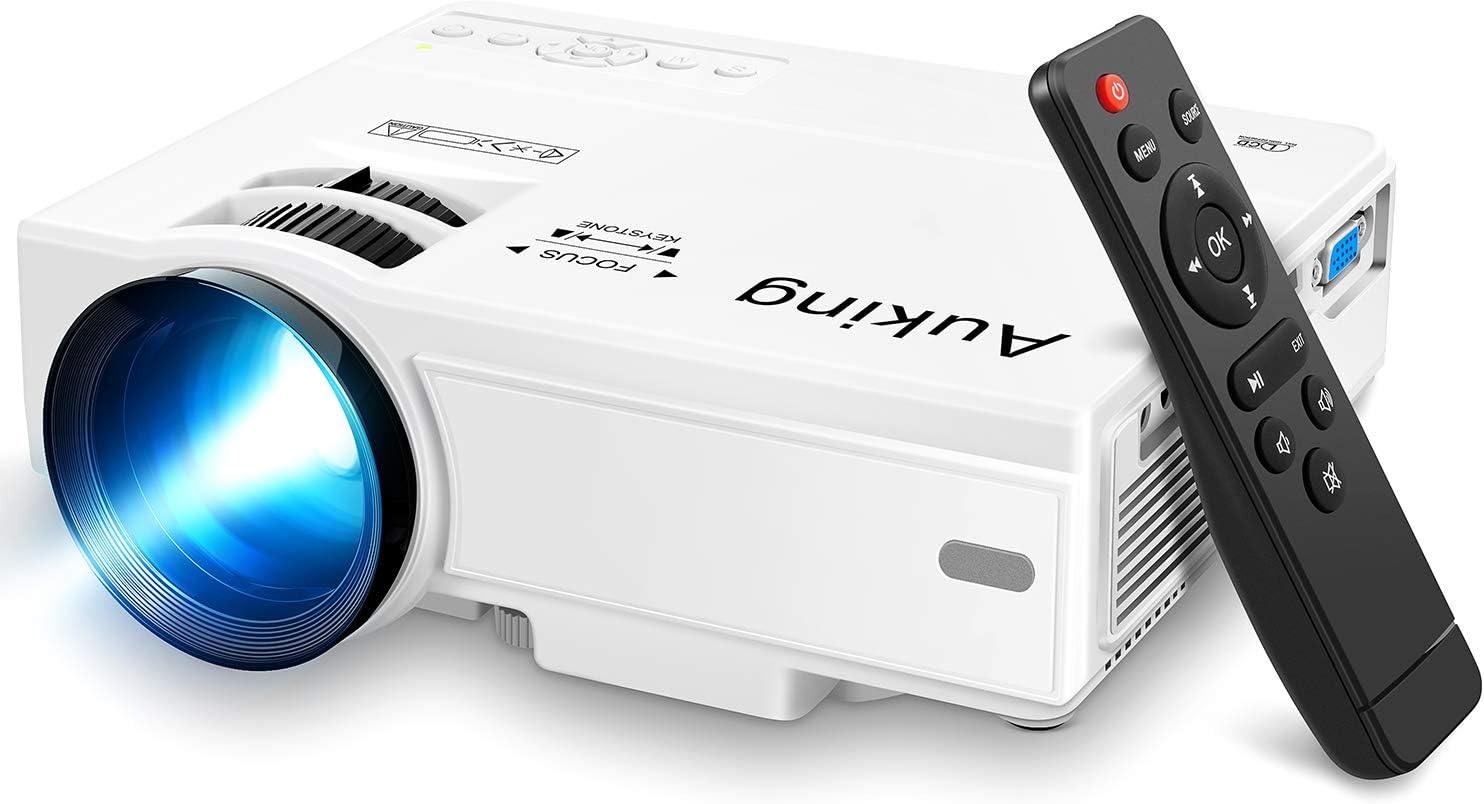
Image: The AuKing Mini Projector, a compact white device, is shown alongside its black remote control. The projector features a prominent lens and control buttons on its top surface.
Tuotteen ominaisuudet
- Full HD 1080P Support: Experience clear and sharp detailed images with the latest color reproduction technology for a vibrant viewvaikutus.
- Large Projection Screen: Nauti mukaansatempaavasta viewing experience with a projection size ranging from 35 to 200 inches, suitable for distances between 3.6ft and 16.4ft.
- Pitkä lampun käyttöikä: The powerful cooling system effectively dissipates heat, extending the lamp's life up to 55,000 hours for over 15 years of use.
- Low Noise & Dual Stereo Speakers: Advanced noise reduction technology reduces fan noise by 80%. Built-in dual stereo speakers provide clear sound quality. External speakers can be connected for enhanced audio.
- Usean laitteen yhteys: Equipped with HDMI, VGA, AV, and USB interfaces, compatible with smartphones, laptops, pads, USB drives, and TV boxes. (Note: An extra HDMI adapter may be needed for phone connection, and copyrighted apps like Netflix, Prime Video, Hulu require a TV Stick or Roku.)

Image: A split image demonstrating the AuKing projector's superior color reproduction and 1080P support compared to a generic projector.
Mitä laatikossa on
Your AuKing Projector package includes:
- AuKing Mini Projector
- Kaukosäädin
- Virtakaapeli
- AV-kaapeli
- HDMI kaapeli
- Käyttöopas
Asennusopas
1. sijoitus
Choose a suitable location for your projector. It can be placed on a table, mounted on a tripod, or ceiling-mounted. Ensure the projection surface is flat and clear.

Image: Demonstrates various placement options for the AuKing projector, including tripod installation, ceiling mount, and simple table placement.
2. Virtaliitäntä
Kytke virtajohto projektoriin ja sitten pistorasiaan.
3. Laiteliitäntä
Connect your desired input device (e.g., laptop, USB drive, smartphone) to the projector using the appropriate cable (HDMI, USB, AV, VGA). For smartphone connections, an additional HDMI adapter may be required (sold separately).

Image: Illustrates the projector's compatibility with multiple devices, showing connections for smartphones, laptops/PCs, PS4, DVD players, memory cards, and USB drives.
4. Tarkennuksen ja trapetsivääristymän säätö
Use the FOCUS and KEYSTONE rings on the projector to adjust the image clarity and shape until it appears rectangular and sharp on your screen.
Käyttöohjeet
1. Virta päälle/pois
Käynnistä tai sammuta laite painamalla projektorin tai kaukosäätimen virtapainiketta.
2. Tulolähteen valinta
Use the "Source" button on the remote or projector to select the correct input source (HDMI, USB, AV, VGA) corresponding to your connected device.
3. Median toisto
Navigoi mediasi läpi files using the remote control. For streaming services like Netflix, Prime Video, or Hulu, ensure you are using a compatible TV Stick or Roku device connected to the projector due to copyright restrictions.

Kuva: Olohuoneen sisustusnäyttelyasing the projector's ability to create a large 200-inch projection, providing an immersive home theater experience.
4. Äänilähtö
The projector has built-in dual stereo speakers. For a higher sound quality, connect external speakers via the audio output port.
Huolto
To ensure optimal performance and longevity of your AuKing projector:
- Pölynpuhdistus: Regularly clean the lens with a soft, lint-free cloth. Avoid abrasive cleaners.
- Ilmanvaihto: Ensure the projector's ventilation ports are not blocked to allow proper airflow and prevent overheating. The advanced cooling system is designed to manage heat effectively.
- Varastointi: Kun projektoria ei käytetä pitkään aikaan, säilytä sitä viileässä, kuivassa paikassa, poissa suorasta auringonvalosta ja äärimmäisistä lämpötiloista.

Image: An illustration highlighting the projector's advanced cooling system, showing arrows indicating airflow to prevent overheating and extend lamp elämää.
Vianetsintä
| Ongelma | Mahdollinen syy | Ratkaisu |
|---|---|---|
| No image or "No Signal" | Väärä tulolähde valittu; Löysä kaapeliliitäntä; Laite ei ole käynnissä. | Select the correct input source. Check all cable connections. Ensure the input device is powered on. |
| Epäselvä kuva | Out of focus; Incorrect keystone adjustment. | Adjust the FOCUS ring until the image is clear. Adjust the KEYSTONE ring to correct image distortion. |
| Ei ääntä | Äänenvoimakkuus liian alhainen; Mykistetty; Ulkoiset kaiuttimet eivät ole kytketty oikein. | Lisää äänenvoimakkuutta. Poista projektorin mykistys. Tarkista ulkoisten kaiuttimien liitännät. |
| Projektorin ylikuumeneminen | Tukkeutunut ilmanvaihto; Pitkäaikainen käyttö kuumassa ympäristössä. | Ensure vents are clear. Turn off and allow to cool. Use in a well-ventilated area. |
Tekniset tiedot
| Ominaisuus | Yksityiskohta |
|---|---|
| Merkki | AuKing |
| Mallinumero | M8-F |
| Näytön resoluutio | 1920 x 1080 (Full HD supported) |
| Projektion koko | 35-200 tuumaa |
| Projektioetäisyys | 3.6 jalkaa - 16.4 jalkaa |
| Lamp Elämä | Jopa 55,000 tuntia |
| Yhteystekniikka | VGA, USB, HDMI, AV |
| Kaiuttimen tyyppi | Built-In Dual Stereo Speakers |
| Tuotteen paino | 2.87 kiloa |
| Tuotteen mitat | 7.95 x 6.3 x 2.91 tuumaa |
Takuu ja tuki
AuKing offers a 2 vuoden tuotetakuu and lifetime after-sales service for your projector. If you encounter any issues or have questions, please do not hesitate to contact our support team. We are committed to providing 100% customer satisfaction.
Jos tarvitset tukea, käy osoitteessa AuKing Store on Amazon tai katso tuotepakkauksessa olevat yhteystiedot.
Ask a question about this manual
Ask about setup, troubleshooting, compatibility, parts, safety, or missing instructions. Manuals+ will review the question and use this page’s manual context to help answer it.