
1. Johdanto
Kiitos ostoksestasiasing the DACOM GF7 TWS V4.2 Bluetooth Earbuds. This manual provides detailed instructions on how to set up, operate, and maintain your earbuds to ensure optimal performance and longevity. Please read this manual thoroughly before using the product and retain it for future reference.
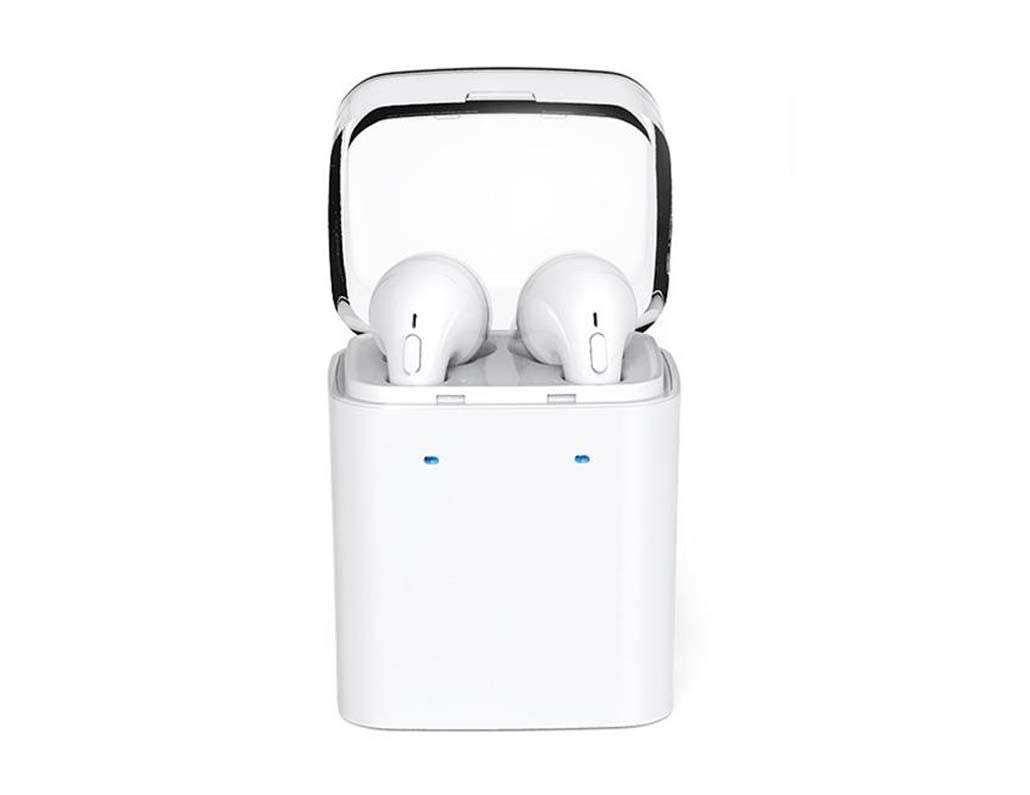
Image 1.1: DACOM GF7 TWS V4.2 Bluetooth Earbuds in their charging case.
2. Pakkauksen sisältö
Tarkista pakkauksen sisältö purkamisen jälkeen. Jos jokin puuttuu tai on vaurioitunut, ota yhteyttä jälleenmyyjään.
- DACOM GF7 TWS V4.2 Bluetooth Earbuds (Left and Right)
- Kannettava latauskotelo
- USB-latauskaapeli
- Korvatyynyt (eri kokoja)
- Käyttöopas (tämä asiakirja)
3. Tuote ohiview
Familiarize yourself with the components of your DACOM GF7 TWS V4.2 Earbuds and charging case.

Image 3.1: Detailed diagram showing the Multifunction Button (MFB), Indicator Light, Microphone (Mic), Air Gate, DC5V Charge Jack Cover, Headphone Charging Indicator Light, USB Charging Input Port, and the Charging Indicator Light of the bottom on the DACOM GF7 TWS V4.2 Earbuds and Charging Case.
- Monitoimipainike (MFB): Used for power, playback, call management, and voice assistant activation.
- Merkkivalo: Displays pairing status, charging status, and power status.
- MIC: Sisäänrakennettu mikrofoni puheluita ja äänikomentoja varten.
- Ilmaportti: Acoustic vent for sound performance.
- DC5V Charge Jack Cover: Protects the charging port on the earbuds.
- Headphone Charging Indicator Light: Shows charging status of individual earbuds within the case.
- USB Charging Input Port: For charging the portable charging case.
- Charging Indicator Light of the bottom: Näyttää kotelon lataustilan.
4. Asennus
4.1. Kuulokkeiden ja latauskotelon lataaminen
- Kotelon lataus: Connect the USB charging cable to the USB Charging Input Port on the charging case and the other end to a 5V USB power adapter (not included). The Charging Indicator Light at the bottom of the case will illuminate to indicate charging. Once fully charged, the indicator light may change color or turn off.
- Kuulokkeiden lataus: Place the earbuds into their respective slots in the charging case. Ensure the earbuds are properly seated. The Headphone Charging Indicator Light on the case will show the charging status of the earbuds. The earbuds' indicator lights will also show charging status (e.g., red while charging, off when fully charged).
- Lataa sekä nappikuulokkeet että latauskotelo täyteen ensimmäisellä käyttökerralla.
4.2. Bluetooth-pariliitos
- Virta päälle: Take both earbuds out of the charging case. They will automatically power on and attempt to pair with each other. You will hear an audible prompt indicating they are connected to each other.
- Pariliitostila: Once the earbuds are paired with each other, one earbud's indicator light will flash red and blue alternately, indicating it is in pairing mode and ready to connect to your device.
- Yhdistä laitteeseen: On your smartphone or Bluetooth-enabled device, go to the Bluetooth settings and search for available devices. Select "DACOM GF7 TWS" (or similar name) from the list.
- Onnistunut yhteys: Once connected, the earbud's indicator light will stop flashing, and you will hear a confirmation sound.
- Automaattinen uudelleenkytkentä: Ensimmäisen pariliitoksen muodostamisen jälkeen nappikuulokkeet yhdistyvät automaattisesti viimeksi pariliitettyyn laitteeseen, kun ne otetaan pois latauskotelosta, edellyttäen, että Bluetooth on käytössä laitteessasi.
5. Käyttöohjeet
The DACOM GF7 TWS V4.2 Earbuds feature a Multifunction Button (MFB) for various controls.
5.1. Virta päälle/pois
- Virta päälle: Take the earbuds out of the charging case. They will power on automatically. Alternatively, press and hold the MFB on both earbuds for approximately 3 seconds until you hear a power-on prompt.
- Virta pois: Place the earbuds back into the charging case. They will power off automatically. Alternatively, press and hold the MFB on both earbuds for approximately 5 seconds until you hear a power-off prompt.
5.2. Musiikin toisto
- Toista/tauko: Single press the MFB on either earbud.
- Seuraava kappale: Double press the MFB on the right earbud.
- Edellinen kappale: Double press the MFB on the left earbud.
5.3. Puhelunhallinta
- Puhelun vastaaminen/lopetus: Single press the MFB on either earbud.
- Hylkää puhelu: Press and hold the MFB on either earbud for approximately 2 seconds.
5.4. Voice Assistant
- Aktivoi Voice Assistant: Triple press the MFB on either earbud to activate your device's voice assistant (e.g., Siri, Google Assistant).
5.5. Melunvaimennus
- The DACOM GF7 TWS V4.2 features active noise cancellation. Specific activation methods may vary. Refer to the product's quick start guide or manufacturer's website for precise instructions if not detailed here. Typically, a long press or specific tap sequence on an MFB or dedicated button activates/deactivates ANC.
6. Huolto
Kuulokkeiden asianmukainen huolto varmistaa niiden pitkän käyttöiän ja suorituskyvyn.
- Puhdistus: Puhdista nappikuulokkeet ja latauskotelo säännöllisesti pehmeällä, kuivalla ja nukkaamattomalla liinalla. Älä käytä voimakkaita kemikaaleja tai hankaavia materiaaleja.
- Korvavinkkejä: Irrota ja puhdista korvatyynyt säännöllisesti mainosmateriaalilla.amp liinalla ja miedolla saippualla, huuhtele ja kuivaa huolellisesti ennen takaisin kiinnittämistä.
- Varastointi: Kun nappikuulokkeita ei käytetä, säilytä niitä latauskotelossa suojataksesi niitä pölyltä ja vaurioilta.
- Vältä kosteutta: Keep the earbuds and charging case away from water, excessive humidity, and extreme temperatures.
7. Vianmääritys
If you encounter issues with your earbuds, refer to the following common problems and solutions.
| Ongelma | Ratkaisu |
|---|---|
| Kuulokkeet eivät muodosta paritusta keskenään. |
|
| Kuulokkeet eivät muodosta yhteyttä laitteeseen. |
|
| Kuulokkeista ei kuulu ääntä. |
|
| Charging case or earbuds not charging. |
|
8. Tekniset tiedot
| Tuotemerkki | DACOM |
| Mallin nimi | GF7 TWS |
| Mallinumero | 7TWS |
| Väri | Valkoinen |
| Kuulokkeiden muototekijä | Korvassa |
| Melunhallinta | Aktiivinen melunvaimennus |
| Yhteystekniikka | Langaton (Bluetooth) |
| Langaton viestintätekniikka | Bluetooth V4.2 (inferred from title) |
| Mukana olevat komponentit | Korvatyynyt |
| Erikoisominaisuudet | Melunvaimennus, mikrofoni sisältyy |
| Valvontamenetelmä | Kosketa |
| Yhteensopivat laitteet | Kaikki laitteet |
| Materiaali | PU Metal Eraser (likely referring to ear tip material or casing finish) |
9. Turvallisuustiedot
Please read and follow these safety guidelines to prevent injury or damage to your device.
- Älä pura, korjaa tai muuta tuotetta. Tämä voi aiheuttaa tulipalon, sähköiskun tai tuotteen täydellisen vaurioitumisen.
- Keep the product away from extreme temperatures (hot or cold), direct sunlight, and sources of heat.
- Vältä altistamasta tuotetta vedelle tai muille nesteille.
- Älä käytä tuotetta pitkään suurella äänenvoimakkuudella kuulovaurioiden välttämiseksi.
- Käytä vain mukana toimitettuja tai suositeltuja latauskaapeleita ja sovittimia.
- Pidä poissa lasten ja lemmikkien ulottuvilta. Pienet osat voivat aiheuttaa tukehtumisvaaran.
- Be aware of your surroundings when using the earbuds, especially in traffic or other potentially dangerous situations.
10. Takuu ja tuki
DACOM products are designed and manufactured to the highest quality standards. For detailed warranty information, please refer to the warranty card included with your purchase or visit the official DACOM websivusto.
For technical support, troubleshooting assistance, or to inquire about replacement parts, please contact DACOM customer service through their official websivustolla tai tuotepakkauksessa olevissa yhteystiedoissa.
- Online-tuki: Visit the official DACOM websivusto usein kysytyille kysymyksille, tukiartikkeleille ja yhteydenottolomakkeille.
- Sähköpostituki: Refer to your product packaging for customer service email addresses.