
Johdanto
This manual provides essential information for the safe and effective use of your Canon PowerShot SX740 HS Digital Camera. Please read it thoroughly before operating the camera to ensure proper handling and to maximize its features. The Canon PowerShot SX740 HS is a compact digital camera featuring a 20.3-megapixel CMOS sensor, 40x optical zoom, 4K video recording capabilities, and built-in Wi-Fi and Bluetooth connectivity.

Kuva 1: Etuosa view of the Canon PowerShot SX740 HS Digital Camera with the lens retracted.
Mitä laatikossa on
Varmista, että pakkauksessasi on kaikki seuraavat osat:
- Canon PowerShot SX740 HS -digitaalikamera
- NB-13L Lithium-Ion Battery Pack
- CB-2LH Battery Charger
- Rannehihna
- HDMI kaapeli
- Kolmijalka
- SanDisk 64GB SDHC Memory Card
- Premium Camera Case
- Nopea USB-kortinlukija
Asennus
1. Akun lataaminen ja asentaminen
- Insert the NB-13L battery into the CB-2LH charger.
- Plug the charger into a power outlet. The charging indicator light will show the charging status.
- Kun akku on ladattu täyteen, irrota akku laturista.
- Avaa kameran pohjassa olevan akkulokeron kansi.
- Insert the charged battery into the compartment, ensuring correct orientation. Close the cover securely.
2. Muistikortin asettaminen paikalleen
- Avaa muistikorttipaikan kansi, joka sijaitsee yleensä akkulokeron lähellä.
- Insert the SDHC memory card with the label facing the front of the camera until it clicks into place.
- Sulje muistikorttipaikan kansi.
3. Ensimmäinen käynnistys ja perusasetukset
- Käynnistä kamera painamalla virtapainiketta.
- Aseta päivämäärä, kellonaika ja kieli noudattamalla näytön ohjeita.
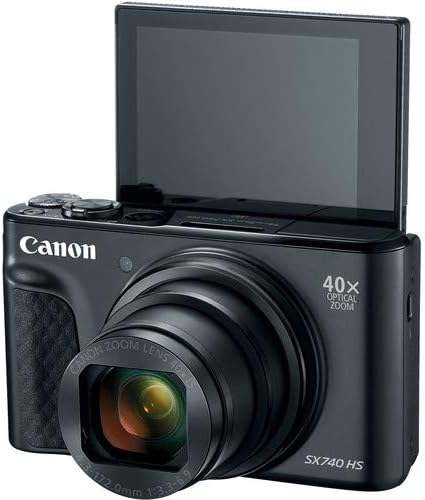
Kuva 2: Etuosa view of the camera with the LCD screen tilted upwards, ready for use.
Kameran käyttö
1. Virta päälle/pois
Paina POWER kameran päällä olevaa painiketta sen kytkemiseksi päälle tai pois päältä.
2. Kuvaustilat
The camera offers various shooting modes. Use the mode dial or menu options to select:
- Automaattinen tila: For simple point-and-shoot operation, where the camera automatically adjusts settings.
- Ohjelma (P) -tila: Mahdollistaa enemmän asetusten hallintaa kameran asettaessa valotusta.
- Kohtaustilat: Optimized settings for specific scenarios like portraits, landscapes, or night scenes.
- Feature Assistant: Provides on-screen explanations to help you understand and use various camera features.
3. Zoomaustoiminto
The camera features a 40x optical zoom lens. Use the zoom lever around the shutter button to zoom in (telephoto) or out (wide-angle). Digital zoom can extend the range further, but may reduce image quality.

Kuva 3: Etuosa view of the camera with the lens extended for zooming.
4. Keskittäminen
The camera primarily uses autofocus. Point the camera at your subject and half-press the shutter button to focus. The focus frame will appear on the LCD screen. For specific situations, manual focus options may be available in the menu.
5. Videotallennus
To record videos, switch to video mode (if available via a dedicated button or mode dial) or press the dedicated movie recording button. The camera supports 4K video capture. Press the button again to stop recording.
6. Using the Tilting LCD Screen
The 3.0-inch LCD screen can tilt 180 degrees, allowing for easy framing of selfies or shots from various angles. Adjust the screen to your desired position.

Kuva 4: Takaosa view kameran LCD-näytön ja ohjauspaneelin asettelun näyttäminen.
7. Wi-Fi- ja Bluetooth-yhteydet
The camera features built-in Wi-Fi and Bluetooth for connecting to compatible mobile devices. Download the Canon Camera Connect app to your smartphone or tablet to transfer images, remotely control the camera, and share photos.
- Enable Wi-Fi or Bluetooth in the camera's menu.
- Open the Canon Camera Connect app on your mobile device and follow the pairing instructions.
Huolto
1. Kameran puhdistaminen
- Linssi: Use a soft, lint-free cloth or a lens brush to gently remove dust. For smudges, use a specialized lens cleaning solution and cloth. Avoid touching the lens directly with your fingers.
- LCD-näyttö: Wipe gently with a soft, dry cloth. Do not use harsh chemicals.
- Kameran runko: Use a soft, dry cloth to wipe away dust and dirt.
2. Akun hoito
- Säilytä akkuja viileässä ja kuivassa paikassa, kun niitä ei käytetä.
- Vältä akun usein tapahtuvaa täydellistä tyhjentymistä sen käyttöiän pidentämiseksi.
- Poista akku kamerasta, jos sitä ei käytetä pitkään aikaan.
3. Varastointi
When storing the camera for long periods, ensure it is clean, dry, and stored in a protective case to prevent dust and damage. Remove the battery and memory card.
Vianetsintä
Jos kamerassasi ilmenee ongelmia, katso seuraavia yleisiä ratkaisuja:
- Kamera ei käynnisty: Varmista, että akku on täyteen ladattu ja asetettu oikein paikalleen. Kokeile toista ladattua akkua, jos saatavilla.
- Muistikortin virhe: Check if the memory card is inserted correctly. Format the card (this will erase all data) if the error persists, or try a different compatible SDHC card.
- Kuvat ovat epätarkkoja: Ensure the lens is clean. Check your focus settings and make sure the camera has successfully focused on your subject before taking the shot. Use optical image stabilization for handheld shots.
- Wi-Fi/Bluetooth connection issues: Ensure Wi-Fi/Bluetooth is enabled on both the camera and your mobile device. Restart both devices and try pairing again. Confirm the Canon Camera Connect app is up to date.
- Salama ei välähdä: Check the flash mode settings. Ensure the flash is popped up if it's a manual pop-up type.
For more complex issues or persistent problems, please consult the official Canon support websivustolla tai ota yhteyttä asiakaspalveluun.
Tekniset tiedot
| Ominaisuus | Erittely |
|---|---|
| Mallin nimi | PowerShot SX740 HS |
| Valokuvaanturin resoluutio | 20.3 megapikseliä |
| Optinen zoom | 40x |
| Videon kaappausmuoto | 4K |
| Kuvan prosessori | Canon DIGIC 8 |
| Yhteydet | Bluetooth, HDMI, USB, Wi-Fi |
| Näytön tyyppi | Kallistuva LCD-näyttö |
| Kuvanvakautus | Optinen |
| Akun tyyppi | Litiumioniakku (NB-13L) |
| Yhteensopiva muisti | SDHC (jopa 64 Gt) |
| Jatkuva ammunta | 10 kuvaa sekunnissa |
| Tuettu File Muoto | JPEG, RAW |
Takuu ja tuki
Your Canon PowerShot SX740 HS Digital Camera is covered by a manufacturer's warranty. Please refer to the warranty card included with your product for specific terms and conditions. For technical support, service, or additional information, please visit the official Canon websivustolta tai ota yhteyttä suoraan Canonin asiakaspalveluun. Säilytä ostokuitti ostotodistuksena takuuvaatimuksia varten.
Verkkoresurssit: Canon USA Official Websivusto


