
Johdanto
The Sony BDP-S6700 is a versatile Blu-ray Disc player designed to enhance your home entertainment experience. It features 4K upscaling for improved picture quality on compatible displays, 3D playback capabilities, and access to a wide range of streaming services. This player also supports wireless connectivity for Bluetooth headphones and speakers, and allows playback of music and other media from CDs and USB devices.
Turvallisuustiedot
- Virtalähde: Connect the player only to the type of power source indicated on the marking label.
- Ilmanvaihto: Varmista riittävä ilmanvaihto laitteen ympärillä. Älä tuki tuuletusaukkoja.
- Nestealtistus: Älä altista laitetta sateelle tai kosteudelle. Älä aseta laitteen päälle nesteitä sisältäviä esineitä, kuten maljakoita.
- Puhdistus: Irrota laite pistorasiasta ennen puhdistamista. Käytä pehmeää, kuivaa liinaa.
- Huolto: Älä yritä huoltaa laitetta itse. Jätä kaikki huoltotyöt pätevän huoltohenkilöstön tehtäväksi.
Mitä laatikossa on
Varmista, että pakkauksessa on kaikki tarvittavat osat:
- Sony BDP-S6700 Blu-ray-soitin
- Kaukosäädin (RMT-VB200U)
- AAA -paristot (x2)
- Instruction Manual (Simple Web manuaalinen)
- Takuukortti
- 6ft High Speed HDMI Cable
Asennus
1. Fyysiset yhteydet
Connect the Blu-ray Disc player to your television and power source.

Kuva: Edessä view of the Sony BDP-S6700 Blu-ray Disc Player, showing its sleek black design and front panel controls.
- HDMI-liitäntä: Use the supplied 6ft High Speed HDMI Cable to connect the HDMI OUT port on the player to an HDMI IN port on your TV. Note the HDMI input number on your TV.
- Virtaliitäntä: Connect the AC power cord to the player's AC IN jack, then plug the other end into a wall outlet.

Image: A coiled 6ft High Speed HDMI Cable, used for connecting the player to a television.
2. Verkkoasetukset (Wi-Fi)
The BDP-S6700 supports Wi-Fi for internet connectivity, enabling access to streaming services and firmware updates.
Image: The Wi-Fi Certified logo, indicating the player's wireless network capability.
- Turn on your TV and select the correct HDMI input for the player.
- Power on the Blu-ray Disc player.
- From the player's Home menu, navigate to Asetukset > Verkkoasetukset > Internet-asetukset.
- Valitse Langaton asetus and follow the on-screen instructions to connect to your home Wi-Fi network. You may need to enter your network password.
3. Alkuasetukset
After connecting, the player may guide you through initial setup steps, including language selection and time zone settings.
Toiminnassa
1. Kaukosäätimen käyttö
The supplied remote control (RMT-VB200U) provides full control over the player's functions.

Image: The Sony RMT-VB200U remote control, featuring dedicated buttons for Netflix and Bluetooth.
- Teho: Käynnistää tai sammuttaa soittimen.
- Kotiin: Avaa päävalikon.
- Navigointipainikkeet: Use the arrow keys and ENTER button to navigate menus.
- Toistosäätimet: Toista, Tauko, Pysäytä, Kelaa eteenpäin, Kelaa taaksepäin, Ohita.
- Netflix-painike: Suora pääsy Netflix-suoratoistopalveluun.
- Bluetooth-painike: Toggles Bluetooth on/off for audio device pairing.
2. Playing Discs
The player supports Blu-ray Discs, DVDs, and CDs.
- Paina AUKI/KIINNI -painiketta soittimessa tai kaukosäätimessä levykelkan avaamiseksi.
- Aseta levy varovasti levykelkkaan etikettipuoli ylöspäin.
- Paina AUKI/KIINNI -painiketta uudelleen sulkeaksesi lokeron.
- Playback will usually start automatically. If not, select the disc icon from the Home menu.
3. Suoratoistopalvelut
Access a variety of online streaming content directly from the player.
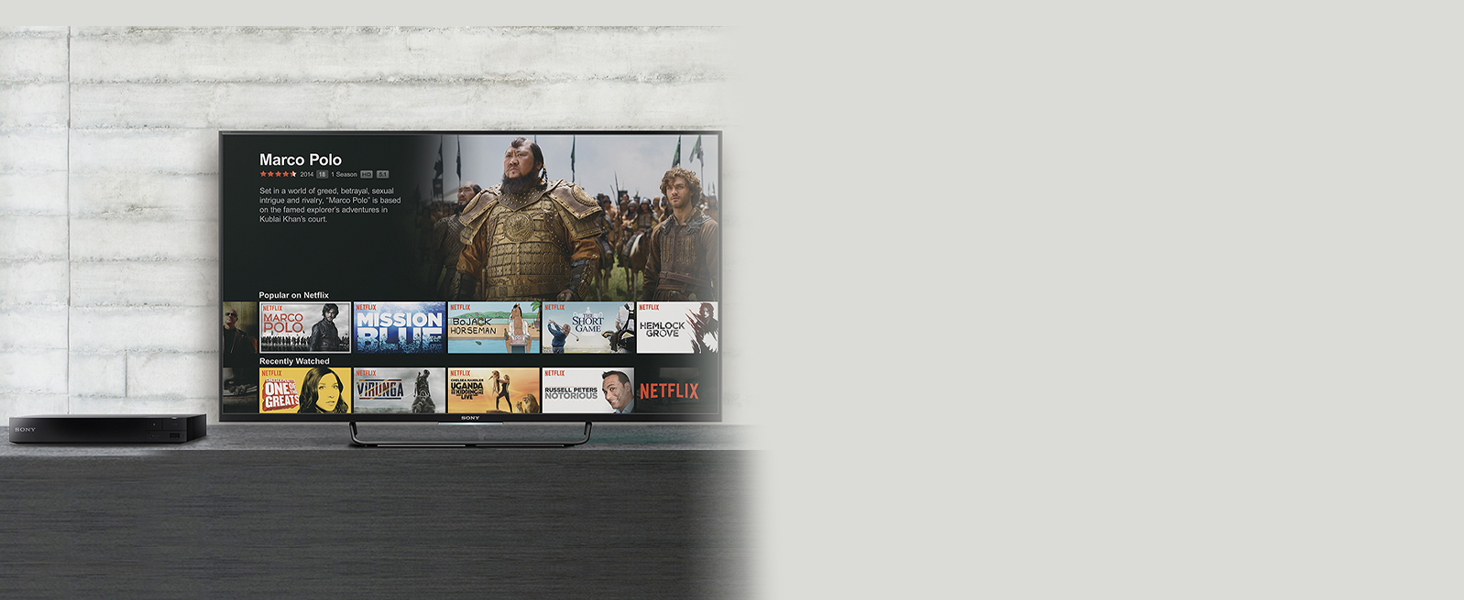
Image: A television screen displaying the Netflix streaming interface, accessible via the Blu-ray player.
- Varmista, että soitin on yhdistetty internetiin Wi-Fin kautta.
- From the Home menu, navigate to the Featured Apps or Omat sovellukset osio.
- Select your desired streaming service (e.g., Netflix, YouTube, Tubi).
- Kirjaudu sisään tilitietojesi avulla, jos sinua pyydetään.
4. 4K-skaalaus
The player can enhance the resolution of standard Blu-ray Discs and DVDs to near-4K quality when connected to a 4K compatible television.

Image: A visual comparison showing the enhanced detail and color of a 4K upscaled image on the right, compared to a standard resolution image on the left.
- Connect the player to a 4K television using an HDMI cable.
- The upscaling process is automatic. No special settings are typically required.
5. 3D-toisto
Enjoy 3D Blu-ray content with a compatible 3D TV and 3D glasses.
- Ensure your television supports 3D playback and you have active 3D glasses.
- Insert a 3D Blu-ray Disc. The player will automatically detect and prompt for 3D playback.
- 3D settings can be adjusted in the player's menu if needed.
6. Bluetooth-yhteys
Connect wireless headphones or speakers for a personalized audio experience.

Image: A person wearing wireless headphones, enjoying content from the Blu-ray player on a television, demonstrating Bluetooth audio connectivity.
- Paina Bluetooth button on the remote control or navigate to Asetukset > Bluetooth-asetukset.
- Aseta Bluetooth-äänilaite pariliitostilaan.
- Valitse laitteesi televisioruudulla näkyvästä luettelosta pariliitosta varten.
7. USB-toisto
Pelaa mediaa files USB-tallennuslaitteesta.
- Aseta USB-tallennuslaite soittimen etuosassa olevaan USB-porttiin.
- From the Home menu, select the USB icon or navigate to the media playback section.
- Selaa ja valitse haluamasi mediatiedostot file (e.g., MP3, AAC).
Huolto
1. Puhdistus
- Wipe the exterior of the player with a soft, dry cloth. Do not use liquid or aerosol cleaners.
- Keep the disc tray and lens free of dust and debris. Do not use disc cleaning kits that insert into the player.
2. Laiteohjelmistopäivitykset
Regularly check for and install firmware updates to ensure optimal performance and access to the latest features and security enhancements.
- Varmista, että soitin on yhteydessä internetiin.
- Navigoi kohteeseen Asetukset > Järjestelmäasetukset > Ohjelmistopäivitys.
- Follow the on-screen prompts to check for and install any available updates. Do not power off the player during an update.
Vianetsintä
Jos soittimessasi ilmenee ongelmia, katso seuraavia yleisiä ratkaisuja:
- Ei virtaa: Ensure the power cord is securely connected to the player and a working electrical outlet. Try a different outlet.
- Ei kuvaa/ääntä: Verify that the HDMI cable is securely connected to both the player and the TV. Ensure your TV is set to the correct HDMI input. Check TV volume and player audio settings.
- Levy ei toistu: Ensure the disc is inserted correctly (label side up) and is clean and free of scratches. Verify the disc format is supported by the player (Blu-ray, DVD, CD).
- Ei verkkoyhteyttä: Check your Wi-Fi router and ensure it is powered on and functioning. Re-enter your Wi-Fi password in the player's network settings. Restart both the player and your router.
- Kaukosäädin ei toimi: Check the batteries in the remote control and replace them if necessary. Ensure there are no obstructions between the remote and the player's IR sensor.
Tekniset tiedot
| Ominaisuus | Kuvaus |
|---|---|
| Merkki | Sony |
| Malli | BDP-S6700 |
| Mediatyyppi | Blu-ray-levy, DVD, CD |
| Videolähdön tarkkuus | 1080p, 4K UHD (Upscaled) |
| Erikoisominaisuudet | 4K Upscaling, 3D Playback, Streaming Services, Bluetooth, Wi-Fi |
| Yhteystekniikka | Bluetooth, HDMI, USB, Wi-Fi |
| Liittimen tyyppi | HDMI, USB |
| Äänilähtötila | Surround |
| Tuettu äänimuoto | Dolby TrueHD, DTS-HD |
| Virrankulutus | 12 wattia |
| Tuotteen paino | 2 puntaa |
Takuu ja tuki
For detailed warranty information, please refer to the Warranty Card included with your product. This card outlines the terms and conditions of your warranty coverage.
For technical assistance, product registration, or additional support resources, please visit the official Sony support websivustolta tai ota yhteyttä suoraan Sonyn asiakaspalveluun. Yhteystiedot löytyvät yleensä Sonyn websivustolla tai tuotedokumentaatiossa.