
Johdanto
This manual provides detailed instructions for the installation, operation, and maintenance of the Gree XK-60 Wired Programmable Controller. This controller is designed to interface with Gree U-Match air conditioning systems, offering precise control over your indoor climate. Please read this manual thoroughly before installation and operation to ensure proper use and optimal performance.
Tuote loppuview
The Gree XK-60 is a wired, programmable controller featuring a backlit LCD display and intuitive button controls. It allows users to manage various functions of their U-Match system, including operating modes, temperature settings, fan speeds, and programmable timers.
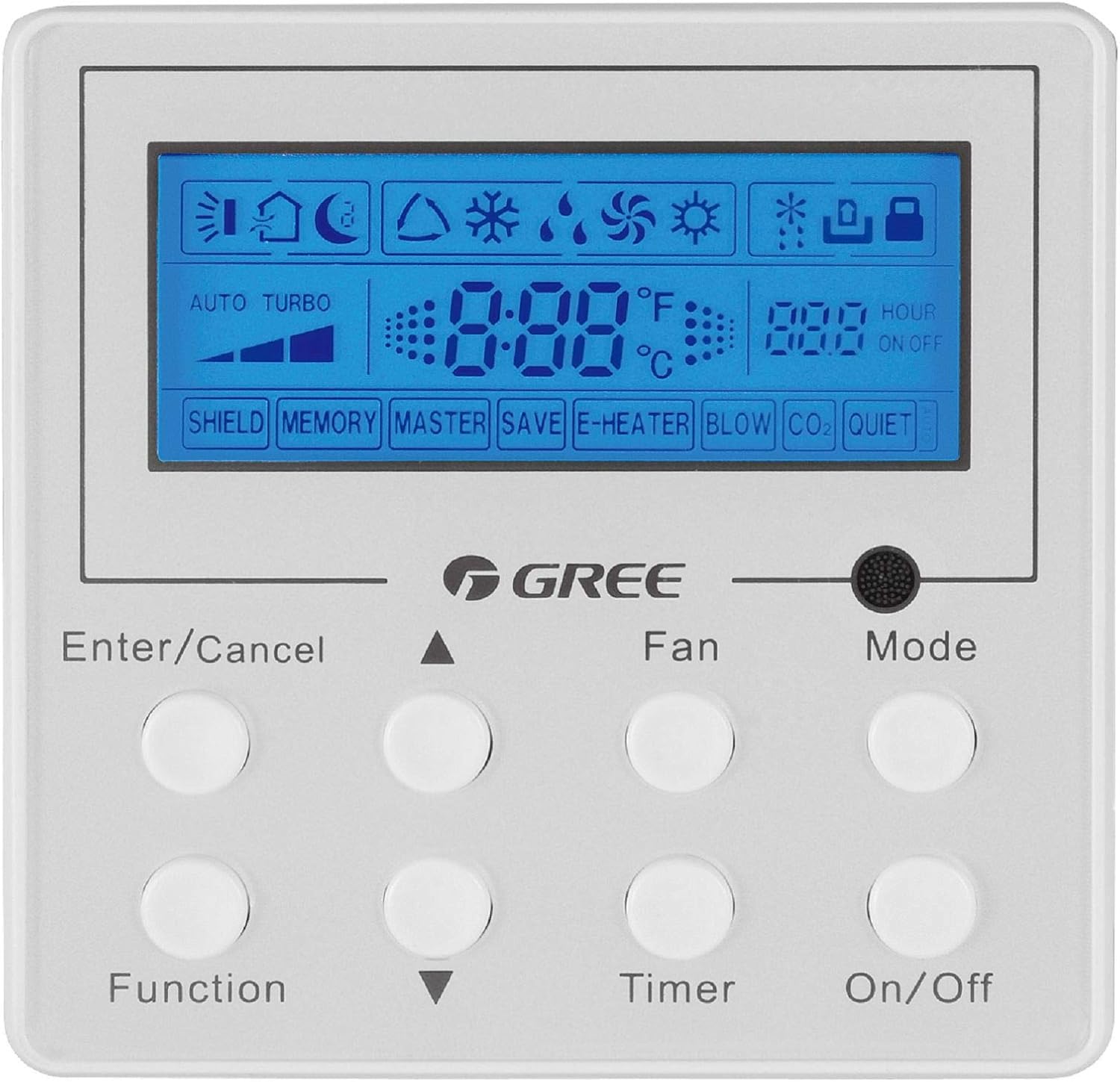
Kuvan kuvaus: Etupuoli view of the Gree XK-60 wired programmable controller. The controller is white with a blue backlit LCD screen at the top. Below the screen are eight circular white buttons arranged in two rows of four. Text labels are printed below each button or pair of buttons. The GREE logo is centered between the screen and the buttons. The screen displays various icons for operating modes, fan speed, temperature, and timer settings.
Turvallisuustiedot
- Installation must be performed by a qualified and licensed HVAC technician.
- Disconnect all power to the indoor and outdoor units before performing any wiring or maintenance.
- Varmista, että kaikki johdotusliitännät ovat paikallisten ja kansallisten sähkömääräysten mukaisia.
- Do not attempt to repair or modify the controller yourself. Contact qualified service personnel.
- Keep the controller away from water and excessive humidity.
Asennus ja asennus
Ohjaimen asennus
The XK-60 controller is designed for wall mounting. Choose a location that is easily accessible, away from direct sunlight, heat sources, and drafts, which could affect temperature readings.
Johdotusohjeet
The controller connects to the indoor unit via a wired connection.
- Turn off the main power supply to the U-Match system.
- Open the wiring cover on the indoor unit and locate the control terminal block.
- Connect the communication wires from the XK-60 controller to the designated terminals on the indoor unit's control board. Refer to the U-Match system's indoor unit installation manual for specific wiring diagrams.
- Varmista, että kaikki liitännät ovat tukevasti kiinni ja oikein polarisoituja.
- Close the wiring cover and restore power to the system.
Huomautus: Incorrect wiring can damage the controller or the U-Match system. If you are unsure, consult a professional technician.
Käyttöohjeet
The Gree XK-60 controller features an LCD display and eight control buttons.
Painikkeiden toiminnot
- Syötä/Peruuta: Confirms selections or cancels current operations.
- Ylöspäin osoittava nuoli (▲): Increases temperature, fan speed, or navigates menu options upwards.
- Alaspäin osoittava nuoli (▼): Decreases temperature, fan speed, or navigates menu options downwards.
- Tehtävä: Accesses advanced settings or special functions.
- Tuuletin: Säätää tuulettimen nopeutta (Auto, Matala, Keskitaso, Korkea).
- Ajastin: Asettaa päälle/pois-ajastimen.
- Tila: Vaihtaa toimintatiloja (automaattinen, jäähdytys, kuivaus, lämmitys, tuuletin).
- Päällä/pois: Kytkee laitteen päälle tai pois päältä.
LCD-näytön ilmaisimet
- Lämpötilanäyttö: Shows the current room temperature or set temperature in °F or °C.
- Toimintatilan kuvakkeet:
- Sun (Heat)
- Snowflake (Cool)
- Water Drop (Dry)
- Fan Blade (Fan Only)
- Auto (Automatic mode)
- Tuulettimen nopeuden ilmaisin: Bar graph or specific icon showing current fan speed.
- Ajastimen ilmaisin: "HOUR ON OFF" with numerical display for programmed times.
- Special Function Indicators: "SHIELD", "MEMORY", "MASTER", "SAVE", "E-HEATER", "BLOW", "CO2", "QUIET" indicate active special features.
Peruskäyttö
- Virta päälle/pois: Paina Päälle/Pois painiketta kytkeäksesi järjestelmän päälle tai pois päältä.
- Valitse tila: Paina tila button repeatedly to cycle through available operating modes (Auto, Cool, Dry, Heat, Fan).
- Aseta lämpötila: Käytä jäähdytys- tai lämmitystilassa Ylöspäin osoittava nuoli (▲) or Alaspäin osoittava nuoli (▼) painikkeita halutun lämpötilan säätämiseksi.
- Säädä tuulettimen nopeutta: Paina Tuuletin button repeatedly to select the desired fan speed (Auto, Low, Medium, High).
- Aseta ajastin: Paina Ajastin button to enter timer setting mode. Use the Ylöspäin osoittava nuoli (▲) or Alaspäin osoittava nuoli (▼) buttons to set the desired ON or OFF time, then press Anna/Peruuta vahvistaaksesi.
Lisätoiminnot
To access advanced functions like "SHIELD" or "QUIET" mode, press the Toiminto button. Use the arrow buttons to navigate through options and Anna/Peruuta to select or confirm. Refer to the U-Match system's specific feature documentation for detailed explanations of each advanced function.
Huolto
Ohjaimen puhdistus
- Pyyhi ohjaimen pinta pehmeällä, kuivalla liinalla.
- Älä käytä hankaavia puhdistusaineita, liuottimia tai kemiallisia suihkeita, sillä ne voivat vahingoittaa muovi- ja elektroniikkakomponentteja.
- Varmista, ettei ohjaimeen pääse nestettä casing.
System Filter Maintenance
While the controller itself does not require filter maintenance, regular cleaning or replacement of the U-Match indoor unit's air filters is crucial for optimal system performance and air quality. Refer to your U-Match indoor unit manual for filter maintenance instructions.
Vianetsintä
If you encounter issues with your Gree XK-60 controller, refer to the following common problems and solutions.
| Ongelma | Mahdollinen syy | Ratkaisu |
|---|---|---|
| Ohjaimen näyttö on tyhjä. | No power to the unit or controller. | Check the main power supply to the U-Match system. Ensure wiring connections are secure. |
| Ohjain ei reagoi painikkeiden painalluksiin. | Temporary software glitch or communication error. | Turn off power to the system for a few minutes, then restore power. If the issue persists, check wiring. |
| Virheellinen lämpötilalukema. | Controller located near a heat source or draft. | Relocate the controller if possible, or ensure no external factors are influencing the sensor. |
| System not operating in selected mode. | Communication error with indoor unit or system fault. | Check for error codes on the indoor unit. Consult a qualified technician if the problem persists. |
For complex issues or error codes not listed, contact a qualified HVAC technician or Gree customer support.
Tekniset tiedot
- Malli: Gree XK-60
- Ohjaustyyppi: Langallinen ohjelmoitava ohjain
- Yhteensopivuus: Gree U-Match Systems
- Voitage: 230 volttia
- Erikoisominaisuus: Programmable, Backlight
- Valvontamenetelmä: Painikkeiden ohjaus
- Paketin mitat: Noin 13.62 x 1.54 x 0.98 tuumaa
- Tuotteen paino: Noin 6.7 unssia
Takuu ja tuki
For warranty information and technical support, please refer to the documentation provided with your Gree U-Match system or contact Gree customer service directly. Keep your purchase receipt as proof of purchase for warranty claims.
Gree Customer Support: Visit the official Gree website or contact your local distributor for support.