
Yaheetech YA-00097936
Yaheetech Multistore 2002 Tietokonepöytä Käyttöohje
Malli: YA-00097936 | Tuotemerkki: Yaheetech
Johdanto
Thank you for choosing the Yaheetech Multistore 2002 Computer Desk. This manual provides detailed instructions for assembly, operation, maintenance, and troubleshooting to ensure safe and efficient use of your new desk. Please read this manual thoroughly before beginning assembly or use, and retain it for future reference.
Turvallisuustiedot
- Pidä kaikki osat ja pakkausmateriaalit poissa lasten ulottuvilta.
- Kokoa pöytä pehmeälle ja puhtaalle alustalle naarmujen välttämiseksi.
- Varmista, että kaikki ruuvit ja kiinnikkeet on kiristetty tiukasti ennen käyttöä. Tarkista ne säännöllisesti ja kiristä tarvittaessa.
- Do not overload the desk. Refer to the "Specifications" section for weight capacities.
- Vältä kuumien esineiden asettamista suoraan pöydän pinnalle.
- Use caution when moving the desk, especially on uneven surfaces. Ensure casters are unlocked if moving.
Osaluettelo
Ennen kokoamista tarkista, että kaikki alla luetellut osat ovat mukana ja vahingoittumattomia. Jos osia puuttuu tai on vaurioitunut, ota yhteyttä asiakastukeen.

Kuva 1: Räjähtänyt view of the desk showing main components and their names. This image highlights the heavy MDF boards, thickened frame, smooth steel ball drawer, open middle shelf, open bottom shelf, and lockable casters.
- A: Top Board (1 pc)
- B: Middle Shelf (1 pc)
- C: Bottom Shelf (1 pc)
- D: Side Frames (2 pcs)
- E: Drawer Front (1 pc)
- F: Laatikon sivut (2 kpl)
- G: Drawer Back (1 pc)
- H: Drawer Bottom (1 pc)
- I: Drawer Slides (2 sets)
- J: Casters (4 pcs, 2 lockable)
- K: Hardware Pack (Screws, bolts, Allen wrench)
Kokoamisohjeet
Noudata näitä ohjeita huolellisesti asianmukaisen kokoamisen varmistamiseksi. Kokoamiseen on suositeltavaa osallistua kaksi henkilöä.
- Step 1: Attach Casters to Side Frames.
Carefully attach the four casters (J) to the bottom of the two side frames (D). Ensure the two lockable casters are placed on the front side for easy access. Tighten securely with the provided wrench.

Kuva 2: Detail of a caster wheel attached to the desk's metal frame. This shows the sturdy connection point and the wheel's design.
- Vaihe 2: Kokoa päärunko.
Connect the bottom shelf (C) and middle shelf (B) to the side frames (D) using the appropriate screws from the hardware pack (K). Do not fully tighten screws until all parts are aligned.
- Vaihe 3: Kokoa laatikko.
Assemble the drawer components (E, F, G, H) using the provided screws. Ensure the drawer bottom (H) slides into the grooves correctly. Attach the drawer slides (I) to the sides of the assembled drawer.

Kuva 3: The desk's pull-out drawer, shown partially open, revealing its interior space. This image demonstrates the drawer's functionality and capacity.
- Step 4: Install Drawer Slides to Desk Frame.
Attach the other part of the drawer slides (I) to the designated points on the desk's main frame, just below where the top board will sit. Ensure they are level and aligned.

Kuva 4: Yksityiskohtainen view of the smooth steel ball drawer slide mechanism. This highlights the quality of the sliding components for the drawer.
- Vaihe 5: Kiinnitä ylälevy.
Place the top board (A) onto the assembled frame and secure it with screws. Ensure all pre-drilled holes align.
- Step 6: Insert the Drawer.
Carefully slide the assembled drawer into the installed drawer slides until it clicks into place.
- Vaihe 7: Viimeinen kiristys.
Once all components are in place and aligned, fully tighten all screws and fasteners. Do not overtighten.
Käyttöohjeet
The Yaheetech Multistore 2002 Computer Desk is designed for versatile use in various settings, including home offices, living rooms, or bedrooms.

Kuva 5: The computer desk positioned next to a sofa in a living room, demonstrating its compact size and suitability for small spaces. A laptop is placed on the top surface.
- Sijoitus: Position the desk on a flat, stable surface. If using on carpet, ensure the casters can move freely.
- Liikkuvuus: To move the desk, unlock the two lockable casters by flipping their levers. Push or pull the desk gently to its desired location. Once in place, lock the casters to prevent accidental movement.
- Varastointi:
- The top surface is suitable for laptops, monitors, or writing.
- The pull-out drawer provides enclosed storage for small items like pens, notebooks, or external hard drives.
- The open middle shelf is ideal for books, documents, or small electronic devices.
- The open bottom shelf can accommodate larger items such as a CPU tower, printer, or storage boxes.
- Painokapasiteetti: Adhere to the maximum weight capacities specified in the "Specifications" section to prevent damage.
Huolto
Regular maintenance will help prolong the life and appearance of your Yaheetech Multistore 2002 Computer Desk.
- Puhdistus: Pyyhi pinnat pehmeällä, damp liinalla. Vältä voimakkaiden kemikaalien, hankaavien puhdistusaineiden tai kiillotusaineiden käyttöä, jotka voivat vahingoittaa pintaa.
- Roiskeet: Clean up spills immediately to prevent staining or damage to the MDF boards.
- Kiinnikkeet: Tarkista säännöllisesti kaikki ruuvit ja kiinnikkeet varmistaaksesi, että ne ovat kireällä. Kiristä niitä tarvittaessa vakauden säilyttämiseksi.
- pyörät: Pidä pyörät vapaina roskista (hiuksista, pölystä jne.) sujuvan liikkeen varmistamiseksi.
- Auringonvalo/Lämpö: Vältä pitkäaikaista altistumista suoralle auringonvalolle tai äärimmäiselle kuumuudelle, sillä se voi aiheuttaa haalistumista tai vääntymistä.
Vianetsintä
Jos työpöydässäsi ilmenee ongelmia, tutustu seuraaviin yleisiin ongelmiin ja ratkaisuihin:
| Ongelma | Mahdollinen syy | Ratkaisu |
|---|---|---|
| Työpöytä on heiluva. | Löysät kiinnikkeet; epätasainen lattia. | Ensure all screws are fully tightened. Move desk to a level surface or use shims if necessary. |
| Laatikko ei liuku tasaisesti. | Laatikon liukukiskot vinossa; kiskoissa roskia. | Tarkista, että laatikon kiskot on asennettu oikein ja kohdistettu. Puhdista kiskot pölystä ja roskista. |
| Pyörät eivät pyöri vapaasti. | Casters locked; debris in wheels. | Unlock casters if they are engaged. Remove any hair or debris from the wheels. |
| Puuttuvia osia laatikon avaamisen jälkeen. | Pakkausvirhe. | Ota yhteyttä Yaheetechin asiakastukeen ja kerro ostotietosi sekä puuttuvat osat. |
Tekniset tiedot
Detailed dimensions and material information for the Yaheetech Multistore 2002 Computer Desk.
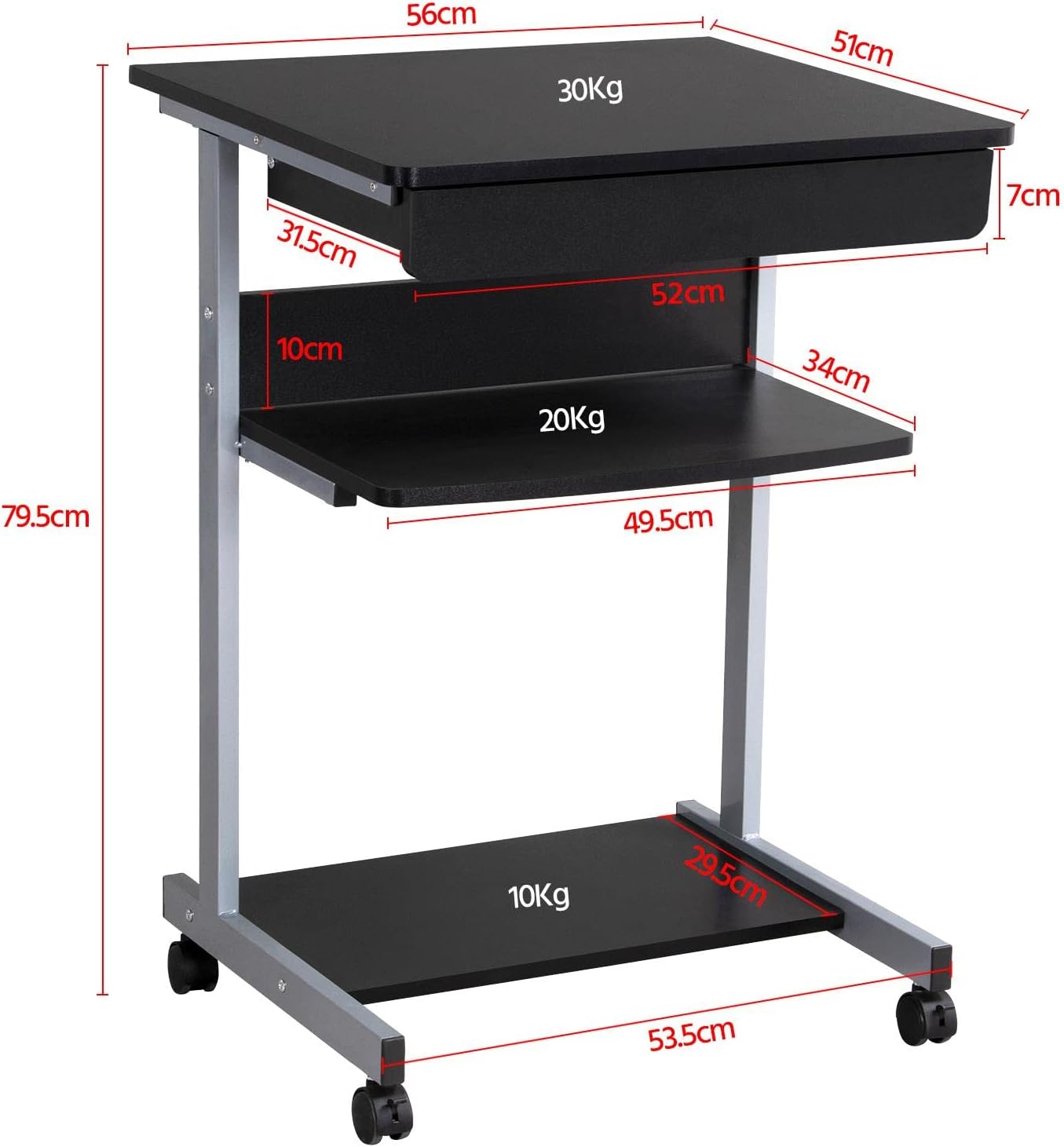
Kuva 6: Detailed dimensional drawing of the desk, including measurements for overall height, width, depth, and individual shelf and drawer dimensions. Also shows weight capacities for each surface.
| Ominaisuus | Yksityiskohta |
|---|---|
| Mallinumero | YA-00097936 |
| Kokonaismitat (P x L x K) | 56 x 51 x 79.5 cm (22 x 20.1 x 31.3 tuumaa) |
| Top Board Dimensions | 56 x 51 cm (22 x 20.1 tuumaa) |
| Drawer Dimensions (Inner) | 45 x 30 x 6 cm (17.7 x 11.8 x 2.4 tuumaa) |
| Middle Shelf Dimensions | 50 x 34 cm (19.7 x 13.4 tuumaa) |
| Bottom Shelf Dimensions | 50 x 30.5 cm (19.7 x 12 tuumaa) |
| Materiaali | MDF (Medium Density Fiberboard) with Metal Frame |
| Väri | Musta |
| Nettopaino | Noin 10.9 kg (24 lbs) |
| Max. Load Capacity (Top Board) | 30 kg (66 lbs) |
| Maksimikuormituskapasiteetti (keskihylly) | 20 kg (44 lbs) |
| Maksimikuormituskapasiteetti (alahylly) | 10 kg (22 lbs) |
| Pyörät | 4 (2 lukitusmekanismilla) |
Takuu ja tuki
Yaheetech products are manufactured to high-quality standards. For specific warranty information, please refer to the warranty card included with your product or visit the official Yaheetech website. If you have any questions, require assistance with assembly, or need to report missing/damaged parts, please contact our customer support team:
- Websivusto: www.yaheetech.com (Tarkista alueellinen websivustot)
- Sähköposti: Refer to your purchase documentation for customer service email.
- Puhelin: Refer to your purchase documentation for customer service phone number.
When contacting support, please have your model number (YA-00097936) and purchase date ready.
Ask a question about this manual
Ask about setup, troubleshooting, compatibility, parts, safety, or missing instructions. Manuals+ will review the question and use this page’s manual context to help answer it.