
1. Johdanto
Thank you for choosing the Adastra DM40 Digital 100V Mixer Amplifier System. This system provides a comprehensive audio solution for various small to medium-sized installations, combining a powerful amplifier with versatile input options including USB, FM radio, and Bluetooth connectivity. The included Adastra BC3V-B background speakers are designed for clear audio reproduction and flexible installation.
This manual provides essential information for the safe and efficient operation of your Adastra DM40 system. Please read it thoroughly before installation and use, and retain it for future reference.
2. Turvallisuusohjeet
To prevent the risk of fire or electric shock, do not expose this appliance to rain or moisture. Do not open the casing. Anna kaikki huoltotoimenpiteet pätevän henkilöstön tehtäväksi.
- Virtalähde: Varmista verkkovirta voltage is correct for the amplifier (230Vac, 50Hz). Use the supplied IEC power lead.
- Ilmanvaihto: Do not obstruct any ventilation openings. Ensure adequate airflow around the unit.
- Vesi ja kosteus: Do not use this appliance near water or in damp environments. Do not place objects filled with liquids on the unit.
- Lämmönlähteet: Pidä laite poissa lämmönlähteistä, kuten pattereista, lämmittimistä, liesistä tai muista lämpöä tuottavista laitteista.
- Puhdistus: Puhdista ainoastaan kuivalla liinalla. Älä käytä nestemäisiä puhdistusaineita tai aerosoleja.
- Ylikuormitus: Do not overload power outlets or extension cords, as this can result in a risk of fire or electric shock.
- Huolto: Älä yritä huoltaa tätä tuotetta itse. Kansien avaaminen tai poistaminen voi altistaa sinut vaaralliselle tilavuudelletages tai muita vaaroja.
3. Pakkauksen sisältö
Carefully unpack the system and check the contents to ensure all items are present and in good condition. If any items are missing or damaged, please contact your supplier immediately.

Figure 3.1: Complete Adastra DM40 System Package Contents
This image displays the full Adastra DM40 system package, including the DM40 digital mixer amplifier, four Adastra BC3V-B background speakers, and a roll of 100m speaker cable. This visual representation helps confirm all components are present upon unboxing.
- 1 x Adastra DM40 Digital 100V Mixer Ampelävämpi
- 4 x Adastra BC3V-B Background Speakers
- 1 x 100m Speaker Cable
- 1 x IEC Mains Power Lead
- 1 x Käyttöohje (tämä asiakirja)
4. Tuote ohiview
4.1. DM40 Ampnostimen etupaneelin säätimet
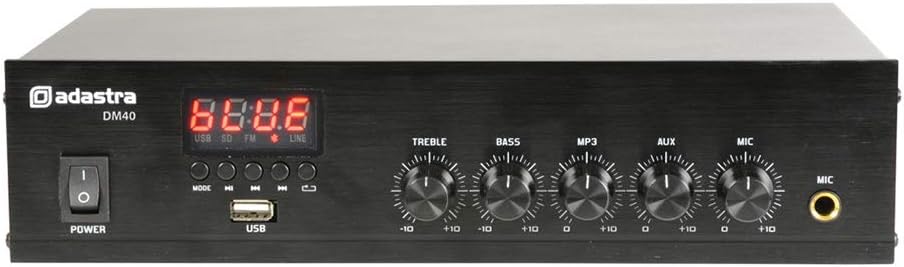
Figure 4.1: Adastra DM40 Ampnostimen etupaneeli
This image shows the front panel of the Adastra DM40 amplifier. Key features visible include the power switch, digital display, control buttons for media playback (Mode, Play/Pause, Previous, Next, Repeat), a USB port, and rotary controls for Treble, Bass, MP3/USB/FM volume, Aux volume, and Microphone volume, along with a 6.3mm microphone input jack.
- Virtakytkin: Vaihtaa ampnostin päälle/pois.
- Digitaalinen näyttö: Shows current mode (USB, SD, FM, LINE) and track/station information.
- MODE-painike: Switches between USB, FM, Bluetooth, and Line input modes.
- PLAY/PAUSE-painike: Starts or pauses playback for USB/Bluetooth, or auto-scans for FM.
- EDELLINEN painike: Hyppää edelliseen kappaleeseen/asemaan.
- SEURAAVA-painike: Hyppää seuraavaan kappaleeseen/asemaan.
- REPEAT-painike: Repeats current track or all tracks (USB mode).
- USB-portti: For connecting USB flash drives with audio files.
- TREBLE-ohjaus: Säätää korkeataajuista lähtöä.
- BASS-säätö: Säätää matalataajuista lähtöä.
- MP3/USB/FM Volume: Controls the volume level for the integrated media player.
- AUX Volume: Controls the volume level for the auxiliary input.
- MIC-äänenvoimakkuus: Controls the volume level for the microphone input.
- MIC-tulo: 6.3mm jack for connecting an unbalanced microphone.
4.2. DM40 Amplifier-takapaneelin liitännät

Figure 4.2: Adastra DM40 Ampnostin Takapaneeli
This image displays the rear panel of the Adastra DM40 amplifier, highlighting its various input and output connections. These include RCA line inputs (AUX IN), RCA line outputs (OUT), spring terminals for speaker connections (COM, 4-16 Ohms, 100V), an FM antenna terminal, and the IEC mains power inlet.
- AUX-TULO (RCA): Stereo RCA input for external audio sources (summed to mono).
- ULOS (RCA): Stereo RCA line output for connecting to another ampelinikää tai tallennuslaitetta.
- Speaker Outputs (Spring Terminals):
- COM: Common negative terminal for all speaker connections.
- 4-16 Ohms: Output for low impedance speakers (e.g., 8 Ohm speakers).
- 100V: Output for 100V line speakers.
- FM-antennin liitin: Spring terminal for connecting the FM antenna wire.
- IEC Mains Inlet: For connecting the supplied power cable.
4.3. Adastra BC3V-B Background Speakers

Figure 4.3: Adastra BC3V-B Speaker Front View
Tämä kuva näyttää etupuolen view of a single Adastra BC3V-B background speaker, highlighting its sturdy metal grille and compact ABS housing. This speaker is designed for clear audio output in various indoor settings.

Figure 4.4: Adastra BC3V-B Speaker Rear View
This image displays the rear panel of the Adastra BC3V-B speaker, featuring the rotary selector switch for 100V line taps (6W, 3W, 1.5W) or 8 Ohm operation, and spring terminals for speaker wire connection. The adjustable mounting bracket is also visible.
The BC3V-B speakers are 2-way systems with a 75mm (3'') reinforced paper cone woofer and a 13mm (0.5'') polymer HF driver. They feature a rotary selector switch on the rear for choosing between 100V line taps (6W, 3W, 1.5W) or 8 Ohm operation. They come with an adjustable mounting bracket for wall or freestanding installation.
5. Asennus
5.1. Kaiuttimen liitäntä
The DM40 amplifier supports both 100V line and 4-16 Ohm speaker connections. The BC3V-B speakers can be configured for either mode using their rear selector switch.
- 100V Line Connection: This is recommended for multiple speakers over long distances.
- Set the rotary switch on each BC3V-B speaker to the desired 100V tap (6W, 3W, or 1.5W).
- Connect the positive (+) terminal of each speaker to the '100V' terminal on the DM40 ampelävämpi.
- Connect the negative (-) terminal of each speaker to the 'COM' terminal on the DM40 ampelävämpi.
- Varmista kokonaiswattimäärätage of all connected 100V speakers does not exceed the ampelevaattorin lähtöteho (40 W).
- 4-16 Ohm Connection: Use this for direct impedance matching, typically for fewer speakers over shorter distances.
- Set the rotary switch on each BC3V-B speaker to '8 Ohms'.
- Connect the positive (+) terminal of each speaker to the '4-16 Ohms' terminal on the DM40 ampelävämpi.
- Connect the negative (-) terminal of each speaker to the 'COM' terminal on the DM40 ampelävämpi.
- Ensure the total impedance of connected speakers is within the 4-16 Ohm range. For multiple 8 Ohm speakers, connect them in series-parallel to achieve a suitable total impedance.
Use the supplied 100m speaker cable for connections. Ensure correct polarity (+ to + and - to -) for optimal sound quality.
5.2. Äänilähteen liitäntä
- Aputulo: Connect external audio devices (e.g., CD player, mixer) to the 'AUX IN' RCA jacks on the rear panel.
- Mikrofonin tulo: Connect an unbalanced microphone to the 6.3mm 'MIC' jack on the front panel.
- USB-media: Aseta MP3-ääntä sisältävä USB-muistitikku fileetupaneelin 'USB'-porttiin.
- FM-antenni: Connect the supplied FM antenna wire to the 'FM' spring terminal on the rear panel for radio reception.
5.3. Virtaliitäntä
Connect the supplied IEC mains power lead to the 'IEC Mains Inlet' on the rear panel of the DM40 amplifier and then to a suitable 230Vac, 50Hz power outlet.
6. Käyttöohjeet
6.1. Virta päälle / pois
Press the 'POWER' switch on the front panel to turn the amppäälle tai pois päältä. Digitaalinen näyttö syttyy, kun laite on päällä.
6.2. Lähteen valinta
Press the 'MODE' button on the front panel to cycle through the available input sources: USB, FM, Bluetooth, and Line (AUX).
6.3. USB-soittimen käyttö
- Insert a USB flash drive into the USB port. The unit will automatically switch to USB mode and begin playback.
- Use the 'PREVIOUS' and 'NEXT' buttons to skip tracks.
- Press 'PLAY/PAUSE' to pause or resume playback.
- Press 'REPEAT' to cycle through repeat modes (e.g., repeat one, repeat all).
- Adjust the 'MP3' volume control to set the output level.
6.4. FM-virittimen käyttö
- Switch to FM mode using the 'MODE' button.
- Press and hold the 'PLAY/PAUSE' button to initiate an automatic station scan. The tuner will scan and save available FM stations.
- Use the 'PREVIOUS' and 'NEXT' buttons to navigate through saved stations.
- Adjust the 'MP3' volume control to set the output level.
6.5. Bluetooth-pariliitos
- Switch to Bluetooth mode using the 'MODE' button. The display will show 'BT'.
- Ota Bluetooth käyttöön älypuhelimessa tai tabletissa ja etsi käytettävissä olevia laitteita.
- Select 'Adastra DM40' (or similar name) from the list of devices to pair.
- Once paired, you can play audio from your device wirelessly through the ampelävämpi.
- Adjust the 'MP3' volume control to set the output level.
6.6. Auxiliary Input Operation
- Switch to Line mode using the 'MODE' button. The display will show 'LINE'.
- Toista ääntä liitetystä ulkoisesta laitteesta.
- Adjust the 'AUX' volume control to set the output level.
6.7. Microphone Operation
- Connect a microphone to the 'MIC' input jack.
- Adjust the 'MIC' volume control to set the microphone's output level.
- The microphone input is active regardless of the selected audio source, allowing for announcements or voice-overs.
6.8. Äänen säätimet
- Use the 'TREBLE' control to adjust the high-frequency response of the overall output.
- Use the 'BASS' control to adjust the low-frequency response of the overall output.
7. Huolto
The Adastra DM40 system requires minimal maintenance. Follow these guidelines to ensure longevity and optimal performance:
- Puhdistus: Pyyhi amplifier and speakers with a soft, dry cloth. Do not use abrasive cleaners, waxes, or solvents.
- Ilmanvaihto: Tarkista säännöllisesti, että laitteen tuuletusaukot amplifier are clear of dust and debris.
- Liitännät: Ensure all cable connections remain secure. Loose connections can lead to poor sound quality or intermittent operation.
- Varastointi: Jos laitetta säilytetään pitkään, irrota se virtalähteestä ja säilytä sitä viileässä, kuivassa paikassa, poissa suorasta auringonvalosta ja äärimmäisistä lämpötiloista.
8. Vianmääritys
| Ongelma | Mahdollinen syy | Ratkaisu |
|---|---|---|
| Ei virtaa | Power cable not connected; Power outlet faulty; Power switch off | Check power cable connection; Try a different outlet; Ensure power switch is ON |
| Ei äänilähtöä | Incorrect source selected; Volume too low; Speaker cables disconnected/incorrectly wired; Speaker selector switch incorrect | Select correct source; Increase volume; Check speaker wiring and polarity; Ensure speaker selector switch is set correctly (100V or 8 Ohm) |
| Vääristynyt ääni | Volume too high; Incorrect impedance matching (for 4-16 Ohm); Damaged speaker/cable | Reduce volume; Verify speaker impedance matches amplifier output; Inspect speakers and cables for damage |
| Bluetooth ei muodosta yhteyttä | Amplifier not in Bluetooth mode; Device not in pairing mode; Device too far | Varmista amplifier is in BT mode; Put device in pairing mode; Move device closer to ampelävämpi |
| USB-toisto-ongelmat | Ei tueta file format; USB drive faulty; USB drive not properly inserted | Varmista files are MP3; Try a different USB drive; Re-insert USB drive firmly |
| Huono FM -vastaanotto | Antennia ei ole kytketty; Heikko signaali | Connect FM antenna; Reposition antenna for better reception |
9. Tekniset tiedot
9.1. Adastra DM40 Ampelävämpi
| Ominaisuus | Erittely |
|---|---|
| Virtalähde | 230 Vac, 50 Hz (IEC) |
| Suurin lähtöteho | 40W |
| Äänilähteet | USB player, FM tuner, Bluetooth receiver, AUX (RCA), Microphone (6.3mm jack) |
| Bluetooth-versio | 2.1 |
| Kaiutinlähdöt | COM, 100V, 4-16 Ohms (spring terminals) |
| Säätimet | Treble, Bass, MP3/USB/FM Volume, Aux Volume, Microphone Volume |
| Mitat (L x S x K) | 280 x 205 x 67 mm |
| Paino | 1.74 kg |
9.2. Adastra BC3V-B Background Speakers (per unit)
| Ominaisuus | Erittely |
|---|---|
| Malli | BC3V-B |
| Väri | Musta |
| Bassokaiutin | 75mmØ (3'') reinforced paper cone |
| Diskantti | 13mm (0.5'') polymer HF driver |
| Taajuusvaste | 110 Hz - 20 kHz |
| Power Max. (8 Ohms) | 60W |
| Power RMS (8 Ohms) | 30W |
| SPL @ 1W/1m | 87dB |
| 100V Tappings | 6W, 3W, 1.5W |
| Impedanssi (100V) | 1.6k, 3.3k, 6.6k Ohms |
| Mitat (L x K x S) | 106 x 153 x 98 mm |
| Paino | 0.900 kg |
10. Takuu ja tuki
Specific warranty information for the Adastra DM40 Digital 100V Mixer Amplifier System is not provided within this manual. Please refer to your purchase documentation or contact your retailer or the manufacturer, Adastra, for details regarding warranty coverage and support services.
For technical assistance or inquiries, please visit the official Adastra websivustolla tai ota yhteyttä heidän asiakastukikanaviinsa.


