
1. Johdanto
Kiitos ostoksestasiasing the GooDee Mini Projector GD-DE-9. This manual provides essential information for setting up, operating, and maintaining your projector. Please read it thoroughly before use to ensure optimal performance and safety.
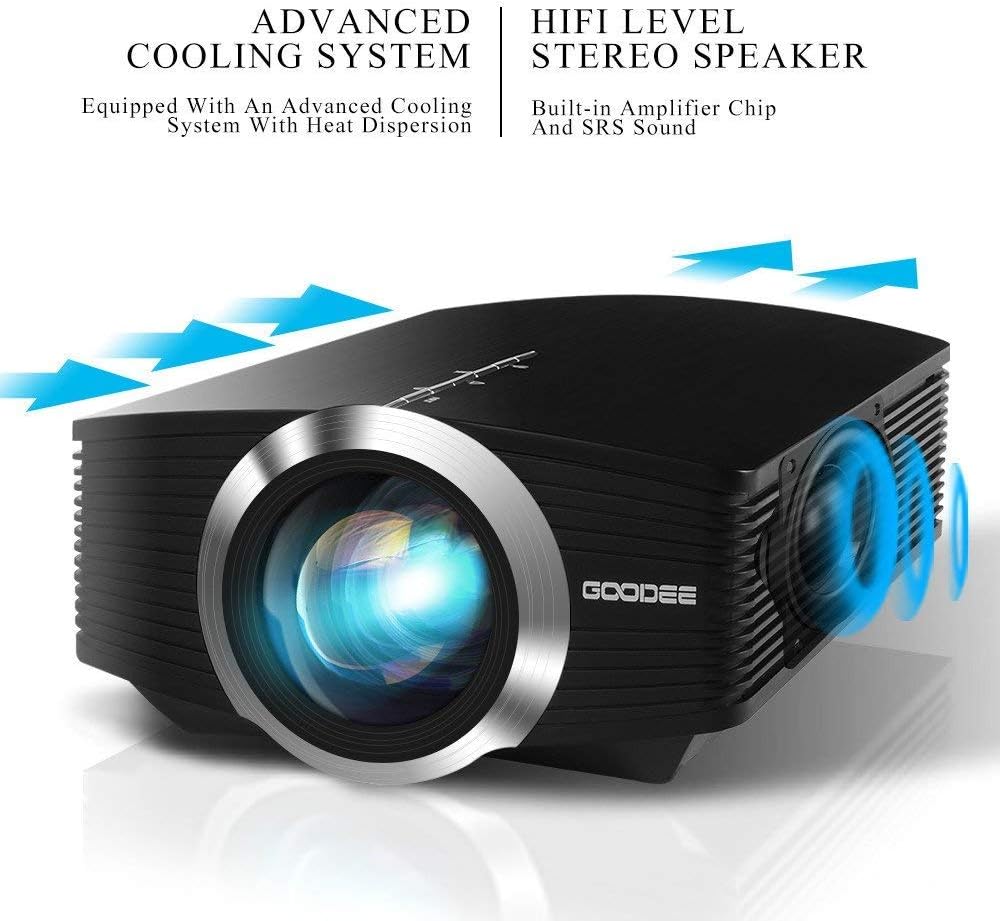
The GooDee GD-DE-9 is a portable LED projector designed for home entertainment, gaming, and presentations. It features a native resolution of 800x480p, supports up to 1080p input, and offers multiple connectivity options including HDMI, VGA, USB, AV, and SD card. Its advanced cooling system ensures quiet operation, and the integrated 2W speaker provides clear audio.

Kuva 1.1: Etuosa view of the GooDee Mini Projector GD-DE-9.
2. Turvallisuustiedot
Tulipalo-, sähköisku- tai loukkaantumisvaaran välttämiseksi noudata seuraavia turvallisuusohjeita:
- Älä avaa projektorin koteloa.asing. Anna kaikki huoltotoimenpiteet pätevän huoltohenkilöstön tehtäväksi.
- Älä altista projektoria sateelle tai kosteudelle tulipalon tai sähköiskun välttämiseksi.
- Varmista asianmukainen ilmanvaihto. Älä tuki tuuletusaukkoja.
- Käytä ainoastaan projektorin mukana toimitettua virtalähdettä.
- Vältä katsomasta suoraan projektorin linssiin, kun lamp on päällä.
- Aseta projektori vakaalle, tasaiselle alustalle.
- Irrota projektori pistorasiasta ukkosmyrskyjen aikana tai jos sitä ei käytetä pitkään aikaan.
3. Pakkauksen sisältö
Tarkista, että pakkauksessasi on kaikki tarvittavat osat:
- GooDee Mini Projector GD-DE-9
- Virtalähde
- Kaukosäädin
- HDMI kaapeli
- AV-kaapeli
- Käyttöopas
4. Tuote ohiview
4.1 Projektorin osat

Kuva 4.1: Sivu view tulo-/lähtöporteilla.
The projector features a direct light path optical technology for enhanced brightness and an advanced cooling system for quiet operation.

Figure 4.2: Advanced Cooling System and HIFI Stereo Speaker.
4.2 Kaukosäädin
The remote control allows you to operate the projector from a distance. Insert two AAA batteries (not included) into the remote control before use.

Kuva 4.3: Kaukosäädin.
5. Asennus
5.1 Sijoittelu ja heijastusetäisyys
The image size is adjusted by changing the projection distance. For optimal viewing, a projection distance between 1.5 to 4 meters is recommended, yielding screen sizes from 50 to 130 inches. The best projection size is typically 80-100 inches at a distance of 6.6-8 feet.

Figure 5.1: Projection Distance and Screen Size Chart.
Kuva 5.2: Esimample Projector Placement.
5.2 Virtaliitäntä
Connect the power adapter to the projector's power input port, then plug the adapter into a power outlet.
5.3 Syöttölaitteiden kytkeminen
The projector supports various input sources including HDMI, VGA, USB, AV, and SD card. It can connect to PCs, laptops, DVD players, PS3/4, Xbox ONE, and smartphones/tablets (via MHL cable and adapter, not included).

Figure 5.3: Multimedia Connection Diagram.
To connect a smartphone or tablet, ensure your device supports MHL functionality. You will need an MHL cable and a suitable adapter (not included).

Figure 5.4: Connecting Smartphones/Tablets.
5.4 Focus Adjustment and Keystone Correction
Adjust the focus ring on the projector lens until the image is clear. Use the keystone correction feature to adjust the image if it appears trapezoidal. The projector supports a ±15° keystone correction.
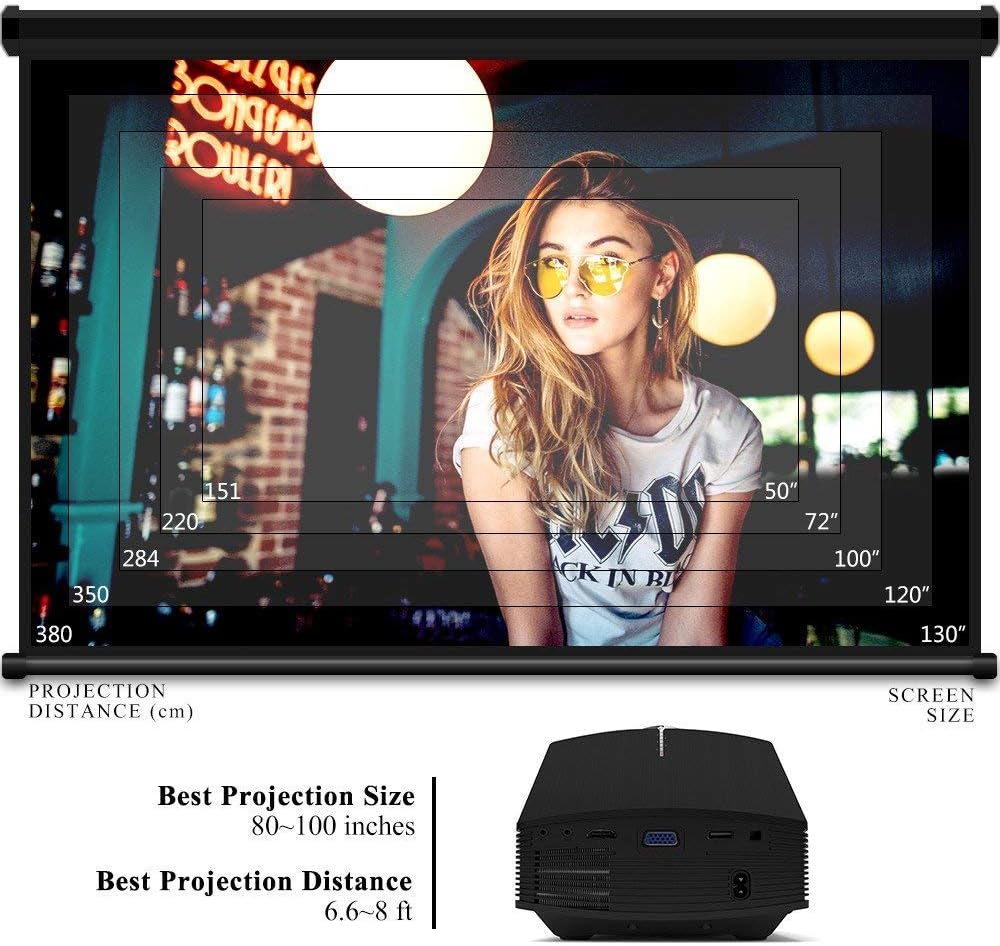
Figure 5.5: Focus and Keystone Adjustment.
6. Käyttöohjeet
6.1 Virta päälle/pois
Press the power button on the projector or the remote control to turn the projector on or off.
6.2 Lähteen valinta
Press the 'Source' button on the projector or remote control to cycle through available input sources (HDMI, VGA, USB, AV, SD). Select the desired input source corresponding to your connected device.
6.3 Navigointi valikossa
Use the arrow buttons on the projector or remote control to navigate through the on-screen menu. Press 'OK' or 'Enter' to confirm selections. Use the 'Menu' button to access settings and 'Exit' or 'Return' to go back.
6.4 Äänilähtö
The projector has a built-in 2W speaker. For external audio, connect speakers or headphones to the 3.5mm audio output jack on the projector.
7. Huolto
7.1 Linssin puhdistaminen
Use a soft, lint-free cloth or lens cleaning paper to gently wipe the projector lens. Do not use abrasive cleaners or solvents.
7.2 Cleaning Air Vents
Regularly clean the air vents to ensure proper airflow and prevent overheating. Use a soft brush or compressed air to remove dust accumulation.
7.3 Varastointi
Kun projektoria ei käytetä, säilytä sitä viileässä, kuivassa paikassa, poissa suorasta auringonvalosta ja äärimmäisistä lämpötiloista. Käytä alkuperäistä pakkausta tai suojakoteloa pölyn ja vaurioiden estämiseksi.
8. Vianmääritys
| Ongelma | Mahdollinen syy | Ratkaisu |
|---|---|---|
| Kuvaa ei näy | Incorrect input source selected; Cable not connected properly; Device not powered on. | Select the correct input source; Check all cable connections; Ensure the source device is powered on. |
| Kuva on epäselvä | Tarkennusta ei ole säädetty; Projektori on liian lähellä/kaukana valkokankaasta. | Säädä tarkennusrengasta; Säädä projektioetäisyyttä. |
| Kuva on puolisuunnikkaan muotoinen | Projektori ei ole kohtisuorassa valkokankaaseen nähden. | Säädä trapetsivääristymän korjausta. |
| Ei ääntä | Volume too low; Muted; External audio device not connected/configured. | Increase volume; Unmute; Check external audio connections and settings. |
| Kaukosäädin ei toimi | Batteries low/dead; Obstruction between remote and projector; Remote sensor blocked. | Vaihda paristot; Poista esteet; Varmista, että kaukosäätimen anturi on vapaa. |
9. Tekniset tiedot
| Ominaisuus | Yksityiskohta |
|---|---|
| Merkki | Hyvä Dee |
| Mallinumero | GD-DE-9 |
| Näytön tyyppi | LCD |
| Alkuperäinen resoluutio | 800 x 480 pikseliä |
| Tuettu resoluutio | Jopa 1080p |
| Kirkkaus | 3000 Lumens (LED) |
| Lamp Elämä | 30,000 tuntia |
| Yhteystekniikka | HDMI, USB, VGA, AV, SD Card |
| Laitteistorajapinta | HDMI, USB, VGA |
| Integroitu kaiutin | 2W Stereo Speaker |
| Projektioetäisyys | 1.5 - 4 meters (6.6 - 8 feet recommended) |
| Näytön koko | 50 - 130 inches (80 - 100 inches recommended) |
| Keystone-korjaus | ±15° Manuaalinen |
| Muototekijä | Kannettava |
| Asennustyyppi | Pöytäteline |
| Väri | Musta |
| Pakkauksen mitat | 33 x 21.6 x 11.8 cm |
| Tuotteen paino | 1.48 kg |
| Suositeltu käyttö | Gaming, Home Theater |
| Yhteensopivat laitteet | Smartphone, PC, Laptop, DVD Player, PS3/4, Xbox ONE, Fire TV Stick |
10. Takuu ja tuki
GooDee offers a 3-year warranty for this projector. If you encounter any issues or are not completely satisfied with your purchase, please contact GooDee customer support. A refund or replacement is available within the first 2 months of purchase. Customer satisfaction is our top priority.
For support, please refer to the contact information provided on the GooDee official websivustollasi tai ostoalustallasi.