1. Johdanto
The ZdalaMit XRT020 is a pre-programmed replacement remote control designed for various Vizio TV models. This remote offers a straightforward, ready-to-use solution without the need for complex programming or pairing procedures. Simply insert the batteries, and it is ready for operation.
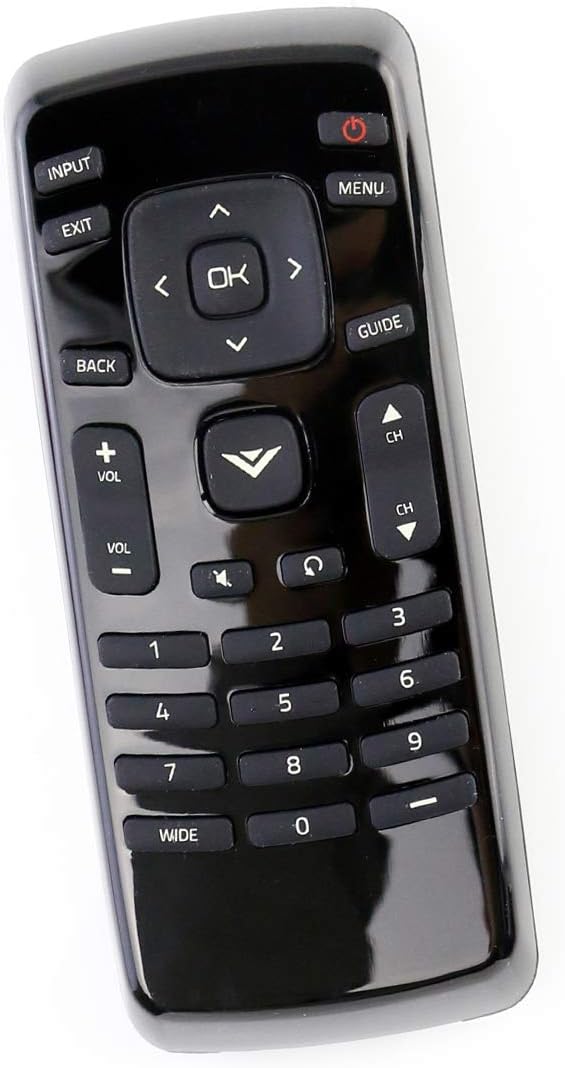
Kuva 1: Etuosa view of the XRT020 Remote Control.
Tärkeimmät ominaisuudet:
- Esiohjelmoitu: No setup required, ready to use out of the box.
- Kestävä rakenne: Made from high-quality ABS material.
- Laajennettu valikoima: Operates effectively up to 30 feet (10 meters).
- Responsiiviset painikkeet: Designed for quick response times (0.2 seconds) and long-lasting use (over 160,000 clicks).
2. Asennus
Akun asennus:
- Paikanna paristolokero kaukosäätimen takana.
- Liu'uta paristokotelon kansi auki.
- Insert two (2) 1.5V AAA alkaline batteries, ensuring correct polarity (+ and -) as indicated inside the compartment.
- Sulje paristolokeron kansi kunnolla.
The remote control is now ready for immediate use with your compatible Vizio TV. No additional programming or pairing is necessary.

Kuva 2: Paristolokero AAA-paristoille.
3. Käyttöohjeet
The XRT020 remote control provides standard functions for your Vizio TV. Below are the primary buttons and their uses:
| Painike | Toiminto |
|---|---|
| Teho (●) | Kytkee television päälle tai pois päältä. |
| Syöte | Selects the video input source (e.g., HDMI 1, AV). |
| Valikko | Avaa television päävalikon. |
| OK / Navigointinäppäimet | Vahvistaa valinnat ja navigoi valikoissa. |
| Takaisin / Poistu | Palaa edelliseen näyttöön tai poistuu nykyisestä valikosta. |
| Äänenvoimakkuus (+ / -) | Adjusts the sound volume up or down. |
| Channel (CH ▲ / ▼) | Vaihtaa TV-kanavaa ylös tai alas. |
| Mykistä | Mykistää tai poistaa television äänen mykistyksen. |
| Numeronäppäimistö (0-9) | Syöttää kanavanumerot suoraan. |
4. Huolto
To ensure the longevity and optimal performance of your ZdalaMit XRT020 remote control, follow these maintenance guidelines:
- Puhdistus: Wipe the remote with a soft, dry cloth. Avoid using liquid cleaners or abrasive materials, as they may damage the surface or internal components.
- Akun vaihto: Replace batteries promptly when the remote's performance degrades. Always use new AAA alkaline batteries and dispose of old batteries responsibly.
- Varastointi: Säilytä kaukosäädintä viileässä, kuivassa paikassa, poissa suorasta auringonvalosta, äärimmäisistä lämpötiloista ja korkeasta kosteudesta.
- Suojaus: Avoid dropping the remote or subjecting it to strong impacts, which can cause internal damage or breakage.
5. Vianmääritys
If you encounter issues with your XRT020 remote control, please refer to the following common troubleshooting steps:
- Kaukosäädin ei vastaa:
- Varmista, että paristot on asetettu oikein päin ja oikea napaisuus on oikea.
- Replace old batteries with new 1.5V AAA alkaline batteries.
- Tarkista, onko kaukosäätimen ja television infrapunatunnistimen välissä esteitä.
- Ajoittainen toiminnallisuus:
- Verify that the remote is within the operational range (up to 30 feet / 10 meters) of the TV.
- Ensure there are no strong light sources or other electronic devices interfering with the remote's signal.
- Tietyt painikkeet eivät toimi:
- Inspect the buttons for any physical damage or debris that might be preventing them from pressing correctly.
Since this remote is pre-programmed, no manual programming or pairing is required. If issues persist after following these steps, please contact customer support.
6. Tekniset tiedot
| Ominaisuus | Yksityiskohta |
|---|---|
| Mallinumero | XRT020 |
| Merkki | ZdalaMit |
| Tuotteen mitat | 5 x 1.5 x 0.6 tuumaa |
| Tuotteen paino | 1.59 unssia |
| Virtalähde | 2 x 1.5 V AAA-alkaliparistoa (eivät sisälly toimitukseen) |
| Erikoisominaisuus | Pre-programmed, no setup required |
| Väri | Musta |
| Tuettujen laitteiden enimmäismäärä | 1 (Televisio) |
| Toiminta-alue | Jopa 30 jalkaa / 10 metriä |

Figure 3: XRT020 Remote Control dimensions.
7. Compatible Vizio TV Models
The ZdalaMit XRT020 remote control is compatible with a wide range of Vizio TV models, including but not limited to:
- D32hn-E0
- D39hn-E0
- D48n-E0
- D24H-C1
- E390-A1
- E280-A1
- E280-B1
- E291-A1
- D32hnx-E1
- D50n-E1
- D32hn-D0
- D39hn-D0
- D40n-E3
- D60n-E3
- D320-B1
- E241-A1
- D28H-C1
- D390-B0
- D32H-C1
- E221-A1
- E231-B1
- E320-A1
- E320-B0E
- E241-B1
- E320-B0
- E320-B2
- E320-B1
- E320-B1E
- E390-B1
- D32hn-E1
- E390-B1E
- D43n-E1

Figure 4: Partial list of compatible Vizio TV models.
8. Tuki ja takuu
For any questions, concerns, or support regarding your ZdalaMit XRT020 remote control, please refer to the seller's contact information provided at the point of purchase. While specific warranty details are not included in this manual, please retain your purchase receipt for any potential warranty claims.
"Please feel free to contact us if you have any query, thanks!"