
Johdanto
This manual provides instructions for the installation, operation, and maintenance of your Audiovox ELEAUDAX80EXT Wireless Extension. This device is designed to expand the functionality of compatible Audiovox phone models, specifically the AX8001, AX8001E, and AX8101AM, by providing an additional wireless handset.
Pakkauksen sisältö
Varmista, että pakkauksessa on kaikki tarvittavat osat ennen asennuksen jatkamista.
- Audiovox ELEAUDAX80EXT Wireless Extension Unit
- Virtalähde (jos käytettävissä)
- Ladattava akku (esiasennettu tai erillinen)
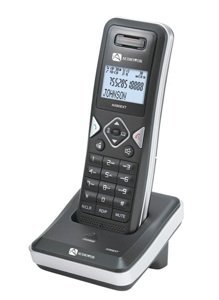
Image: The Audiovox ELEAUDAX80EXT Wireless Extension Unit. This image displays the compact design of the extension handset.
Asennus
- Lataa akku: If the battery is not pre-installed, insert it into the extension unit according to the markings. Place the extension unit on its charging cradle (if included) or connect the power adapter directly to the unit and a power outlet. Allow the unit to charge for at least 12-16 hours before initial use.
- Register the Extension:
- Ensure your main Audiovox phone base (AX8001, AX8001E, or AX8101AM) is powered on.
- On the main phone base, locate and press the "Register" or "Page" button. Hold it until the indicator light on the base begins to flash (refer to your main phone's manual for exact instructions).
- While the base is in registration mode, on the ELEAUDAX80EXT extension unit, navigate to the "Menu" and select "Register Handset" or a similar option. Follow the on-screen prompts.
- Once registration is successful, the extension unit will display a confirmation message, and the indicator light on the base will stop flashing.
- Testiyhteys: Make a test call from the extension unit to ensure proper functionality.
Käyttöohjeet
Soittaminen
- Nosta luuri tai paina PUHUA -painiketta.
- Soita haluttuun puhelinnumeroon.
- Paina PUHUA -painiketta uudelleen tai aseta luuri takaisin telineeseen lopettaaksesi puhelun.
Puheluun vastaaminen
- Kun puhelin soi, nosta luuri tai paina PUHUA -painiketta.
- Lopeta puhelu painamalla LOPPU button or place the handset back on the cradle.
Intercom Function (if supported by base unit)
- Paina SISÄPUHELIN -painiketta.
- Dial the number of the extension you wish to call (e.g., "2" for the second handset).
- Paina PUHUA to initiate the intercom call.
Huolto
- Puhdistus: Pyyhi laite pehmeällä, damp kangas. Älä käytä voimakkaita kemikaaleja tai hankaavia puhdistusaineita.
- Akun hoito: For optimal battery life, avoid fully discharging the battery frequently. Keep the unit on its charger when not in use.
- Varastointi: If storing the unit for an extended period, remove the battery and store it in a cool, dry place.
Vianetsintä
| Ongelma | Ratkaisu |
|---|---|
| Ei valintaääntä / Puheluita ei voi soittaa |
|
| Luuri ei lataudu |
|
| Huono puhelun laatu / Staattinen ääni |
|
Tekniset tiedot
- Mallinumero: ELEAUDAX80EXT
- Compatible Base Units: Audiovox AX8001, AX8001E, AX8101AM
- Mitat (P x L x K): 20 x 40 x 30 millimetriä
- Paino: 20 grammaa
- UPC: 044476082719
Takuu ja tuki
For specific warranty information and technical support, please refer to the documentation included with your original Audiovox phone system or visit the official Audiovox websivusto. Säilytä ostokuitti ostotodistuksena takuuvaatimuksia varten.
For further assistance, please contact Audiovox customer service.