
1. Johdanto
The SUNMI L2 SmartOrder is a rugged industrial terminal designed for various business applications requiring mobility and data capture. It features an Android 7.1 operating system, a 5-inch display, and an integrated 1D/2D Zebra scanner. This manual provides essential information for the proper setup, operation, and maintenance of your device.
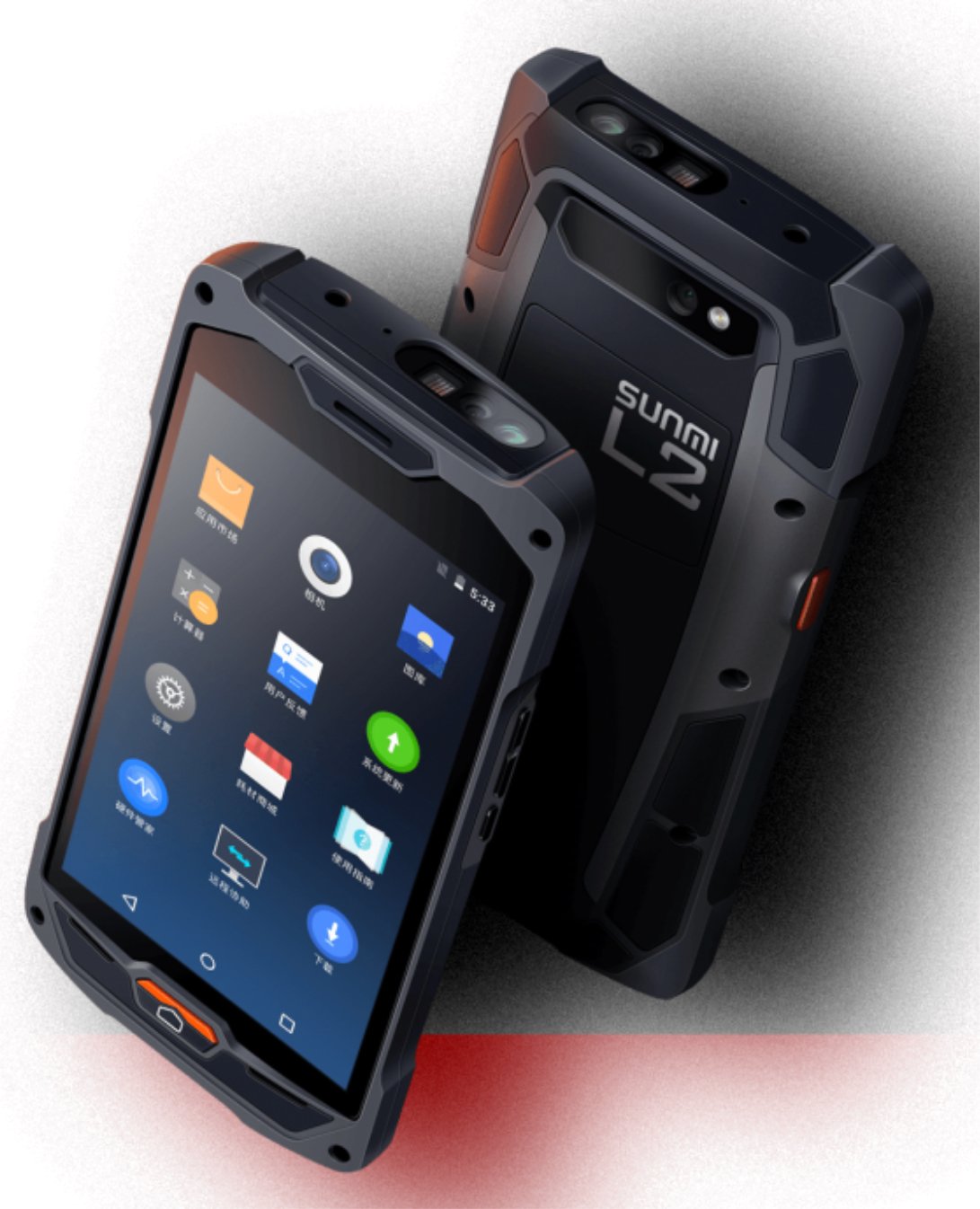
Kuva 1: Edessä ja takana view of the Sunmi L2 SmartOrder industrial terminal.
2. Turvallisuustiedot
Lue kaikki turvallisuusohjeet ennen laitteen käyttöä loukkaantumisten ja vaurioiden välttämiseksi. Säilytä tämä käyttöohje myöhempää tarvetta varten.
- Älä altista laitetta äärimmäisille lämpötiloille, suoralle auringonvalolle tai korkealle kosteudelle.
- Use only SUNMI-approved accessories and power adapters.
- Vältä laitteen pudottamista tai kovien iskujen kohteeksi altistamista sen kestävästä rakenteesta huolimatta.
- Älä yritä purkaa tai korjata laitetta itse. Ota yhteyttä pätevään huoltohenkilöstöön.
- Pidä laite poissa lääkinnällisten laitteiden läheltä, sillä se voi häiritä niiden toimintaa.
3. Laite loppuview
The SUNMI L2 SmartOrder is designed for durability and functionality. Key features include:
- 5 tuuman näyttö: High-resolution touchscreen for clear visibility.
- 1D/2D Zebra Scanner: Integrated for efficient barcode and QR code scanning.
- USB-C-portti: Lataamiseen ja tiedonsiirtoon.
- SIM-korttipaikka: For cellular network connectivity.
- TF-korttipaikka: Laajennettavaa tallennustilaa varten.
- PSAM Card Slot (Optional): For enhanced security in professional applications.
- NFC Induction Area: For near-field communication.

Kuva 2: Takaosa view showing SIM card slot, TF card slot, PSAM card slot, and NFC induction area.

Figure 3: Three different scanner options for the Sunmi L2: Zebra Code Scanner, Standard Code Scanner, and without scanner.
4. Asennus
4.1. Akun asennus ja lataus
The device is equipped with a 5000mAh high-volume battery. Ensure the battery is fully charged before initial use.
- Connect the provided USB-C cable to the USB-C port on the device.
- Connect the other end of the USB-C cable to a compatible power adapter and plug it into a power outlet.
- The charging indicator will illuminate. Allow the device to charge completely before disconnecting.

Figure 4: Illustration of the 5000mAh high-volume battery with Quick Charge technology.
4.2. SIM- ja TF-kortin asennus
To install SIM or TF cards:
- Locate the card slot cover on the rear of the device (refer to Figure 2).
- Avaa kansi varovasti.
- Insert the SIM card into the designated SIM card slot with the gold contacts facing down.
- Insert the TF card (microSD) into the TF card slot if additional storage is required.
- Close the card slot cover securely to maintain the device's IP67 rating.
4.3. Ensimmäinen käynnistys
After charging, press and hold the power button located on the side of the device until the screen illuminates and the SUNMI logo appears. The device will boot into the Android 7.1 operating system.
5. Käyttöohjeet
5.1. Perusnavigointi
The SUNMI L2 operates on Android 7.1. Navigate the interface using the touchscreen. Swipe to unlock, tap icons to open applications, and use the navigation buttons (Home, Back, Recent Apps) as standard for Android devices.
5.2. Using the 1D/2D Zebra Scanner
The integrated Zebra scanner is located at the top of the device.
- Avaa skannaussovellus laitteellasi.
- Point the scanner window at the barcode or QR code you wish to scan.
- Press the dedicated scan button (if available on your model) or trigger the scan via the software interface.
- Ensure the barcode is well-lit and within the scanner's optimal range for accurate reading.

Kuva 5: Pohja view of the Sunmi L2, highlighting its rugged design and integrated scanner.
5.3. Yhteydet
Laite tukee useita liitäntävaihtoehtoja:
- WLAN (Wi-Fi): Supports 2.4 GHz and 5 GHz bands. Access Wi-Fi settings from the Android system menu to connect to available networks.
- Bluetooth (BT): Pair with other Bluetooth-enabled devices such as printers or headsets via the Bluetooth settings.
- GPRS/LTE: Utilize cellular data by inserting a SIM card and configuring network settings.
- NFC: For short-range wireless communication, typically used for contactless payments or data exchange.
6. Huolto
6.1. Laitteen puhdistaminen
Laitteen suorituskyvyn ja ulkonäön ylläpitämiseksi:
- Käytä pehmeää, nukkaamatonta liinaa hieman dampvedellä tai miedolla näytönpuhdistusaineella.
- Avoid using harsh chemicals, abrasive cleaners, or solvents, as these can damage the device's surface and seals.
- Varmista ennen puhdistamista, että kaikki porttien kannet ovat tiiviisti kiinni, jotta ne pysyvät vesi- ja pölytiiviinä.
6.2. Akun hoito
Akun asianmukainen hoito pidentää sen käyttöikää:
- Vältä akun usein toistuvaa täydellistä tyhjentymistä.
- Älä altista laitetta äärimmäiselle kuumuudelle tai kylmyydelle, sillä se voi heikentää akun suorituskykyä.
- Jos laitetta säilytetään pitkään, lataa akku noin 50 %:iin ja säilytä sitä viileässä ja kuivassa paikassa.
6.3. Varastointi
When not in use, store the SUNMI L2 in a cool, dry environment, away from direct sunlight and corrosive materials.
7. Vianmääritys
This section addresses common issues you might encounter with your SUNMI L2 device.
- Laite ei käynnisty: Ensure the battery is sufficiently charged. Connect the device to a power source and attempt to power it on again.
- Scanner not working: Verify that the scanning application is active and the scanner is enabled in the device settings. Ensure the barcode is clean, undamaged, and properly illuminated.
- Yhteysongelmat (Wi-Fi/matkapuhelinverkko): Check your Wi-Fi network connection or cellular data settings. Ensure the SIM card is correctly inserted. Try restarting the device.
- Kosketusnäyttö ei reagoi: Käynnistä laite uudelleen. Jos ongelma jatkuu, ota yhteyttä tukeen.
8. Tekniset tiedot
Key technical specifications for the SUNMI L2 SmartOrder:
| Mallinumero | Sunmi L2 Zebra T8900 |
| Käyttöjärjestelmä | Android 7.1 |
| Näyttö | 5-tuumainen |
| CPU | Neliytiminen |
| RAM | 2 Gt |
| ROM | 16 Gt |
| Skanneri | 1D/2D Zebra Scanner |
| Yhteydet | USB-C, WLAN 2.4/5 GHz, Bluetooth, GPRS, LTE, NFC |
| Akku | 5000mAh (up to 2 days use, 30 days standby) |
| Kestävyys | IP67 rated (dust-proof, water-resistant, drop-resistant) |
| Käyttölämpötila | -20°C - +55°C |
| Paino | 349.27 g |
| Yhteensopivat laitteet | Desktop computer, Laptop, POS, Smartphone, Tablet |

Figure 6: Sunmi L2 device partially submerged in water, demonstrating its IP67 dust-proof and water-resistant capabilities.
9. Takuu ja tuki
For detailed warranty information, technical support, or service inquiries, please refer to the official SUNMI website or contact your authorized SUNMI distributor. Please retain your purchase receipt as proof of purchase for any warranty claims.