
1. Johdanto
Thank you for choosing the Petlibro Automatic Pet Feeder. This device is designed to provide consistent and timely meals for your pet, ensuring they are fed according to a set schedule, even when you are away. Please read this manual thoroughly before use to ensure proper operation and maintenance of your feeder.
2. Tärkeitä turvallisuustietoja
Noudata seuraavia turvaohjeita loukkaantumisten tai tuotteen vaurioitumisen välttämiseksi:
- Lue kaikki ohjeet huolellisesti ennen syöttölaitteen käyttöä.
- Pidä ruokintalaite poissa lasten ja lemmikkien ulottuvilta, kun sitä ei käytetä tai kokoamisen aikana.
- Älä upota pääyksikköä veteen tai muihin nesteisiin.
- Käytä vain kuivaa lemmikkieläinten ruokaa, jonka halkaisija on 5–15 mm. Älä käytä märkä-, säilyke- tai kosteaa ruokaa.
- Varmista, että syöttölaite on asetettu vakaalle ja tasaiselle alustalle.
- Irrota syöttölaite pistorasiasta ennen puhdistusta tai huoltoa.
- Do not attempt to repair or modify the feeder yourself. Contact customer support for assistance.
- Hävitä paristot vastuullisesti paikallisten määräysten mukaisesti.
3. Pakkauksen sisältö
Tarkista pakkauksen sisältö varmistaaksesi, että kaikki osat ovat mukana:
- Petlibro Automatic Pet Feeder Main Unit
- Ruokakulho
- USB-C Power Adapter and Cable
- Kuivauspussi (esiasennettu tai erillinen)
- Käyttöopas
4. Tuote ohiview
Familiarize yourself with the different parts of your Petlibro Automatic Pet Feeder:
- Ruokasäiliö: Stores dry pet food.
- Kansi: Covers the food tank to keep food fresh.
- Ohjauspaneeli: Buttons and display for setting schedules and manual feeding.
- Ruokapiste: Where food dispenses into the bowl.
- Ruokakuppi: Detachable bowl for your pet to eat from.
- Virtaportti (USB-C): Liitetään virtalähteeseen.
- Akkulokero: Holds backup batteries (not included).
5. Asennus
Follow these steps to set up your Petlibro Automatic Pet Feeder:
5.1 Kokoaminen
- Pura pakkauksesta: Poista kaikki osat varovasti pakkauksesta.
- Install Food Bowl: Place the food bowl securely at the base of the feeder.
- Install Food Tank: Align the food tank with the base and twist to lock it into place.
- Insert Desiccant Bag: If not pre-installed, open the desiccant compartment (usually under the lid) and insert the desiccant bag to keep food fresh. Replace every 15-30 days.

Image: Step-by-step assembly guide for the Petlibro Automatic Pet Feeder. It shows how to twist open the lid, take out the food bowl, put the desiccant bag into its compartment, install the food tank, put the lid back on, and finally install the food bowl.
5.2 Virtalähde
The feeder can be powered by a USB-C adapter or backup batteries.
- Ensisijainen teho: Connect the USB-C power adapter to the feeder's power port and plug it into a wall outlet.
- Akkuvarmuuskopio (valinnainen): Voiman vuoksitages, install 3 D-cell batteries (not included) into the battery compartment at the bottom of the feeder. This ensures continuous operation.
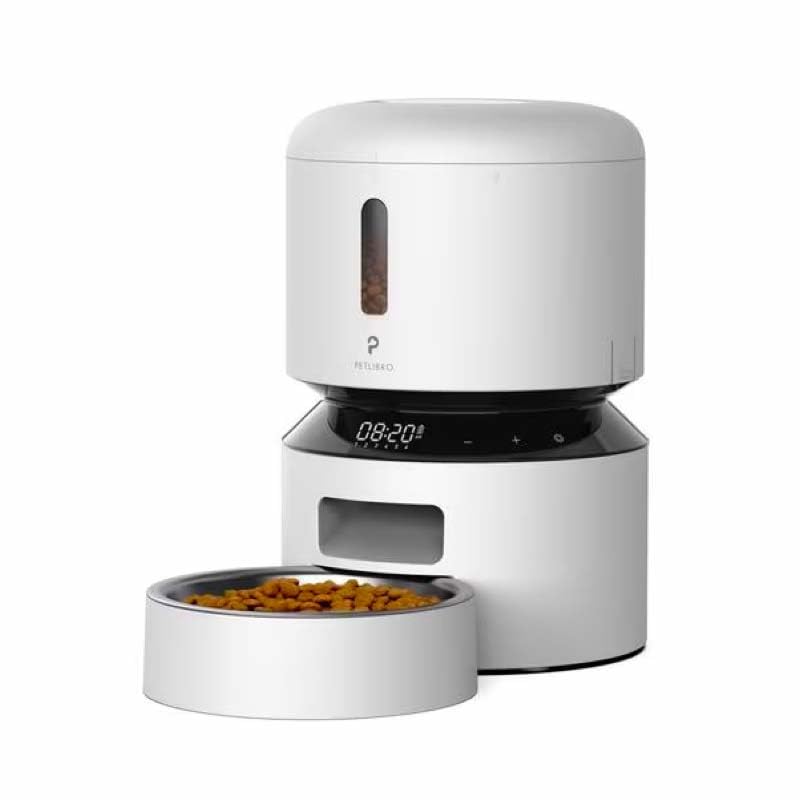
Image: Diagram illustrating the dual power supply system of the Petlibro Automatic Pet Feeder. It shows the USB-C adapter connected for primary power and the battery compartment for backup power. A note indicates that batteries are not included.
6. Käyttöohjeet
Once assembled and powered, you can begin programming your feeder.
6.1 Ruokasäiliön täyttö
- Avaa ruokasäiliön kansi.
- Pour dry pet food into the tank. Ensure the food is within the recommended size (5-15mm diameter).
- Close the lid securely to maintain freshness.
6.2 Setting Meal Schedules and Portions
The feeder allows you to schedule up to 6 meals per day, with 1 to 50 portions per meal.

Image: A cat eating from the Petlibro Automatic Pet Feeder, illustrating the feeder's function. Text overlays indicate "Portion: 1-50" and "Meals: 1-6", highlighting the customizable feeding schedule.
- Aseta nykyinen aika: Use the control panel buttons (e.g., "SET", "UP", "DOWN") to set the current time.
- Ohjelman ruokailuajat: Press the "MEAL" button to enter meal programming mode. Select the desired meal number (e.g., Meal 1) and set the feeding time.
- Set Portions: For each programmed meal, set the number of portions (1-50) using the "PORTION" or "UP/DOWN" buttons.
- Repeat for all meals: Program up to 6 meals as needed.
- Tallenna asetukset: Ensure all settings are saved according to the feeder's specific interface (usually by pressing "SET" or waiting for auto-save).
6.3 Manuaalinen syöttö
To dispense food instantly, press the manual feed button (often labeled "FEED" or a paw icon) on the control panel. Each press typically dispenses one portion.
7. Huolto ja puhdistus
Säännöllinen puhdistus varmistaa hygienian ja pidentää ruokintalaitteen käyttöikää.
- Irrota: Always unplug the feeder from the power outlet before cleaning.
- Pura: Remove the food bowl and food tank.
- Puhtaat komponentit: Wash the food bowl and food tank with mild soap and water. Rinse thoroughly and dry completely before reassembling.
- Pyyhi pääyksikkö: Pyyhi pääyksikkö pehmeällä damp kangas. Älä upota pääyksikköä veteen.
- Vaihda kuivausaine: Replace the desiccant bag every 15-30 days to maintain food freshness.
- Kokoa uudelleen: Varmista, että kaikki osat ovat kuivia ennen syöttölaitteen kokoamista uudelleen.
8. Vianmääritys
If you encounter issues with your feeder, refer to the following common problems and solutions:
| Ongelma | Mahdollinen syy | Ratkaisu |
|---|---|---|
| Syöttölaite ei käynnisty. | No power connection; batteries depleted or incorrectly installed. | Tarkista virtalähteen liitäntä; vaihda paristot tai varmista oikea napaisuus. |
| Ruokaa ei annostella. | Food tank empty; food jammed; dispenser blocked; incorrect schedule settings. | Refill food tank; clear any food jams; check dispenser for blockages; verify meal schedule and portion settings. |
| Food dispenses too much/too little. | Incorrect portion settings. | Adjust portion settings for each meal. |
| Näyttö ei toimi. | Virtaongelma; näytön toimintahäiriö. | Tarkista virransyöttö; jos ongelma jatkuu, ota yhteyttä asiakastukeen. |
9. Tekniset tiedot
| Ominaisuus | Yksityiskohta |
|---|---|
| Tuotteen nimi | Petlibro Automatic Pet Feeder |
| Malli | 3L automaattinen lemmikkieläinten syöttölaite |
| Kapasiteetti | 3 litraa |
| Materiaali | Food-grade ABS plastic |
| Virtalähde | USB-C adapter (5V/1A); 3 x D-cell batteries (backup, not included) |
| Ateriat päivässä | Jopa 6 ateriaa |
| Annokset per ateria | 1-50 portions (approx. 5-10g per portion, depending on food density) |
| Suositeltu ruokakoko | 5–15 mm kuivaa nappulaa |
| Väri | Valkoinen |
10. Takuu ja tuki
Your Petlibro Automatic Pet Feeder comes with a standard manufacturer's warranty. For detailed warranty information, please refer to the warranty card included in your package or visit the official Petlibro websivusto.
If you have any questions, require technical support, or need assistance with your product, please contact Petlibro customer service. Contact details can typically be found on the product packaging, the official website, or by searching for "Petlibro customer support" online.